Understanding your dashboard and session statistics
Valid for AI Receptionist.
Whenever your AI Receptionist interacts with a user, it automatically saves helpful details about the conversation. This article explains the different pieces of information collected during these chats and how they help you track potential sales, measure success, and see how much money your AI is bringing in.
Accessing your AI Receptionist Dashboard
- Log in to your IONOS account.
- Click on Menu > AI Receptionist in the title bar. The AI Agent Portal opens.
- Click on Customer Portal under Actions for the desired receptionist. The Dashboard opens.
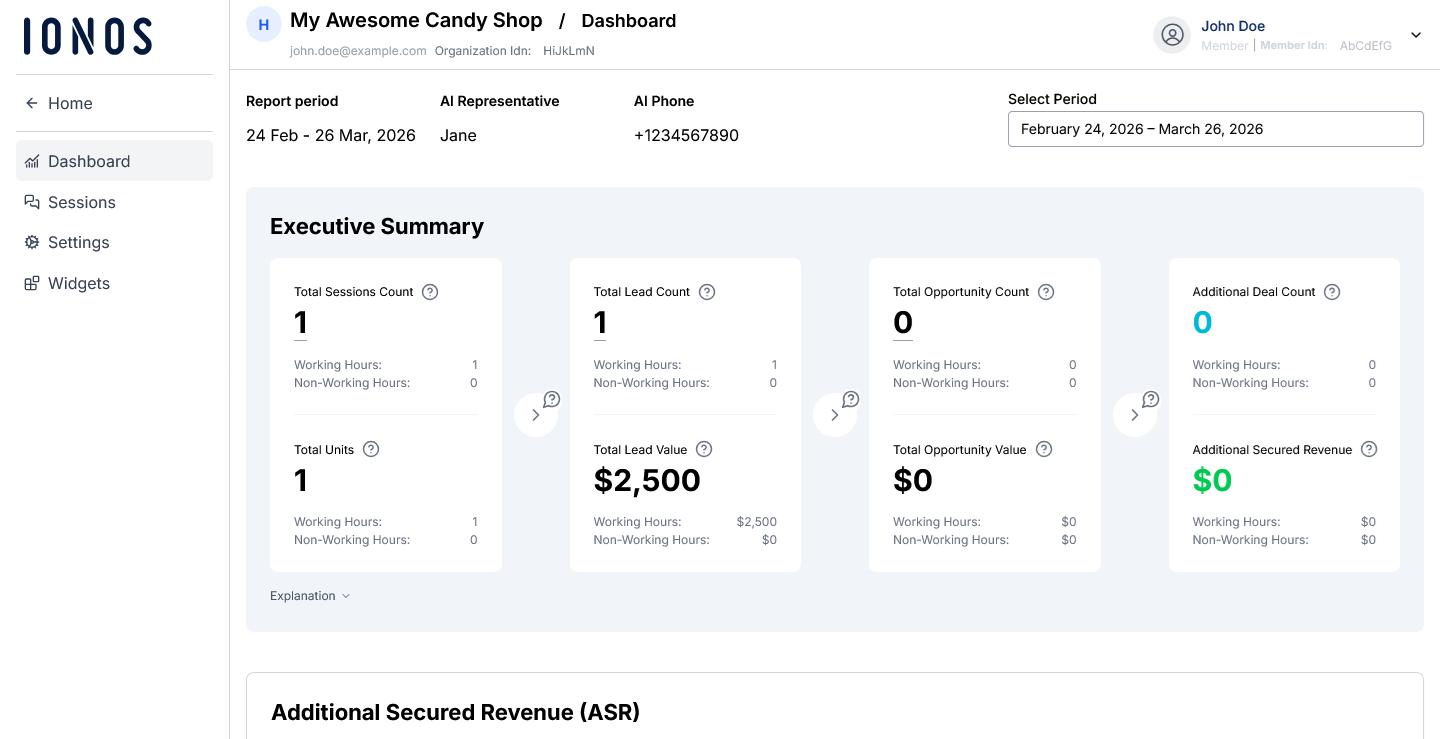
Reading your dashboard numbers
Your main dashboard takes all the individual chat details and adds them up. Here is a breakdown of what the big numbers mean:
| Statistic | What it means |
|---|---|
| Total Sessions Count | The total volume of all phone and text sessions, excluding test data. |
| Total Lead Count | The proportion of sessions where clients indicated a desire to book or make a purchase. |
| Total Opportunity Count | The proportion of leads, excluding scheduling conflicts and client refusals. |
| Additional Deal Count | The percentage of opportunities converted into deals exclusively due to the AI Receptionist. |
| Total Units |
Your subscription is billed in 'Units.' Your plan comes with a set allowance of Units, and any usage beyond this will incur extra charges. Here is how Units are calculated:
Note: These definitions may vary depending on your specific plan, industry, or region. |
| Total Lead Value | <Total Lead Value> = <Total Lead Count> * <Average Lead Value> |
| Total Opportunity Value |
By definition, an Opportunity is any Lead that the system automatically validates at the end of a session. A session is disqualified from being an Opportunity if no contact information was collected, if the requested product or time slot was unavailable, or if the user explicitly refused to proceed or hung up. <Total Opportunity Value> = <Total Opportunity Count> * <Average Lead Value> |
| Additional Secured Revenue |
Additional Secured Revenue (ASR) is the estimated incremental revenue generated exclusively by the AI Receptionist. ASR = [Lead Value] × [Is Opportunity] (1 if "True", 0 if "False") × [Conversion Ratio] × [Agent Success Factor] (1 if "Yes-A" or "Yes-B, 0 if "No") × [Recognition] |
Accessing your AI Receptionist Sessions page
- Click on Sessions from the left-side menu.
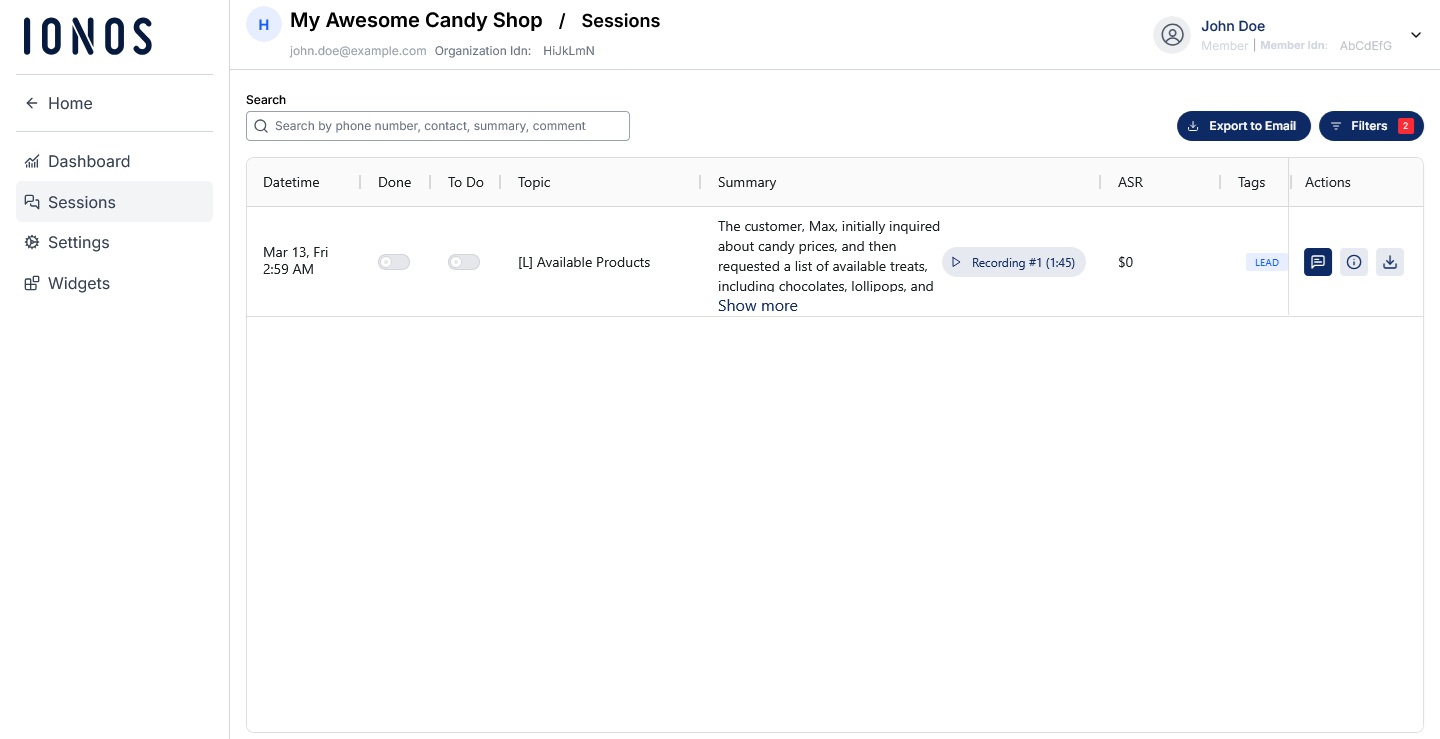
Understanding the Sessions page
Your AI Receptionist logs every interaction, and displays them for you on the Sessions page. Every conversation contains the following information:
- Date & time of the interaction
- Done & to do: Tasks completed, as well as upcoming tasks scheduled by your AI Receptionist, for example, follow up calls
- Topic of the interaction
- Summary: A detailed summary of the conversation, as well as a link to listen to the conversation
- ASR
- Tags: Categories determined by your receptionist in regard to the possibility of achieving a sale, such as Lead or Opportunity
Sessions can be filtered by clicking on the Filters button in the top right corner of the Sessions page.
You can view more information and metrics on the conversation by clicking on the i icon under the Actions column for that session.
Additional information
For more information on additional metrics, please see the following article: Sessions metrics and definitions.