Adding more AI Credits to the AI App & Site Builder
Valid for AI App & Site Builder (Momentum AI).
Use of the AI App & Site Builder is tracked using AI Credits. The amount of AI Credits available depends on your chosen package. This Help Centre article explains how to use, manage, and top up your AI Credits.
Notes
AI Credits are not available in all AI App & Site Builder packages.
Manual actions, such as changing text or moving elements, do not use up AI Credits.
Use of AI Credits
The number of AI Credits a particular task uses depends on the requirements it entails.
As a general rule, the more extensive and complex a task (prompt) is, the more AI Credits it will use.
To give you an idea of how many AI Credits certain actions use, the consumption is displayed in the toolbar below the AI’s response to your task. To display the toolbar, hover your mouse pointer over the relevant AI response in the chat window.
Check the current balance of AI Credits
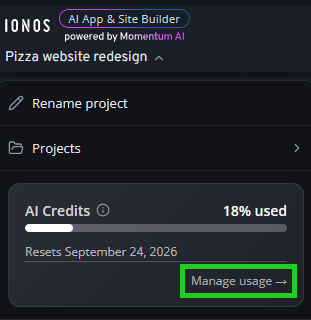
Your available AI Credit balance is updated immediately after each use of AI App & Site Builder. To check your AI Credit balance, click on the menu bar at the top left of AI App & Site Builder. Your current AI Credit usage and when they will be reset are displayed under the Projects menu item.
Click on Manage usage to view further details, such as the allocation to specific projects.
Top up AI Credits
Once the AI Credits included in your contract have been used up, the billing-based features of the AI App & Site Builder will not be available again until the next billing period. If you wish to continue working on your project right away, there are several options available to you:
Switch to a higher AI App & Site Builder package
Purchase additional AI Credits (not available on all packages)
To top up your AI Credits, click on Manage usage > Add credits in the AI App & Site Builder menu.
Please note that credit packs have an expiry date. The validity period is shown in the AI Credit billing management section.
To receive more AI Credits on a permanent basis, switch to a higher AI App & Site Builder package. IONOS Customer Support can help you choose the best package.
Billing and period of validity
AI Credits in your package
- At the start of each AI App & Site Builder billing period, your AI Credits will be fully refilled.
- Any unused AI Credits from your package expire at the end of a billing period and cannot be carried over.
AI Credits via credit packs
- A credit pack must be used up before the next one can be purchased.
- A credit pack is valid for 30 days, regardless of the package’s billing period. After that, it expires.
Note
AI Credits are used according to the “first-in, first-out” (FIFO) principle: the AI Credits that are due to expire next are used first.