Object Storage: Viewing bucket settings
Valid for VPS+ and migrated Cloud Servers.
This article explains how to display and manage bucket settings.
View bucket settings
- Log in to your IONOS account.
Click on Menu > Servers & Cloud in the title bar.
Optional: If you have multiple server contracts, select the desired contract.
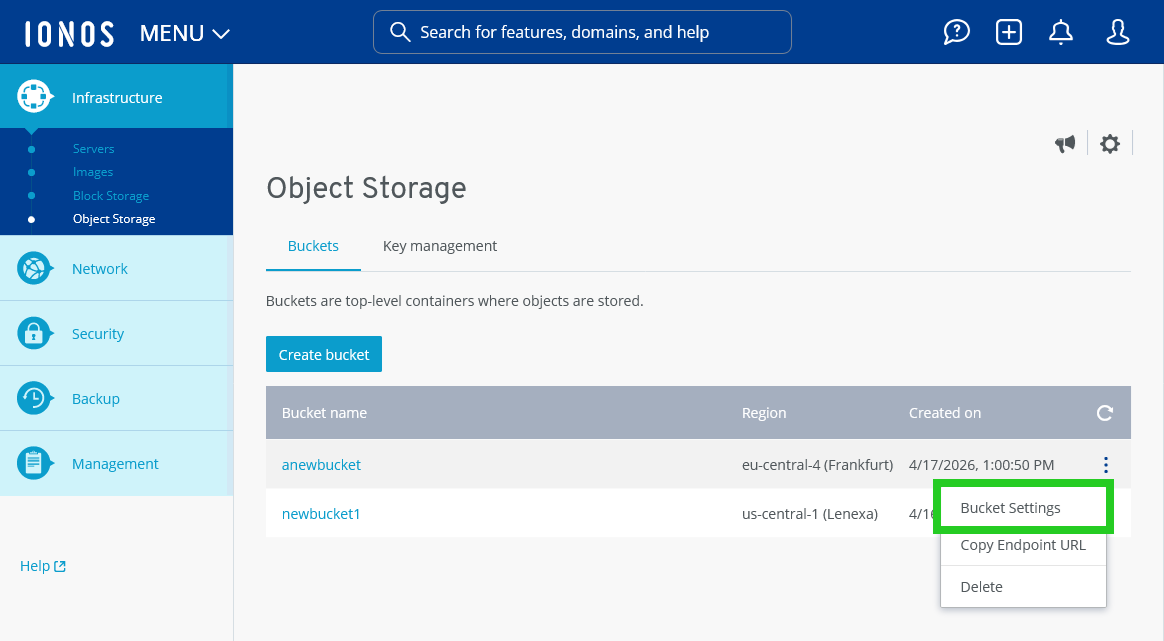
- Click on Infrastructure > Object Storage in the left-side menu.
- Click on the three-dot icon in the line with the bucket name.
- Click on Bucket Settings. The Bucket settings area opens.
View bucket properties
To access the properties of the bucket, click Bucket properties in the Bucket settings. The following information is displayed in the section that opens:
- Bucket name
- Region
- Endpoint URL
- Created on