Website Design Service: Uploading files and documents with the Upload Centre
Valid for IONOS Website Design Service.
You can use the Upload Centre to upload required files such as company logos, images, or documents for use on your website. This article explains how to use the Upload Centre.
Use Upload Centre
- Log in to your IONOS account.
Click on Menu > Websites & Shops in the title bar.
Click on Manage website in the tile for your Website Design Service contract.
Click on To the website in the top right-hand corner.
Click on Upload Centre in the navigation bar on the left.
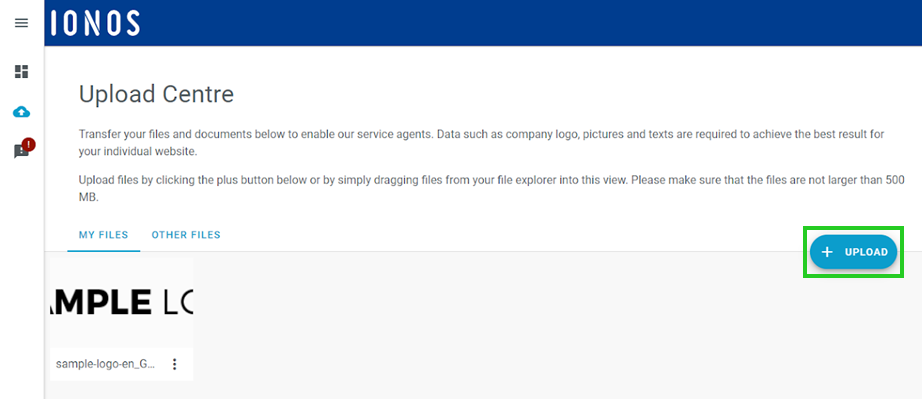
Click on the Upload button to upload one or more files.
Alternatively: Drag the files from your local computer to the Upload Centre (drag & drop).
Note
Accidentally uploaded, outdated, or incorrect files can be deleted at any time in the Upload Centre.
Usable file formats
The following file formats are supported by the Upload Centre:
- Graphic formats: jpg, jpeg, jpe, gif, png, bmp, tiff, tif, webp, ico, heic
- Video formats: asf, asx, wmv, wmx, wm, avi, divx, flv, mov, qt, mpeg, mpg, mpe, mp4, m4v, ogv, webm, mkv, 3gp, 3gpp, 3g2, 3gp2
- Text formats: txt, asc, c, cc, h, srt, csv, tsv, ics, rtx, css, htm, html, vtt, dfxp,
- Audio formats: mp3, m4a, m4b, aac, ra, ram, wav, ogg, oga, flac, mid, midi, wma, wax, mka,
- Various application formats: rtf, pdf, tar, zip, gz, gzip, rar, 7z, psd, xcf
- Microsoft Office formats: doc, pot, pps, ppt, wri, xls, xlt, xlw, mdb, mpp, docx, dotx, xlsx, xltx, pptx, ppsx, potx, sldx, onetoc, onetoc2, onetmp, onepkg, oxps, xps
- OpenOffice formats: odt, odp, ods, odg, odc, odb, odf
- WordPerfect formats: wp, wpd
- iWork formats: key, numbers, pages
Additional information
Help Centre article: Website Design Service: Using CoOperator
Help Centre article: Website Design Service: Using the text editor
Help Centre article: Website Design Service: Giving feedback