

ASCII Table + PDF download

The ASCII code is predominantly used to represent characters correctly on electronic devices. Find out which characters correspond to which binary, decimal, or hexadecimal number in the ASCII table.
Overview of ASCII tables
Because of the large number of characters that can be represented by ASCII code, it’s a good idea to consult a chart with the characters that can be represented by ASCII and the binary, decimal, and hexadecimal numbers representing these characters. The first two number systems are commonly used by humans and machines, respectively. The hexadecimal system, on the other hand, has the advantage of containing 16 characters (0-9 + A-F) and can represent larger numbers in fewer digits compared to the other systems. Thus a byte can be represented with a maximum of two digits.
Want to learn more about character encoding with ASCII? Check out our article on ASCII code for more information!
For the sake of clarity, we’ll split control characters, that is characters which are not printed by the computer but represent commands such as a line break, and the printable characters into two separate tables.
ASCII table: control characters
| Bin. | Hex. | Dec. | ASCII Symbol | Explanation |
|---|---|---|---|---|
| 0000000 | 0 | 0 | NUL | The null character prompts the device to do nothing |
| 0000001 | 1 | 1 | SOH | Initiates a header (Start of Heading) |
| 0000010 | 2 | 2 | STX | Ends the header and marks the beginning of a message. (Start of text) |
| 0000011 | 3 | 3 | ETX | Indicates the end of the message (End of text) |
| 0000100 | 4 | 4 | EOT | Marks the end of a completes transmission (End of transmission) |
| 0000101 | 5 | 5 | ENQ | A request that requires a response (Enquiry) |
| 0000110 | 6 | 6 | ACK | Gives a positive answer to the request (Acknowledge) |
| 0000111 | 7 | 7 | BEL | Triggers a beep (Bell) |
| 0001000 | 8 | 8 | BS | Lets the cursor move back one step (Backspace) |
| 0001001 | 9 | 9 | TAB (HT) | A horizontal tab that moves the cursor within a row to the next predefined position (Horizontal tab) |
| 0001010 | A | 10 | LF | Causes the cursor to jump to the next line (Line feed) |
| 0001011 | B | 11 | VT | The vertical tab lets the cursor jump to a predefined line (Vertical tab) |
| 0001100 | C | 12 | FF | Requests a page break (Form Feed) |
| 0001101 | D | 13 | CR | Moves the cursor back to the first position of the line (Carriage Return) |
| 0001110 | E | 14 | SO | Switches to a special presentation (Shift Out) |
| 0001111 | F | 15 | SI | Switches the display back to the normal state (Shift In) |
| 0010000 | 10 | 16 | DLE | Changes the meaning of the following characters (Data Link Escape) |
| 0010001 | 11 | 17 | DC1 | Control characters assigned depending on the device used (Device Control) |
| 0010010 | 12 | 18 | DC2 | Control characters assigned depending on the device used (Device Control) |
| 0010011 | 13 | 19 | DC3 | Control characters assigned depending on the device used (Device Control) |
| 0010100 | 14 | 20 | DC4 | Control characters assigned depending on the device used (Device Control) |
| 0010101 | 15 | 21 | NAK | Negative response to a request (Negative Acknowledge) |
| 0010110 | 16 | 22 | SYN | Synchronises a data transfer, even if no signals are transmitted (Synchronous Idle) |
| 0010111 | 17 | 23 | ETB | Marks the end of a transmission block (End of Transmission Block) |
| 0011000 | 18 | 24 | CAN | Makes it clear that a transmission was faulty and the data must be discarded (Cancel) |
| 0011001 | 19 | 25 | EM | Indicates the end of the storage medium (End of Medium) |
| 0011010 | 1A | 26 | SUB | Replacement for a faulty sign (Substitute) |
| 0011011 | 1B | 27 | ESC | Initiates an escape sequence and thus gives the following characters a special meaning (Escape) |
| 0011100 | 1C | 28 | FS | File Separator: marks the separation of logical data blocks (Hierarchy: file > group > record > unit) |
| 0011101 | 1D | 29 | GS | Group Separator: marks the separation of logical data blocks (Hierarchy: file > group > record > unit) |
| 0011110 | 1E | 30 | RS | Record Separator: marks the separation of logical data blocks (Hierarchy: file > group > record > unit) |
| 0011111 | 1F | 31 | US | Unit Separator: marks the separation of logical data blocks (Hierarchy: file > group > record > unit) |
| 1111111 | 7F | 127 | DEL | Deletes a character. Since this control character consists of the same number on all positions, during the typewriter era it was possible to invalidate another character by punching out all the positions (Delete) |
ASCII table: printable characters
Printable characters include letters and numbers but also special characters.
| Bin. | Hex. | Dec. | ASCII Symbol | Explanation |
| 0100000 | 20 | 32 | SP | Blank space (Space) |
| 0100001 | 21 | 33 | ! | Exclamation mark |
| 0100010 | 22 | 34 | " | Only quotes above |
| 0100011 | 23 | 35 | # | Pound sign |
| 0100100 | 24 | 36 | $ | Dollar sign |
| 0100101 | 25 | 37 | % | Percentage sign |
| 0100110 | 26 | 38 | & | Ampersand |
| 0100111 | 27 | 39 | ' | Apostrophe |
| 0101000 | 28 | 40 | ( | Left bracket |
| 0101001 | 29 | 41 | ) | Right bracket |
| 0101010 | 2A | 42 | * | Asterisk |
| 0101011 | 2B | 43 | + | Plus symbol |
| 0101100 | 2C | 44 | , | Comma |
| 0101101 | 2D | 45 | - | Dash |
| 0101110 | 2E | 46 | . | Full stop |
| 0101111 | 2F | 47 | / | Forward slash |
| 0110000 | 30 | 48 | 0 | |
| 0110001 | 31 | 49 | 1 | |
| 0110010 | 32 | 50 | 2 | |
| 0110011 | 33 | 51 | 3 | |
| 0110100 | 34 | 52 | 4 | |
| 0110101 | 35 | 53 | 5 | |
| 0110110 | 36 | 54 | 6 | |
| 0110111 | 37 | 55 | 7 | |
| 0111000 | 38 | 56 | 8 | |
| 0111001 | 39 | 57 | 9 | |
| 0111010 | 3A | 58 | : | Colon |
| 0111011 | 3B | 59 | ; | Semicolon |
| 0111100 | 3C | 60 | < | Small than bracket |
| 0111101 | 3D | 61 | = | Equals sign |
| 0111110 | 3E | 62 | > | Bigger than symbol |
| 0111111 | 3F | 63 | ? | Question mark |
| 1000000 | 40 | 64 | @ | At symbol |
| 1000001 | 41 | 65 | A | |
| 1000010 | 42 | 66 | B | |
| 1000011 | 43 | 67 | C | |
| 1000100 | 44 | 68 | D | |
| 1000101 | 45 | 69 | E | |
| 1000110 | 46 | 70 | F | |
| 1000111 | 47 | 71 | G | |
| 1001000 | 48 | 72 | H | |
| 1001001 | 49 | 73 | I | |
| 1001010 | 4A | 74 | J | |
| 1001011 | 4B | 75 | K | |
| 1001100 | 4C | 76 | L | |
| 1001101 | 4D | 77 | M | |
| 1001110 | 4E | 78 | N | |
| 1001111 | 4F | 79 | O | |
| 1010000 | 50 | 80 | P | |
| 1010001 | 51 | 81 | Q | |
| 1010010 | 52 | 82 | R | |
| 1010011 | 53 | 83 | S | |
| 1010100 | 54 | 84 | T | |
| 1010101 | 55 | 85 | U | |
| 1010110 | 56 | 86 | V | |
| 1010111 | 57 | 87 | W | |
| 1011000 | 58 | 88 | X | |
| 1011001 | 59 | 89 | Y | |
| 1011010 | 5A | 90 | Z | |
| 1011011 | 5B | 91 | [ | Left square bracket |
| 1011100 | 5C | 92 | \ | Inverse/backward slash |
| 1011101 | 5D | 93 | ] | Right square bracket |
| 1011110 | 5E | 94 | ^ | Circumflex |
| 1011111 | 5F | 95 | _ | Underscore |
| 1100000 | 60 | 96 | ` | Gravis (backtick) |
| 1100001 | 61 | 97 | a | |
| 1100010 | 62 | 98 | b | |
| 1100011 | 63 | 99 | c | |
| 1100100 | 64 | 100 | d | |
| 1100101 | 65 | 101 | e | |
| 1100110 | 66 | 102 | f | |
| 1100111 | 67 | 103 | g | |
| 1101000 | 68 | 104 | h | |
| 1101001 | 69 | 105 | i | |
| 1101010 | 6A | 106 | j | |
| 1101011 | 6B | 107 | k | |
| 1101100 | 6C | 108 | l | |
| 1101101 | 6D | 109 | m | |
| 1101110 | 6E | 110 | n | |
| 1101111 | 6F | 111 | o | |
| 1110000 | 70 | 112 | p | |
| 1110001 | 71 | 113 | q | |
| 1110010 | 72 | 114 | r | |
| 1110011 | 73 | 115 | s | |
| 1110100 | 74 | 116 | t | |
| 1110101 | 75 | 117 | u | |
| 1110110 | 76 | 118 | v | |
| 1110111 | 77 | 119 | w | |
| 1111000 | 78 | 120 | x | |
| 1111001 | 79 | 121 | y | |
| 1111010 | 7A | 122 | z | |
| 1111011 | 7B | 123 | { | Left curly bracket |
| 1111100 | 7C | 124 | | | Vertical line |
| 1111101 | 7D | 125 | } | Right curly bracket |
| 1111110 | 7E | 126 | ~ | Tilde |
ASCII table: extended version
Extended ASCII versions use an eighth bit, which is assigned differently from program to program. In most cases, the additional digit is used to accommodate country-specific peculiarities. The first 128 characters are always the same.
Below is an example of the ASCII extension Windows-1252 developed for the Windows operating system.
Besides ASCII, UTF-8 encoding is just as significant and near congruent.
| Bin. | Hex. | Dec. | ASCII Symbol | Explanation | Group |
|---|---|---|---|---|---|
| 10000000 | 80 | 128 | € | Euro sign | Special character |
| 10000001 | 81 | 129 | Empty | ||
| 10000010 | 82 | 130 | ‚ | Single lower quotation mark | Special character |
| 10000011 | 83 | 131 | ƒ | Letter f from Latin | Special character |
| 10000100 | 84 | 132 | „ | Double lower quotation mark | Special character |
| 10000101 | 85 | 133 | … | Horizontal skip points | Special character |
| 10000110 | 86 | 134 | † | Dagger | Special character |
| 10000111 | 87 | 135 | ‡ | Double cross | Special character |
| 10001000 | 88 | 136 | ˆ | Circumflex accent | Special character |
| 10001001 | 89 | 137 | ‰ | Per mille sign | Special character |
| 10001010 | 8A | 138 | Š | Capital letter | |
| 10001011 | 8B | 139 | ‹ | Single left-pointing angle quotation | Capital letter |
| 10001100 | 8C | 140 | Π| Capital letter | |
| 10001101 | 8D | 141 | Empty | ||
| 10001110 | 8E | 142 | Ž | Capital letter | |
| 10001111 | 8F | 143 | Empty | ||
| 10010000 | 90 | 144 | Empty | ||
| 10010001 | 91 | 145 | ‘ | Left single quotation mark | Special character |
| 10010010 | 92 | 146 | ’ | Right single quotation mark | Special character |
| 10010011 | 93 | 147 | “ | Left double quotation mark | Special character |
| 10010100 | 94 | 148 | ” | Right double quotation mark | Special character |
| 10010101 | 95 | 149 | • | Bullet | Special character |
| 10010110 | 96 | 150 | – | En dash | Special character |
| 10010111 | 97 | 151 | — | Em dash | Special character |
| 10011000 | 98 | 152 | ˜ | Small tilde | Special character |
| 10011001 | 99 | 153 | ™ | Trademark sign | Special character |
| 10011010 | 9A | 154 | š | Lower case letter | |
| 10011011 | 9B | 155 | › | Single right-pointing angle quotation | Lower case letter |
| 10011100 | 9C | 156 | Π| Capital letter | |
| 10011101 | 9D | 157 | Empty | ||
| 10011110 | 9E | 158 | ž | Lower case letter | |
| 10011111 | 9F | 159 | Ÿ | Capital letter | |
| 10100000 | A0 | 160 | Empty | ||
| 10100001 | A1 | 161 | ¡ | Inverted exclamation mark | Special character |
| 10100010 | A2 | 162 | ¢ | Cent sign | Special character |
| 10100011 | A3 | 163 | £ | Pound sign | Special character |
| 10100100 | A4 | 164 | ¤ | Currency sign | Special character |
| 10100101 | A5 | 165 | ¥ | Yen sign | Special character |
| 10100110 | A6 | 166 | ¦ | Broken pipe | Special character |
| 10100111 | A7 | 167 | § | Paragraph | Special character |
| 10101000 | A8 | 168 | ¨ | Umlaut | Special character |
| 10101001 | A9 | 169 | © | Copyright sign | Special character |
| 10101010 | AA | 170 | ª | Ordinal character | Special character |
| 10101011 | AB | 171 | « | Left-pointing double angle quotation marks | Special character |
| 10101100 | AC | 172 | ¬ | Not sign | Special character |
| 10101101 | AD | 173 | | Soft hyphen (optional hyphen) | Special character |
| 10101110 | AE | 174 | ® | Registered trademark sign | Special character |
| 10101111 | AF | 175 | ¯ | Macron | Special character |
| 10110000 | B0 | 176 | ° | Degree | Special character |
| 10110001 | B1 | 177 | ± | Plus minus | Special character |
| 10110010 | B2 | 178 | ² | Superscript 2 (square character) | Special character |
| 10110011 | B3 | 179 | ³ | Superscript 3 (cubic sign) | Special character |
| 10110100 | B4 | 180 | ´ | Acute accent | Special character |
| 10110101 | B5 | 181 | µ | Micro sign | Special character |
| 10110110 | B6 | 182 | ¶ | Paragraph sign | Special character |
| 10110111 | B7 | 183 | · | Centre point | Special character |
| 10111000 | B8 | 184 | ¸ | Cedille | Special character |
| 10111001 | B9 | 185 | ¹ | Superscript 1 | Special character |
| 10111010 | BA | 186 | º | Male ordinal indicator | Special character |
| 10111011 | BB | 187 | » | Right-pointing double angle quotation marks | Special character |
| 10111100 | BC | 188 | ¼ | Fraction one quarter | Special character |
| 10111101 | BD | 189 | ½ | Fraction one half | Special character |
| 10111110 | BE | 190 | ¾ | Fraction three quarters | Special character |
| 10111111 | BF | 191 | ¿ | Inverted question mark | Special character |
| 11000000 | C0 | 192 | À | Capital letter | |
| 11000001 | C1 | 193 | Á | Capital letter | |
| 11000010 | C2 | 194 | Â | Capital letter | |
| 11000011 | C3 | 195 | Ã | Capital letter | |
| 11000100 | C4 | 196 | Ä | Capital letter | |
| 11000101 | C5 | 197 | Å | Capital letter | |
| 11000110 | C6 | 198 | Æ | Capital letter | |
| 11000111 | C7 | 199 | Ç | Capital letter | |
| 11001000 | C8 | 200 | È | Capital letter | |
| 11001001 | C9 | 201 | É | Capital letter | |
| 11001010 | CA | 202 | Ê | Capital letter | |
| 11001011 | CB | 203 | Ë | Capital letter | |
| 11001100 | CC | 204 | Ì | Capital letter | |
| 11001101 | CD | 205 | Í | Capital letter | |
| 11001110 | CE | 206 | Î | Capital letter | |
| 11001111 | CF | 207 | Ï | Capital letter | |
| 11010000 | D0 | 208 | Ð | Capital letter | |
| 11010001 | D1 | 209 | Ñ | Capital letter | |
| 11010010 | D2 | 210 | Ò | Capital letter | |
| 11010011 | D3 | 211 | Ó | Capital letter | |
| 11010100 | D4 | 212 | Ô | Capital letter | |
| 11010101 | D5 | 213 | Õ | Capital letter | |
| 11010110 | D6 | 214 | Ö | Capital letter | |
| 11010111 | D7 | 215 | × | Multiplication symbol | Capital letter |
| 11011000 | D8 | 216 | Ø | Capital letter | |
| 11011001 | D9 | 217 | Ù | Capital letter | |
| 11011010 | DA | 218 | Ú | Capital letter | |
| 11011011 | DB | 219 | Û | Capital letter | |
| 11011100 | DC | 220 | Ü | Capital letter | |
| 11011101 | DD | 221 | Ý | Capital letter | |
| 11011110 | DE | 222 | Þ | Capital letter | |
| 11011111 | DF | 223 | ß | Lower case letter | |
| 11100000 | E0 | 224 | à | Lower case letter | |
| 11100001 | E1 | 225 | á | Lower case letter | |
| 11100010 | E2 | 226 | â | Lower case letter | |
| 11100011 | E3 | 227 | ã | Lower case letter | |
| 11100100 | E4 | 228 | ä | Lower case letter | |
| 11100101 | E5 | 229 | å | Lower case letter | |
| 11100110 | E6 | 230 | æ | Lower case letter | |
| 11100111 | E7 | 231 | ç | Lower case letter | |
| 11101000 | E8 | 232 | è | Lower case letter | |
| 11101001 | E9 | 233 | é | Lower case letter | |
| 11101010 | EA | 234 | ê | Lower case letter | |
| 11101011 | EB | 235 | ë | Lower case letter | |
| 11101100 | EC | 236 | ì | Lower case letter | |
| 11101101 | ED | 237 | í | Lower case letter | |
| 11101110 | EE | 238 | î | Lower case letter | |
| 11101111 | EF | 239 | ï | Lower case letter | |
| 11110000 | F0 | 240 | ð | Lower case letter | |
| 11110001 | F1 | 241 | ñ | Lower case letter | |
| 11110010 | F2 | 242 | ò | Lower case letter | |
| 11110011 | F3 | 243 | ó | Lower case letter | |
| 11110100 | F4 | 244 | ô | Lower case letter | |
| 11110101 | F5 | 245 | õ | Lower case letter | |
| 11110110 | F6 | 246 | ö | Lower case letter | |
| 11110111 | F7 | 247 | ÷ | Division symbol | Special character |
| 11111000 | F8 | 248 | ø | Lower case letter | |
| 11111001 | F9 | 249 | ù | Lower case letter | |
| 11111010 | FA | 250 | ú | Lower case letter | |
| 11111011 | FB | 251 | û | Lower case letter | |
| 11111100 | FC | 252 | ü | Lower case letter | |
| 11111101 | FD | 253 | ý | Lower case letter | |
| 11111110 | FE | 254 | þ | Lower case letter | |
| 11111111 | FF | 255 | ÿ | Lower case letter |
Example: Convert ASCII characters
In ASCII, the system converts binary numbers into printable and non-printable characters according to a specified standard, as listed in the table above. Users can also perform these computational processes without any aids. All you have to do is understand how to calculate in binary or hexadecimal. In a number system, each digit corresponds to the power on a particular basis: in the decimal system, the base is 10. The bases are 2 and 16 for binary and hexadecimal systems, respectively. Multiply the value of the digit by the value of the digit.
Digit values in the decimal system:
| Decimal system | ||||
|---|---|---|---|---|
| 100 | 101 | 102 | 103 | … |
| 1 | 10 | 100 | 1000 | … |
Therefore:


This also works analogously in the other two systems:
| Binary system | ||||
|---|---|---|---|---|
| 20 | 21 | 22 | 23 | … |
| 1 | 2 | 4 | 8 | … |
However, there are only two digits, so:


| Hexadecimal system | ||||
|---|---|---|---|---|
| 160 | 161 | 162 | 163 | … |
| 1 | 16 | 256 | 4096 | … |
There are 16 characters, therefore:


With this information and the ASCII chart, ASCII strings can be converted into any number system. See this example, using the term ‘digital’:
‘d’ corresponds to the decimal value of 68 in the ASCII table, therefore:
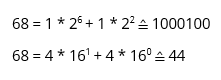
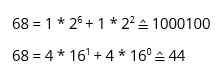
‘i’ corresponds to the decimal value of 105, therefore:
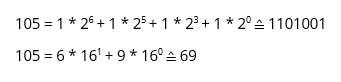
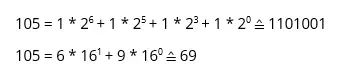
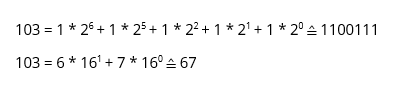
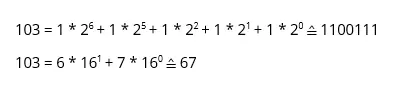
‘g’ corresponds to the decimal value 103, therefore:
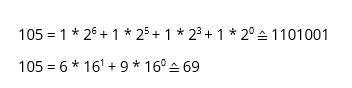
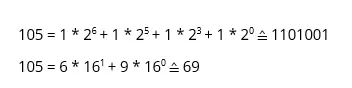
‘i’ corresponds to the decimal value 105, therefore:
‘t’ corresponds to the decimal 1106, therefore:
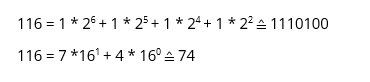
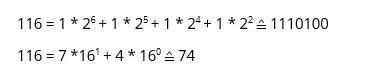
‘a’ corresponds to the decimal value 97, therefore:
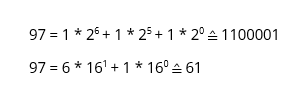
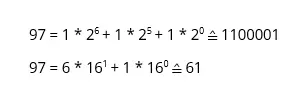
‘l’ corresponds to the decimal value 108, therefore:
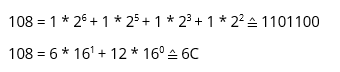
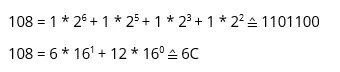
Accordingly, the example word can be represented as such:
| Symbol | D | i | g | i | t | a | l |
|---|---|---|---|---|---|---|---|
| Dec | 68 | 105 | 103 | 105 | 116 | 97 | 108 |
| Bin | 1000100 | 1101001 | 1100111 | 1101001 | 1110100 | 1100001 | 1101100 |
| Hex | 44 | 69 | 67 | 69 | 74 | 61 | 6C |
Reviewer

Christian Heldmaier
Christian Heldmaier is an experienced online marketing and SEO specialist from Karlsruhe. He has been working as an SEO Manager at IONOS since July 2020.