

Adblockers’ impact on web design and web development

There’s hardly any chance that the Danish student, Henrik Aasted Sörensen was aware of the profound effects his Phoenix (predecessor to Firefox) extension was to later have on the web design industry back when this game changing add-on was still in its infancy in 2002. From its very inception, both the concept and the possibilities the extension offered were very well received by the internet community, which in turn played a substantial role in perfecting the application. While the early versions of Sörensen’s programme only blocked user-defined ads, today’s product automatically shields users from known ad formats before they can be loaded, a development that has continued much to the chagrin of developers and those responsible for running web projects.
And while the effects (and losses) of this development may be apparent for the advertising industry, Adblocker’s impact on web design and web development may not be as obvious. However, advertisements constitute an important source of income for site operators. What’s more, adblockers are often much more than what their names may let on: in addition to also preventing advertisements from being shown to viewers, adblockers also prevent other conventional web design components and applications from properly functioning, even if no advertisement is involved. For this reason, it’s important for web developers to be aware of the impacts that adblockers have, even if they have no intention of running ads themselves.
How do modern adblockers work?
In contrast to Sörensen’s original add-on, today’s adblockers function automatically and don’t require any special settings. This is due to the fact that browser extensions make use of a pre-defined list of filter rules. These contain well-known advertising networks or typical URLs and expressions, like adserv, ads, and are constantly updated by both developers and users alike. All of this means that adblockers are very flexible and cannot easily be dealt with through a catch-all solution. Whenever a user visits a website with an adblocker running, all of the site’s content is first examined based on these defined rules. Next, any matching results are either directly blocked before they can be loaded, or are hidden within the displayed HTML document. In order to be able to expand this set of judgement criteria for the filter, users are also able to create their own filter rules. What’s more, whitelists can also be used to block certain content and override specific websites. Adblock Plus and Ghostery, which are often used by those with Firefox and Google Chrome browsers, are among some of the most commonly used adblockers. Installation is easy and can be carried out via your add-on manager. It’s important to differentiate adblockers from script blockers, which deactivate virtually all active web content (e.g. JavaScript, Flash or Microsoft Silverlight elements). These applications aim less to filter out ad content and instead are intended to support the general security of web users; this is due to the fact that active website elements are often plagued by security gaps. The most commonly used script blockers include: NoScript for Firefox und ScriptSafe for Google Chrome.
What does adblocker mean for advertisers?
Companies purchasing online advertising space are most affected by advertising filters. Regardless of the whether the advertisement is found on a website, on social media platforms, or in the search engine results: such filters greatly reduce the success of advertisements.
But given the fact that the use of such browser add-ons is well known, it should be assumed that these applications are taken into account when it comes to planning advertising and marketing measures. And there’s some recent evidence that suggests that one element of our daily lives also proves to be a universal solution when it comes to adblocking: money. In 2014, Google transferred an undisclosed sum of money to the operators of Adblock Plus, Eyeo Ltd., in order to place all AdWords ads onto its whitelist, a measure that was carried out as part Adblock Plus’ Acceptable Ads Initiative. However, this practice has recently come under fire in Adblock Plus’ native Germany and was ruled to be an unfair business practice by one of the country’s high courts.
Those who finance their web projects solely through advertisements are hit even harder by adblocking mechanisms. This particularly affects websites that provide content of journalistic nature, which includes a substantial portion of all online web presences; small, independent bloggers are also affected. For this reason, some bloggers have already begun seeking alternative income sources, such as relying on donations or paid content.


Ad free pages: adblockers’ impact on web development.
Those responsible for managing web projects need to make sure to always be aware of the ways in which users are interacting with your website, online store, or application. This is the only way that you’ll truly be able to measure and increase the success of your web project. In order to guarantee an optimal start, user experience should always occupy a predominant role during the design and development phase of your web presence. If, at some future point in time, it turns out that certain elements aren’t functioning as they should be, then this generally means that they’re being used improperly or aren’t being perceived by the users as they are intended to be. The root cause of such shortcomings could be traced back to the use of adblockers. Due to their filtering rules and the fact that advertising material is often quite similar to conventional content, filter add-ons are increasingly responsible for also blocking ad-free content. This is especially beginning to become a problem in the e-commerce sector, given that product descriptions and call to actions can be affected by adblockers working in the wrong locations. Provided that the user isn’t informed by the adblocker as to which content is being blocked, they will normally never be aware of which items have failed to be displayed. The result of this is that the potential customer may not get to see the item they wish to view or open any relevant links related to this item. A similar problem is called banner blindness. Some adblockers may affect the functionality of web analysis tools given that they’re able to recognise tracking codes (for example those of Google analytics) and prevent the script from being executed. While this does help protect the privacy of users, it does present potential drawbacks in that it makes evaluating and analysing traffic and conversions more difficult. What’s more, adblockers are able to indirectly influence SEO measures due to the fact that ads running in search engines are also affected by this filtering process. And given that both sidebar advertisements as well as advertisements presented in the top positions of the search results aren’t seen by some users, your project’s search engine optimisation efforts and the high organic ranking that these are able to achieve make it possible to compete with already-established rankings.
Understanding the adblocker requirements for web development and web design
Before you let adblockers endanger the success of your web project, you should make sure that your web presence isn’t at odds with today’s most modern adblockers. Adblocking is becoming more and more popular in the UK and it’s predicted that more than a quarter (27%) of internet users in the UK will use ad blocking software in 2017. The study estimates that 90% of people block ads on their desktop PCs, whereas only about 28% do so on their smartphones.
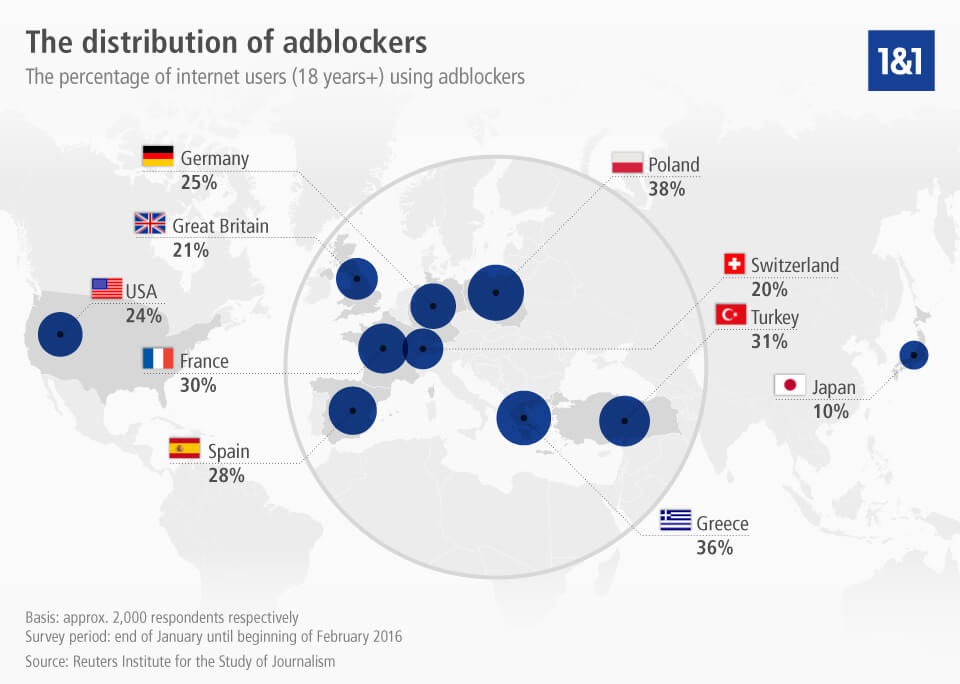
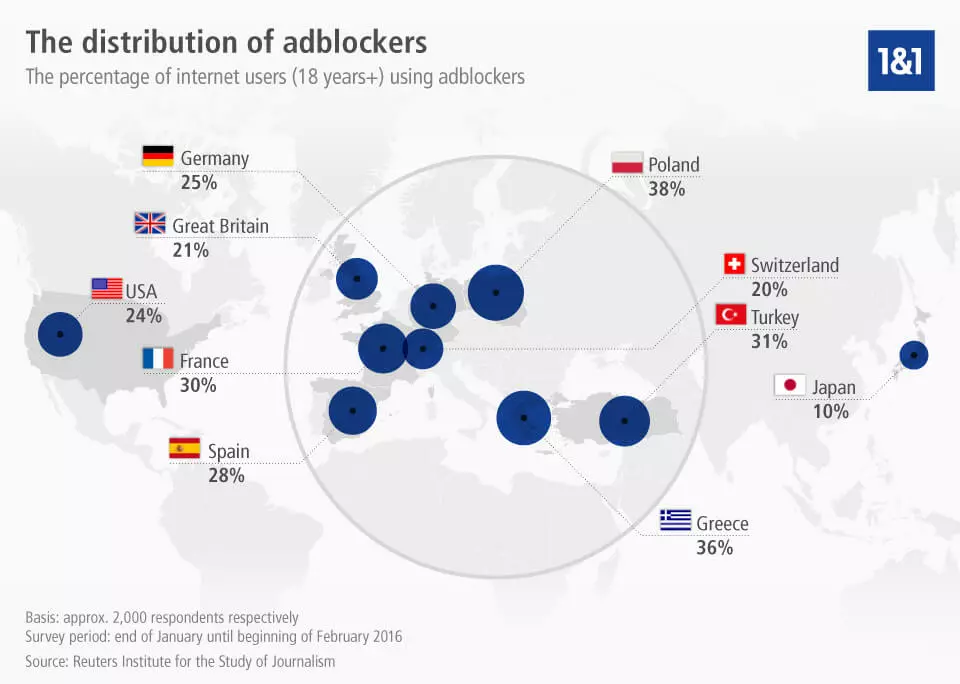
Click here to download the infographic showing the distribution of adblockers worldwide.
Solution approaches for web projects without integrated advertisements
In order to steer clear of filter-add on lists, there’s one universal-yet-time-consuming method that can be employed: explicitly withdrawing your content from conventional advertising types as well as formats. Following this, users are able to:
- go the technical route by avoiding pop-up elements all together,
- and clearly indicate to adblockers that the element in question is not an advertisement,
which can be done by creating a clear, optical distinction between it and the advertising banner. In order to simultaneously fight banner blindness, you should make sure to keep navigational as well as content portions of your web presence away from the advertising areas of your website. Here, the right sidebar as well as the header are of particular importance, as these seem to be more sporadically perceived by users even in the absence of an ad filter. Next, make sure to regularly test the functionality of your website. In terms of how it’s carried out, this tactic is no different to typical AB or multivariate tests. These tests, which are designed to inspect the functionality of your web project, take many factors into account and check whether your web presence supports different screen sizes and resolutions, devices, and web browsers; they also look into the effects of the most common adblockers. Regarding the problems arising from web analysis, there’s also one simple fix for this dilemma. For example, there are WordPress tools, like BlockAlyzer, which reveals how many of your users currently use an adblocker. The results obtained from this application can be used together with the rest of your statistics in order to obtain a more global overview of your actual conversion rate.
Solution approaches for online projects with advertising
Even if there’s no panacea for these adblocker woes, there are many different options to choose from in order to combat the detrimental effects of these browser extensions. A large portion of these solutions do require, however, the ability to recognise which users are employing an adblocker feature. Fortunately, this is a requirement that can be fulfilled with a little bit of know-how. A JavaScript program built into an HTML document allows you to determine whether an adblocker is being used, and can directly initiate the desired reaction to the presence of such users. The following is a list of plausible solutions for dealing with users that have been identified as adblockers:
- Notices and warnings: The built-in JavaScript code is able to register that users have switched on their adblocker. Site operators are given free rein regarding the way in which they convey to users that it’s important for them to turn off their adblockers.
- Blocking users: one option that should be carefully considered before it’s actually implemented involves prohibiting known users of adblockers from accessing your web project. Such script can be created, tested, and implemented into your HTML document free of charge on Antiblock.org. Given that you’re not able to give users any additional input once they’ve clicked out of the prompt you’ve created, this option can prove to be risky. A more watered-down version of this method may be worth mulling over. These allow you to prevent users with adblockers from accessing certain premium content offers, such as movies.
- Offer alternatives to turning off adblockers: there are other routes one can take other than requesting users to turn off their adblockers. The fact that a user has chosen to install an adblocker may simply be due to the fact that many online advertisements are still considered to pose a security threat and punishing such visitors may not bode well among certain target groups. An alternative solution to this problem comes in the form of changing the conditions on which users are able to freely access your content. For example, simply requesting that visitors share your site on outlets like Facebook or Twitter may prove a viable alternative to displaying advertisements. And of course, at least when it comes to sites with heavy viewer traffic, there’s always the option of demanding payment in order to view ad-free content.
One alternative to the measures mentioned involves learning a few tricks that prevent your advertisements from being read as such by adblockers. For example, simply excluding the presence of certain keywords, like ‘ad’ or ‘banner’, in the advertising element’s URL may be enough to circumvent many adblockers. To this end, it may be worthwhile to regularly look at the filter lists of known adblockers. The size of the advertisement is also a deciding criterion for adblockers. Given that advertising banners often are of a standard size, extensions contain the corresponding functions in order recognise ads simply based on their pixel numbers. Small variations of this number, which may only occur provided the original copyright holder approves of such modifications, is enough to circumvent the nets of these automatic ad filters. Just like noticeable keywords, the image’s pixel count also shouldn’t appear in the URL. A further possibility involves creating one’s own individual ad server in order to remain independent of external advertising networks, which are generally known to most adblocker developers.
Conclusion: adblockers are here to stay
Lawsuits and court cases brought against adblocker developers are no rarity. But with the exception of a few, modest victories, no substantial successes on this front have yet to come about. Recognising the fact that advertising filters are part of today’s online reality and reacting to this fact with relevant counter measures is an important step towards success for your online presence. Of course, it’s possible to design web presences and advertisements in such a way that prevents them from triggering adblockers. But it’s important to remember that these steps are often associated with much more additional effort on behalf of the advertisers and site operators. And it shouldn’t be forgotten that each filter add-on is well-endowed with a large community that generates new filter rules on a daily basis.
A more elegant approach to dealing with this challenge involves finding alternative advertising formats or revenue sources that spare users of less popular banners and pop-ups, while at the same time managing to generate the desired income. Limiting access to content only for those who pay is an addition to native advertising and a further point that many website operators consider. Those who focus on premium content and look for creative solutions to circumventing adblockers will most likely find out that many users will be willing to turn off their adblockers or accept your alternative conditions for viewing.
Reviewer

Julia Hertler
With over 18 years of experience in content marketing, Julia Hertler has deep expertise in digital communications. For the past 10 years, she has specialised in the areas of domains and hosting at the IONOS Digital Guide, making complex technical topics easy to understand.