

How can you get on Google News and improve your visibility?

Google News no longer requires publishers to register their websites manually. Instead, Google automatically selects suitable content based on factors such as relevance, timeliness, authority and compliance with its guidelines. Publishers can improve their chances of appearing in Google News by producing high-quality journalistic content, ensuring their websites meet technical requirements and providing transparent information about their publications.
- Top rankings on Google
- Present in AI answers
- Right at the top of the ads
How Google News works
Google News compiles content from many verified sources in a structured and clear way for users. The portal provides a quick overview of daily events as well as personalised news offerings. The menu bar at the top enables navigation to different sections or personalised feeds. There is also the option of using the search function to look up news directly.
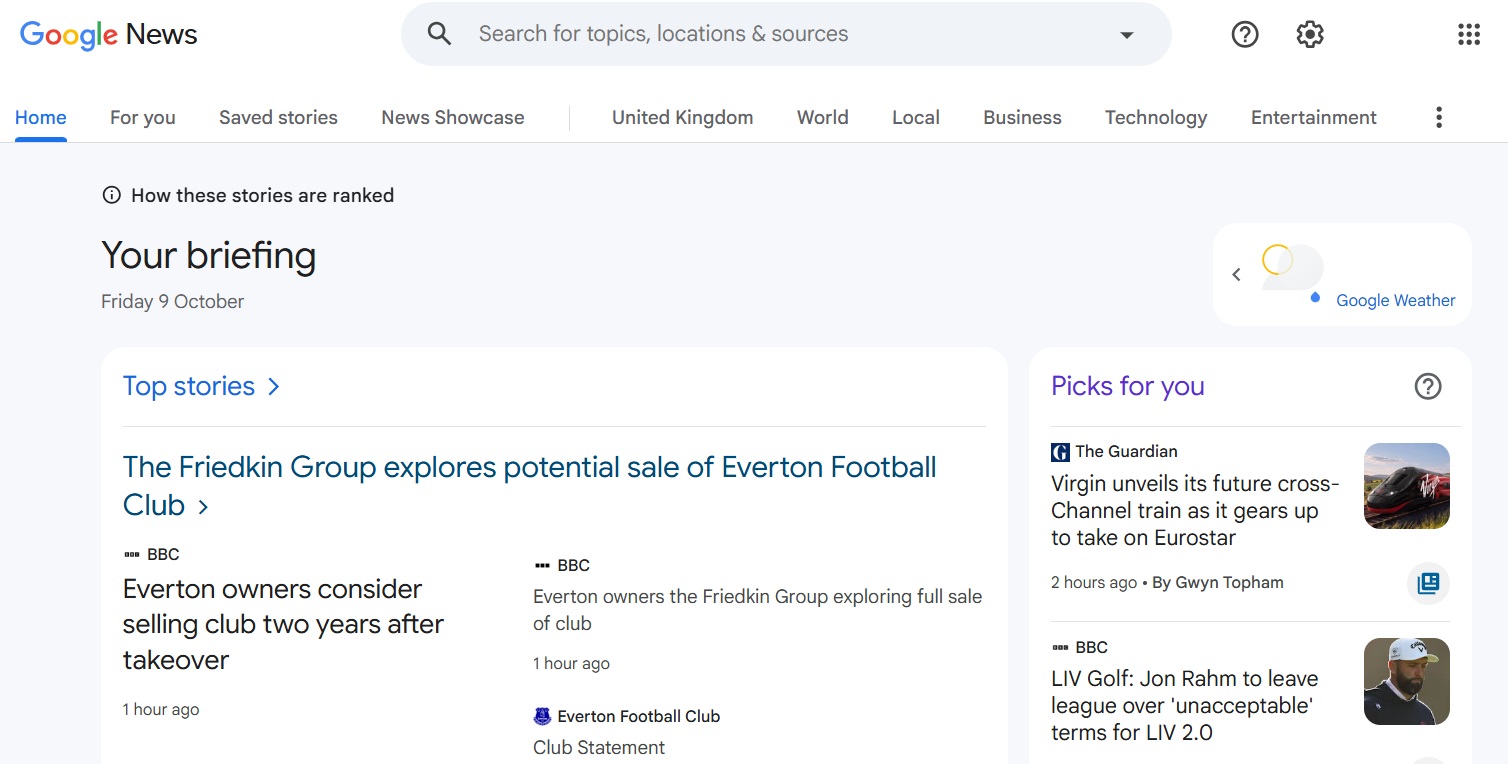
The Google News homepage displays both current headlines, selected according to factors such as news value, timeliness, authority of the source and global relevance, and personalised content. The latter is based on factors such as click behaviour, reading time, preferred topics and the user’s own location. In the next category in the menu bar, ‘For you’, Google News shows only personalised content. The ‘Following’ category gives users an overview of topics, sources, searches and stories they follow or have saved. The remaining categories in the menu bar lead to ‘News Showcase’ and to individual sections such as local news, business and entertainment.
How to get on Google News
Publishers once had the option to create and manage Google News publication pages through the Publisher Center, although this never guaranteed inclusion in Google News. Since the end of March 2025, Google has automatically generated these pages and no longer uses RSS feeds or website URLs submitted through the Publisher Center. Content that complies with Google’s policies is automatically eligible for consideration. Publishers can improve their chances of appearing in Google News by producing high-quality journalism and following technical best practices.
What has changed?
Previously, publishers could create and manage Google News publication pages through the Publisher Center. Google discontinued this functionality as part of its transition to automatically generated publication pages in March 2025. For publishers, this means:
- Publishers can no longer create or manage Google News publication pages manually through the Publisher Center.
- Google automatically generates publication pages and no longer uses RSS feeds or website URLs submitted through the Publisher Center.
- Content that complies with Google’s policies remains automatically eligible for consideration, with algorithms determining which articles appear and how prominently they are displayed.
Guidelines for appearing on Google News
As with search engine optimisation (SEO), following Google’s guidelines is essential for publishers looking to appear in Google News. To give your content the best chance of being featured, you need to meet certain editorial and technical standards.
Google News now automatically selects news sources and articles, with algorithms determining which content appears and how prominently it is displayed. Several factors can help Google recognise your website as a credible news source.
Journalistic quality
- Regular publication of timely, relevant news
- Accurate, independent reporting with proper source attribution
- Clear distinction between news, opinion and advertising
- Headlines that accurately reflect the content and avoid misleading clickbait
- Transparent information about the editorial team and authors
- Clear labelling of corrections and updates
- A strong focus on original reporting rather than republished agency content or press releases
Trustworthiness
- Clear publisher information, editorial details and accessible contact information
- Author profiles outlining relevant expertise, roles and specialist areas
- Consistent coverage of topics that demonstrate editorial expertise
- Compliance with Google News policies and general content guidelines
- Clear labelling of sponsored content, affiliate links and advertising
Technical requirements
- Mobile-friendly website with a responsive design
- Fast loading times and good Core Web Vitals performance
- Well-structured HTML with clear headings, paragraphs and links
- Content that Google can easily crawl without encountering unnecessary JavaScript barriers or login requirements
- Correct indexing settings, with no accidental blocks in
robots.txt,noindexdirectives or incorrect canonical tags - Relevant structured data, such as
NewsArticle,Article,BreadcrumbListandOrganization - A properly configured news sitemap to help Google discover new articles quickly
Publishing original, reliable journalism and maintaining a technically sound website can improve your chances of appearing in Google News. However, meeting these standards does not guarantee inclusion.
You can use Google Search Console, server log analysis and performance reports to monitor how Google discovers, indexes and displays your content. These insights can help you identify technical issues and make targeted improvements.


What role does the Publisher Center still play?
Since the end of March 2025, the Publisher Center has no longer determined whether a publication appears in Google News. Google now automatically generates publication pages and no longer uses RSS feeds or website URLs submitted through the Publisher Center. The logos and titles displayed on standard Google News publication pages are also no longer managed there. Instead, Google uses each website’s favicon and site name.
However, the Publisher Center still provides tools for managing certain publisher settings and monetisation features. Its main functions include:
- Managing Reader Revenue Manager: Publishers can use Reader Revenue Manager to set up subscriptions, voluntary contributions and other ways for readers to support their publications through their Google accounts.
- Managing Google News Showcase: Publishers participating in Google News Showcase can manage their settings and content panels through the Publisher Center. Showcase logos can also still be managed there.
- Managing publication and organisation settings: Publishers can update basic publication details, business addresses, verified website properties and contact information. They can also manage user permissions for publications and organisations.
How can you optimise content for Google News?
Although publishers can no longer submit their websites to Google News manually, there are still several ways to improve their chances of appearing in Google’s news results. The most important factors are journalistic quality, technical performance, timeliness and a clear content structure. This involves optimising individual articles as well as ensuring the entire website meets Google’s technical requirements.
Optimising individual articles
Start by optimising your article headlines (H1). Include the main keyword near the beginning where it fits naturally, and keep headlines clear, concise and informative. They should immediately convey the main news story.
| Good example | Bad example |
|---|---|
| ‘Olympic ski jumping gold: Carmichael sets hill record’ | ‘Carmichael rewards herself for years of hard work with Olympic gold’ |
| ‘Flooding disrupts rail services across London’ | ‘Commuters face another difficult day as heavy rain causes problems for trains in the capital’ |
Clear, accurate headlines help Google understand what an article is about. They can also improve its chances of appearing in Top Stories or relevant Google News sections.
The teaser, or introductory paragraph, should summarise the main news clearly, include relevant keywords naturally and encourage readers to find out more. Google News may use text from the beginning of an article to generate a preview, so make sure the most important information appears early on.
| Good example | Bad example |
|---|---|
| Ski jumper Katie Carmichael won Olympic gold with an outstanding second jump, setting a new hill record in the process. The other British competitors finished further down the rankings in challenging conditions. (Important keywords appear early, and the introduction provides useful context.) | Wet conditions and strong winds kept many spectators away, leaving the venue unusually quiet. Nevertheless, 23-year-old Carmichael produced the jump of her life and won gold. (The introduction delays the main news and omits important details such as ski jumping, the Olympics and the hill record.) |
Your article image should be relevant to the story and clearly reflect its subject. Use descriptive alt text and an informative caption. As Google News may display the image as a thumbnail alongside your article, choose a high-quality image that helps readers immediately understand what the story is about.
Avoid misleading, sensationalised or unnecessarily provocative images. Google News has policies against deceptive content, including previews that misrepresent the underlying story.
The meta description provides a short summary of your article for search engines. Write a clear, concise description that reflects the content and includes relevant keywords naturally. You can use your teaser as a starting point, but avoid copying it word for word. Google may use the meta description to generate a preview, although it often selects text directly from the article instead.
The former news_keywords meta tag is no longer supported by Google News. There is also no fixed minimum word count for articles. What matters most is the quality, relevance and depth of the content.
Optimising the technical foundations
Maintain a Google News sitemap: A separate news sitemap is not mandatory, but it is recommended, particularly for websites that publish news frequently. It helps Google discover new articles more efficiently. Make sure your sitemap follows Google’s guidelines. A properly configured news sitemap should:
- include only articles published within the last 48 hours
- contain no more than 1,000 news entries
- be updated automatically whenever new articles are published
- include accurate metadata, such as the publication name, language, publication date and article title
General technical optimisation for Google News:
- Fast loading times and good Core Web Vitals performance
- Mobile-friendly design with a responsive layout and readable content
- Consistent URL structure with permanent links to articles
- Well-structured HTML with clear headings and content organisation
- Relevant Schema.org structured data
- Easily accessible content without unnecessary JavaScript barriers, with paywalled content correctly marked up
- No crawling or indexing issues caused by incorrect canonical tags,
noindexdirectives orrobots.txtsettings
Further content and strategic tips for Google News optimisation
- Advertising – Avoid excessive advertising, particularly intrusive video ads and animated banners that can affect the user experience and Core Web Vitals. Make sure your editorial content remains the main focus of each page and that advertising is clearly distinguishable from news coverage. Follow the Google News policies, which state that advertising and sponsored content should not outweigh editorial content.
- Consistent topical focus – Establish a clear editorial focus and publish content that reflects your expertise. For example, a website specialising in political news should prioritise political reporting rather than regularly branching out into unrelated lifestyle topics. A consistent focus helps readers understand what your publication covers and can strengthen its credibility.
- Timeliness and publishing frequency – Publish news promptly, particularly when covering breaking stories. Freshness is an important factor for time-sensitive topics, but speed should never come at the expense of accuracy. Incorrect or poorly researched reports can damage your credibility. Aim to publish timely, reliable content rather than simply increasing your output.
- Managing comments – If readers can comment on your articles, make sure comments are clearly separated from the editorial content. Use appropriate HTML markup to help search engines distinguish user-generated content from the article itself. Moderate comments where necessary to maintain content quality.
- Identifying technical issues – Even Google’s web crawlers can encounter difficulties accessing or interpreting content. Familiarise yourself with common indexing issues and regularly check Google Search Console for crawling errors, indexing problems and other technical issues that could affect your visibility.
What is Google News Showcase?
Google News Showcase launched in the UK in February 2021, initially involving more than 120 local, regional and national publications. Participating publishers included The Financial Times, The Independent, The Telegraph, Evening Standard and Reuters. This gave UK news organisations an additional way to present their journalism to readers through Google News and Discover.
Unlike standard Google News, where algorithms select the articles displayed, News Showcase gives publishers greater editorial control over how their stories are presented. Readers benefit from more context and a clearer understanding of the news, while publishers can increase their visibility and strengthen their relationship with their audience.
How is Google News Showcase structured?
Unlike standard Google News feeds, which are generated algorithmically, News Showcase allows participating publishers to choose which stories to feature and how to present them. The format uses dedicated panels that editorial teams can curate themselves. These panels can include selected articles, summaries, key highlights, images and links to related content.
What are the benefits of Google News Showcase?
Google News Showcase aims to support quality journalism and strengthen relationships between publishers and their readers. Participating publishers can benefit in several ways:
- Greater visibility – News Showcase panels can help publishers reach new audiences, raise brand awareness and attract more visitors to their websites.
- More editorial control – Publishers can choose which stories to feature and how to present them. This allows them to provide additional context for complex topics, highlight investigative reporting and showcase their editorial expertise.
- Stronger subscriber relationships – Participating publishers can offer readers free access to selected articles that would normally be behind a paywall. This gives readers a chance to explore premium content before deciding whether to subscribe.
- Financial compensation – Google pays participating publishers for curating content and, where applicable, providing access to paywalled articles. Payment terms are agreed individually with each publishing partner.
Who can publish on News Showcase?
Google News Showcase is not automatically available to all publishers. Participation requires a licensing agreement with Google. The programme brings together news organisations that produce original journalism, including local, regional and national publishers. Unlike standard Google News, publishers cannot gain access to News Showcase simply by meeting Google’s general content guidelines.

Reviewer

Melissa Senn
Melissa Senn has been with IONOS since 2016 and focuses on website, e-commerce, social media, and AI in the Digital Guide. As a digital strategist, she uses her extensive SEO and GEO experience to transform complex technological trends into practical content.