

Cash book template: a useful tool for bookkeeping

The cash book is one of the most important accounting books for corporate bookkeeping. In the form of a simple document, often an Excel spreadsheet, the cash book is used to record a company’s cash payments. After all, if the annual financial statements are due at the end of the fiscal year, the IRS doesn’t only want to see the transactions done via debit or credit, but also a list of all cash transactions.
Keeping a cash book helps ensure that this list is complete. Corresponding templates are a great help. The advantage of a digital cash book format using an Excel spreadsheet: It’s quick, clear, and the entered amounts are automatically offset against each other. In this way, digital cash book templates offer a direct overview of the financial situation of a company and spare the need for time-consuming calculations – where errors can easily creep in.
A cash book template also has advantages for all self-employed individuals – regardless of whether you’re obligated to keep a cash book or not. Simply download the corresponding blank cash book template online. In the following, you’ll find a template for your cash book as well as all important information about how to fill it out correctly. But first of all, we explain who is actually involved in keeping a cash book.
Who has to keep a cash book?
Not everybody is required to keep a cash book – it’s only mandatory for businesses that operate using double-entry accounting and must prepare a balance sheet at the end of the year. There are no laws in the US governing how companies must keep their books, but double-entry accounting is strongly recommended for larger businesses and has its benefits for smaller businesses as well. If you do choose to use this method, it’s important to read and comply with the US GAAP (Generally Accepted Accounting Principles).
In the event of a tax audit, an incomplete or incorrect cash book could have unpleasant consequences, such as costly assessments by the IRS. Be sure to keep your books completely and comprehensibly at all times.
Even if you choose to stick to simple accounting for your documentation, it can still be logical to keep a cash book. As opposed to online business, cash payments are much more difficult to comprehend in hindsight, and keeping an overview is advantageous for every company. With a cash book, you can keep track of inflows and outflows of cash.
Download the cash book template
If you decide to keep a cash book, you can download a free cash book template from us in the Digital Guide. The cash book is available as an Excel spreadsheet. Simply download your online cash book and begin the digital bookkeeping of your cash transactions. In the following, we explain in detail what information the form contains and how to fill it out correctly.
Details of the cash book template
When you submit your tax return to the IRS at the end of a fiscal year, the cash book is part of the company’s tax base. Like all other commercial books, the cash book must be kept in accordance with the principles of transparency and comprehensibility. To ensure this, there are some mandatory entries that each cash book entry needs to have.
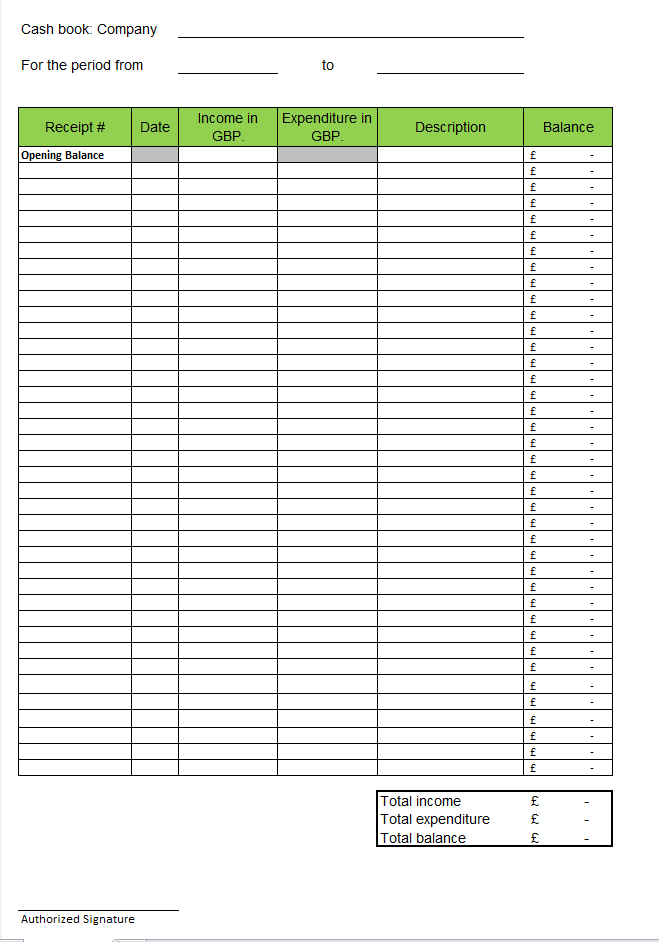
Our downloadable blank cash book template contains all the details that are necessary for a properly filled out cash book. The following information is recorded in six columns:
- Date of the transaction
- Receipt number for clearly assigning the document to the transaction
- Booking text (short description of the transaction)
- Receipt and currency of the cash revenue or expenditure
- Applied tax rate (sales tax)
- Current cash balance and debit balance
In the header of the cash book template, there are two additional fields: one to enter the name of your company, and another for recording the time during which the respective cash book sheet was kept. You then just have to put your signature under the table. All incurred income and expenses are documented chronologically. Here, the principle of completeness is very important. Even something as simple as the purchase of stamps – a classic cash payment – belongs in the cash book. One of the major advantages of the cash book format for Excel: The program offsets the items directly with each other and automatically displays the current balance.
Fill out the cash book template
Once you’ve downloaded the free cash book template, proceed as follows:
- First, enter the name of your company in the header of the document.
- Then make the initial entry for the time: If you want to start the cash book on the same day, note the current date. If you want to fill out the cash book sheet over multiple days (more likely to occur in exceptional cases), then enter the end date when the sheet is filled out. This way, you avoid incorrect entries.
- The next step is to transfer the current cash balance into the table. This is given in the first row as the ‘Balance’: Here, note the current date and bash amount.
- Now, begin to chronologically log the cash payments of the day (or the period in which you’re keeping the cash book): The document number of the cash receipt, the date of the transaction, and the amount of the income or expenditure. It’s important that you enter each transaction individually and that the number values can be read out correctly from the Excel table.
If a given value isn’t readable (for example, if a comma is set incorrectly), then the balance column displays the error message #VALUE!. Simply correct your error and the values will be recalculated correctly.
- In the ‘Comments’ column, enter a short description of the business transaction, for example, in the form of a booking text. By the following day at the latest, you must enter all payments into the cash book template.
- Under the table, on the right, the sum of incomes and expenditures is entered and the balance is calculated. Before you print out the cash book sheet, make sure once again that all values are correctly entered so that the final entry can be calculated without errors. This will be transferred as the starting balance on the next sheet.
- In general, you should print out the cash book sheet at the end of every day. Check first to see whether the complete period of the document has been specified correctly in the header. You can attach your signature to the printed document and file it chronologically with your other records. You can also save the sheets as PDFs.
- On the next day, start a new cash book sheet with the saved template.
Important to note: Details in the cash book cannot be changed after being filed. To do so would be contrary to the principles of proper accounting. If you should encounter an error, the change needs to be identifiable and comprehensible to third parties and marked with the date of the change – this is the transparency principle of the US GAAP. Therefore, it’s not sufficient to keep the cash book exclusively in digital form. To ensure that subsequent changes are traceable, print out the cash book at the end of the day, sign it, and file it chronologically. This guarantees that all accounting principles are maintained.
In the IONOS Digital Guide, you can find further details on cash books and how to fill them out correctly.
Please note the legal disclaimer relating to this article.