

Curriculum vitae: Template and tips

When putting together an application, applicants usually focus on the cover letter, tailor it to the advertised position, and try to score points with creativity and authenticity. The curriculum vitae (CV), on the other hand, is often not given this kind of attention – a huge mistake. While the CV usually comes in second to the cover letter, HR personnel will often pick it up first. And there are good reasons for this.
The HR departments of bigger companies often go through hundreds or even thousands of applications for every job opening. The preselection is made based on facts. Does the applicant hold a relevant degree, the required professional experience, or the desired know-how? Answers to these questions are found in the CV. You should keep this in mind when summarising your professional career. Contrary to the cover letter, in your CV, accuracy will score you more points than creativity. The most important thing is that the recipient of your application can inform themselves on your qualifications quickly and completely.
A curriculum vitae is a summarised presentation of your professional career, including any relevant events. A CV is created in written form (usually in a tabular format) and sent in together with supporting application documents.
We’ll show you how to create a professional CV and which information you should not leave out. To increase your chances at success, we will also introduce a free CV template that you can use.
Formal requirements
A paragraph-style CV is a rare sight these days. HR usually expect a tabular format. This format is easily skimmable, not more than two pages in length, and offers the recipient the possibility to gain an overview of your career path in a fast way.
There are no formal requirements for a tabular CV. There are certain content requirements that should be taken into account when creating a business letter, including structure, content, and design.
Beyond this, these points should be taken into account:
- The length of your CV should not exceed two pages.
- Choose a typeface that can be easily read, that is not too eccentric. You don’t necessarily have to choose Times New Roman or Arial; suitable font alternatives include Calibri, Cambria, Garamond, Georgia, Verdana, or Helvetica.
- Use a maximum of two different fonts.
- Make sure the font size is big enough. Depending on the font, we recommend a font size between 10 and 12 points.
- Single-line spacing is recommended.
- Adapt font and font size to the style used in your cover letter.
- Organize your CV into clear segments and use a heavier subheading, emphasised through bold font, italic font, and/or font size. Apart from this, you should keep stylistic elements like bold type, cursive type, and underlined type to a minimum.
- Use white space to structure your document – for example, through spaces, paragraphs, or indents.
- Align different levels with vanishing lines.
Nowadays, a CV is created in a word processing program. Microsoft Word or a similar Office program are ideal for writing a CV. Make sure to find out whether the company you’re applying to requires your application in digital or paper format.
- Up to 50 GB Exchange email account
- Outlook Web App and collaboration tools
- Expert support & setup service
In many sectors, the online application has become standard. Application documents are either sent in via email or an online form on the employer’s website.
Make sure to not send digital documents in an editable format, but only in a write-protected format. Generally speaking, HR will expect application materials in PDF format. You can find out how to create a PDF, in our Digital Guide.
When applying to a job via email, make sure to follow the appropriate etiquette of professional online communication. We’ve summarized the key points in our guide on business emails.
CV setup
The setup of your CV should follow an established, tabular format. Generally speaking, HR will expect you to cover the following points in your CV – in this order:
- Name and contact details
- Professional background
- Schools and education
- Special knowledge and skills
- Personal interests and hobbies
- Date and signature
A tabular CV should be titled “CV.”
Personal details
Personal details include information on you as well as contact details, so that the recipient can get in touch with you for any questions.
Make sure that these personal details are easily legible and don’t take up too much space in your CV – for example in the header or in the upper-half of the document. If your CV features several columns, then these personal details can also be included in a color-highlighted or otherwise segmented area.
Your CV must include this information:
- First and last name
- Address
- Date and place of birth
- Telephone number
- Email address
Beyond this, you can choose to include other details in your CV that may not be requested by an employer, due to possible discrimination, as per the Equality Act 2010, such as:
- Sex
- Gender identity
- Disability
- Religion or belief
In the UK, it is not recommended to include a photo of yourself on the CV. If you do choose to do so, then it should meet the requirements of a professional photo. Selfies or holiday pictures won’t score you points with HR.
Do you manage your presence on social networks? Then it’s a good idea to include links in your CV, to give HR the opportunity to learn more about you. Depending on the platform, links to platforms like LinkedIn, Facebook, Twitter, or Instagram are appropriate. But make sure it’s professional! Your social presence should be earnest and related to your work or relevant interests. Party pictures won’t get you a foot in the door. If you primarily use Instagram to document your meals then it’s best not to provide this link – unless you’re applying for a job in gastronomy.
Professional background
Around the world, the US format of presenting your professional background has become standard. Here, professional experience is presented in a reverse chronological order, in other words, starting with your last position.
In this section you should include the following information:
- Professional roles
- Experience during and after your education
- Relevant student jobs or marginal employment
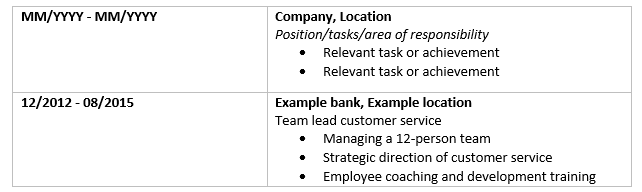
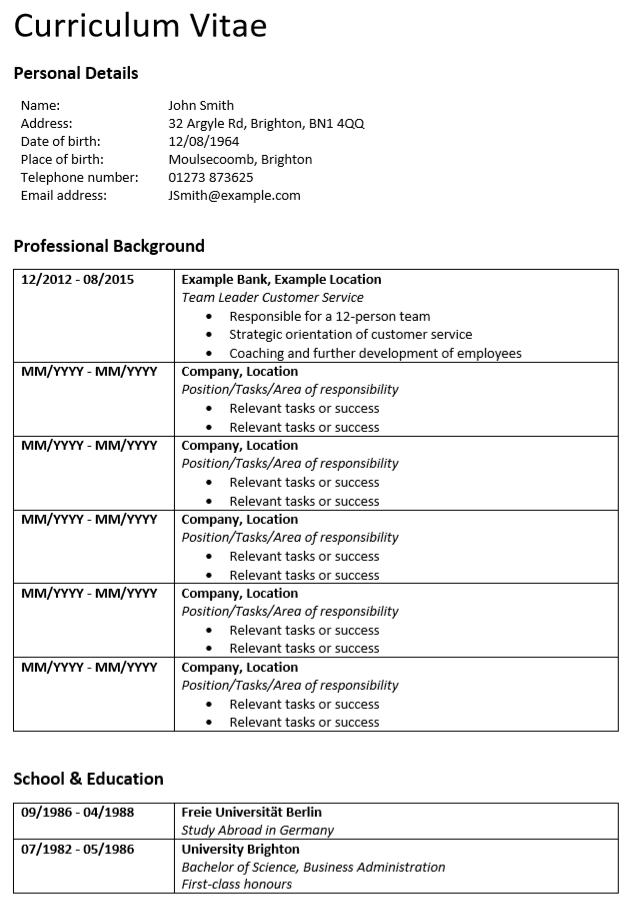
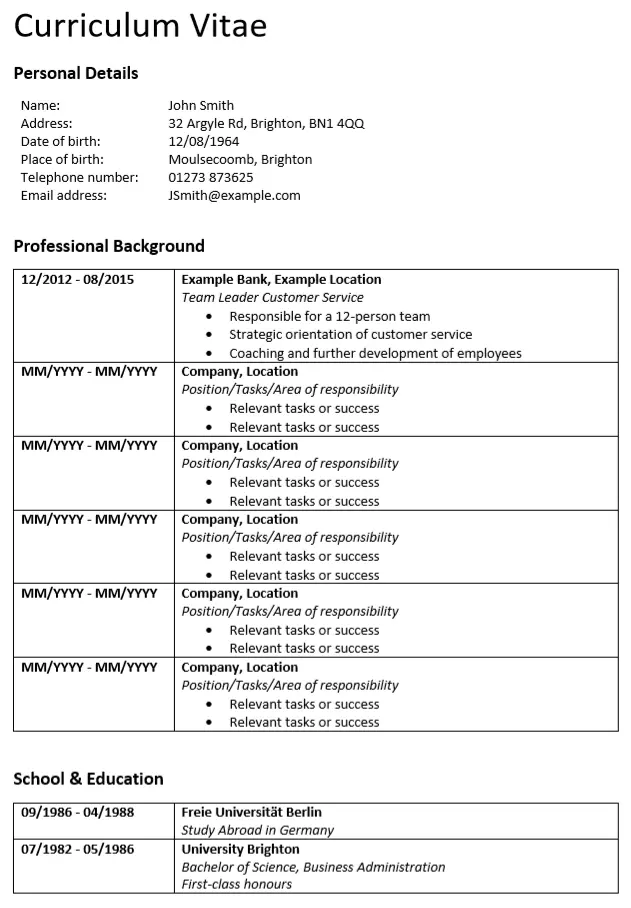
Here, we recommend a two-column setup: In the left column, include your period of employment and on the right the title of your position as well as relevant information relating to your employment.
Every entry should have the correct name of the company you worked for, the place of employment, and the exact title of your position. It can also prove useful to emphasise relevant tasks or milestones in bullet points.
For the employment time, you can go down to the month – for example, “12/2012 - 08/2015.” But make sure to use a consistent format.
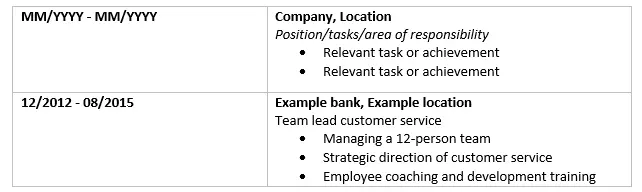
An example of the format of your CV’s professional background section can look something like this:
In the best case, your professional background will not have any gaps. Breaks that last more than three months between two jobs should be explained and will be picked up on, at the latest, by HR personnel during your interview.
Schools and education
Normally, the section on your education is separated from that of your professional career, and can include the following points:
- Studies (university/school name, majors and minors, grades, thesis/dissertation topic (optional))
- Vocational training
- Overseas experience during your education
- Degrees (institute name, grade)
These points, too, should be listed in a reverse chronological order – including the name of the institution, your final grade, and if relevant, the topic of your thesis or dissertation (especially if it matches the position you’re applying for).
Based on the scope of your professional experience, you can go into more or less detail in these points. Entry level professionals that have just completed their education and have had an internship or two should list their education from primary school to graduation or list their most important years of education without any gaps. Applicants with a 20-year track record, on the other hand, can limit this section to their degrees and apprenticeships.
Special knowledge and skills
Have you acquired additional qualifications independently of your education or from your career? Fantastic! Then you can present these under “special knowledge and skills.” Make sure that the mentioned points relate to the job you’re applying to though.
The HR department at an insurance bureau won’t be interested in your fishing licence, or that you’ve completed a chainsaw masterclass at the construction store, for that matter. Industry-specific training and certificates – for example in project management – are more on cue.
In this section, you should concentrate on the knowledge and skills that qualify you for the position you are applying to. This includes:
- Further education and workshops
- Language skills
- Computer literacy (for example relating to industry-specific software)
- Relevant certificates (for example driving license class or a forklift truck license)
Language skills usually include a self-assessment of your competencies. The following classifications are common:
- Elementary proficiency
- Limited working proficiency
- Professional working proficiency
- Full professional proficiency
- Native or bilingual proficiency
For your computer skills, too, you should include a similar level of competencies.
Make sure that you’re able to vouch for your skills with the right qualifications – for example by including certificates, credentials, or reports.
Hobbies and interests
In the above sections of your CV you’ve proven your professional competencies with so-called “hard skills.” The section on “interests and hobbies” gives you the opportunity to point HR to your
.Soft skills are understood as extracurricular competencies with a personal, social, or methodical angle. For professional success, the following skills are relevant, among others:
| Personal skills | Social skills | Methodical skills |
|---|---|---|
| Resilience | Empathy | Analytical skills |
| Responsibility | Capacity to integrate | Organisational skills |
| Engagement | Communication skills | Presentation skills |
| Motivation | Acceptance of criticism | Problem solving skills |
| Curiosity | Insight into human nature | Stress resistance |
| Self-discipline | Team skills | |
| Self-reflection | Manners | |
| Confidence |
Contrary to hard skills, these kind of skills are difficult to prove and should be implicitly stated in the CV – for example through hobbies and interests. Here, too, you should limit yourself to what’s relevant. Daily activities like reading, watching TV, or listening to music don’t count.
If you’re an active member of a sports club, then you can include this if the sports activity shows off your team skills, problem solving capacity, self-discipline, or resilience. If travel is one of your main interests, then you might score points with your worldly mindset and independent character. Hobby cooks can also make a creative or social impression. But these interpretations are not guaranteed. That’s why it’s important that you remain authentic, and only state the hobbies and interests that you’re truly passionate about, and be prepared for any questions.
Are you into extreme sports and find yourself in dangerous situations when skydiving, mountain climbing, or martial art sports? Then it’s best to keep this out of your CV, as HR don’t respond well to this kind of appetite for risk, since it suggests that you might not be fully accountable.
Volunteer work can also give HR an idea of your extracurricular competencies – especially if it’s in the social field. However, you should only include these references if you’re currently volunteering or have just completed work in this field. In the best case, your extracurricular activities will overlap with the advertised requirements for the prospective job.
Not every kind of volunteer work is suited to a CV. Especially political engagement should be carefully considered. If you’re not familiar with others’ views, you might be shooting yourself in the foot by stating your association with the “wrong” party affiliation.
Date, place, and signature
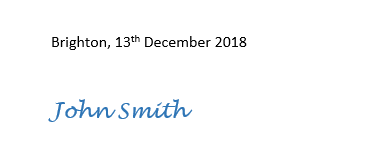
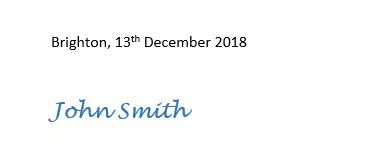
Confirm the accuracy of your statements by signing your CV. A complete signature includes your names, the date, as well as your location when signing the document. Your signature should be handwritten, and can be scanned or photographed if you’re sending your documents electronically.
A CV will be just as valid without the signature, but it does award it a personal note. Your personal signature also serves to guarantee the authenticity of the document, and that you’re familiar with the practices of professional business communication.
CV template: Word template
Do you want to create you CV with a professional example as your template? Then you can use our CV template in Word.
Here’s how: Download the CV template in Word for free, edit the layout, fill in your information, and send it off together with your other application documents. Good luck!
Have you sent in the perfect CV, but still not had a response? After about two weeks, it’s best practice to follow up. You can find out more about your application status without coming across as pushy in another article in our series on the topic of applications.