

What is pharming and how to protect pharming attacks

Anyone who clicks on internet links without thinking or logs into online accounts without checking the authenticity of a website can quickly become the victim of crime. While internet users have become more cautious about opening links in emails, attackers have come up with new methods. Pharming is one of them.
What Is Pharming?
Pharming is a new method derived from phishing. In the case of pharming, website requests from a user are redirected to fraudulent websites. The attackers run huge server farms in order to host these fraudulent sites. These farms give this form of cybercrime its name: pharming. The spelling with “ph” has been adopted from the slang used in hacker groups.
Example: A Pharming Attack
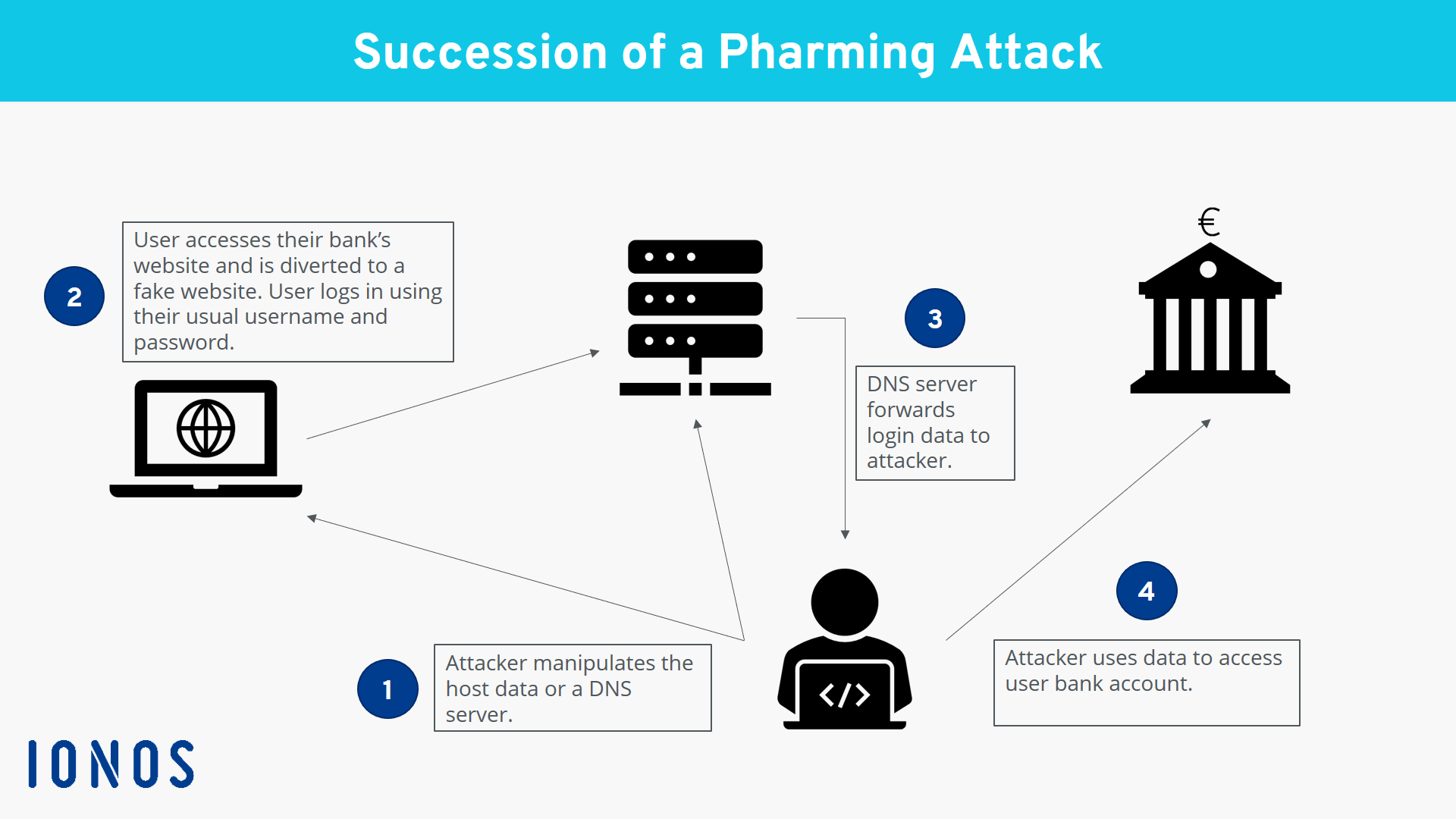
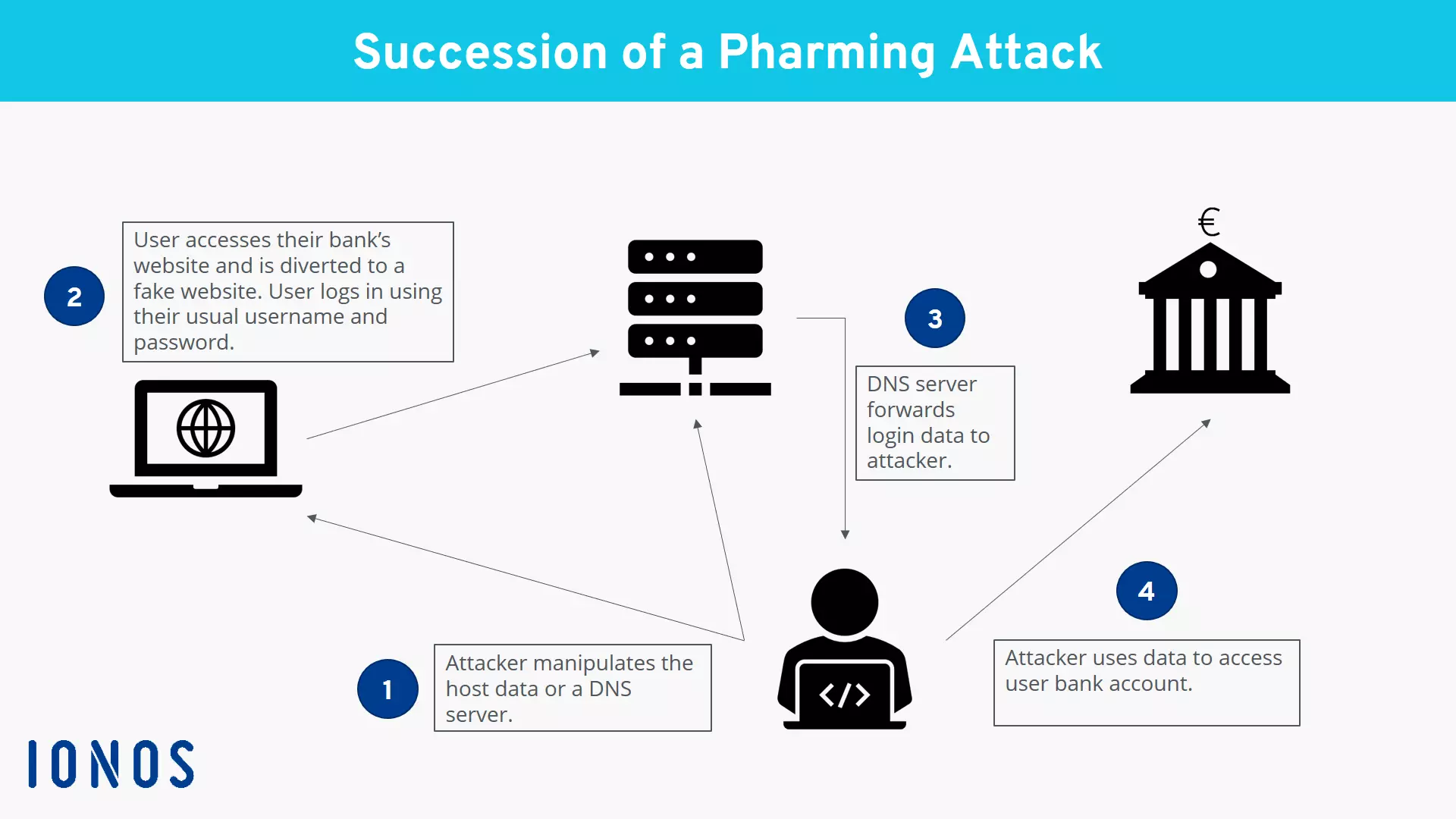
An example of pharming would be if a user would open their browser and enter the web address of their bank in order to complete a transaction in online banking. However, the user is redirected to a fraudulent site that looks like the bank’s website. For this reason, it doesn’t seem suspicious – the user doesn’t check the address line and proceeds to enter their login data. An error message appears. The user is briefly surprised by the message, but puts it down to technical problems and tries to make the bank transfer later. Nonetheless, the attackers were able to capture the user’s login data from their entries. They can now use this data to gain access to the user’s account and send themselves large sums of money. The user only discovers the attack a few days later when they check their account statement and see the unfamiliar transfer.
How Does Pharming Work?
The user request is redirected by manipulating the DNS protocol. The protocol is responsible for converting the text-based host name (URL address) into a numerical IP address. This conversion process offers criminals two points of attack in order to redirect the request.
1. Attacking the hosts. File
With every website request, the computer first accesses the local hosts. file to check whether the website has been visited before and if the IP address is already known.
Attackers can exploit this process. They can install malware on the computer, for instance via email attachments infected with viruses or using Trojan horses on websites. These manipulate the record of IP addresses, thereby redirecting any request to the fraudulent site.
2. Attacking the DNS Server
Another more elaborate approach to pharming is to directly infect the DNS server, from where the IP address is requested after a user enters a URL. This technique is particularly insidious: Although the user’s computer itself isn’t infected with malware, it becomes the victim of an attack.
The attack occurs via a process called DNS flooding. Here, the server is suggested an address resolution before it is able to find the correct assignment.
Pharming vs. Phishing – What’s the Difference?
In the case of phishing, attackers exploit the gullibility of email users. They apply methods of social engineering. At first glance, the emails appear to give credible reasons for why internet users should provide certain data, for instance to verify an account or agree to new terms and conditions.
With pharming, the attack occurs directly in the browser, rather than via email communication. No malware at all needs to be planted on the victim’s computer.
However, the result can be identical in both cases: The user shares confidential information with fraudsters, who then use this data to enrich themselves financially.
Five Tips to Protect Yourself against Pharming
In order to protect yourself against pharming, there are no specific measures you can take for this form of attack. Instead, you should follow the general security recommendations that also provide protection against other cyberattacks.
Antivirus and Antimalware Software
Use antivirus and antimalware software and make sure it’s updated daily. This way, current threats can be detected in emails and on websites which could infect your host file.
Dubious Email Attachments
Don’t open any email attachments from unknown senders or attachments that seem suspicious for other reasons (for example: unusual name or the sender doesn’t normally send this kind of email).
Secure Websites
Whenever you use online banking platforms or online payment providers, check that the URL is marked as secure with “https”. A lock symbol should be shown in the URL bar. By clicking on it, you can see information about the website’s security certificate and its validity. There are antivirus programs that automatically check the validity of certificates and produce warning notices if certificates are invalid or suspicious. You should take these certificate warnings seriously and leave the website straight away.
Questionable Websites
Has the appearance of a familiar website changed? Does something appear strange about the login prompt? Trust your intuition before you enter any confidential information. In the case of unfamiliar websites: Check which URLs are behind links and avoid visiting any questionable sites.
Administrator Rights
To make it more difficult for attackers to make any changes to the host file of computers, you should not work with administrator rights during everyday use. Create a dedicated profile with restricted rights. This makes it impossible for attackers to gain write access to the hosts. file.
If you take these measures to heart, you will improve your protection against cyberattacks like pharming as best as possible. However – just like in the offline world – there is no absolute protection against criminal activities online.
Besides all the technical precautions, the most important and effective measure against online fraud is to be aware of the danger and act with critical awareness.