How to add a meta description in WordPress

The content of your website should be accessible and easy to find. One simple option to generate new traffic and help customers or readers navigate to your site is to add a suitable meta description. WordPress provides several options to add them. Read on to find out what they are, why a meta description is important, and what you should consider when writing one.
- Free website protection with SSL Wildcard included
- Free private registration for greater privacy
- Free Domain Connect for easy DNS setup
What are WordPress meta descriptions?
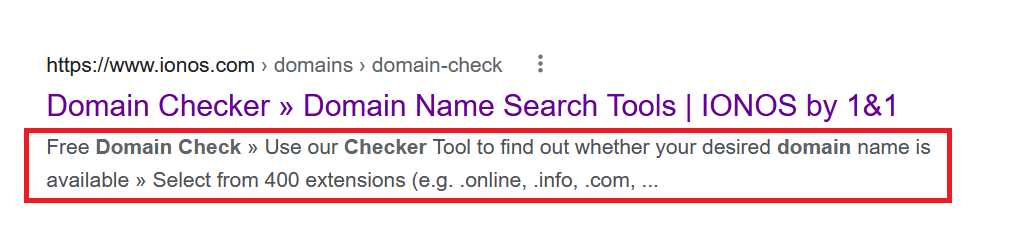
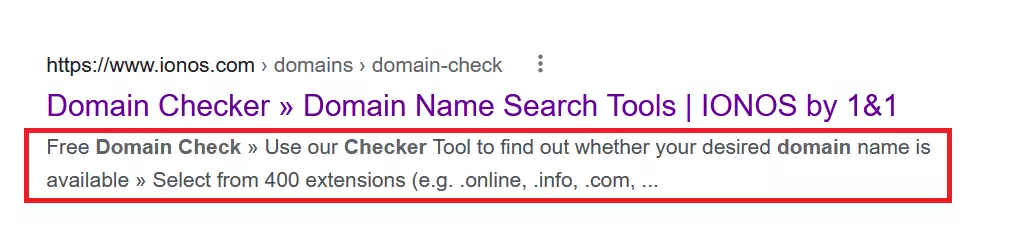
Even if you’re unsure what a meta description is, you’ve likely come across them. When using a search engine like Google, search results are usually displayed with a meta description below the title of a page. The short text offers a preview of what you can expect when you visit the corresponding page. When you write your own meta description in WordPress, you increase the chances that readers will visit your site. While a website title provides little space for more detailed information on what a page is all about, a WordPress meta description provides more information and acts like free advertising in that way.
Get the perfect domain in no time! Register your favourite domain with IONOS and benefit from Wildcard SSL, easy setup, and numerous security features.
Why are WordPress meta descriptions useful?
Generally, it’s easy to add meta descriptions in WordPress. If you do this conscientiously and follow a few other SEO tips, your website can be found more frequently in searches, will perform better in rankings, and reach the visitors your site is intended for. An informative, succinct WordPress meta description can be an advantage over competitors.
Create meta descriptions with Yoast SEO
The easiest way to add a meta description in WordPress is using an SEO plugin. With such popular plugins you can write meta snippets that include a title, URL, and description for each post and page. Yoast SEO is among the favourite and most popular SEO plugins. It is easy to use and achieves excellent results. Let’s take a look at how to create a meta description with Yoast SEO step by step.
- First, install the plugin by selecting it from the WordPress backend. To do this, click on ‘Plugins’ in the bar on the left and then on ‘Add new’. Since Yoast SEO is often used for meta descriptions, you’ll find it among the popular providers in the category. Alternatively, select the plugin on the WordPress site under ‘Plugins’.
- Download Yoast SEO for meta descriptions and activate the plugin under ‘Plugins’ and ‘Installed Plugins’. You can find these options again on the left side of the screen. Now you can use Yoast SEO.
- You’ll spot Yoast SEO on each page you’ll create or have already created. To add a meta description, select the ‘Edit Snippet’ option.
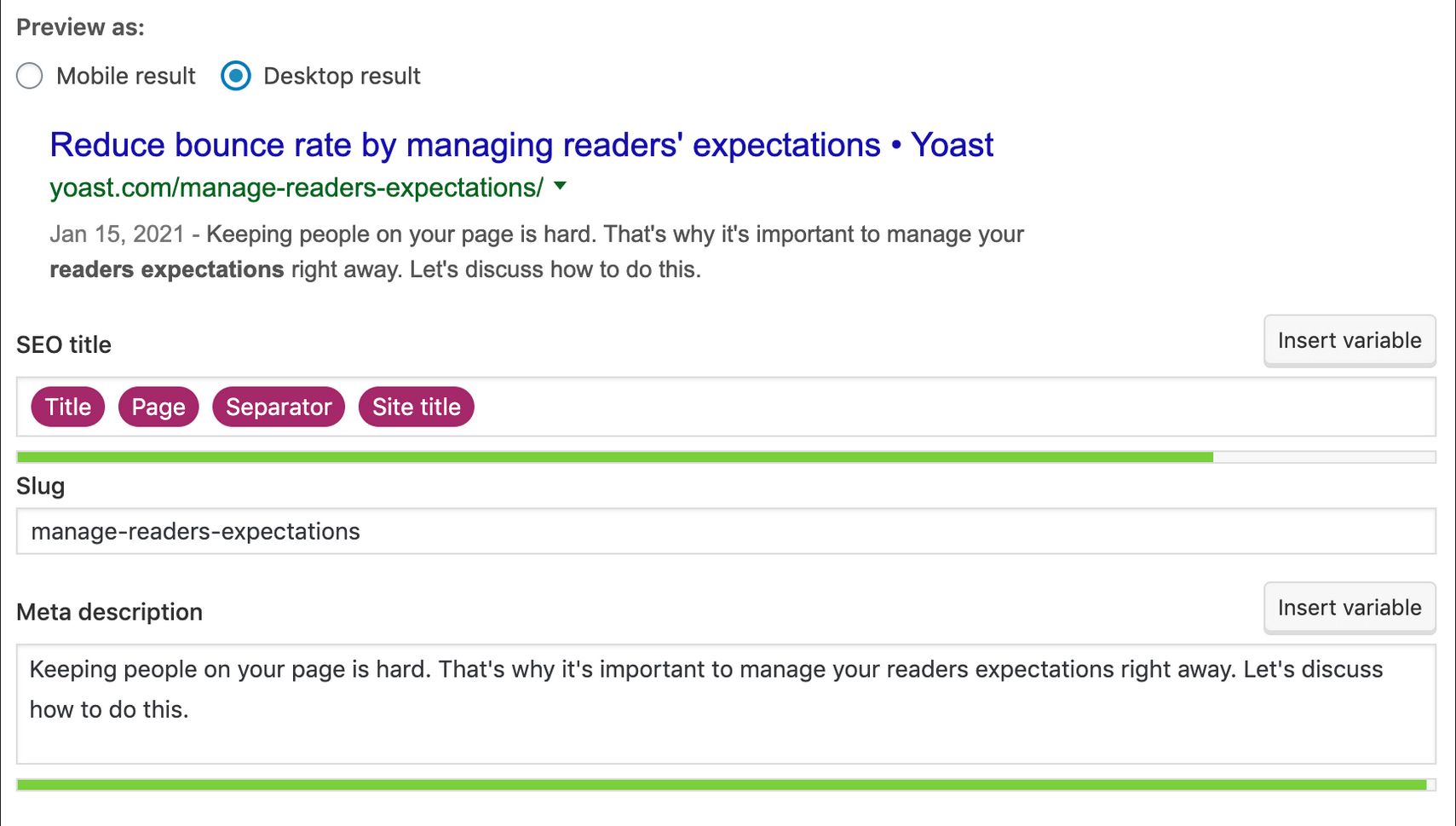
- Write your meta description for your WordPress page. The plugin signals when you have reached the correct length. When the strip turns green, the description has the optimal number of characters.
- You can perform this step not only for all new posts, but also for existing pages. It is recommended to add a meta description to every post in WordPress if possible.
Add a standard description
Yoast SEO lets you add default meta descriptions. In this way, every time you create a new post, the default description is automatically added. Select ‘Search Appearance’ and then ‘Content Types’ in the bar on the left below ‘SEO’. Create the appropriate text according to the above procedure and save it as default. If you forget to add a WordPress meta description or do not wish to formulate a description, the default text will be used.
Get your website up and running with Hosting for WordPress from IONOS. Available at various plans – one to suit every need. The ideal solution for your domain(s)!
Create WordPress meta description without using a plugin
Using a plugin like Yoast to create a meta description in WordPress is by far the simplest recommended solution. You can add meta descriptions without using a plugin but the process is more cumbersome and time-consuming. To do so you’ll need to change your theme files.
- Before you create a WordPress meta description without a plugin, be sure to back up your page. This way, any errors won’t have a serious impact on your website and can be undone.
- To add a description, head to the ‘Tagline’ option via general settings and create the meta description for your WordPress page.
- Now switch to the theme editor and the menu item ‘Appearance’, click on ‘Theme header’ and insert the following code between and :
Your meta description will now be applied to every WordPress post. While this option is better than adding no meta description at all, its suboptimal for boosting traffic to your site. You could add a description for each individual post, but you should have strong programming skills, otherwise you could compromise the functionality of your website. The safest, easiest, and ultimately most convenient way to add meta description is using a plugin like Yoast SEO.
What makes for a good meta description in WordPress?
Although meta descriptions do not impact the ranking of a website, they shouldn’t be neglected. On the contrary! For one thing, descriptions ideally contain the most important keywords, which has a positive effect on SEO. A good meta description is one reason why people click on a search result in the first place. If the description shows that the corresponding website offers the required information, it increases the chances of users navigating to your site.
So what does a good meta description in WordPress look like? The answer depends entirely on the type of website. If you run a blog and wish to attract readers, you’ll need a different approach than an online store or a corporate website. A few basic tips that are common to all website types are:
- Your meta description should contain your focus keywords. This way, interested users know roughly what information they can expect. There are various free tools available to determine the appropriate keywords.
- The meta description of your WordPress page should be written well. Be succinct and highlight the most important information. Try to anticipate and answer potential reader questions. Although duplicate content plays only a minor role for the ranking, it looks more professional if high-quality pages also have suitable, unique descriptions.
- The length of a meta description matters in WordPress. If you use too many characters, the search engine preview simply cuts off the text. Too short a text, on the other hand, can seem like you don’t have much to say. To make matters worse, previews are shorter on smartphones than on desktop. When you create your meta descriptions with Yoast SEO, for example, the plugin automatically highlights the optimal length.
- End your description with a call-to-action. ‘Learn more!’ or ‘Order now!’ indicates that more content is waiting on your page and gets users to click faster.
Conclusion: WordPress meta descriptions
If you intend to boost traffic to your site, it would be wise to add thoughtful meta tags. In WordPress the easiest way to add meta descriptions is by using a plugin. Meta descriptions make websites look more professional and help to generate more traffic.
- Improve your Google ranking without paying an agency
- Reply to reviews and generate social media posts faster
- No SEO or online marketing skills needed