WordPress vs. Joomla

Content management systems (CMS) like WordPress, Joomla, Drupal, and Magento make it much easier for those that are not so tech-savvy to set up websites on their own. When comparing CMS it quickly becomes clear that they have a lot in common but are also quite different. Let’s take a closer look at two of those systems, WordPress and Joomla.
- Free website protection with SSL Wildcard included
- Free private registration for greater privacy
- Free Domain Connect for easy DNS setup
WordPress vs Joomla in numbers
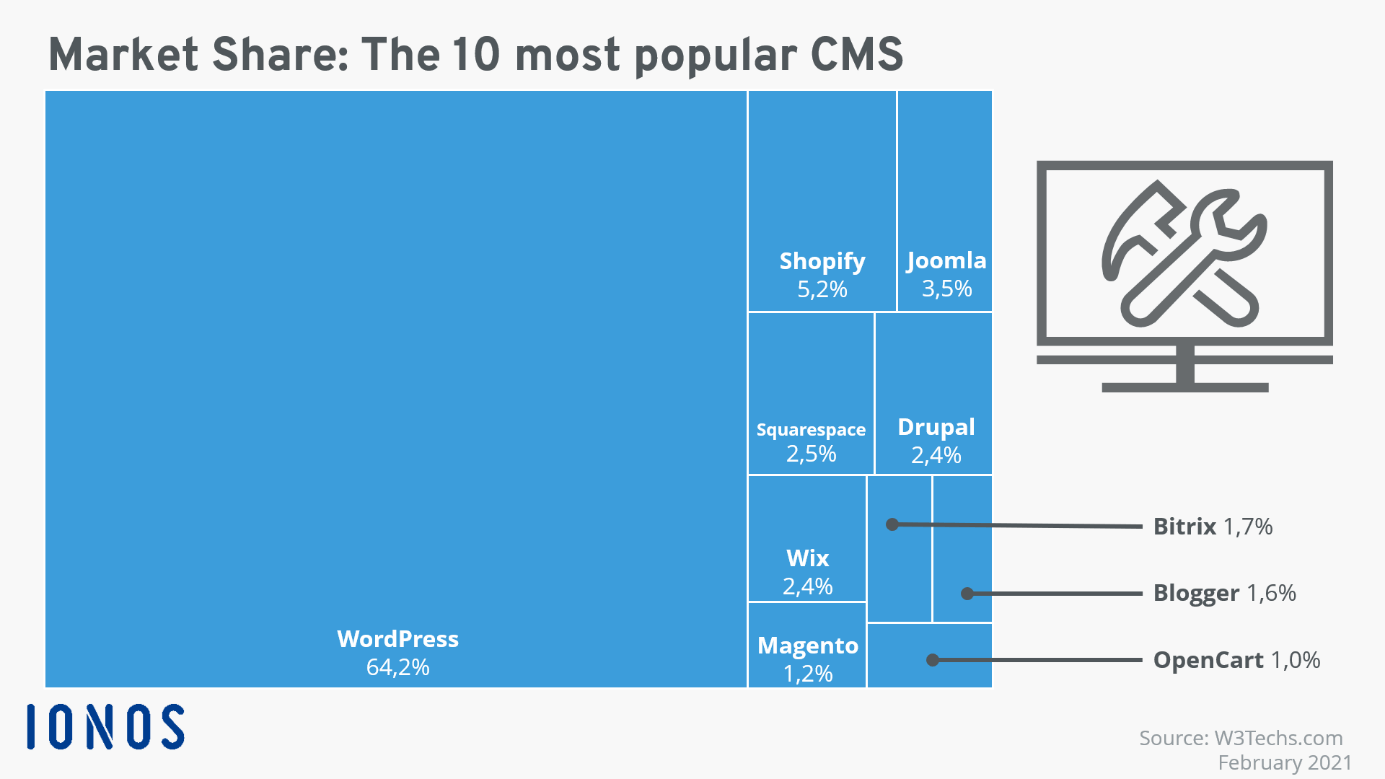
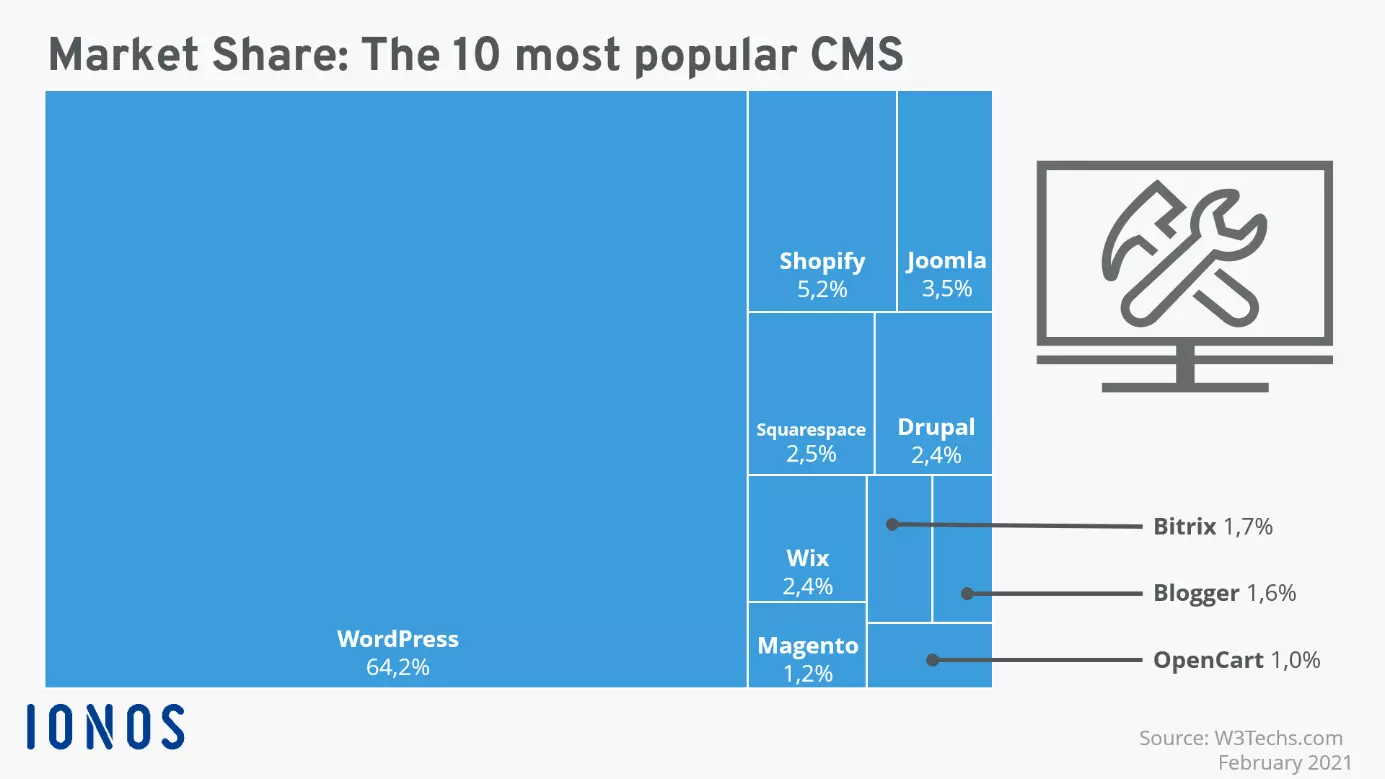
More and more CMS have come on the market in recent years, and user friendliness has only increased. This means that users without any knowledge of programming can update the contents of a website – usually all you need is decent knowledge of a word processing program, and you can upload and integrate videos, photos, text, and audio files on your website. News pages, blogs, and websites with event information can thus be kept up to date by online editors. Joomla and WordPress are two of the most well-known content managements systems, with WordPress clearly dominating the market:
WordPress vs Joomla: Pros and cons
WordPress is widely favoured because it’s free, easy to use, and its features can easily be expanded on. But that doesn’t necessarily mean it’s the right choice for you! Joomla also comes with a number of advantages.

WordPress
The WordPress CMS was launched in 2003. It’s not tied to any particular operating system, is based on the programming language PHP, and needs a database (either MySQL or MariaDB). In late 2020, Version 5.6 was published. Huge companies like Sony, Disney, and The New Yorker and celebrities such as Beyoncé all use WordPress. And in fact, creating a website with WordPress is very easy. But WordPress also has its disadvantages. The following table sums up the pros and cons of the popular CMS:
| Pros of WordPress | Cons of WordPress |
|---|---|
| Easy to use even without tech knowledge, thanks to WYSIWYG editor and drag and drop features | Not very secure; additional plug-ins or .htaccess are required for improved protection |
| Large selection of design templates (themes), which are often free for the basic version | A website can only have one theme |
| Huge library of plug-ins for pretty much any feature you’ll want on your website | Plug-ins also give rise to security problems |
| Huge, worldwide community there for support | Limited user management |
| Free, minimalist open-source software | Multilingual websites can only be set up with plug-ins |
You’re looking for an easy way to put your business idea online? Check out the rates for Hosting for WordPress with IONOS. You’re sure to find the right package for your project.
Joomla
Joomla was published for the first time in 2006. As of mid-2021 it was on Version 3.9.27 and there is already a 4.0 beta. The company refers to itself as ‘Joomla!’, with an exclamation point. Like WordPress, Joomla isn’t bound to any operating system and is written in PHP. It can work with MySQL, Microsoft SQL Server, and PostgreSQL. The CMS is structured into three levels: the functional level, page contents, and the layout of the website. When it comes to design, there are numerous Joomla templates available. Setting up a website with Joomla is also quite easy but using it can be tricky.
| Pros of Joomla | Cons of Joomla |
|---|---|
| Easy to use and very flexible for different types of content; WYSIWYG editor | Is also open to attack, though more secure than WordPress |
| One website can use multiple templates | Learning curve for extensions, components, and modules |
| Good selection of templates, basic version usually free | Extensions can give rise to security problems |
| Large library of extensions, components, and modules | Only one content type ('article'); can be changed by assigning categories |
| Helpful community and plenty of tutorials available | Many options require explanation |
| Multilingual functionality already integrated | |
| Extended user management including user groups |
Flexibility and security are top priorities for your project? Then IONOS’ Joomla hosting packages are just the thing for you!
WordPress vs Joomla: Frequently asked questions
Which CMS should beginners choose? WordPress or Joomla?
Despite the many similarities between the two CMS, WordPress comes out ahead on this count. After the so-called ‘5-minute installation’, you’ll be ready to get going with your website. Adding pictures and videos is just as easy as editing texts. For pretty much every problem, there’s a solution in the form of a plug-in with very good documentation. The WordPress backend is clearly laid out. On the other hand, Joomla comes with a bit more of a learning curve; after that it’s comparatively intuitive.
How do WordPress and Joomla compare when it comes to security?
In general, every website is vulnerable to attack – naturally, this also includes websites run with WordPress and Joomla. In terms of programming, Joomla is a bit more secure – WordPress sites are more often subject to attacks due to the popularity of the CMS. This usually involves attempting to gain access to the site by trying different password combinations in quick succession (a method referred to as a brute force attack. You can prevent this kind of attack by moving the log-in to a different path from the default installation one or implementing additional protection in the .htaccess file. Similar recommendations hold for Joomla, though the general security is already somewhat better since version 3.2, Joomla also offers the option of two-factor authentication. In WordPress you need a plug-in for two-factor authentication.
To make things harder on attackers, you should always change your username to something other than ‘admin’ or ‘administrator’. If you combine this with a strong password, you can lower the chances of anyone illicitly gaining access to your site.
Plug-ins, components, and modules can also be a source of security gaps. Make sure to keep all of these up to date.
WordPress vs Joomla: Who has better templates?
There is no shortage of templates for Joomla and themes for WordPress. However, WordPress offers about five times as many templates as Joomla. In addition, WordPress always offers its own free standard theme, which takes the current year as its name. This standard template is very impressive in terms of performance.
Joomla also offers two of its own templates: ‘protostar’ and ‘beez3’. However, Joomla doesn’t have a template catalogue like WordPress does. You have to work through the sites of the individual providers of the templates. In total, there are about 1,000 free templates that fulfill the needs of most websites. One important difference between Joomla and WordPress is that on Joomla you can use multiple templates on a single site. So, for example, your online shop site can have a different design from your ‘About us’ page. There are also templates that can be used to customise the backend.
How good are the extensions?
When it comes to extensions, the main difference between Joomla and WordPress is the number each of them has on offer. With the large support communities for both CMS, you’ll find feedback on pretty much every extension available. In the WordPress plug-in library, it will show you whether a certain plug-in is compatible with your WordPress version. On Joomla, it will also show you version compatibility in the details section of the extension.
As far as the quality of individual plug-ins goes, it’s up to the user to develop their own opinions. The number of downloads of a WordPress plug-in is usually a good indicator of what other users think of it. There are also reviews from users on both WordPress and Joomla. In Joomla, it will say in the overview whether or not a plug-in costs anything. In WordPress, you’ll have to check the details to see whether a plug-in is free or requires a subscription.
SEO on WordPress vs Joomla: Who comes out ahead?
Optimising your website for search engines is one of the most important and difficult tasks associated with your online presence. In addition to the relevant content planning, a good CMS should be equipped for search engine optimisation (SEO). So how does it look for Joomla and WordPress?
WordPress has its own SEO options that are already available out of the box. They include, for example, easily adaptable URLs (permalinks). The huge plug-in library is home to numerous other SEO options – there are 3,500 results for the search term ‘SEO’.
Joomla also has all sorts of SEO-friendly options on offer. For example, articles can be enriched with meta titles and meta descriptions, and URLs can be adapted to be more search-engine friendly. And there are over 100 extensions that can help you further develop the SEO for your site.
Who offers better support?
The answer to this question can already be found in the market share graphic shown above. The huge community of WordPress users is one of the biggest assets of the CMS. There are countless Facebook groups, developer websites, blogs, and forums where people exchange questions, answers, and tips. The official WordPress support page is also well-structured.
Joomla also offers a comprehensive forum, where dozens of posts a day are published. Two Facebook groups have around 30,000 members. So, you’re sure to find the answers you need to solve whatever problem you’re facing.
- Free WordPress with .co.uk
- Free website protection with one Wildcard SSL
- Free Domain Connect for easy DNS setup
WordPress vs Joomla: Overview of the most important facts
| WordPress | Joomla | |
|---|---|---|
| Suitable for beginners | + + + + + | + + |
| Security | + + + | + + + + |
| Support | + + + + + | + + + + |
| Suitable for online shops | + + + + | + + + + |
| Suitable for blogs | + + + + | + + |
| Number of plug-ins (free) | > 54,000 | around 8,000 |
| Number of design templates (free) | > 5,000 | > 1,000 |
In a comparison between WordPress and Joomla, WordPress comes out on top due to its user friendliness and its numerous themes and plug-ins. Joomla is best suited for larger web projects with larger structures and more complex design needs.