

Galera Cluster for MariaDB

In modern database management solutions, continuous operation, high availability, and flexible scaling options are all equally important. Without these characteristics, it’s impossible to handle fluctuating loads and unexpected peaks. Moreover, meeting these requirements while keeping infrastructure costs to a minimum via cloud-based solutions is often a rather difficult balancing act.
Galera Cluster was designed with precisely these challenges in mind. It is a multi-master clustering solution for databases that uses high-performance synchronous replication to supply all the nodes of a database with the same data in real time. It ensures minimum data loss and high reliability and is available for MariaDB and other database management systems. The following sections explain the architecture behind MariaDB Galera Clusters, what the benefits are and where the software is being used.
What is Galera Cluster?
Galera Cluster is a software package for Linux operating systems that allows users to set up and manage MySQL, XtraDB, and MariaDB clusters. The clustering application is based on the InnoDB storage engine and its fork, XtraDB. There is also experimental support for the MyISAM engine that was used extensively in MySQL and MariaDB before InnoDB was developed. When saving data in the various independent cluster nodes, Galera Cluster uses the principle of synchronous replication. This means that all the replication processes and changes to stored data are carried out simultaneously on all the primary and secondary storage units so that the data is always up to date on all the nodes and there can be no divergence between them.
A Galera Cluster contains at least three nodes, and the developers generally recommend having an odd number of nodes. The reason for this is that if there’s a problem with a transaction on one node (e.g. due to network problems or the system becoming unresponsive), the other two nodes will form a majority and can successfully complete the transaction.
Galera Cluster is primarily designed for the MariaDB and MySQL database systems. You can read a detailed comparison of MariaDB and MySQL in our special article.
How do MariaDB Galera Clusters work?
In a MariaDB cluster based on Galera Cluster, all the nodes in the network have access to the same data at all times. In clustering software, the conventional master/slave distinction for database servers (where the master is the server to which data can be written and the slaves are read-only servers) no longer exists. In other words, the user can write data to any of the storage nodes, and it will automatically be replicated to all the other nodes in the cluster. This is known as a “multi-master” configuration.
To manage this flexible exchange of data, Galera Cluster uses a synchronous certification-based replication procedure. When data is replicated (i.e. written to one of the databases in the cluster), Galera Cluster applies two basic principles:
- A unique sequence number is assigned to each database transaction. Before any node in the cluster commits the requested changes to the database, it compares this sequence number with the last committed transaction. All nodes will always give the same result for the check (commit or abort). The node that initiated the transaction can then notify the client of the outcome.
- For each transaction, all the database replicas are updated. Consequently, if a transaction is committed after the certification check, the corresponding changes will be made on all the nodes. A Galera Cluster node can only be excluded (temporarily) from the synchronous replication procedure if it has a technical problem.
What does the structure of a Galera Cluster look like?
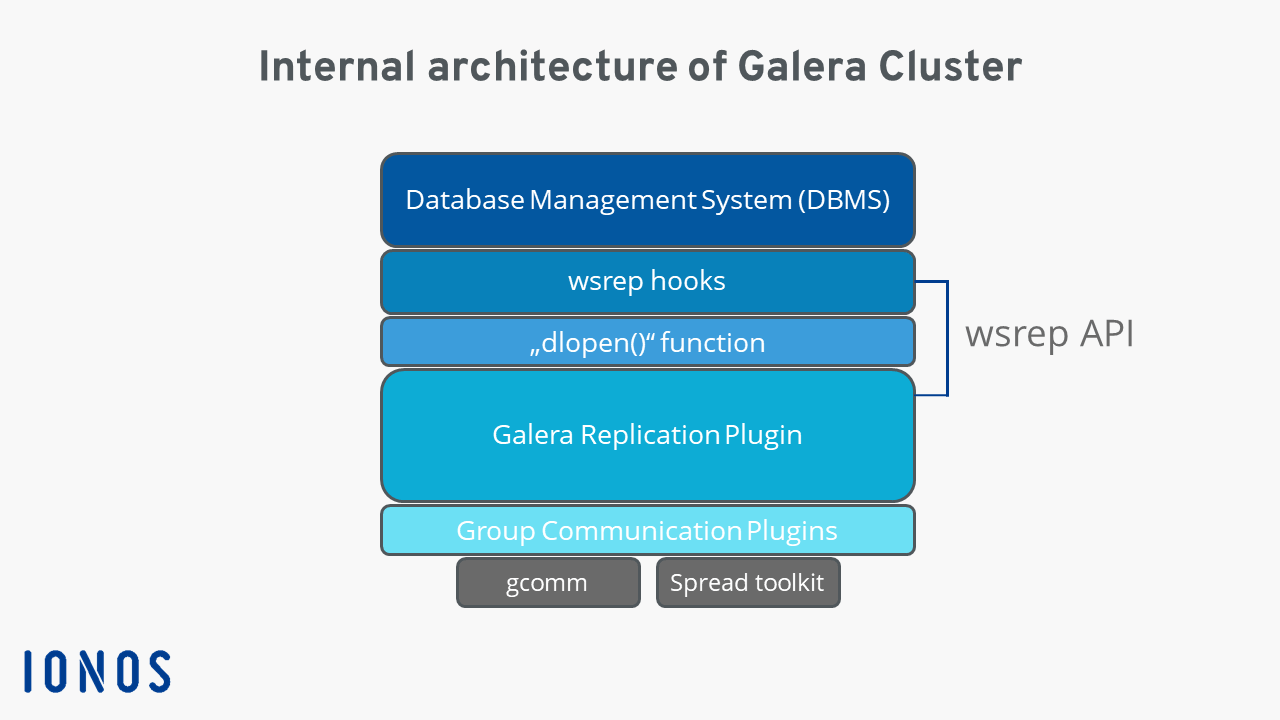
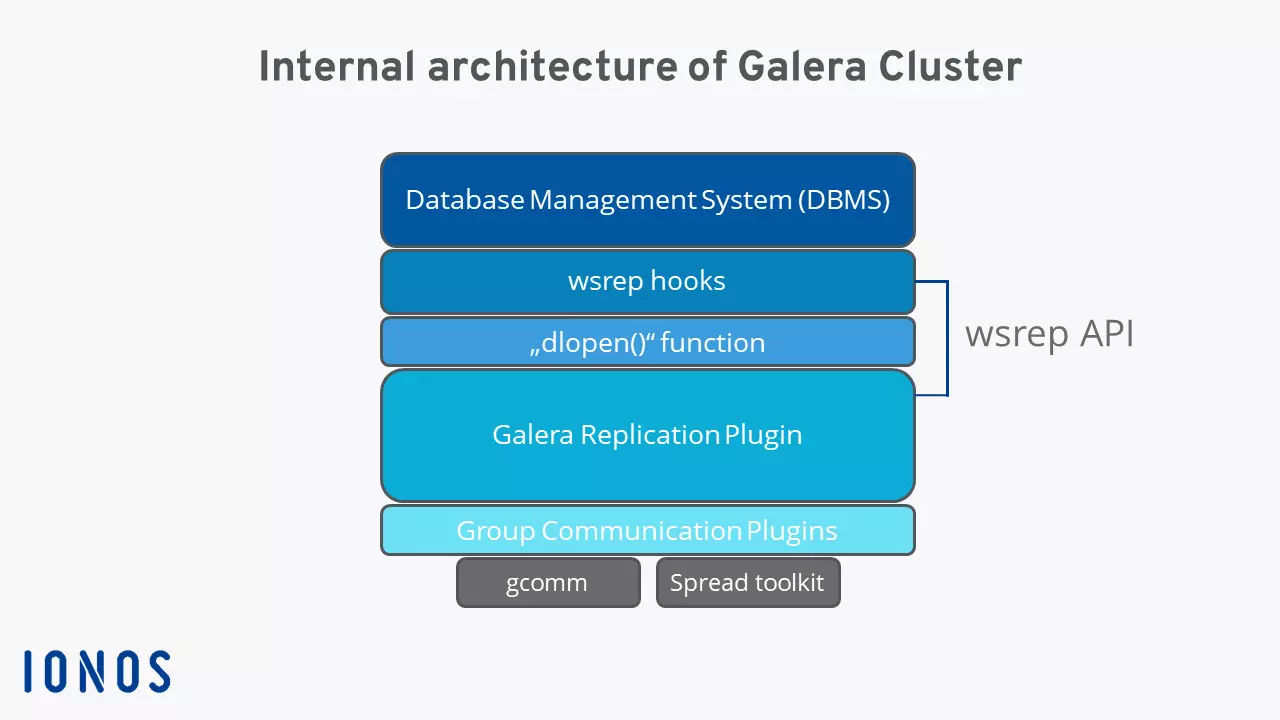
The internal architecture of a Galera Cluster consists of the following four components:
- Database Management System: The DBMS is the central unit of the cluster. A corresponding database server runs on each node. As already mentioned, Galera Cluster supports MariaDB, MySQL and Percona XtraDB.
- wsrep API: The wsrep API defines and implements the interface and the responsibilities for access to the connected database servers. It also regulates data replication. The API has two main elements: wsrep hooks which links to the database server for data replication and dlopen() which is a function that enables communication with the wsrep hooks.
- Galera Replication Plugin: This plugin implements the wsrep API. It provides a Certification Layer, a Replication Layer (including the replication protocol), and a Group Communication Framework.
- Group Communication Plugins: Galera Cluster has several plugins for implementing group communication systems such as the Spread toolkit and gcomm. The Group Communication Framework provides the architecture for these plugins.
What are the benefits of a MariaDB cluster?
As noted above, the main advantages of the MariaDB Galera Cluster solution lie in the fact that the technology combines flexible data storage with maximum reliability and availability – you won’t be able to achieve the same results with a standard MariaDB setup.
Thanks to the synchronous replication mechanism you no longer have to concern yourself with making sure that all the individual storage units are up to date. Galera Cluster automatically updates each database unit with the latest changes which completely eliminates the need for making time-consuming manual copies and backups. Furthermore, the multi-master setup means you can access any one of the linked MariaDB database servers when you want to write, edit or delete data, and since you can locate the nodes close to the clients, latency is kept to a minimum.
Another advantage of a MariaDB cluster based on Galera Cluster is that there is good cloud support for this architecture – the setup is ideal for flexible, cloud-based scaling of the database resources. Galera Cluster also makes it easy to distribute data between different data centres because each transaction only needs to be sent to each data centre once.
IONOS offers customised SQL server hosting! Check out our server and hosting solutions for MariaDB, MySQL or MSSQL.
Where are Galera Clusters used?
As we’ve seen, thanks to its characteristics and benefits, a MariaDB Galera Cluster is an excellent solution for managing your database environment. It’s particularly suited to the following use cases.
Database applications with high write transaction throughput
Distributing writes across the entire cluster optimises use of the available write resources. After the initial processing of a client transaction, all the nodes to which this transaction is sent only have to record the changes it contains. The overall write transaction throughput of the Galera Cluster replication method is thus significantly higher than that of a standard database setup, making it an ideal solution for write-intensive applications.
WAN clustering
The replication principle of Galera Cluster also works perfectly in a wide area network (WAN) like the internet. There will be some delay in transmission (proportional to the round-trip time – RTT), but this will only affect the commit operation of the incoming database transactions. A MariaDB cluster is therefore a very sensible choice for cloud-based systems.
Disaster recovery
Anyone who stores and manages data in the cloud needs to consider data recovery. Thanks to Galera Cluster, data can be stored in a separate data centre so that a complete copy of the data is available for recovery purposes in the event of an emergency. In this setup, the recovery data centre of the MariaDB cluster receives replication events but does not process client transactions. If it is required for a recovery process, it is temporarily configured as the primary instance, which keeps downtime to a minimum.
For more information about Disaster Recovery, see our article on creating an IT disaster recovery plan.