

SQL JOIN

SQL JOIN is an operation in relational databases that allows queries across multiple database tables. JOINs merge data stored in different tables and output it in filtered form in a results table.
The principle of SQL JOIN is based on the relational algebra operation of the same name – a combination of Cartesian product and selection. The user determines which data from the output tables is transferred to the results table by selecting a JOIN type and defining a selection condition.
We will introduce you to the mathematical principle of SQL JOINs, compare different JOIN types, and show you how to implement JOINs in the context of database queries via SQL using practical examples.
This article on SQL JOIN requires knowledge of certain concepts of the relational database model, especially regarding relations, tuples, attributes, or keys. Our basis article on relational databases will give you a solid introduction.
How do SQL JOINs work?
The basic principle of SQL JOIN can be illustrated by deriving the database operation from its sub-operations. The following relational algebra operations form the basis of each JOIN:
- Cartesian product
- Selection
The Cartesian product
The Cartesian product (also called the cross product) is a set theory operation whereby two or more sets are linked together. In the relational database model, the Cartesian product is used to connect tuple sets in the form of tables. The result of this operation is a set of ordered tuples, where each tuple consists of one element of each initial set.
The multiplication sign (x) is used as an operator for the Cartesian product in relational algebra.
Here is an example:
The Cartesian product A × B of both sets A = {x, y, z} and B = {1, 2, 3} is:
A × B = {(x,1), (x,2), (x,3), (y,1), (y,2), (y,3), (z,1), (z,2), (z,3)}
The calculation can be illustrated using the following graphic:
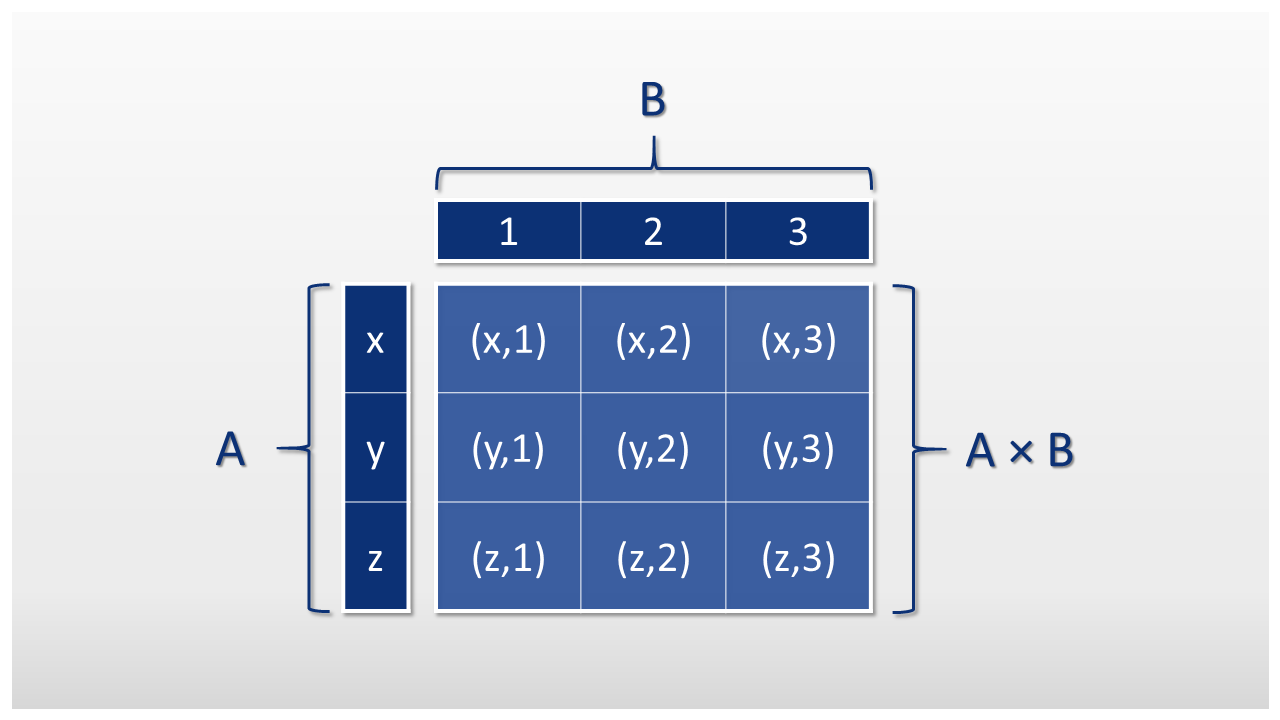
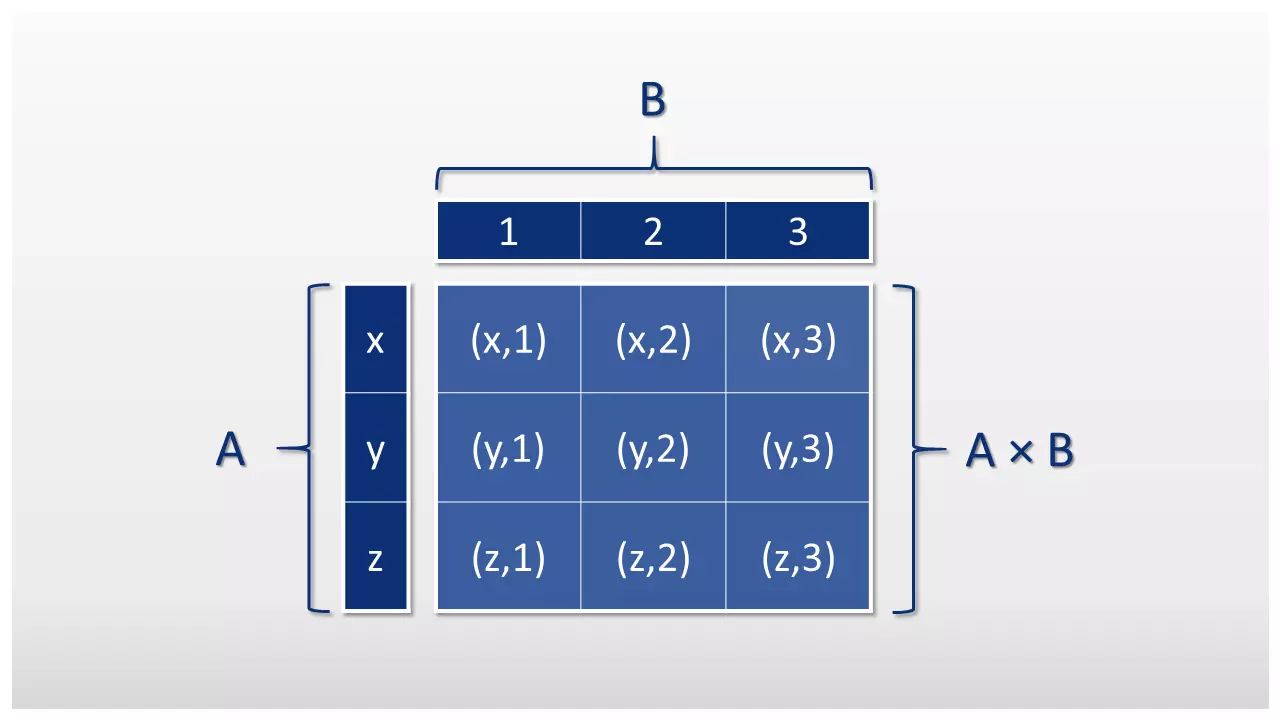
Please note the sequence of pair formation. For example, the Cartesian product A x B does not correspond to the same quantity as the Cartesian product B x A.
A × B = {(x,1), (x,2), (x,3), (y,1), (y,2), (y,3), (z,1), (z,2), (z,3)}
B × A = {(1,x), (1,y), (1,z), (2,x), (2,y), (2,z), (3,x), (3,y), (3,z)}
In SQL terminology, an operation in which the Cartesian product is formed from two database tables is called “cross JOIN.” In practice, cross JOINS are rarely used due to the unfiltered result set.
The selection
Selection is a relational algebra operation that allows you to select specific tuples in an initial set and output them as a result set. Which tuples are included in the result set can be determined by a comparison expression. The result of the selection is a set of tuples that fulfill the selection condition defined in the comparison expression. The Greek letter sigma (σ) is used as an operator. The operation is noted as follows:
σF (R)
The placeholder “F” corresponds to the relational expression, a formula of logical predicates that define the selection conditions. R stands for the dataset to be selected. Alternatively, the linear notation R[F] can be used.
The usual comparison operators are available for formulating selection conditions: for example, equal to (=), greater than (>) or less than (<).
We will explain the selection using an example that we have already introduced in the basic text of the relational database model. The following table shows fictitious personnel data that a company could have entered for its employees. The personnel number (e_id), the name (surname, first name), the social security number (ssn), the address (street, number, zip code) and the assigned company car (company car ID) are specified for each employee.
Table: employees
| e_id | Surname | First name | ssn | Street | No. | Zip code | location | vehicle_id |
|---|---|---|---|---|---|---|---|---|
| 1 | Schmidt | Jack | 25 120512 S 477 | Main St. | 1 | 11111 | Denver | 3 |
| 2 | Muller | Blain | 25 100615 M 694 | Station St. | 2 | 22222 | Boulder | 1 |
| 3 | McClain | Walker | 25 091225 M 463 | Market Alley | 3 | 33333 | Denver | 1 |
| 4 | Cohn | Greg | 25 170839 K 783 | Forest Way | 4 | 44444 | Niwot | 2 |
If we want to select the employee table so that only the employees who drive the vehicle with the vehicle_id 1 are displayed, we can proceed as follows.
σvehicle_id=1(employee)
We only retrieve the tuples where the value in the column vehicle_id is 1.
The results are shown in the following table:
Table: employee (selected)
| e_id | Surname | First name | svn | Street | No. | Zip code | location | vehicle_id |
|---|---|---|---|---|---|---|---|---|
| 2 | Muller | Blain | 25 100615 M 694 | Station St. | 2 | 22222 | Boulder | 1 |
| 3 | McClain | Walker | 25 091225 M 463 | Market Alley | 3 | 33333 | Denver | 1 |
In the SQL database language, selection conditions are defined using the “WHERE” command.
SELECT * FROM employee WHERE employee.vehicle_id = 1;If a tuple fulfils the condition vehicle_id=1, the values of all columns should be shown for this tuple.
The asterisk (*) represents all columns in a table in the SQL syntax.
Combination of Cartesian product and selection
All common JOIN types combine the Cartesian product with a selection condition. To explain this kind of database operation, we will reduce the “employees” table to four columns for the sake of clarity. In addition, we will introduce the car table, where detailed information on the company’s vehicle fleet is kept.
Both tables are linked to each other using a foreign key relationship. The primary key of the “car” table functions as a foreign key in the “employees” table.
Table: employee
| e_id | Surname | First name | vehicle_id |
|---|---|---|---|
| 1 | Schmidt | Jack | 3 |
| 2 | Muller | Blain | 1 |
| 3 | McClain | Walker | 1 |
| 4 | Cohn | Greg | 2 |
Table: car
| vehicle_id | Make | Model | Registration | Year | State inspection |
|---|---|---|---|---|---|
| 1 | VW | Caddy | B KH 778 | 2016 | 18.12.2018 |
| 2 | Opel | Astra | B PO 654 | 2010 | 12.08.2019 |
| 3 | BMW | X6 | B MW 780 | 2017 | 01.09.2018 |
Storing information in different database tables is a basic concept of the relational database model. The advantages of this kind of database design and its implementation are discussed in an article on normalization of databases.
If you want to merge the two tables and select relevant tuples at the same time, you combine the previously introduced database operations:
σvehicle_id=vehicle_id(employee × vehicle)
First, the Cartesian product is formed by employee x vehicle. The (intermin) result is a cross JOIN – a results table in which every tuple in the “employees” table is combined with every tuple in the “vehicle” table.
Table: Cartesian product “employee” × “car”
| e_id | Surname | First name | employee.vehicle_id | vehicle.vehicle_id | Make | Model | Registration | Year | State inspection |
|---|---|---|---|---|---|---|---|---|---|
| 1 | Schmidt | Jack | 3 | 1 | VW | Caddy | B KH 778 | 2016 | 18.12.2018 |
| 1 | Schmidt | Jack | 3 | 2 | Opel | Astra | B PO 654 | 2010 | 12.08.2019 |
| 1 | Schmidt | Jack | 3 | 3 | BMW | X6 | B MW 780 | 2017 | 01.09.2018 |
| 2 | Muller | Blain | 1 | 1 | VW | Caddy | B KH 778 | 2016 | 18.12.2018 |
| 2 | Muller | Blain | 1 | 2 | Opel | Astra | B PO 654 | 2010 | 12.08.2019 |
| 2 | Muller | Blain | 1 | 3 | BMW | X6 | B MW 780 | 2017 | 01.09.2018 |
| 3 | McClain | Walker | 1 | 1 | VW | Caddy | B KH 778 | 2016 | 18.12.2018 |
| 3 | McClain | Walker | 1 | 2 | Opel | Astra | B PO 654 | 2010 | 12.08.2019 |
| 3 | McClain | Walker | 1 | 3 | BMW | X6 | B MW 780 | 2017 | 01.09.2018 |
| 4 | Cohn | Greg | 2 | 1 | VW | Caddy | B KH 778 | 2016 | 18.12.2018 |
| 4 | Cohn | Greg | 2 | 2 | Opel | Astra | B PO 654 | 2010 | 12.08.2019 |
| 4 | Cohn | Greg | 2 | 3 | BMW | X6 | B MW 780 | 2017 | 01.09.2018 |
Then only the tuples are selected which show that the vehicle_id of the “vehicle” table matches the vehicle_id of the “employees” table. The selection condition is that the foreign key of the “employee” table corresponds to the primary key of the “vehicle” table.
The (final) result is a table that combines both output tables without redundancies.
Table: JOIN between “employee” and “car”
| e_id | Surname | First name | employee.vehicle_id | vehicle.vehicle_id | Make | Model | Registration | Year | State inspection |
|---|---|---|---|---|---|---|---|---|---|
| 1 | Schmidt | Jack | 3 | 3 | BMW | X6 | B MW 780 | 2017 | 01.09.2018 |
| 2 | Muller | Blain | 1 | 1 | VW | Caddy | B KH 778 | 2016 | 18.12.2018 |
| 3 | McClain | Walker | 1 | 1 | VW | Caddy | B KH 778 | 2016 | 18.12.2018 |
| 4 | Cohn | Greg | 2 | 2 | Opel | Astra | B PO 654 | 2010 | 12.08.2019 |
As a combination of Cartesian product and subsequent selection, JOINs combine both operations into one. The bowtie symbol (⋈) is used as an operator.
As seen here:
σvehicle_id=vehicle_id(employee × vehicle) := employee⋈vehicle_id=vehicle_idvehicle
Operation σvehicle_id=vehicle_id(employee × vehicle)corresponds to a JOIN via the tables “employee” and “vehicle” with the condition vehicle_id=vehicle_id.
Transferred to the SQL syntax, the above operation would correspond to the following statement:
SELECT * FROM employee INNER JOIN car ON employee.vehicle_id = vehicle.vehicle_id;The inner JOIN is one of the most important JOINS used in database queries. However, special JOIN types are sometimes required to achieve the desired result.
SQL JOIN types
Different SQL JOIN types are used in the relational database model, which enables queries to be executed using a group of database tables. The prerequisite for this is that the selected tables are linked to one another using foreign key relationships.
The most important JOIN types include the following:
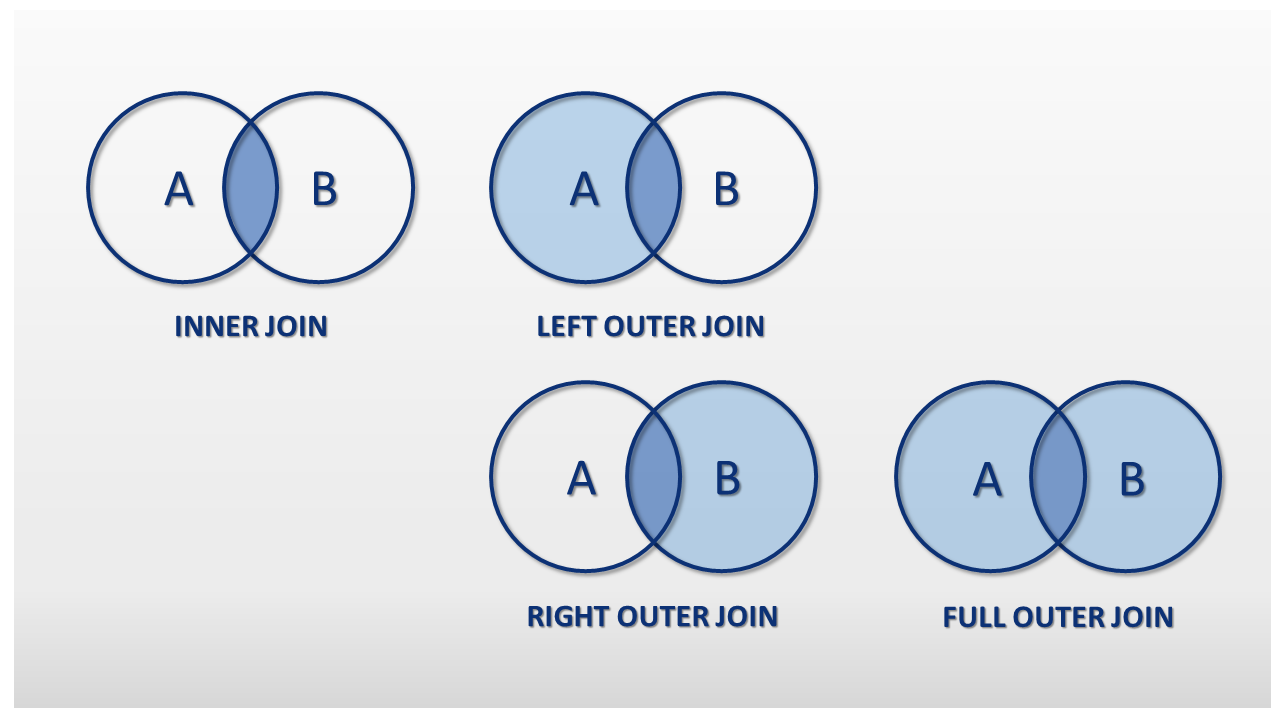
- INNER JOINs: An inner JOIN is a filtered form of the cross JOIN, in which only the tuples of both output tables that fulfil the selection condition defined by the user are combined in the results.
- OUTER JOINs: The outer JOIN is an extension of the inner JOIN result and contains the tuples of both output tables that fulfill the selection condition defined by the user, as well as all remaining tuples from the first table, the second table, or both tables. Outer JOINS are realized as left outer JOIN, right outer JOIN, or full outer JOIN.
You can find a detailed description of INNER JOINs and OUTER JOINS in our series of articles on these JOIN types.
The differences between inner JOINs and the different variants of the outer JOIN can be illustrated by quantity diagrams. The following graphic is a pictorial representation of the JOIN types presented:

Regardless of the distinction between inner JOIN and outer JOIN, SQL JOINs can also be classified in the following JOIN types:
- EQUI JOIN
- NON EQUI JOIN
- SELF JOIN
Inner JOINs and outer JOINs can be implemented as equi JOINs and non equi JOINs. All JOIN examples presented so far represent equi JOINs. Equi JOINs are characterised in that they only allow the equal sign as the relational operator (=).
The selection condition of an equi JOIN is always that column values need to be equal.
In principle, however, JOINs (like selection in relational algebra) are not limited to column equality. Possible comparison operators are:
| Comparison operator | Meaning |
|---|---|
| = | Equal to |
| < | Smaller than |
| > | Greater than |
| ≤ | Small than or equal to |
| ≥ | Greater than or equal to |
| <> | unequal |
| != | unequal |
Since SQL-92, the database language with the keyword USING provides a short form for EQUI JOINS. However, this presupposes that the relevant columns have the same name, which does not necessarily have to be the case.
The following example shows two different SQL statements that lead to the same result. In the first statement, the JOIN operation is explicitly defined using the keyword ON. For the second statement, we use the short notation with the key USING.
SELECT * FROM employee INNER JOIN vehicle ON employee.vehicle_id = vehicle.vehicle_id;SELECT * FROM employee INNER JOIN vehicle USING vehicle_id;NON EQUI JOINs on the other hand, exclude operations based on the equality of columns. All comparison operations are allowed except the equal sign (=).
As relationships in relational databases are usually defined by the equality of primary and foreign keys, NON EQIO JOINs are of secondary importance in the relational database model. Not least because, just like with CROSS JOINs, these often lead to a large number of result data records.
Finally, a SELF JOIN is a special form of SQL JOIN in which a database table is linked to itself. In principle, any JOIN type can be executed as SELF JOIN.
If two tables are linked by columns with the same name, then it is called a NATURAL JOIN. A NATURAL JOIN is implemented by default as an INNER JOIN using the keyword with the same name. NATURAL JOINs are not set to this JOIN type. A NATURAL LEFT OUTER JOIN or a NATURAL RIGHT OUTER JOIN is also possible.
Since NATURAL JOINs are linked using columns with the same names, the respective values are not output twice in the result set, but are instead combined into a common column. Examples of NATURAL JOINs can be found in the articles on INNER JOINs and OUTER JOINs.