

SQL OUTER JOIN

An SQL JOIN is a query operation that links several tables in a relational database and outputs their data records (tuples) filtered according to a selection condition defined by the user.
- Free website protection with SSL Wildcard included
- Free private registration for greater privacy
- Free Domain Connect for easy DNS setup
The most common JOIN type in relational database models is the SQL INNER JOIN. In practice, users use INNER JOINs, for example, if two database tables need to be connected using the same columns. Each record of one table is merged with a corresponding record of the other table. Data records that the database management system (DBMS) cannot find a match for in the other table remain hidden. An SQL OUTER JOIN, on the other hand, not only outputs the data records of both tables that fulfill the selection condition (for example, the equality of the values of two columns), but also all other tuples of one table or the other. With reference to the reading direction of the SQL syntax, there is a left and a right table. The corresponding operations are called LEFT OUTER JOIN and RIGHT OUTER JOIN. If, in addition to the data records that fulfill the selection condition, you want to output all data records in the left and right tables in database queries, this is a FULL OUTER JOIN. The principle of the different JOIN types can be illustrated very well by quantity diagrams:
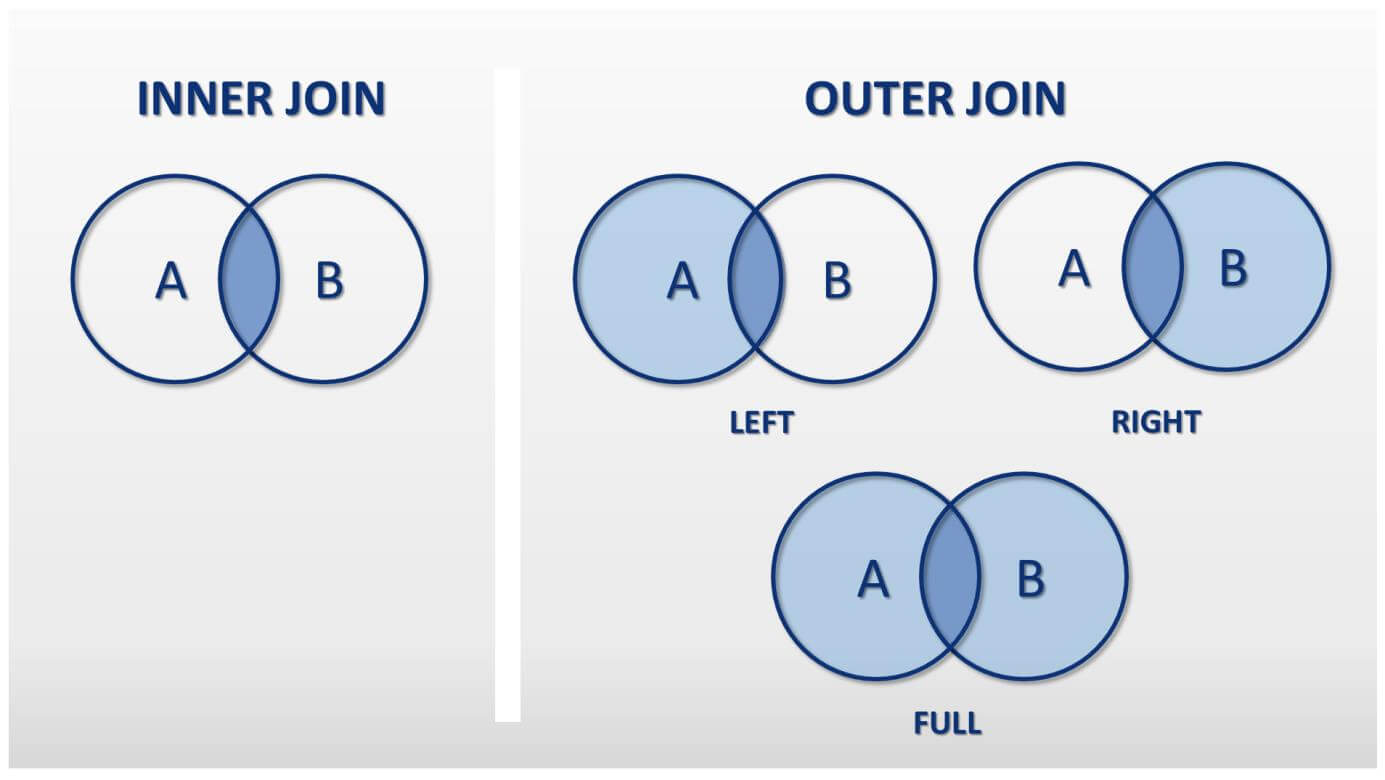
OUTER JOIN subtypes
Each OUTER JOIN is created as a LEFT OUTER JOIN, RIGHT OUTER JOIN or FULL OUTER JOIN.
The keyword OUTER is optional in SQL syntax. Users usually use the abbreviated notation LEFT JOIN, RIGHT JOIN, and FULL JOIN.
We’ll illustrate the functionality of OUTER JOINs using the database tables “employees” and “cars”.
Table: employee
| e_id | surname | firstname | vehicle_id |
|---|---|---|---|
| 1 | Schmidt | Jack | 3 |
| 2 | Muller | Blain | 1 |
| 3 | McClain | Walker | 1 |
| 4 | Cohn | Greg | 2 |
| 5 | Smith | Marshall | NULL |
The employees table contain the first and last names of the employees of a fictitious company and the identification of the assigned company car (vehicle_id). The primary key of the table is a consistent employee ID (employee_id). The employee with ID 5 (Marshall Smith) has not yet been assigned a company car. The cell in the corresponding column therefore contains a null value.
The zero value NULL stands for the absence of a value. It does not correspond to the numerical value 0.
Table: vehicle
| vehicle_id | make | model | registration | year | State inspection |
|---|---|---|---|---|---|
| 1 | VW | Caddy | B KH 778 | 2016 | 12.18.2018 |
| 2 | Opel | Astra | B PO 654 | 2010 | 08.12.2019 |
| 3 | BMW | X6 | B MW 780 | 2017 | 09.01.2018 |
| 4 | Porsche | Boxster | B AA 123 | 2018 | 12.23.2020 |
The table “cars” contains information on the company’s vehicles: the company car make, model, registration number, year of construction, and date of next state inspection. Each company car is assigned a consistent ID (vehicle_id), which acts as the primary key of the table.
Both tables are linked by a foreign key relationship. The primary key of the “vehicle” table (the vehicle_id) was integrated into the “employees” table as a foreign key. This allows us to link both tables through a common column.
Whilst valid primary keys must not contain null values, null values in foreign keys do not violate the integrity of a data set.
SQL LEFT OUTER JOIN
For a LEFT OUTER JOIN, the table on the left side of the JOIN operator is the dominant table. In relational algebra, LEFT OUTER JOINs are noted with the following operator: ⟕.
To link the tables “employee” and “vehicle” within a LEFT OUTER JOIN, you can use the following operation:
employee ⟕ vehicle_id=vehicle_idvehicle
Interaction with the DBMS takes place in the database language SQL. The above formula corresponds to the following SQL statement:
SELECT * FROM employee LEFT JOIN vehicle ON employee.vehicle_id = vehicle.vehicle_id;The “employees” table is on the left side of the JOIN operator, the table “vehicle” on the right. As selection conditions, we select employee.vehicle_id=vehicle.vehicle_id. The result set of a LEFT OUTER JOIN includes all data records from the left table, and those data records from the right table that fulfill the JOIN condition. This means that only data records from the “vehicle” table are included in the JOIN result set that contained a value in the vehicle_id column, and that the DBMS can also find a corresponding value in the “employee” table for.
Missing values in the result table are output as zero values.
Notice the order of the tables in the SQL statement is different from INNER JOINs. With a LEFT JOIN, all table data records to the left of the JOIN operator are displayed completely, with a RIGHT JOIN, all data records of the table to the right of the JOIN operator.
As a result of the LEFT OUTER JOIN we get the following table:
Table: LEFT OUTER JOIN via the “employee” and “vehicle” tables.
| e_id | surname | firstname | employee.vehicle_id | vehicle.vehicle_id | Make | Model | Registration | Year | State inspection |
|---|---|---|---|---|---|---|---|---|---|
| 1 | Schmidt | Jack | 3 | 3 | BMW | X6 | B MW 780 | 2017 | 09.01.2018 |
| 2 | Muller | Blain | 1 | 1 | VW | Caddy | B KH 778 | 2016 | 12.18.2018 |
| 3 | McClain | Walker | 1 | 1 | VW | Caddy | B KH 778 | 2016 | 12.18.2018 |
| 4 | Cohn | Greg | 2 | 2 | Opel | Astra | B PO 654 | 2010 | 08.12.2019 |
| 5 | Smith | Mashall | NULL | NULL | NULL | NULL | NULL | NULL | NULL |
The result table has two special features:
The data record for vehicle_id 4 (Porsche Boxer) in the “vehicle” table does not appear in the results. The reason for this is that there is no suitable foreign key in the “employees” table for a primary key with the value 4. The selection condition is not fulfilled. The data record comes from the right output table and is therefore hidden.
The foreign key vehicle_id in the initial table “employees” contains a zero value for the data record for the employee Marshall Smith. Therefore, no corresponding primary key can be found in the “vehicle” table. The selection condition is not fulfilled here either. However, since the data record originates from the left output table, it’s still included in the result table for a LEFT JOIN. Missing values in the result table tuple are set to NULL.
SQL RIGHT OUTER JOIN
The RIGHT OUTER JOIN follows the same principle as the LEFT OUTER JOIN, but the dominant table here is not the left but the right.
The result set of a RIGHT OUTER JOIN includes all tuples of the table on the right side of the JOIN operator, and the tuples of the left table that fulfill the JOIN condition. The following symbol is used as an operator: ⟖.
We’ll start again from the output tables “employees” and “cars” and define the same selection condition for the RIGHT JOIN, like the example for the LEFT JOIN.
Relational Algebra:
employee ⟖ vehicle_id=vehicle_idvehicle
SQL-Statement:
SELECT * FROM employee RIGHT JOIN vehicle ON employee.vehicle_id = vehicle.vehicle_id;The result table for the RIGHT JOIN differs significantly from the LEFT JOIN.
Table: RIGHT OUTER JOIN via the “employee” and “vehicle” tables.
| e_id | surname | firstname | employee.vehicle_id | vehicle.vehicle_id | make | model | registration | year | State inspection |
|---|---|---|---|---|---|---|---|---|---|
| 1 | Schmidt | Jack | 3 | 3 | BMW | X6 | B MW 780 | 2017 | 09.01.2018 |
| 2 | Muller | Blain | 1 | 1 | VW | Caddy | B KH 778 | 2016 | 12.18.2018 |
| 3 | McClain | Walker | 1 | 1 | VW | Caddy | B KH 778 | 2016 | 12.18.2018 |
| 4 | Cohn | Greg | 2 | 2 | Opel | Astra | B PO 654 | 2010 | 08.12.2019 |
| NULL | NULL | NULL | 4 | 4 | Porsche | Boxster | B AA 123 | 2018 | 12.23.2020 |
The data record for employee Marshall Smith is not contained in the results table. The reason for this: the vehicle_id of the data set corresponds to the value NULL and therefore cannot be assigned to a data set on the right hand side of the table.
As a result of the RIGHT JOIN we get all data records from the “vehicle” table – as well as the data record with the vehicle_id 4, which had no employee “tuple” assigned to it.
SQL FULL OUTER JOIN
A FULL OUTER JOIN is a combination of LEFT OUTER JOIN and RIGHT OUTER JOIN. For the operating process, the relational algebra defines the following operator is: ⟗.
We’ll also illustrate the FULL JOIN in the output tables “employees” and “vehicles” and assume the same selection conditions as before.
Relational Algebra:
Employee ⟗ vehicle_id=vehicle_idvehicle
SQL Statement:
SELECT * FROM employee FULL JOIN vehicle ON employee.vehicle_id = vehicle.vehicle_id;The result corresponds to the following table:
Table: FULL OUTER JOIN for the tables “employees” and “vehicles”.
| e_id | surname | firstname | employee.vehicle_id | vehicle.vehicle_id | make | model | Registration | Year | State inspection |
|---|---|---|---|---|---|---|---|---|---|
| 1 | Schmidt | Jack | 3 | 3 | BMW | X6 | B MW 780 | 2017 | 09.01.2018 |
| 2 | Muller | Blain | 1 | 1 | VW | Caddy | B KH 778 | 2016 | 12.18.2018 |
| 3 | McClain | Walker | 1 | 1 | VW | Caddy | B KH 778 | 2016 | 12.18.2018 |
| 4 | Cohn | Greg | 2 | 2 | Opel | Astra | B PO 654 | 2010 | 08.12.2019 |
| 5 | Marshall | Smith | NULL | NULL | NULL | NULL | NULL | NULL | NULL |
| NULL | NULL | NULL | 4 | 4 | Porsche | Boxster | B AA 123 | 2018 | 12.23.2020 |
The FULL JOIN connects the output table’s data records according to selection conditions. It doesn’t just list the linked data records in the result table, but also links the data records of both tables that do not fulfill the selection condition.
Missing values are also set to NULL for FULL JOIN.
FULL OUTER JOINs are of little importance in practice and are not supported by market-leading database management systems like MySQL and MariaDB.
NATURAL OUTER JOIN
Like INNER JOINs, OUTER JOINs can also be implemented as NATURAL JOINs. The corresponding operators are:
LEFT/RIGHT JOIN ... USINGOr:
NATURAL LEFT/RIGHT JOINNATURAL OUTER JOINs connect tables using columns with the same names. Which columns are selected can be explicitly defined using the USING keyword:
SELECT * FROM employee LEFT JOIN vehicle USING (vehicle_id);Alternatively, you can use a short notation whereby the DBMS automatically searches for columns with the same names and connects the listed tables through them:
SELECT * FROM employee NATURAL LEFT JOIN sections;With reference to the example tables listed above, both SQL statements lead to the same result.
| e_id | nachname | surname | vehicle_id | Make | Model | Registration | Year | State inspection |
|---|---|---|---|---|---|---|---|---|
| 1 | Schmidt | Jack | 3 | BMW | X6 | B MW 780 | 2017 | 09.01.2018 |
| 2 | Muller | Blain | 1 | VW | Caddy | B KH 778 | 2016 | 12.18.2018 |
| 3 | McClain | Walker | 1 | VW | Caddy | B KH 778 | 2016 | 12.18.2018 |
| 4 | Cohn | Greg | 2 | Opel | Astra | B PO 654 | 2010 | 08.12.2019 |
| 5 | Smith | Marshall | NULL | NULL | NULL | NULL | NULL | NULL |
In NATURAL LEFT JOIN, the columns employee.vehicle_id and vehicle.vehicle_id are merged into the common column vehicle_id.
OUTER JOINs in practice
OUTER JOINS usually lead to table groups with zero values. This is useful, for example, if you want to highlight them. In our example, the Porsche Boxster has not yet been assigned to an employee. This is not shown in the “vehicle” table. And the “employees” table merely shows that Marshall Smith has not yet used a company car. After a FULL JOIN over both tables, it is easy to see that Marshall could drive the Porsche in the future.