

What is a tracking pixel? How modern tracking works so easily

Tracking pixels have played a key role in online marketing for years, as they provide reliable data on user behaviour, allowing personalised advertising and sales campaigns. Integrating tracking pixels into websites and emails is not particularly complicated. However, concerning data protection, companies should definitely comply with GDPR when using tracking techniques.
- Write perfect emails with optional AI features
- Includes domain, spam filter and email forwarding
- Best of all, it's ad-free
What is a tracking pixel?
A tracking pixel is defined in online marketing as a graphic element embedded in the code of websites, online advertisements, or emails. It is usually just one pixel wide and one pixel high, thus also called a 1x1 pixel or single-pixel image. Due to its small size, the tracking pixel does not affect the load times of emails, advertisements, and websites. Other common terms for the tracking pixel include the following:
- Counting pixel
- Pixel tag
- On-site or website pixel
- Pixel method
- Clear GIF
- Web bug
- Web spy
- Web beacon
Occasionally, it is also referred to as an IVW pixel. This term indicates that the tracking pixel for measuring reach is loaded from a resource of the Information Society for the Verification of the Dissemination of Advertising Media e.V.
Tracking pixels are usually colourless and transparent (hence the term ‘Clear GIF’) and perform their tasks unnoticed behind the scenes. Within interconnected backend processes beyond user experience, they are used in online marketing and e-commerce for the collection and analysis of user data. Through tracking pixels, companies gather information about the reach of online and email marketing, allowing them to optimise their sales and marketing strategies.
- Fast drag and drop editing
- AI-powered text generation
- Seamless syncing with IONOS eCommerce
What data do tracking pixels collect?
Strictly speaking, pixel tags are used to count website visits. However, when a tracking pixel is accessed, additional data is also collected and stored in server log files for the purpose of logfile analysis. The pixel request can also trigger the setting of cookies, which also play an important role in tracking. Combined with cookies and other tracking methods, tracking pixels today are involved in collecting a wealth of information:
- Browser type and version
- Operating system used
- Device type (e.g., mobile device or desktop computer)
- Client used (e.g., browser or email application)
- Screen resolution
- Referrer URL (the address of the previous website visited)
- IP address (used to infer the internet service provider and approximate location — essential for geotargeting)
- Data on the customer journey (e.g., user movement across the site, search behaviour, clicked links or ads — often tracked via multiple pixels)
- Date and time of a server request (triggered by opening an email or webpage)
- Opening, opening time, and forwarding of emails
- Click-through rate (link tracking)
- Time and date of a page view (including a description of the page where the tracking pixel is located. This allows, for example, transactions in affiliate marketing to be tracked)
Since this and other data can be collected across servers and pages, modern tracking provides a comprehensive picture of the browsing, shopping, and consumption behaviour of website visitors.
How tracking pixels work and where they’re embedded
Embedding tracking pixels with HTML and CSS
To enable tracking pixels to perform their tasks, you need to modify the source code of a webpage or an email and embed a tracking pixel. A simple HTML code snippet ensures that the tracking pixel is loaded from a specific address (tracking pixel URL) when the page is accessed and is provided with a characteristic display size (1x1 pixel). You can also set the values for width and height to ‘0’ to completely suppress the display of the tracking pixel:
< img src="Tracking pixel URL" width="1" height="1">The appearance of modern websites is usually more precisely defined with special style templates called Cascading Style Sheets (CSS). The style attribute visibility:hidden specifies that a tracking pixel should be hidden. The CSS attribute position:absolute ensures that the pixel tag is completely removed from the normal flow of the page layout:
< img src="Tracking pixel URL" style="position:absolute; visibility:hidden">To completely suppress a display, you can use display:none:
< img src="Tracking pixel URL" style="display:none">The code blocks can be manually inserted into a website’s source code during page tagging. If you use a content management system, tracking pixels can also be conveniently configured and integrated with a plugin. For WordPress, you can use the Pixel Tag Manager PixelYourSite for this purpose, for example.
Tracking pixel in JavaScript
Modern tracking often uses more complex code. By using JavaScript, you can trigger the tracking pixel script-based and learn even more about users as well as the software and hardware they use. The classic HTML integration of website pixels is usually part of a dual strategy: With so-called JavaScript tags, you first try to achieve the best in tracking and data collection.
If this method doesn’t work, the simple HTML code for triggering tracking pixels is used as an alternative and ensures that important tracking data is transferred. The tracking pixel is embedded in a special tag (<noscript>) that the reading browser processes if JavaScript is disabled. Facebook uses such a ‘Plan B code’ for integrating the Facebook pixel:
<noscript>
<img height="1" width="1" style="display:none"
src="https://www.facebook.com/tr?id={insert Pixel ID here}&ev=PageView&noscript=1"/>
</noscript>In affiliate marketing, tracking pixels can be customised with additional parameters to enable precise attribution. For example, shop IDs, order IDs, and revenue values are often appended to the pixel URL. This allows affiliate networks to track individual transactions for commission and reporting purposes. Here’s a typical example of such a tracking pixel in use:
<img
src="https://www.example-affiliate.com/track?shop_id=SHOP-ID&order_id=ORDERID&revenue=TOTAL-VALUE"
width="1" height="1"
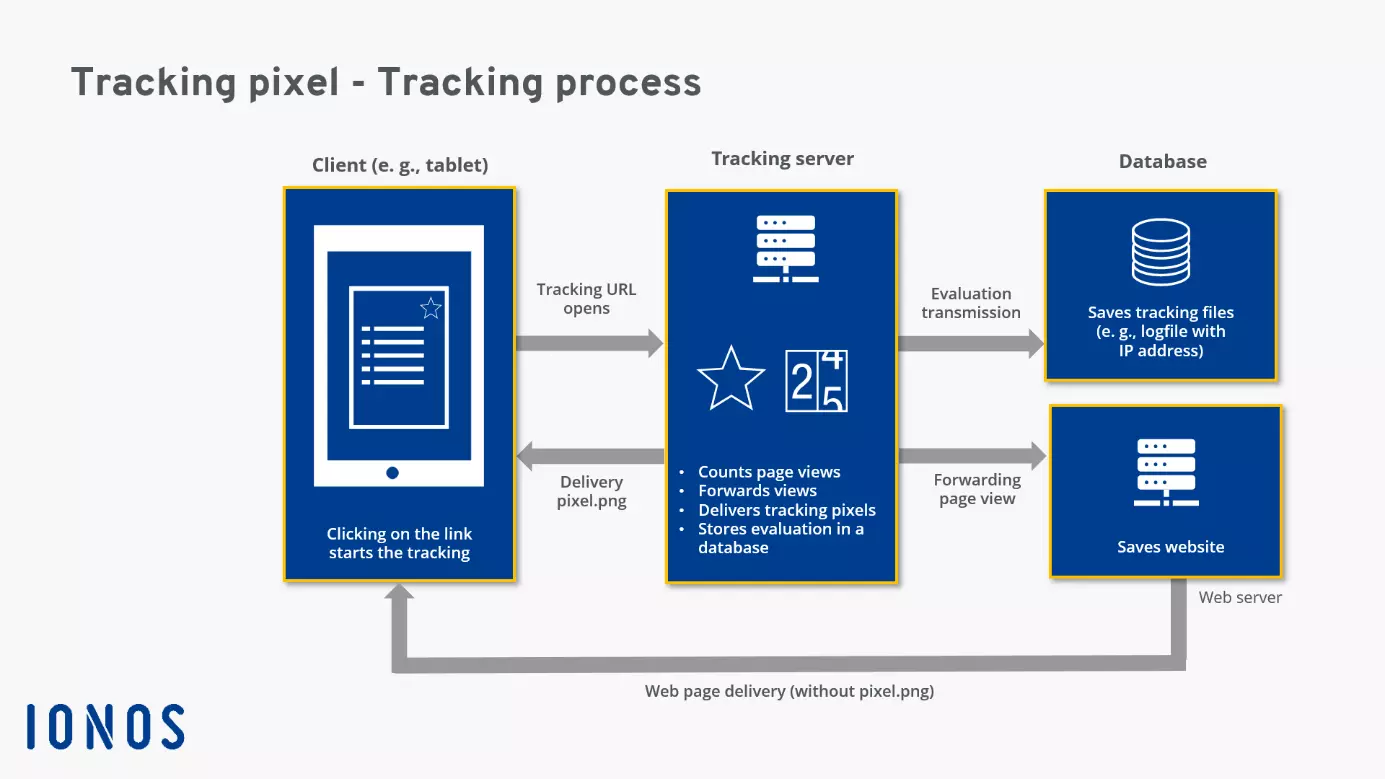
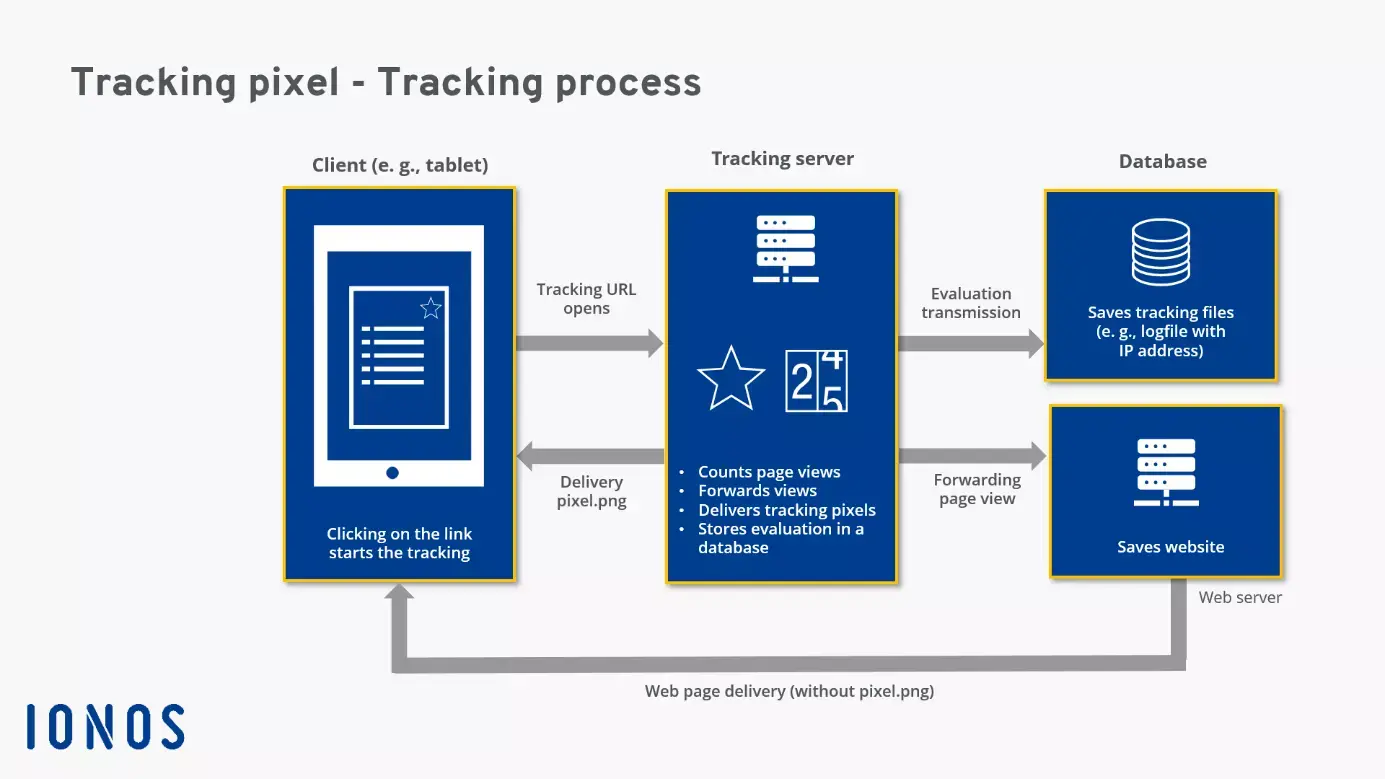
/>A tracking pixel is triggered when, for example, an online shop page is accessed via a mouse click and loaded in the browser (e.g., Google Chrome). The browser reads the code snippet for the tracking pixel and requests the tiny image using the stored tracking pixel URL. The addressed server then sends the pixel tag to the client’s browser, counts the page view, and logs the unique IP address of the recipient as well as other visitor information sent during the request procedure in log files. These records are then used for quantitative (statistical) and qualitative analysis in online marketing.
Which web analytics tools work with tracking pixels?
Web analytics tools are used for evaluation. Some of the most well-known tools and services of this type include Google Analytics, etracker, and the open-source web analytics platform Matomo (formerly Piwik). Facebook customers integrate tracking data with the Meta Pixel analysis tool using the appropriate embedding code. In email marketing, tracking pixel data can be evaluated with tools such as the following:
- MailChimp
- Brevo
- CleverReach
- GetResponse
- Campaign Monitor
Nowadays, it’s common to use a special technical infrastructure for collecting and recording user data. Often, a specific third-party server (tracking server) is used to redirect links, capturing all relevant tracking data for reporting. In many cases, a dedicated database stores and maintains this massive data collection.
Advantages and disadvantages of tracking pixels
Advantages of tracking pixels
Tracking pixels offer numerous advantages to users:
✓ Data on user behaviour: Website pixels provide data about user behaviour, traffic, and page performance, and can contribute to optimising online strategies and advertising campaigns.
✓ Social media activities and search engine optimisation (SEO): Together with web analytics tools like Google Analytics, tracking pixels provide a broad data foundation and offer valuable insights into marketing performance and customer behaviour. The solid data foundation of pixel-based tracking benefits campaign optimisation, content strategy, and user targeting across platforms.
✓ Targeting: The data foundation minimises waste in targeting audiences, allowing the placement of advertising elements on websites or search engines to be more precise.
✓ Support for sales and E-commerce strategies: Tracking pixels enable the tracking of the customer journey. When on-site pixels are placed on all pages of an online store, the activities of individual customers can be captured comprehensively. So-called conversion pixels are placed on strategically important pages that customers can only access after registering or making a purchase (e.g., on the thank-you page after purchase). These website pixels allow for reliable measurement of whether and how often customer interest actually led to a product purchase (sales conversion).
✓ Improved conversion rate optimisation: Continuous and ongoing customer tracking allows for precise identification of drop-off points in the customer journey and weaknesses in the user experience design and usability of a web offering.
✓ Marketing: Pixel-based tracking can gather information that is helpful for choosing advertising media and selecting suitable advertising contexts. Moreover, it can improve customer acquisition and support lead generation (leads refer to the initiation of contacts).
✓ Understanding Customer Perspective: By analysing tracking pixel data, the customer journey can be visualised in the form of a customer journey map and interactions between customer and brand can be illustrated. This is insightful for companies as they can analyse and assess their sales and marketing activities from their customers’ perspective.
✓ Simple implementation: The implementation of basic tracking pixels is straightforward.
✓ Functionality: Tracking pixels embedded in web pages, emails, or ads work reliably — even when JavaScript is disabled. Thanks to their minimal size, pixel tags have virtually no effect on a website’s loading times.
Disadvantages of tracking pixels
However, the use of tracking techniques should not be overdone, as they can also have negative effects.
✗ Increased loading times: Using numerous marketing pixels for various purposes can indeed slow down page loading. The browser then communicates with different software interfaces and servers, which should be easily reachable and not overloaded at that moment. Performance can also suffer if you use tracking tools from multiple providers simultaneously (e.g., Google Analytics, WP Statistics, Facebook Pixel).
✗ Implementation issues: Delays often result from faulty implementation of tracking pixels and JavaScript tags in the source code. If a special plugin is used for tracking in the CMS, it should be proven and performance-optimised; otherwise, it may take too long to load and trigger the pixel tags.
✗ Blocked pixels: The triggering of tracking pixels can be prevented by blocking images. This option is often used on mobile devices to reduce data traffic from volume-based plans and thus save costs.
✗ Security risks: Tracking pixels are often misused and employed in spam emails to verify email addresses. When a user opens a spam email, the tracking pixel is loaded and the address is recognised as valid and registered in the hacker network. This is followed by countless other unwanted spam and phishing emails to the account verified in this way. Additionally, the use of pixel-based tracking technology can lead to targeted manipulations, such as visitor exchange systems or click software.
Tracking pixel and data privacy
Since they document and track user behaviour, tracking techniques have long faced criticism from privacy advocates. This criticism has intensified with the GDPR, which has been enforced throughout the EU since 2018, defining a very high standard of data privacy by international comparison. Privacy advocates particularly criticise that tracking pixels operate unnoticed in the background and do not reveal themselves to users. Additionally, the extent of the collected data and its further processing are not transparent to users.
Tracking is viewed as particularly concerning when it:
-
Collects data without anonymity and without the user’s knowledge or explicit consent, leading to a direct personal reference. This happens, for example, when email newsletters include tracking pixels that can be linked to a user’s private email address or a uniquely assigned tracking ID.
-
Is used for extensive user profiling, often by combining tracking techniques such as cookies with data from various sources — for instance, merging browsing behaviour with social media activity.
-
Shares data with third parties. Privacy advocates view the sale or transfer of personal data for further analysis or marketing as a legal grey area — especially when U.S.-based companies like Google Analytics are involved. In the United States, law enforcement, intelligence agencies, and government bodies can access user data at any time.
To avoid sanctions and fines, companies should always act in full compliance with the GDPR and process data in an encrypted and non-identifiable form — that is, anonymised or pseudonymised. If tracking methods involving personal data are still used, businesses and online store operators should obtain explicit user consent through a GDPR-compliant consent tool. This process is commonly referred to as an opt-in procedure.
In addition, it is essential to include a section on tracking pixels in your website’s privacy policy. Any transfer of data to the United States or other non-EU countries should be carefully evaluated in light of GDPR requirements and the unexpected end of the Privacy Shield agreement.
Since the legal landscape is both complex and evolving — and because GDPR compliance is being reviewed more frequently for websites and online shops — businesses should not take unnecessary risks. When in doubt, it’s best to consult a qualified data protection expert.
Protection from tracking
If users want to actively protect themselves from tracking, they can install appropriate browser plugins—such as those for blocking JavaScript—and adjust browser security settings to completely block or only temporarily allow cookies. By generally disabling images in email programs and browsers, users can effectively defend against tracking pixels, though this may result in limited email and webpage display.
You can act more flexibly by making the loading and display of images contingent on your consent. However, each case must then be individually examined. In email programs, it’s possible to disable support for emails in HTML format, thereby preventing the download of tracking pixels. Using proxy servers or the Tor browser can also help avoid tracking pixels and prevent entries in server log files.
Please note the legal notice for this article.