

GPT partitions: What is a GUID partition table?

Partitions are a tried-and-tested way of getting optimal performance from internal and external storage media. The division of storage space doesn’t just provide more structure, it also gives you the possibility of separating system and application files from one another in the best possible way. In this way, for example, all important data in the operating system can be stored in the first sectors of a hard drive, which usually offer the highest reading and writing speeds.
The technical foundation for this partitioning is so-called partitioning schemes and tables that hold all relevant information about the division of the data storage. One of the newest solutions for this is the standard GUID partition table, the foundation for which we will deal with in more detail here.
What is a GUID partition table (GPT)?
GUID partition table (GPT) is a standard for formatting partition tables for storage media, for hard drives. GPT is a component of UEFI (Unified Extensible Firmware Interface), an interface specification that governs exchange between firmware and operating systems during the boot process and that was developed and published in 2000 to replace BIOS. However, GPT partitions can also be used – with restrictions – independently of UEFI. In this case it is necessary that the operating system used and the hard drive to be partitioned support the standard. Owing to various improvements related to it, today GPT has largely replaced the traditional partition style, MBR (master boot record).
The “GUID” in GUID partition table stands for “Globally Unique Identifier”. This identifier is a 128-bit number (16 bytes) that makes it possible to clearly identify files and documents and – in the case of hard drives – storage media and partition types.
What makes GPT partitions different?
Using GPT as a partition style for hard drives is recommended for a wide variety of reasons. At the top of the list is the fact that a GUID partition table relies on entries with 64 bits for its addressing. This means that the maximum size of a partition is exactly 18 exabytes, which corresponds to 18 billion gigabytes. For today’s generation of storage media, which even in the private sector already offer several terabytes of storage space, this is an invaluable attribute. The older master boot record scheme only permits a partition size of two terabytes at most, which for many modern hard drives is simply too little. The other properties and advantages of GPT partitioning can be summarised as follows:
- No limit for primary partitions: In theory, GUID partition table permits an unlimited number of primary partitions for structuring storage space. In practice, operating systems set a limit. In Windows, for example, the value is 128, which is more than enough.
- Safeguarding through CRC32 checksums: Checksums ensure the integrity necessary for the GPT header. Among other things, this technique detects if faulty sectors are damaging the header area.
- Clear identification of partitions and data carriers: Thanks to the GUID technology already mentioned, data carriers and partitions receive clear identification numbers.
- Back-up header: The header line of GUID partition tables is not only secured with the checksum mentioned, but also with a congruent back-up. This increases the security of the partition metadata and minimises the risk of data loss in case of a hardware fault.
- Downward compatibility: A so-called protective master boot record in Sector 0, the first data block of a GPT hard drive, ensures that almost all operating systems, services and tools designed with MBR partitioning also work with GPT.
You can find detailed information about the advantages and disadvantages of GPT partitions compared with classic MBR partitions in our comparison article “MBR vs. GPT”.
The GPT scheme: How are GPT hard drives generally constructed?
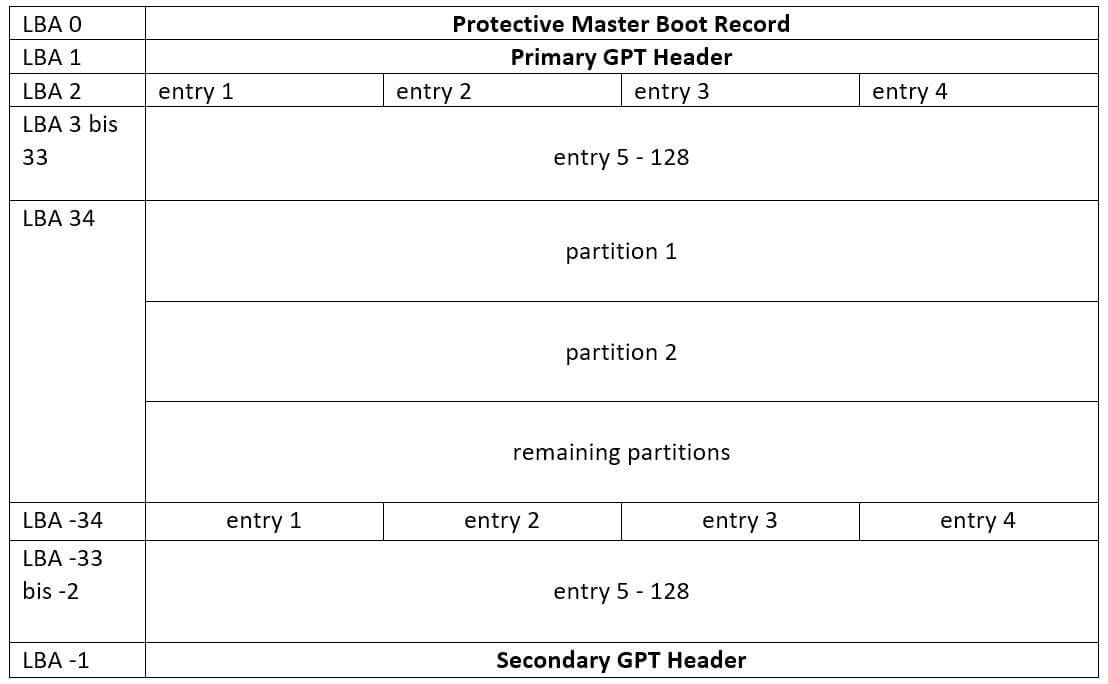
GUID partition table specifies a clear scheme of how the storage space in a data carrier is divided up. The construction is roughly broken down into the following four areas:
- Protective Master Boot Record: In the first position is the protective MBR already mentioned, which ensures the partitioning style’s downward compatibility.
- Primary GUID partition table: GPT header and partition entries
- Partitions: The respective units of the distributed storage space, that is, the different partitions, follow the header and partition entries.
- Secondary GUID partition table: Back-up of the GPT header and partition entries in a mirrored sequence.
The scheme becomes clearer through the following graphic representation of the individual components. The LBA blocks (Logical Block Addressing) featured in it each correspond to one sector of the data carrier and therefore 512 bytes.
A short profile of the GPT header
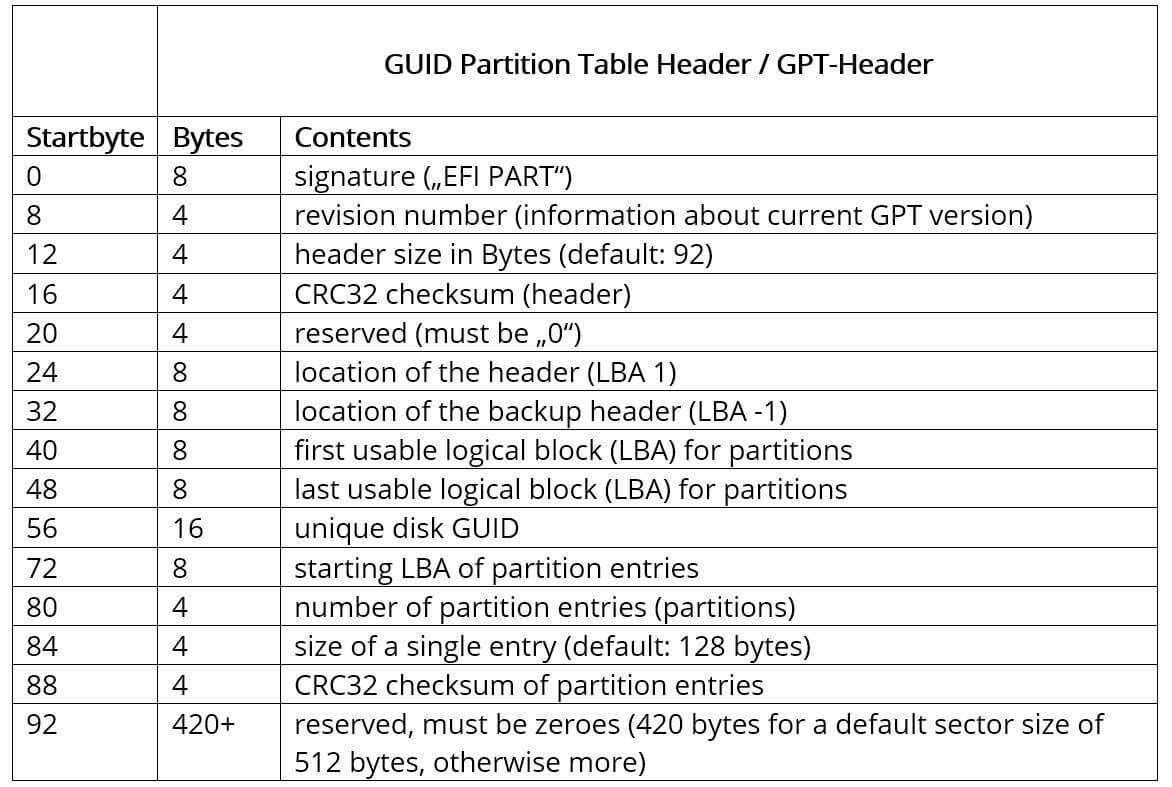
The header of the respective GUID partition table structure describes the useful blocks in the data carrier and the size of the individual partition entries, among other things. It is therefore indispensable for the GPT partitions to work. As already becomes clear in the graphic representation of the scheme, the GPT header is always saved in the second sector of the storage medium (LBA 1) – directly after the protective MBR. The security copy of the header can also be found on the data carrier, though the final sector is stipulated for this back-up (LBA -1). The exact positions of the two versions, which are both protected by a checksum, are also stored in the header.
The automatically generated CRC32 checksums for the header and the partition entries are checked either by the firmware, the bootloader or the operating system.
In detail, the GPT header, which has a standard size of 92 or 512 bytes (including the reserved ‘zero’ space), contains the following information:
What a partition entry looks like
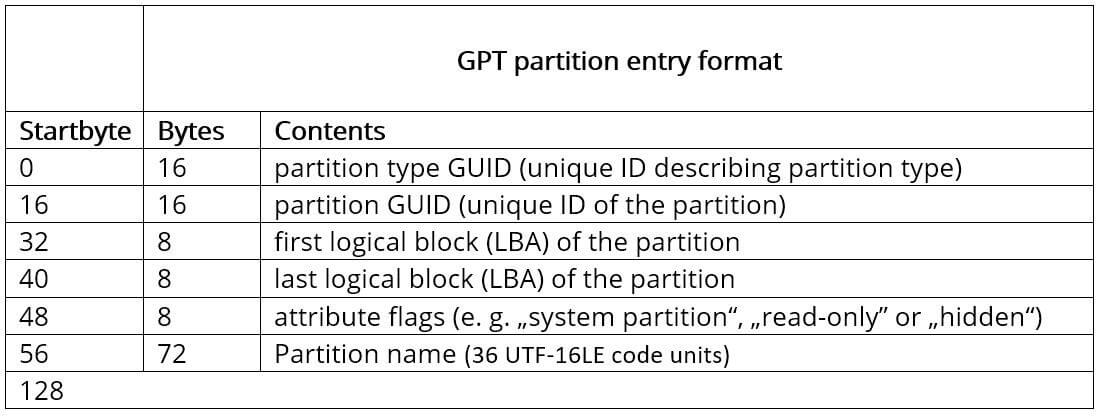
The primary header is followed by the entries describing the individual GPT partitions. Each entry comprises 128 bytes so that four entries per logical block (so per LBA) can always be saved. For the GUID partition table standard, the scheme proposes blocks 2 to 33, which therefore corresponds to 128 partitions – in Windows operating systems, for example, it’s implemented in precisely this way. If needed, the number of authorised sectors for the partition entries can also be arbitrarily increased, which is why the number of possible partitions is also theoretically unlimited, as itemised in the properties of GPT. It is only limited by the storage space that is available.
Independently of the number of partition entries and partitions, the relatively simple structure according to the GPT and UEFI specification is always as follows:
When are GUID partition tables used?
Since 2005, GUID partition table have increasingly been gaining ground as the partition style for HDD and SSD hard drives. The reason behind this is principally the increasing use of UEFI as an alternative to BIOS: For this reason, modern hardware and operating systems more and more frequently use the new interface standard, and therefore GUID partitioning too. Apart from current editions of Windows like Windows 10, 8 or 7, various newer macOS and Linux versions also rank among the operating systems supported by GPT.
You can read about why SSD hard drives are becoming more and more popular, and what makes them so valuable in the server environment in particular, in our article about servers with SSD storage.
GUID partition tables can therefore be used conveniently in almost all modern computer systems that work with integrated data carriers and whose storage capacity is in the gigabyte and terabyte range. The partition style is just as sought-after in external hard drives, of course – especially since here many solutions now provide more than two terabytes of storage and therefore exclude MBR as partition technology. Another typical area of application for GPT: Bootable USB sticks. For this it always depends which operating system and firmware they are designed for, and whether UEFI (meaning GPT) or BIOS is to be used.
Of course, GPT partitioning is also a solution for USB sticks if the stick is not to be used as a boot medium, but as a simple storage medium. In particular, because of the increased protection against data loss if there is a hardware fault, for which the risk is potentially higher with portable storage media (so also with external hard drives).