

What is hyperthreading?

The basic idea behind hyperthreading is to be able to process several threads simultaneously with one microprocessor. While previously only one thread could be managed per processor, Intel’s hyperthreading technology now allows a processor to be divided into two logical, virtual cores that process hyper threads simultaneously. You can find out how hyperthreading can improve CPU performance here.
- Free WordPress with .co.uk
- Free website protection with one Wildcard SSL
- Free Domain Connect for easy DNS setup
What does hyperthreading mean?
What may sound like science fiction is nothing more than the old wisdom that four hands can do more than two: hyperthreading. Intel’s hyperthreading method originates from the server sector, where several physical processors are usually used simultaneously to increase computer performance. With hyperthreading, on the other hand, there is only one physical processor, but it behaves like two processors. This is made possible by the processor dividing itself into two virtual cores – also known as kernel – which process threads in parallel. This allows multiple instruction queues to be processed simultaneously as a hyper thread, processes to be split between the virtual cores, and CPU utilisation to be improved.
Hyperthreading: Hyperthreading refers to the technology invented by Intel, with which a physical microprocessor behaves like two logical, virtual cores. This makes it possible for a processor to process more than one task or more than one thread simultaneously. Hyperthreading increases CPU performance and ensures better utilisation of the computer.
The origin of hyperthreading
Hyperthreading technology (HT) is owed to the processor and CPU manufacturer Intel. Private computer users have been enjoying Intel’s hyperthreading since November 14th 2002. Intel brought its hyperthreading technology onto the market with the Pentium-4 including the Northwood-B core. The successor models, Pentium D and Core-2-Duo, Intel withdrew hyperthreading again and used dual-core main processors instead.
If you are tapped-in to processors and CPU performance then you’re undoubtedly familiar with the two giants of processor manufacturing: Intel and AMD. While hyperthreading technology is only used in Intel processors, simultaneous multithreading techniques that are very similar to Intel’s hyperthreading are also found in AMD processors like the Ryzen 5000 series
How does hyperthreading technology work?
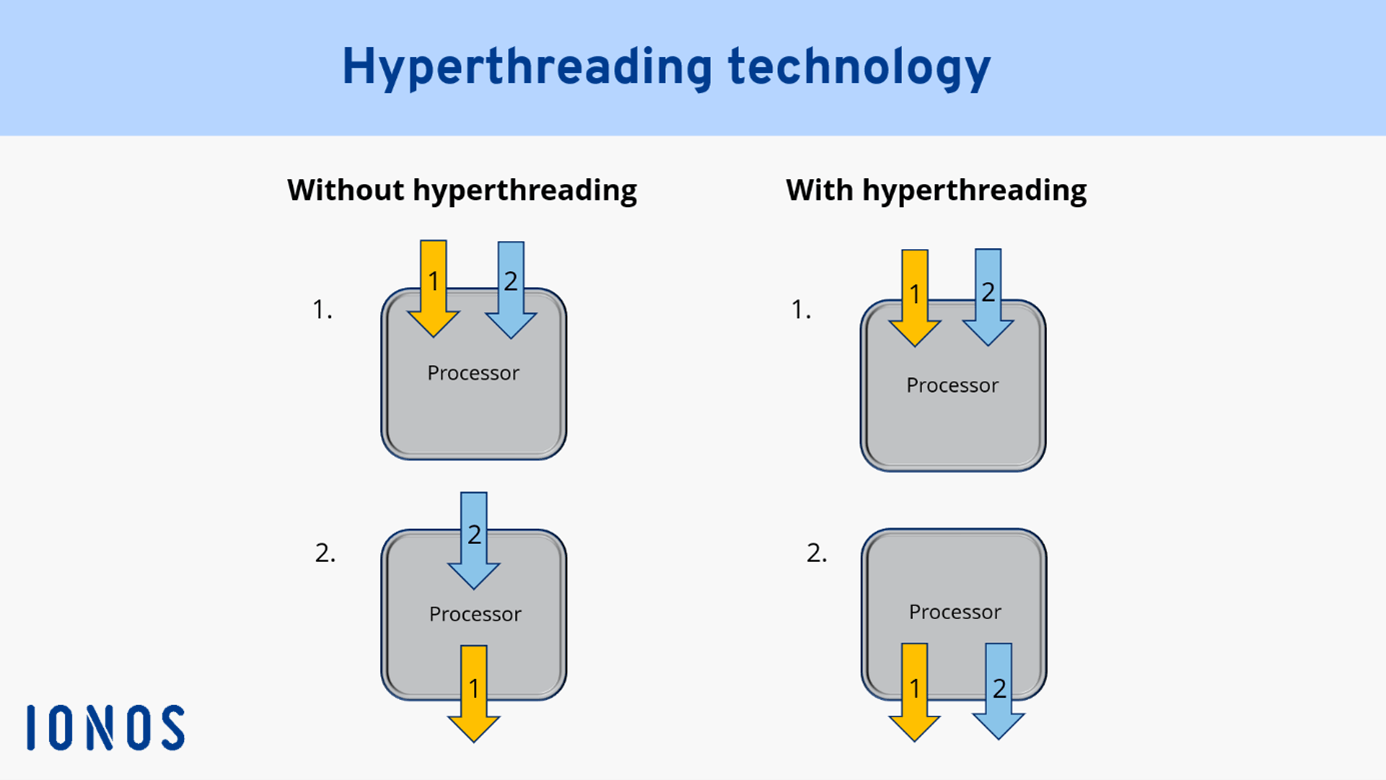
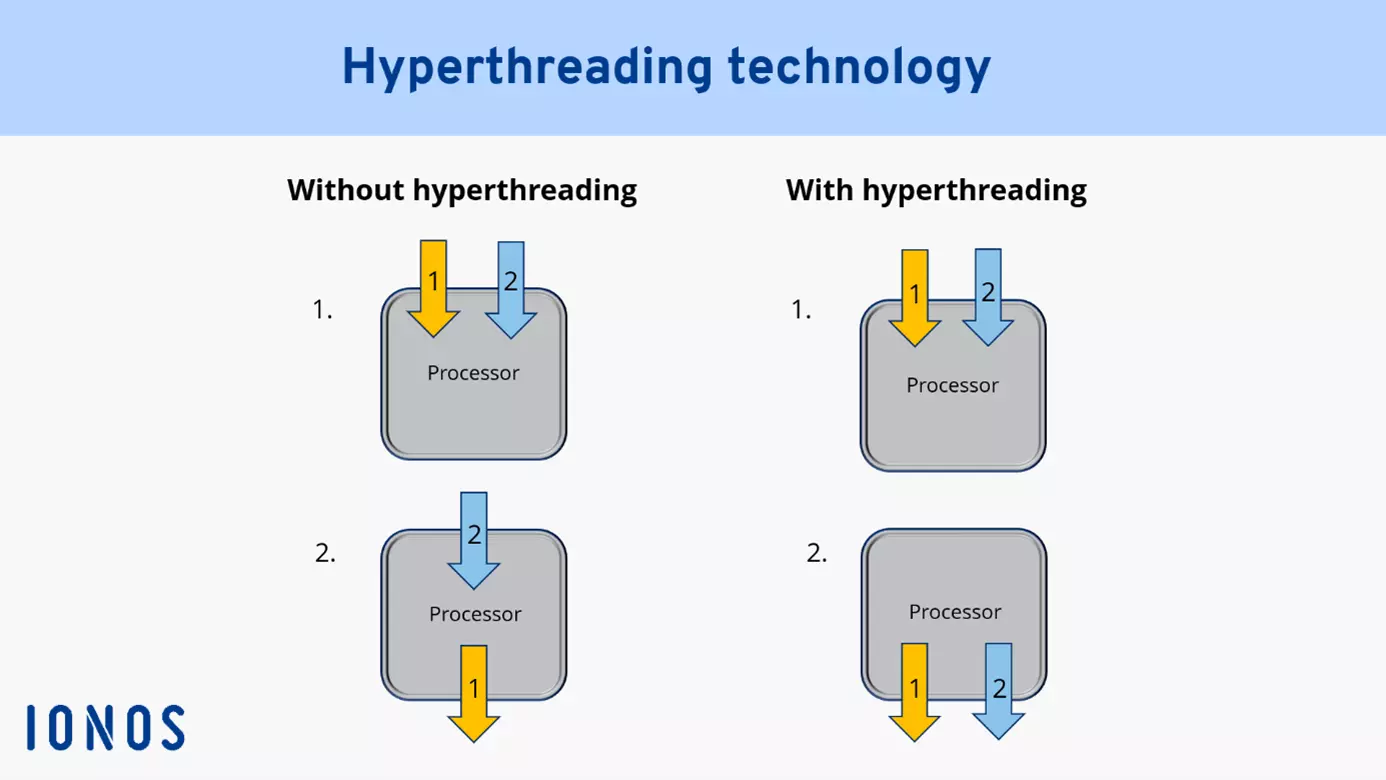
The way hyperthreading technology works was and is one thing above all: innovative. It gives a single processor core the ability to behave like two physical processor cores and to process more threads, i.e. more instruction queues, in parallel without idle times. When hyperthreading is enabled, two execution contexts are managed and processed per CPU core. A core is divided into two virtual, logical cores, which share the processor’s computing power. Hyperthreading always applies per physical core. So, if there is a ten-core processor with hyperthreading enabled, ten physical cores behave like 20 virtual ones and process even more threads.
How can hyperthreading be activated?
If you’re hearing about hyperthreading for the first time, then you may think that every processor should have this technology. Fortunately, hyperthreading is active by default in CPU cores, provided they support HT. Nevertheless, hyperthreading can be turned on and off in the BIOS under ‘Hyper threading technology’ via ‘Enable’ and ‘Disable’. In processors that don’t support hyperthreading, a physical core only processes several logical processes sequentially, i.e. one after the other. You can check whether hyperthreading is active or supported in the Device Manager. For example, if you have a computer with two CPU cores, but you see four processors under ‘Processors’, then hyperthreading is active.
What are the benefits of hyperthreading?
Probably the biggest advantage of hyperthreading is that implementing hyperthreading technology in microprocessors is less expensive than using two physical microprocessors. However, since most computers today already have multi-core processors, this advantage can only be exploited if CPUs with hyperthreading have the same number of physical processors as machines that don’t support hyperthreading.
The actual advantage of hyperthreading is the efficient utilisation of resources. Two virtual cores in one physical core does not mean that all tasks run at double speed. However, the computing load for several processes can not only be distributed sequentially, but also simultaneously between the virtual cores. This avoids unnecessary idle times so that processes can be executed without gaps. Threads don’t have to wait until a computationally intensive thread has been processed, but simply run over the second core.
The more, the better – this is especially true for servers that have to handle a large workload. IONOS offers powerful Intel servers, that are scalable as needed, billed by the minute, and offer 24/7 support from experts.
Multi-core processors vs. virtual cores: which makes more sense?
The advantage of multi-core processors is that a physical core does not have to share its resources. CPUs with ten physical cores, for example, would basically have an advantage over five physical cores with hyperthreading, because each core can use all available resources to handle processes. Virtual cores, in turn, use the same computing power of the physical cores to manage parallel register sets. Nowadays, it makes sense to work with CPUs with at least two or more physical cores.
The difference between multithreading vs. hyperthreading
Multithreading and hyperthreading are very similar at first glance: Both are tasked with efficiently distributing and processing threads in CPU cores. However, hyperthreading is a subcategory of multithreading and is also called simultaneous multithreading (SMT). To understand multithreading, it’s important to know that threads are instruction queues that are processed differently depending on the hardware and software.
Multithreading means that multiple instruction queues are managed simultaneously. However, while multithreading methods such as switch-on event multithreading and time-slice multithreading are referred to as pseudo-simultaneity, since threads do not run simultaneously, simultaneous multithreading, i.e. hyperthreading, stands for true simultaneity in processing. Furthermore, hyperthreading is a hardware-supported SMT technology, while multithreading can also be supported exclusively by programs and software.
Practical examples of the hyper thread procedure
When it comes to hyperthreading, the question often arises whether the function really has advantages compared to multi-core processors without hyperthreading. The answer is: it depends. For example, it’s crucial what hardware is available and what it’s used for. The fact that hyperthreading can optimise thread processing through separate pipelines and parallel register sets is undeniable. For example, the Cray MTA supercomputer is able to manage an impressive 128 threads with only one CPU kernel.
Gaming, in particular, is often noted in connection with SMT or hyperthreading. Gamers in particular require a lot of computing power when games, music, and maybe even a streamed Twitch recording are running in parallel. Whether hyperthreading actually improves gaming performance is debatable. Some gamers say that hyperthreading actually slows down CPU performance, while others say that hyperthreading can be useful when games support four or more cores.
Another way to use computer power as efficiently as possible is overclocking the CPU. This involves deliberately increasing the operating frequency of the CPU above the recommended standard frequency to achieve more performance at a higher CPU speed. However, one risk here is that the CPU temperature increases to such an extent that the hardware can be damaged if the cooling isn’t improved accordingly.
- Enterprise hardware
- Configurable hardware equipment
- ISO-certified data centres
Reviewer

Christian Heldmaier
Christian Heldmaier is an experienced online marketing and SEO specialist from Karlsruhe. He has been working as an SEO Manager at IONOS since July 2020.