

PostgreSQL: a closer look at the object-relational database management system

If complex data types or multimedia content have to be managed in addition to alphanumeric content (e.g. letters, numbers, special characters), classic relational database management systems will quickly reach their limits. However, object-relational databases or database management systems, which expand the traditional model with object-oriented approaches, provide the perfect answer to this problem: object-relational mapping enables objects to be stored in relational systems using applications based on object-oriented programming languages. One of the most popular and oldest solutions in this context is the open source database, PostgreSQL, also known as Postgres.
What is PostgreSQL?
PostgreSQL has a 30-year development history. The origins of the object-relational database management system (ORDBMS) can be traced back to the POSTGRES project from the University of California at Berkeley. This began in 1986 under the leadership of Michael Stonebraker and was sponsored by the Defense Advanced Research Project Agency (DARPA) and the National Science Foundation (NSF), among others. In 1994, students Andrew Yu and Jolly Chen expanded the basic code to include an SQL interpreter. This new and around 30-50% faster modification was released as an open source solution under the name Postgres95 (under their own license, which is similar to the BDS and MIT licenses). Two years later, the database application with version 6.0 was given the name PostgreSQL, under which it is still known today.
Besides the new name PostgresSQL, the original name Postgres (now rarely written in capital letters anymore) is still used for the database system, probably due to the fact that it makes it easier to pronounce.
The POSTGRES project did valuable pioneering work and developed numerous concepts that only found their way into other (and mainly commercial) database systems much later. PostgreSQL is not only a SQL-compliant database, but also offers the following modern features:
- Possibility of complex queries
- Foreign keys for linking data in two tables
- Triggers that are automatically triggered on input and check, confirm, change, delete, or electively use reference data
- Updatable views
- Comprehensive transaction concept
- Multi-version concurrency control (MVCC) for efficient execution of simultaneous database access
Thanks to the free licensing, users can highly modify and extend PostgreSQL, adding new data types, functions, operators, indexing methods, or procedural languages (programming languages for writing functions and triggers), for example.
Postgres: key data and system requirements
PostgreSQL’s flexibility is not only shown by its functionality, expandability, and adaptability: the database also provides plenty of scope for software and hardware setup. Postgres is already included in most UNIX/Linux distributions and has been delivered by Apple as a standard database since Mac OS X Lion (10.7). The only requirement is that a current “gmake” version (3.80 or higher) has to be installed (already included in the finished binary files). Windows operating systems can also be selected as a platform for the system thanks to the corresponding installation packages. The required computing power and storage capacity depend only on the size of the planned database system – the open source software itself only requires about 20 MB.
The following key data of the object-relational database shows that you are more limited by your own storage capacities than by the limits of PostgreSQL in practice:
| Maximum database size | unlimited |
| Maximum table size | 32 terabytes |
| Maximum size of data set | 1.6 terabytes |
| Maximum field size | 1 gigabyte |
| Maximum number of columns | 250 to 1,600 (depending on data type) |
| Maximum number of rows | unlimited |
| Maximum number of indexes | unlimited |
How does PostgreSQL work?
Postgres is based on the typical client-server model: The central server component called “postmaster” manages all database files and all connections that are established for communication (input and output) with the database server. Users only need a suitable client program to establish the connection, whereby the PostgreSQL software package with psql already has a native solution integrated for operation via the command line or the terminal. Alternatively, you can use different applications with a graphical user interface such as pgAdmin or phpPgAdmin, which can be optionally installed and used. With interactive websites, the web server usually takes on the role of the client.
Many Linux distributions include their own graphical Postgres client with pgAccess.
What projects is PostgreSQL suitable for?
As a proven and extremely flexible database management system, Postgres is used in numerous industries and scenarios. The object-relational database is a first-class basis for the safe operation of a wide variety of applications. For example, the open source project is the perfect solution for online banking software, due to its integrated transaction concept and support for MVCC (multi-version concurrency control: procedure for efficient performance of competing access). Analysis programs such as Matlab or R also work well with the database, which is why PostgreSQL is often used in combination with these programs. In combination with the extension PostGIS (which provides hundreds of functions for working with geodata), Postgres also impresses when it comes to working with spatial and geographical data.
PostgreSQL is also in demand as a solution for web projects: The object-relational system works with various modern frameworks such as Django, Node.js or Ruby on Rails, and supports classic web languages such as PHP. Support for synchronous and asynchronous replication also makes it easy to distribute the stored data across multiple servers for high resilience and minimal access time to critical data.
The useful support of JSON also makes PostgreSQL an excellent database solution for scaling NoSQL workloads.
How to install PostgreSQL
If you want to use Postgres for your project, you can install the database management system yourself in a few steps without having to purchase a license or something similar. The download portal of the official PostgreSQL website offers binary files and links to the repositories of source packages for BSD, Linux, macOS, Solaris, and Windows, which can be installed and used free of charge under the open source license. Root rights are not required for this: simple administrator rights are enough for execution. The following two sections show how PostgreSQL should be installed on Linux (Ubuntu 17.10) and Windows.
Installing PostgreSQL on Linux (Ubuntu 17.10)
Postgres’ APT repository officially supports the LTS version of Ubuntu (from 14.04 onwards) as well as others such as Ubuntu 17.04. The source packages often work with other versions as well. However, the PostgreSQL team recommends using the most up-to-date LTS variant to ensure that users get the best possible long-term benefit from the database management system. Since the packages are already included in the standard repository on Ubuntu, you can easily install them with the package manager, APT.
sudo apt-get update
sudo apt-get install postgresql postgresql-contribPostgreSQL is installed using this command. The software automatically creates a Linux user named “postgres” for database access. For security reasons, this should only be used for working with the database. It is also advisable to assign a password to this profile in the first step (since there isn’t one entered by default). All you have to do is enter the following command and then enter the password of your choice twice:
sudo passwd postgresAs well as the “postgres” Linux user, there is also a database user with the same name, which is needed for database administration and should also be protected with a strong password. This can be done by entering the following terminal commands (“new-password” is a placeholder for the desired password and must be replaced accordingly):
su - postgres
psql -d template1 -c "ALTER USER postgres WITH PASSWORD 'neues-passwort';"
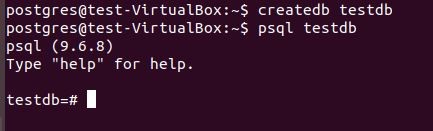
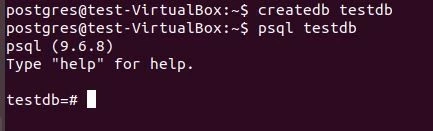
To check if the installation was successful, you should create a database (here: testdb) with the “postgres” Linux account and manage it with the terminal client, psql:
su - postgres
createdb testdb
psql testdb
In the terminal you can see this output of the psql client shell, which can be operated with any SQL commands:
Installing PostgreSQL on Windows
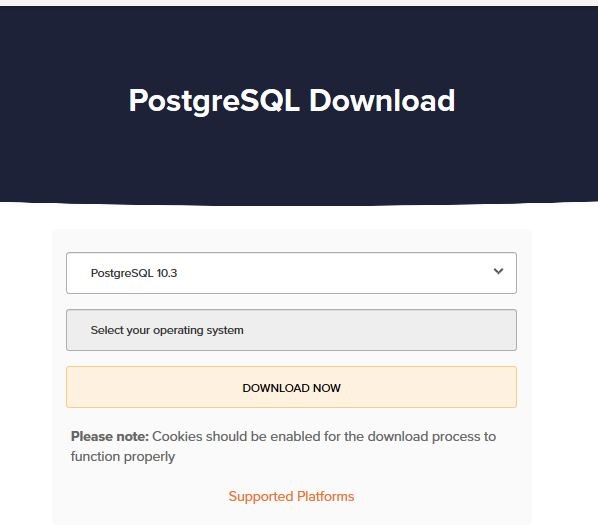
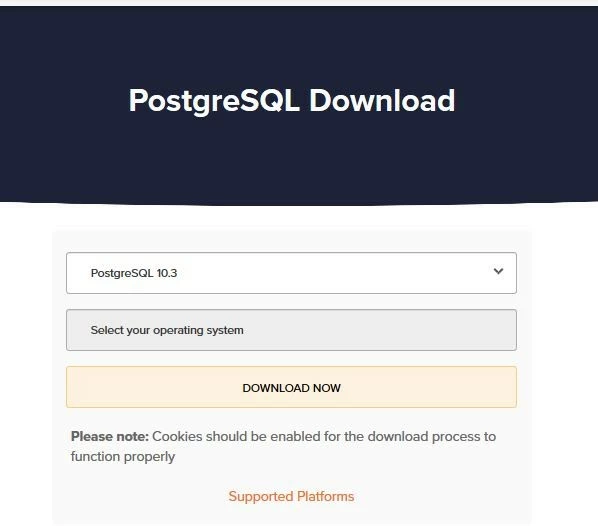
Installing Postgres on Windows computers is easy, thanks to the interactive installer certified by EnterpriseDB. The free installation assistant of the software manufacturer, which offers additional tools as well as commercial support for PostgreSQL, is available to download from the company’s own website. Simply select the desired version of the database management system and the target platform and then click on “DOWNLOAD NOW.”
The downloaded installer can be started by double-clicking. First of all, it installs the Microsoft compiler Visual C++, as long as it isn’t already installed on the system. Select the PostgreSQL location, then you have the option of excluding individual components of the installation package from being installed. In any case, the PostgreSQL server and command line tools are required – the graphical client pgAdmin and the Stack Builder (for simple downloads and installing extensions) are not mandatory, but make it a lot easier to work with the database management system.
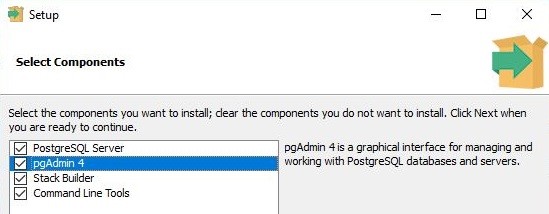
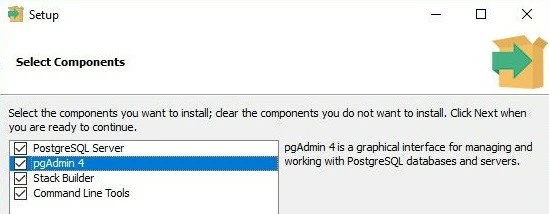
If the storage location for the data was also specified, a password for the “Postgres“ database administrator profile has not yet been assigned. You can keep the default port and localisation settings like this before finally starting the installation in the last step.
After successful installation, a connection to the PostgreSQL server can be established in a few steps via the pgAdmin user interface (if installed). To do this, right-click on the configured Postgres version in the server list and then click on “Connect Server.”
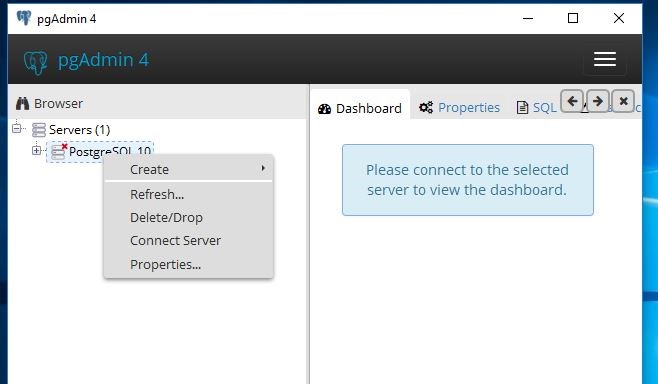
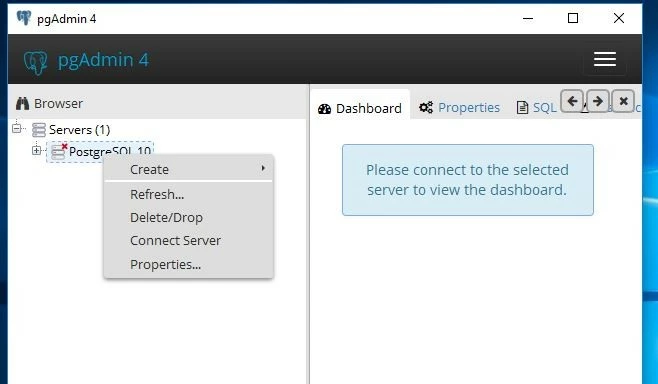
After entering the previously assigned password for the “Postgres” administrator account, the client initiates the connection.
The advantages and disadvantages of PostgreSQL at a glance
| Advantages | Disadvantages |
| Open source | Not available on all hosts by default |
| Highly expandable | Expandable documentation only available in English |
| Largely compliant with SQL standard | Comparatively low reading speed |
| Possible to process complex data types (e.g. geographical data) | |
| Flexible full text search | |
| Creation of own functions, triggers, data types, etc. possible | |
| Good language support (Python, Java, Perl, PHP, C, C++, etc.) | |
| Supports JSON | |
| Cross-platform |
Reviewer

Christian Heldmaier
Christian Heldmaier is an experienced online marketing and SEO specialist from Karlsruhe. He has been working as an SEO Manager at IONOS since July 2020.