

How does SFTP (SSH File Transfer Protocol) ensure secure data transfer?

SFTP is a secure network protocol for transferring, managing, and storing files over encrypted connections. It is based on the SSH protocol and protects data from unauthorised access during transmission. Unlike traditional FTP, SFTP ensures fully encrypted communication.
- Enterprise hardware
- Configurable hardware equipment
- ISO-certified data centres
What is SFTP?
SFTP stands for SSH or Secure File Transfer Protocol (FTP) and is a secure method for transferring files over the internet or a local network. It is based on the SSH transmission protocol, the Secure Shell. This protocol ensures secure authentication of communication partners, protecting both the transmitted data and access credentials from unauthorised access. Unlike traditional FTP, where data is sent in plain text, SFTP ensures that all information is encrypted during transmission.
SFTP is used wherever sensitive data needs to be transferred securely, such as in the following cases:
- Exchange of files between servers
- Backups of websites
- Management of web hosting projects
Users can access their server via an SFTP program to upload, download, rename, or delete files. Since SFTP operates over port 22, which SSH also uses, no separate firewall configuration is necessary. Additionally, the protocol supports modern authentication methods like SSH keys, which provide even greater security than simple passwords.


How does SFTP work?
To establish a working connection with the SSH File Transfer Protocol, an SSH login on the host’s server is required. This provides the access data for the SFTP user: server address, username, and password. These details are entered into the (S)FTP program used by the client. During the initial connection, the key is displayed for verification and saved in the FTP program for future sessions. This allows the client to authenticate with the server each time a connection is made. If an unauthorised party—or a hacker—tries to connect without the correct key, the communication is immediately terminated.
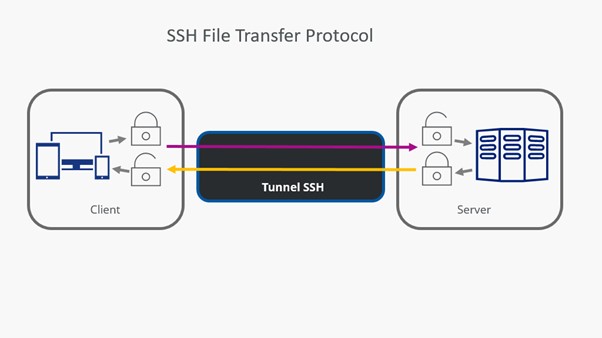
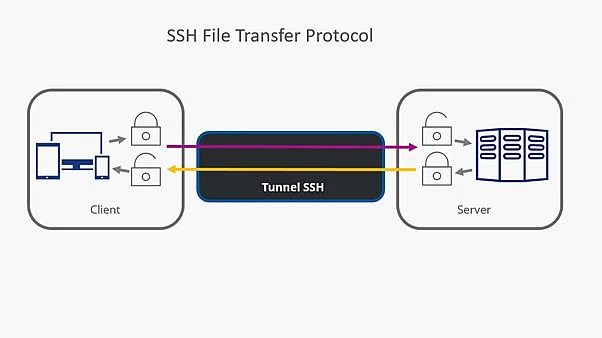
Between the client and server — and along the return path — an SSH tunnel is established through which authentication and data transfer take place. This tunnel is continuously encrypted, preventing attackers from accessing the data. As a result, all information reaches the recipient unchanged. If a hacker tries to tamper with the data during transmission, SSH detects the manipulation and immediately terminates the connection.
Data transfer via the SSH File Transfer Protocol protects against the following threats:
- Alteration of a packet’s IP address — also known as IP spoofing.
- Redirecting the intended hostname to an attacker’s IP address (DNS spoofing).
- Eavesdropping on login credentials sent in plain text.
- Tampering with the data being transmitted by an attacker.
SFTP cannot safeguard users against negligent handling of credentials or security keys!
How to use the SSH File Transfer Protocol
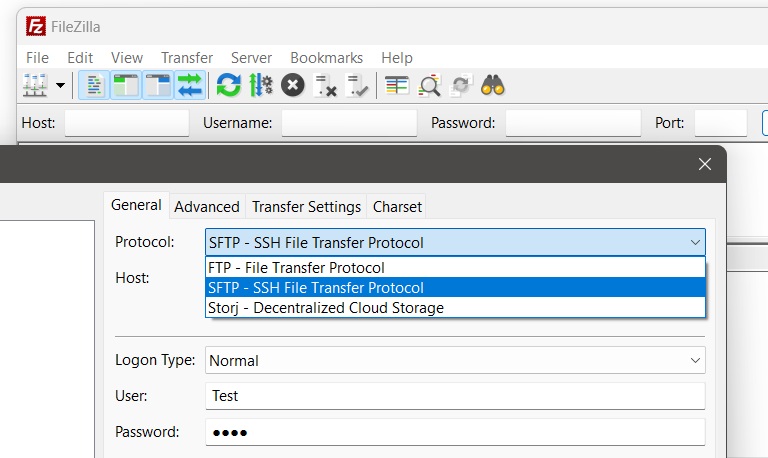
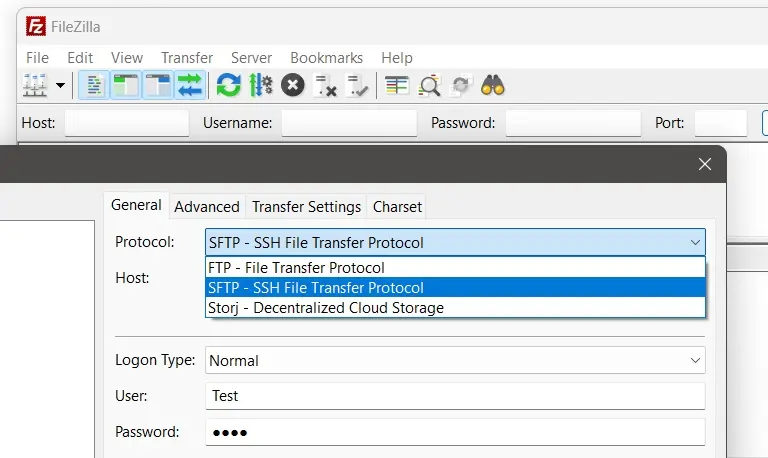
In the (S)FTP program, you can select the desired protocol in the section where login credentials are entered. In the FileZilla client, shown below, this area is called the Server Manager. In most cases, you don’t need to specify a port manually — it’s automatically set to 22 when SFTP is selected.
The first time an attempt is made to establish a connection using the SSH File Transfer Protocol, the SFTP client will receive a message reflecting the SSH security standard. Double-check the accuracy of the server address. The correct use of port 22 is indicated in the server entry: home….-data.host:22. By ticking the box ‘Always trust this host, add this key to the cache’ and clicking the ‘OK’ button, the connection data is saved and the encrypted connection is established.
A repeated request for this information does not occur during the next connection attempt, as the SFTP client identifies itself to the SFTP server using a unique key. This digital signature encrypts all transmissions, including login data for the connection setup. Messages in the FTP program’s status window provide information about the progress of downloads and uploads.
What is the difference between SFTP and FTP?
The main difference is that authentication and all data traffic between client and server are encrypted during SFTP transfer. Even if attackers manage to intercept data, it remains unusable for them. The SSH File Transfer Protocol responds to tampered login data or attack attempts by terminating the connection. In summary, the differences between FTP and SFTP are as follows:
| FTP | SFTP | |
|---|---|---|
| Number of channels used | 2 separate | 1 |
| Encryption standard | None | SSH-based encryption |
| Encryption of authentication | ✗ | ✓ |
| Encryption of data transfer | ✗ | ✓ |
| Attack possibilities (eavesdropping, attack) | ✓ | ✗ |
The technical security of cryptographic transmission should be reinforced with additional security measures on both the client and server sides. This includes considerations such as the geographic location and physical protection of SFTP servers, as well as secure data storage for client access. Any carelessness in handling sensitive data is usually punished sooner or later.
Reviewer

Christian Heldmaier
Christian Heldmaier is an experienced online marketing and SEO specialist from Karlsruhe. He has been working as an SEO Manager at IONOS since July 2020.