

Windows 7 end of support: What you need to do?

Years after it was first released, Microsoft Windows 7 still counts among the favourite operating systems worldwide. But the time has come to say goodbye. Windows 7 has reached its final end-of-life stadium (EOL). Microsoft will no longer be publishing updates or provide any form of support for the operating system. What are the consequences?
When will support for Windows 7 end?
Support for private users of Windows 7 has already finished. As of January 14, 2020, Microsoft is no longer delivering updates for Windows 7, including any security updates. The technology company terminated general support for the popular operating system back in 2015. Ever since, no updates or additional features have been released. 2020 marks the end for Windows 7: Windows will no longer provide security patches via its Extended Support for the operating system.
However, Microsoft has created a few exceptions. Enterprise clients will have the option to join a fee-based Extended Security Update Program (ESU). Only users of the professional or enterprise editions will be able to join ESU. The program extends the period during which security updates will be provided by another three years. Users will need to renew their ESU licence every year and for each device running Windows 7. There are two options for users to join the program. Large enterprises, organisations or authorities that already have a license, can book support via the Volume Licensing Service Center.
Smaller companies that are using the professional or enterprise edition of Windows 7 will need to contact a Cloud Solutions Provider. The latter is an official Microsoft partner authorised to distribute the software maker’s products. If you don’t have access to the Volume Licensing Service Center, you won’t be able to purchase the extended support directly via Microsoft.
What does the end of support for Windows 7 mean?
The end of support for Windows 7 doesn’t necessarily spell the end of Windows 7. The operating system and many installed programs can still be used. The termination of any extended support for the operating system means just that: Microsoft no longer helps users of Windows 7. This includes any assistance services, as well as updates and patches. Most importantly, the company will no longer close security gaps.
But just because you can continue to use Windows 7 doesn’t mean you should. Usage of the operating system could be risky because Microsoft will continue to provide security updates via the ESU program. In this way, security gaps can be deduced for unsupported versions of Windows 7. Cyber criminals may then be able to detect existing weaknesses in the operating system. In fact, something similar happened with Windows XP. The software was considered safe and stable, but once it was no longer supported, fraudsters were able to detect and abuse security gaps.
Over time, however, Windows 7 will become unusable. The end of support is already taken as an opportunity by software developers to no longer make their products compatible with Windows 7. For example, Google announced that Chrome would only continue to support Windows 7 until July 15, 2021. Other software developers are likely to follow suit.
Windows-7-EOL: What you need to do
To avoid security and compatibility issues, users should upgrade to a newer version of Windows (preferably Windows 10). Clients of the ESU program can take a bit more time, but are not advised to wait the full three years before upgrading. For one, that could become very costly because the price for the ESU licence increases year by year. Secondly, it’s advisable to upgrade to a higher version of Windows because Microsoft offers more comprehensive support.
What’s more, Windows 7 users can currently upgrade to Windows 10 for free – albeit unofficially. Microsoft originally suspended the free upgrade on July 29, 2016, but according to reports from multiple websites, the upgrade can still be downloaded via the official software Windows Media Creation Tool. During installation, you’ll just need to enter the licensing key for your Windows 7 version and Windows 10 should work as expected. A valid product key will be necessary for the free upgrade to work – without one, the free upgrade will not be successful.
Because Microsoft officially terminated its support for a free upgrade in 2016, there is no guarantee that it still works. It’s possible that the Windows developers may close down any loopholes for existing free upgrades and charge users looking to upgrade swiftly now.
But should you continue to use Windows at all? Some users are taking the Windows 7 EOL as an opportunity to consider alternatives to Windows. Whilst Apple’s macOS requires users to purchase new hardware, Linux and affiliated distributions allow for older PCs and notebooks to be used. Potential users should note that Windows and Linux do differ quite significantly though.
Still one of the favourite operating systems
The days of Windows 7 are numbered. Microsoft announced its end of support for the software back in 2012, but many users either weren’t aware of the announcement or forgot about it. Either way, Windows 7 continues to run on many desktop PCs today still. NetMarketShare reports that as of 2020, 26.6% of Microsoft users worldwide were still using the outdated Windows version.
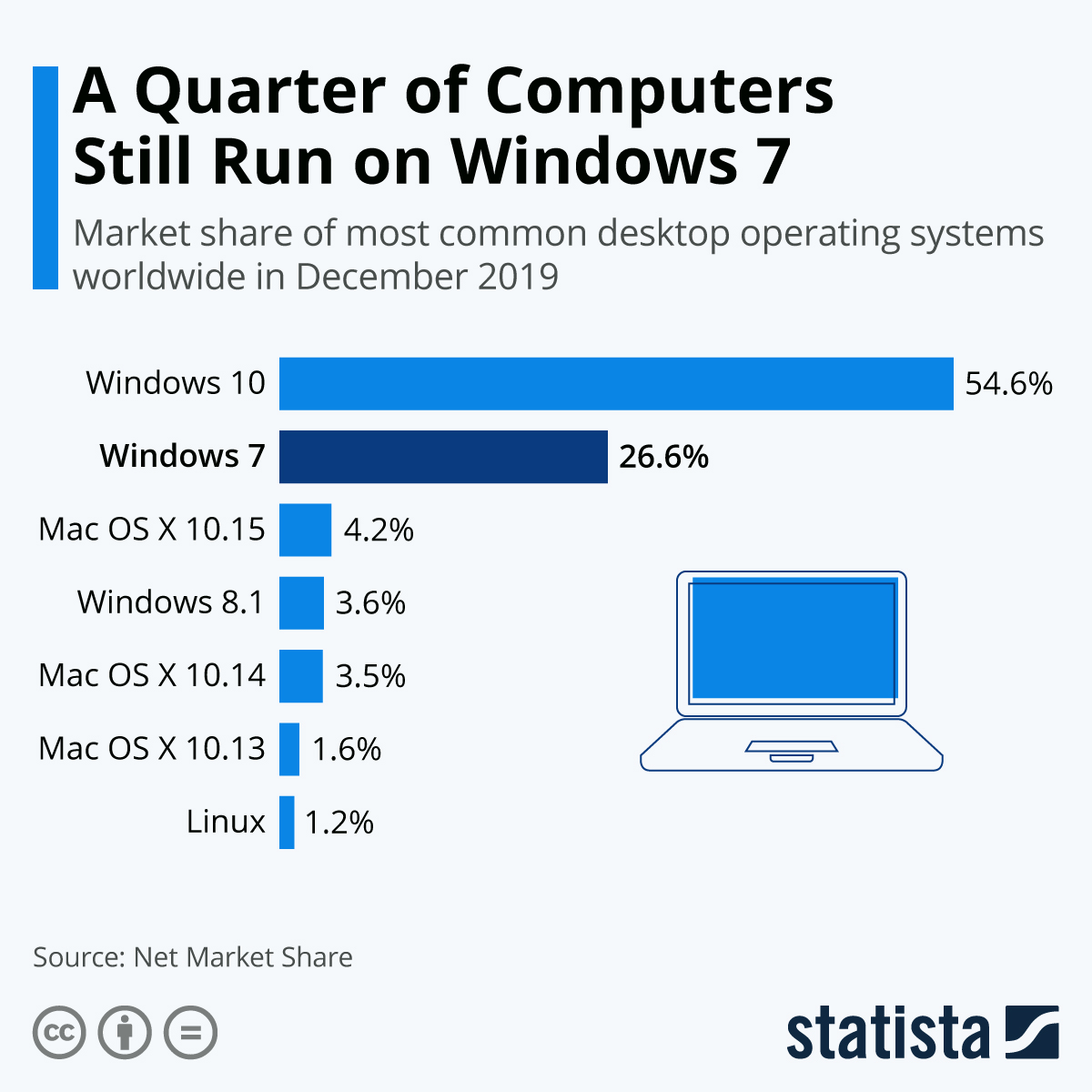 You will find more infographics at Statista
 The reasons are manifold. In comparison to other Windows versions, Windows 7 was a favourite among many users. Whilst its predecessor (Windows Vista) and successor (Windows 8.1) left the community feeling disappointed, professional users were particularly fond of Windows 7.
And it’s the professional user group for whom a transition to Windows 10 is difficult. A business that has equipped its entire office with hundreds of PCs all running a particular operating system faces the hugely complex task of upgrading all its systems. In some cases, an upgrade may require the acquisition of new hardware, upgrades of other software and a good amount of time spent on configuration.
But the alternative is just not viable. Following the end of support for Windows 7, it would be irresponsible for a company to continue to work with the instable version. This does not only jeopardise a company’s data and processes, but may also endanger any customer data a business stores. In that case, businesses may violate data privacy regulations. The EU regulations obligate companies to secure client and user data from access of unauthorised third-parties.