What is the 3-2-1 backup rule?

In a private context, it may be annoying, but in a corporate one it can quickly damage reputations: data loss. And yet, data loss is easy to avoid! With the 321 backup rule, you can reliably protect photos, contracts, and other important documents from being deleted. Find out how it works, what you should consider, and how IONOS can support you with your 321 backup strategy.
- Store, share and edit data easily
- ISO-certified European data centres
- Highly secure and GDPR compliant
Backup 321: a quick overview
For readers in a hurry, here’s a summary of the most important facts. In the 3-2-1 backup rule, each number refers to a feature of the backup process:
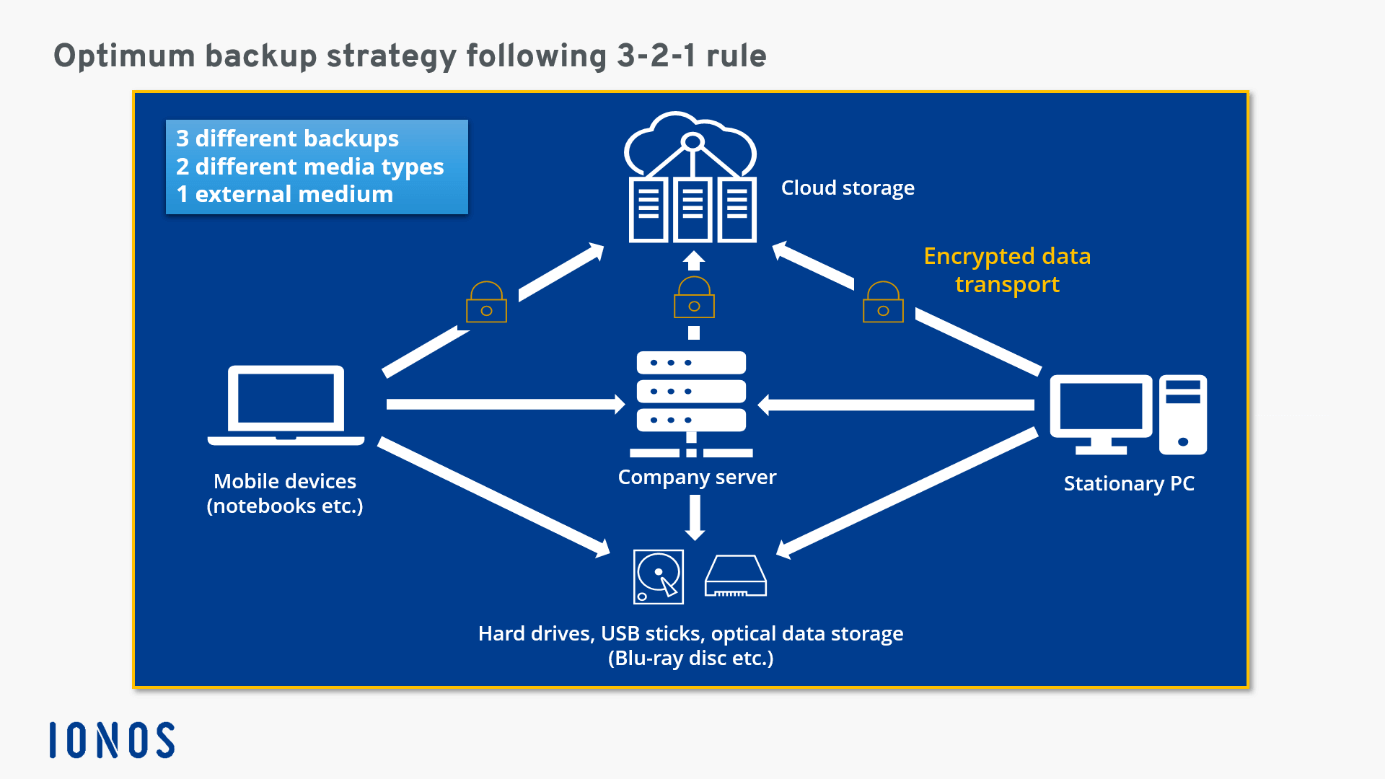
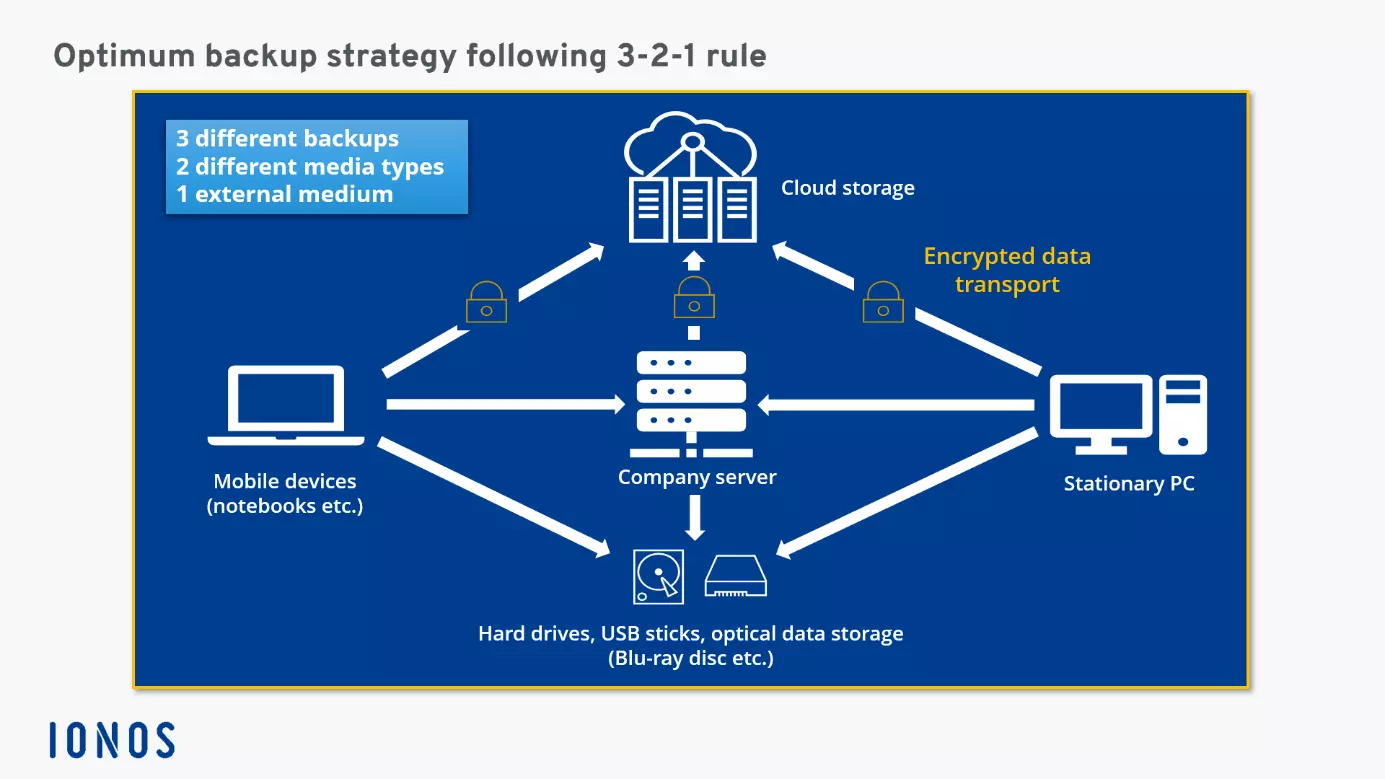
3: Signifies the number of data versions to save – one original and two copies.
2: Stands for two types of media to store your data on, for example, an external hard drive and a cloud account.
1: States that one copy must be kept ‘offsite’ for disaster recovery, that is, one data copy will be stored on a medium that is not kept at the user’s home or a company’s office.
Why is the 3-2-1 backup rule important?
Figures from recent years show that regular data backups are important. The cost of data breaches rose to $4.24 million in 2021 alone, which was the highest since IBM began measuring it as part of its Cost of a Data Breach Report. Companies with more advanced cloud migration strategies were able to contain data breaches faster than those without.
Other surveys suggest that within the private sector, over 60 percent of users have previously been affected by data loss, the main causes of which include technical problems and human error.
To err is human, which has led some of the largest operating system makers to equip their systems with on-board options for data backup. Find out how the Windows 10 backups and the Mac backups work in our dedicated articles on the topic.
The risk of data loss is equally high for private users and businesses. Despite this, only 26% of American computer owners backed up their data in 2018. Meanwhile, 90% of US businesses are making backup copies of their data. The percentage of people and companies applying the 3-2-1 backup rule is unknown.
3-2-1 backup rule in detail
A simple calculation demonstrates how useful the 3-2-1 backup is:
Assuming you store your original file on the hard disk of your computer, the probability of failure is 1 in 100. If you add a second hard disk with the same properties and correspondingly the same probability of failure, the probability of complete data loss is rapidly reduced. Namely: 1 in 100 x 1 in 100 = 1 in 10,000. If you create another copy on a medium that has at least the same probability of failure, you would already be at 1 in 1,000,000. Complete loss of data then becomes highly unlikely.
For the 3-2-1 backup rule to make sense, the individual storage media types and the timing of your backup are important. Find out more about backups in our detailed guide to backing up. Assigning a secure password is another vital component of ensuring your data remains safe and secure.
Ensuring the 3-2-1 data backup is safe
Similar storage media tend to have similar rates of failure and error. External hard disks are more likely to be damaged when dropped or incorrectly stored. This is avoidable when using cloud storage. By using two different types of media for data storage, you can reduce the risk of system failure and thus loss of your data.
Last but not least: the 1 in ‘3-2-1 backup’ refers to the outsourcing of one copy of your data, which significantly reduces the risk of failure. Scenarios that could cause loss of data include fires onsite where your external hard or NAS storage are located.
Easily implement the 3-2-1 backup rule with IONOS
Already own an external hard drive, a USB stick, or other optical storage drive and want to add a cloud solution to your backup strategy? IONOS offers a convenient solution that meets all demands.
Just a few clicks to your cloud solution with MyDefender for individuals or Cloud Backup for businesses.
MyDefender for individuals
Whether you’re storing individual folders or are backing up the entire desktop, once set up, MyDefender lets you create automatic backups of your computer, laptop and/or smartphone. You can decide on which data and folders to back up, how often, and in what form. If there are issues with another backup, you can easily restore your data.
Cloud Backup for businesses
For a more professional backup, companies use the cloud. All devices, from smartphones to entire cloud infrastructures such as virtual machines or SQL servers can be integrated and managed as part of the data backup strategy. Make multiple versions, optimise storage capacities by compressing your backups and track user behaviour so that you can react swiftly and efficiently to any problems. Your backups will be protected with AES 256-bit encryption in our highly secure IONOS data centres.
Secure backups are particularly useful if you’re collaborating on data with colleagues across different times zones and locations. Use the IONOS HiDrive Cloud Storage to keep your data safely stored.