

DHCP Snooping: More Security for Your Network

The Dynamic Host Configuration Protocol (DHCP) makes configuring networks easier. Today, instead of individually setting up every client, every PC, every smartphone and every network-compatible device, we mostly use DHCP. Individual network users receive their IP addresses, subnet masks and other information via a server. This not only simplifies working with large networks, it also minimises sources of error. Because the address assignment process is dynamic, it isn’t possible for two devices to be assigned the same IP address. It also reduces the required address space. If the device leaves the network, the IP address can automatically be reapproved for a new network user.
At the same time, however, this simplification creates a gateway for criminals. When you rely on someone else to do the work for you, you hand over some of your control. As a result, things can be happening in the background that you never find out about. This can also happen with DHCP, however, there is a solution: The fraudulent use of DHCP can be countered with so-called “DHCP snooping”. How does this security technology work?
What is DHCP snooping used for?
When using DHCP, a server ensures that individual clients receive their configurations. For this to happen, the client must first send a request to the network via broadcast. In doing so, the network user wishes to determine which DHCP servers are available and able to respond. All available DHCP servers reply to this request. Should there be several active servers within the network, the client chooses the one whose answer reaches them first. With this DHCP server, the client then receives the address assignment. This is the point where we normally encounter the system’s weak spot, where it’s accessible for criminals.
It is possible to introduce other servers (so-called rogue DHCP servers) into the network. If one of these manages to reach the client first with a response, the network user receives the configuration info via the malicious server. The rogue DHCP server will then send erroneous or manipulated data. As a result, the client is incorrectly setup in the network. This makes it possible to route the client to a wrong gateway — otherwise known as DHCP spoofing. Criminals can record data transfers via the gateway in order to obtain sensitive information. This is also referred to as a man-in-the-middle attack. The assignment of incorrect addresses, in contrast, can lead to a denial-of-service attack, resulting in the paralysis of the entire network. DHCP snooping prevents malicious servers from establishing contact.
In most home networks, regardless of whether they are LAN or WLAN, a router assumes the function of the DHCP server. This however does little to change the dangers caused by DHCP spoofing. The reason for this is that every device can theoretically become a DHCP server. For example, criminals can illicitly connect a laptop to the WLAN and use it to control address assignment.
DHCP snooping, however, not only protects from criminal schemes, but also from error sources that occur through the irresponsible use of additional routers. If a new router is installed into an already existing network, it can confuse the DHCP. The new router then assigns addresses that in fact should not be assigned. This can lead to connection errors. Especially within the context of business operations, it can cause problems when employees add their own devices to the network without informing the network administrator about it.
What is DHCP Snooping?
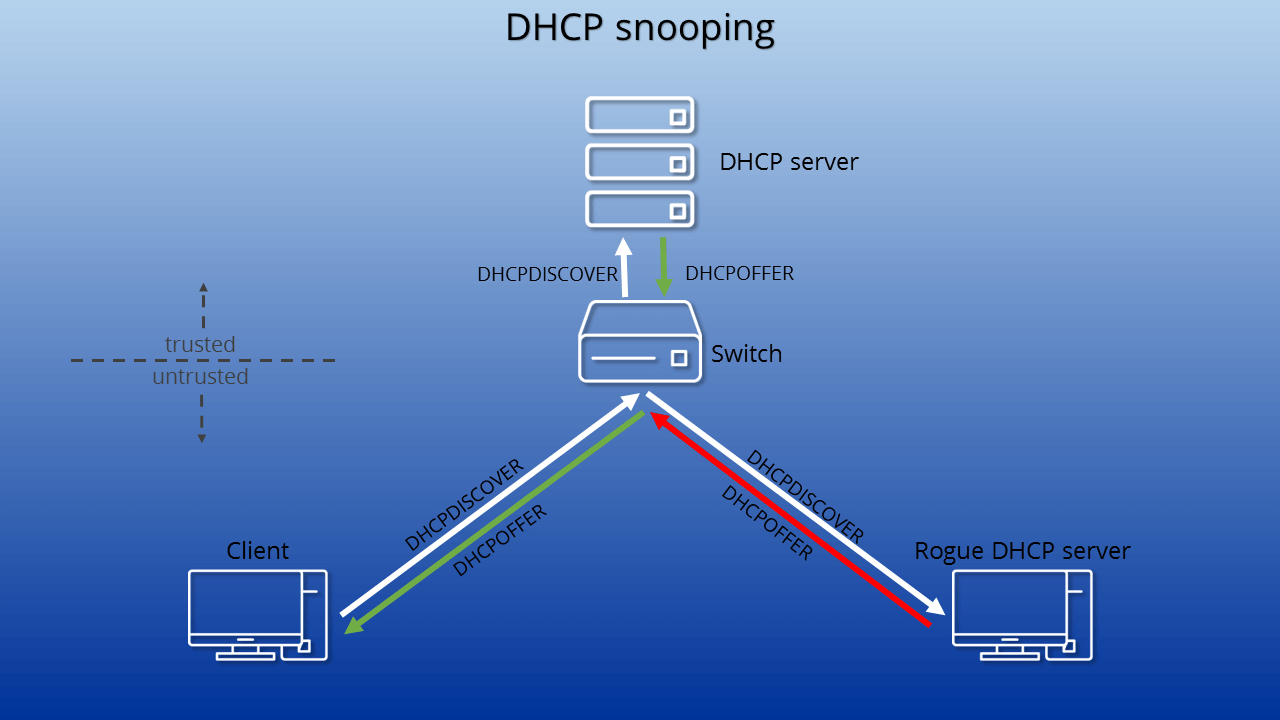
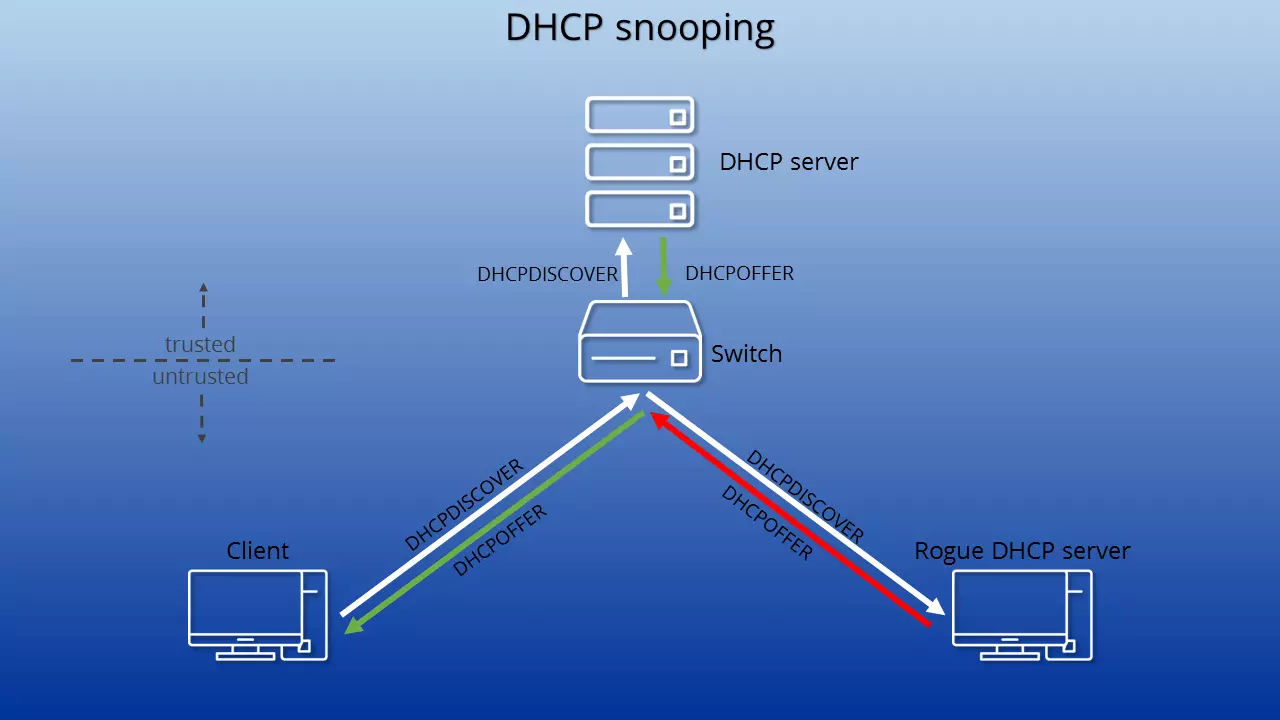
DHCP snooping is a layer two security function according to the OSI model. The function is installed in the switch that connects clients to the DHCP servers. In simple terms, it is a protocol that first checks all DHCP information that passes through the switch. Only approved packages from trusted servers are allowed through to clients.
Cisco was the first manufacturer to use DHCP snooping in its devices. The company was also co-author of RFC 7513, which outlines the concept. In the meantime, however, many manufacturers of network peripherals have followed suit and offer the security function (in some cases under a different name) in their devices.
In this way, a rogue DHCP server — because it monitors the broadcast — can receive the DHCPDISCOVER package (the client’s request for a DHCP server) and is also able to then send a DHCPOFFER package (the response to the request). This, however, will not reach a client. The switch’s DHCP snooping detects that the package was sent by an untrusted server (more specifically, it contains false information) and blocks it from being forwarded.
Trustworthy Ports
In order to make sure that only the right servers can intervene in the configuration info assignment process, DHCP snooping relies on several steps. First, you establish a secure port for your server or servers. Any devices attempting to join the network through another port are to be considered unsafe. This includes all clients. It means that a host running a DHCP server that isn’t authorised by the administrator is considered unsafe. Now, should a DHCP package come through a port that can only be sent by one server (DHCPOFFER, DHCPACK, DHCPMAK) the switch blocks it from being forwarded. No clients will receive the information.
DHCP snooping binding database
An attacker can also try to disrupt the network by pretending to be one of the existing clients, and, under this identity, rejecting offers from the DHCP server. This is why DHCP snooping uses a database that the system creates and updates on its own. The protocol reads through all the DHCP information (but not the actual data after the successful connection) and extracts details for the DHCP Snooping Binding Database.
The system includes all hosts in the database that are running on an untrusted port. The gathered information comprises the MAC address, the assigned IP address, the switchport used, the logical subnet (VLAN), and the lease time duration. This way DHCP snooping can ensure that only the original clients who participated in the communication can send commands to the server, as it is only in these cases that the MAC address and switchport conform with the information stored in the database.
Other security measures also have access to the DHCP Snooping Binding Database, such as ARP Inspection or IP Source Guard.
Logs
In addition, many devices can generate a defense mechanisms report within the DHCP snooping framework. The logs can be forwarded and subsequently analysed. The documentation for the process distinguishes between two errors: on the one hand, the discrepancy between the current MAC address and the info stored in the database, and on the other hand, server packages that are sent via an untrusted port.
The first type of error message is most often caused by poorly-implemented network aspects in a client device, so it is usually not a cause for concern. The second type of error message, however, refers to criminal intentions. It means that someone has deliberately attempted to infiltrate the network with a rogue DHCP server. Because DHCP snooping logs everything, you can initiate target-oriented investigations of such incidents.
DHCP servers can creep into the network without you knowing it. These so-called spurious DHCP servers can be uncovered by a dud in the form of the DHCPDISCOVER package. The malicious server responds to the request, revealing itself.
Option 82
You obtain even more security through the activation of Option 82, also known as DHCP relay agent information. With this, the switch actively enables communication between the client and server. This course of action is sensible if clients and servers are not located in the same subnet. When the client sends a request to the DHCP server, the switch adds additional information to the request’s header. The latter enables the server to locate the switch, and with it, the client’s location.
The DHCP server sorts out the additional information and assigns IP addresses depending on their location info. The server sends the response package back to the client via the switch. If it reaches the switch, the latter recognises from the information still contained in the package that the communication is in fact passing through it. The device then deletes the Option 82 data from the header and forwards the response.
In order to be able to use Option 82, DHCP snooping must be globally activated. Also, the server must be able to handle the additional information. Otherwise, the DHCP server simply ignores the Option 82 data and treats the client request as an ordinary DHCP request.
Reviewer

Christian Heldmaier
Christian Heldmaier is an experienced online marketing and SEO specialist from Karlsruhe. He has been working as an SEO Manager at IONOS since July 2020.