

Hash table | Fast database access to hash values

Where can you find a specific book chapter quickly? Where does Marta Mustermann’s order go? Where can you buy the watch with the brown leather wristband? What these three questions have in common is that they all relate to a location (i.e. ‘where’) and all three assume that what is being sought exists. This is a conceptual model that can also be applied to databases quite easily.
Let us take for example an online shop with thousands of items and customers. The data is stored in databases. The customer can search through the database for a specific item and then order it. The dispatcher then assigns the ordered item to the buyer with their address information via the database. The process entails several searching and sorting tasks, as well as insertion and deletion operations during the ordering process. To manage these tasks more efficiently, large amounts of related data are combined together in a single address position in the database. This position is calculated using hash values and consists of a table with letter-number combinations that are always of the same length. Our guide will familiarise you with the basics of using hash tables.
What is the basic idea behind a hash table?
A hash value is first calculated from the information in a data set. The hash values of all data sets in a database are located in a hash table. An additional mathematical operation calculates the location of the information in the database from this hash value. If a user now enters a search term, this will also be turned into a hash value. The search is no longer for the 'watch with the brown leather wristband' but for a match between the original hash value for the item and the hash value of the search term that was just used (i.e. a match between two letter-number combinations). This method is used for finding highly diverse results.
Security using hash values
A hash table is created after the terms have been assigned automatically generated hash values. These are character strings that are always of the same length and are generated by a hash function. The length of the character string and the characters contained are determined by the hash method used. They are used, for example, to secure login information against attacks.
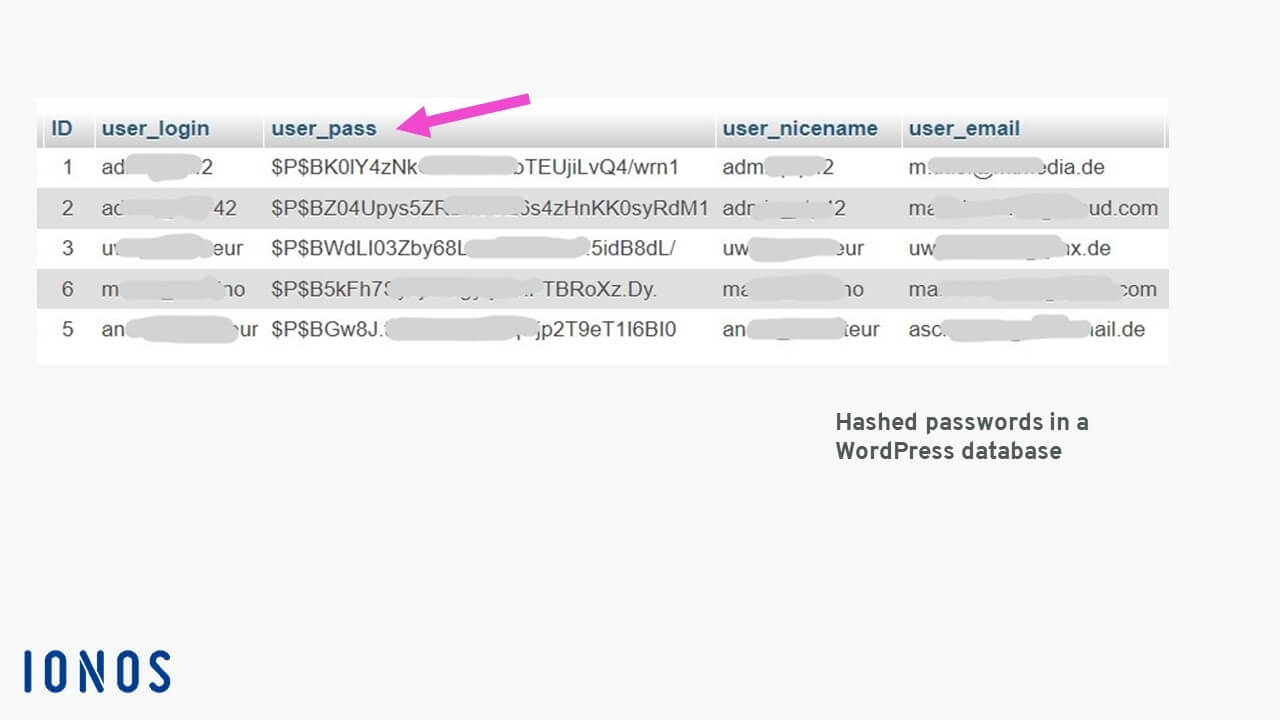
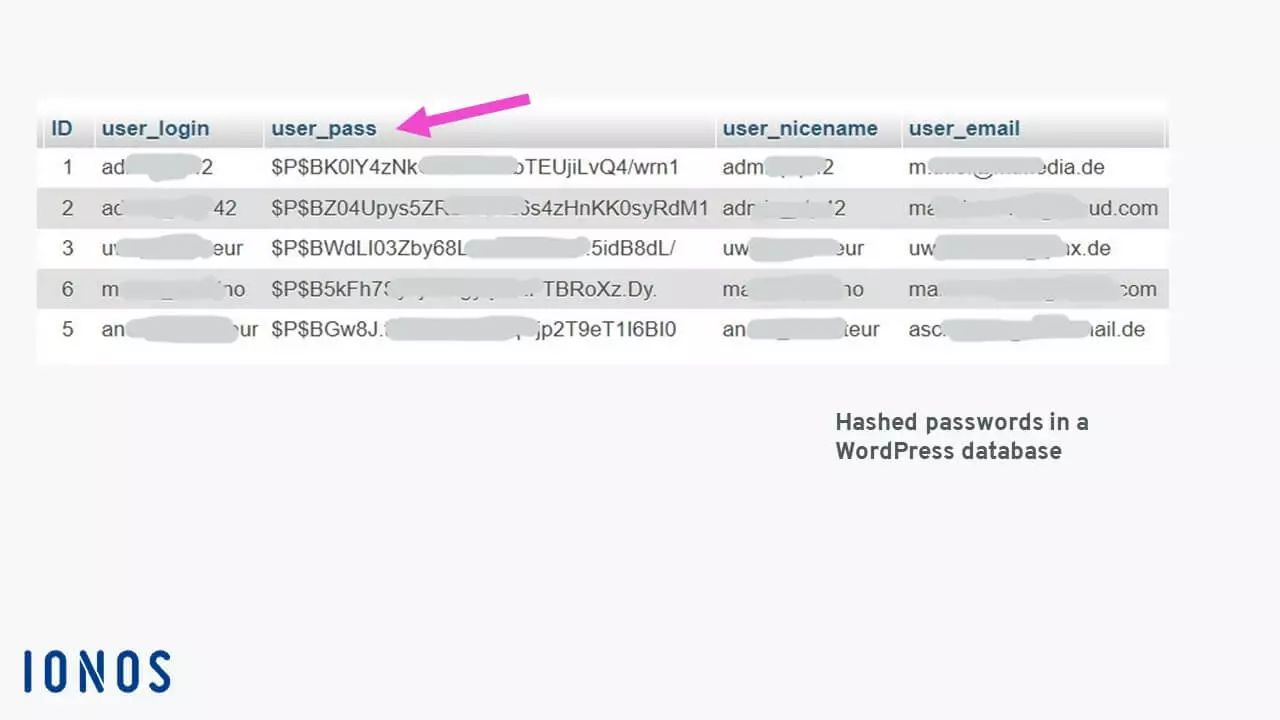
In the example of the WordPress database, when someone attempts to login, the password entered by the user is converted into a hash value using the same procedure and then compared with the entry in the 'user_pass' database field. If the two 34-character-long hash values match, access is granted. It is impossible to convert a hash value back into a password. This is one of the quality features of a hash function.
If someone were to try to breach the security using a brute-force attack, the character string containing all valid characters would need to be run repeatedly until a match was found. Even if the attacker knew the hash function that was used, it would take exactly 839,299,365,868,340,200 attempts to find a match when using uppercase and lowercase letters and numbers in a 10-character-long password.
Navigating databases more quickly
Hash tables are used to speed up searches and the act of entering or deleting data sets in databases. For example, if you search a company’s employee database for a last name, this process can take a long time because each database field has to be searched one after the other (i.e. sequentially) for a match. Converting the search term into a hash value and then searching for a match in the hash table is generally much faster.
So, how is this done? Each data set is assigned a unique address. The way they are addressed is always the same within the database (e.g. 001, 002, 003 or 00A1, 00A2, 00A3, etc.). This address is calculated using the hash function.
Let us take a look at a simple example. In this example, the database can contain 11 entries from position 0 to position 10. The name ‘Lisa’ consists of four ASCII characters with their associated ASCII codes: ‘L’ is 76, ‘I’ is 105, ‘s’ is 115 and ‘a’ is 97. You can test this yourself in Windows with the numeric keypad. For example, [Alt] + 0076 will result in ‘L’. All ASCII values are added together and result in the hash value 393 for ‘Lisa’. Adding together the ASCII values is equivalent to using a hash function.
The remainder is then calculated using whole numbers: 393 % 11 (entry locations) = 35, remainder 8 (the percent sign ‘%’ is used in many programming languages as the mathematical operator to calculate the remainder). The remainder value determines where in the database Lisa and all her other information is stored – in this calculation example, the index number is 8. You might imagine that with this type of addressing, remainder values would often repeat. However, the more entry locations there are and the longer the hash value is, the less likely it is that a repeat will occur. ‘Alis Meyer’ results in a completely different location despite using the same letters since the ‘A’ is now an uppercase letter and the ‘l’ is lowercase.
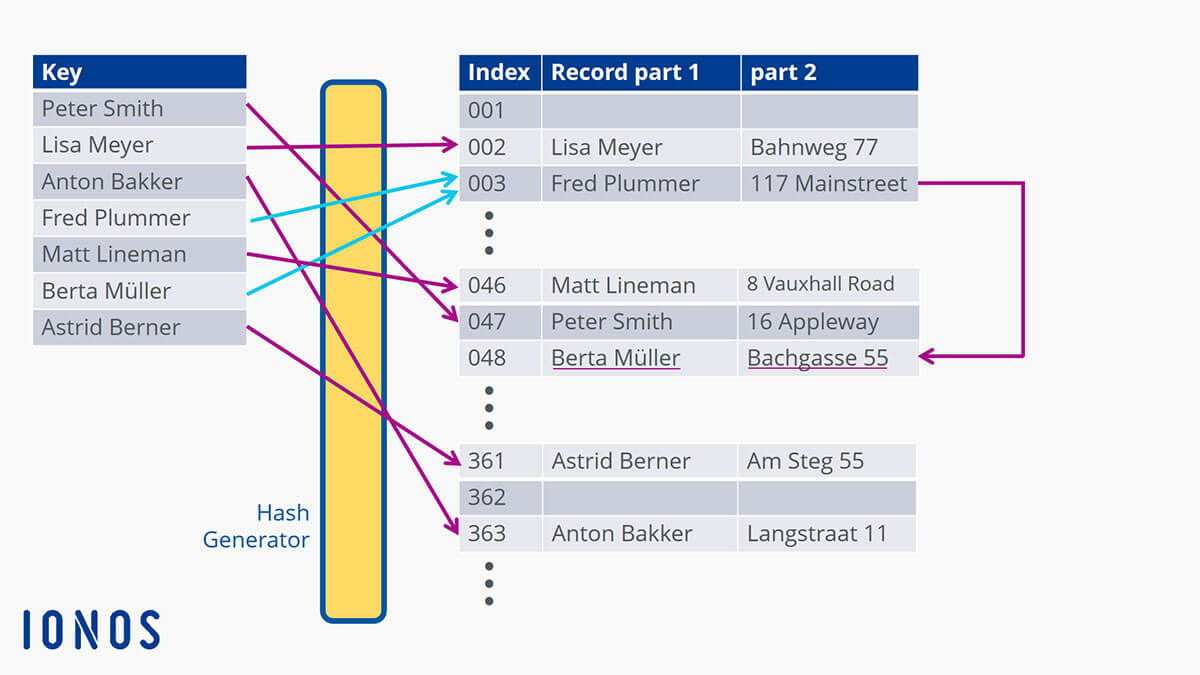
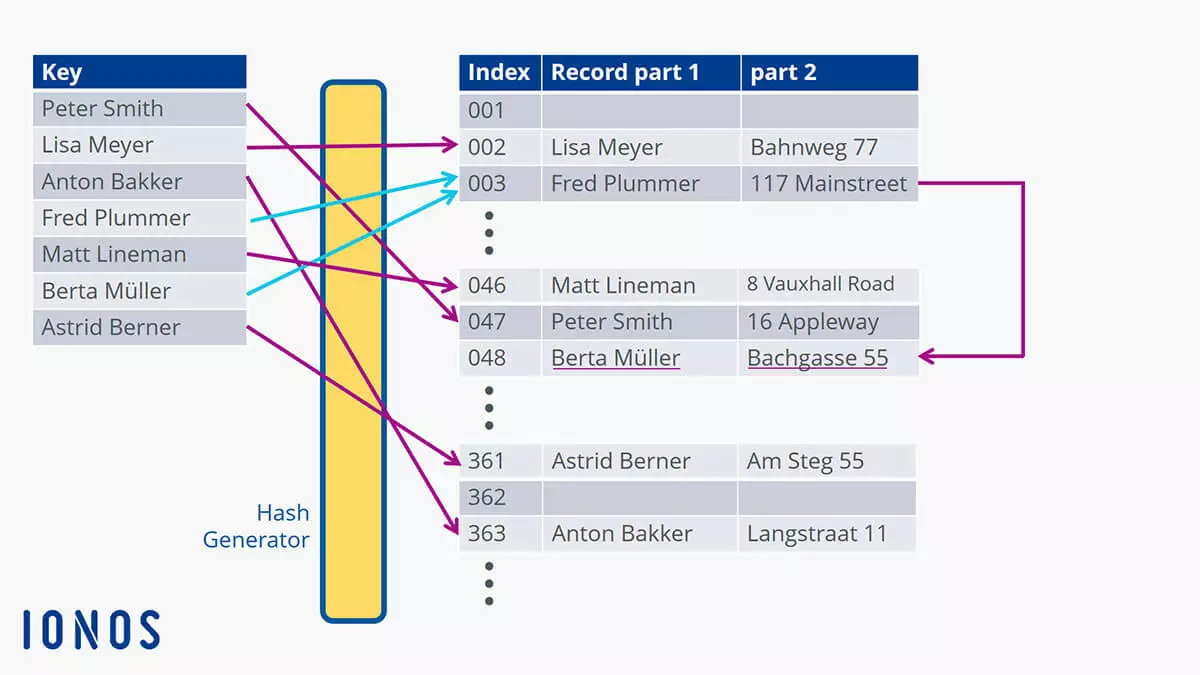
This diagram illustrates the issue with repeats: Different names can be assigned the same index. This results in collisions (shown by the light-blue arrows). So, what does a database ‘do’ when this kind of ‘accident’ occurs? It places the data set in the next available location in the database. If you search for ‘Berta Müller’ in the example, the search will not start at position 001. The pointer will instead start at index position 003 which will (slightly) reduce the amount of time it takes to find the name. This method is called hashing with open addressing which then performs a linear search.
The chaining method for addressing uses a slightly different approach. It does not create a new location for the data set. Instead, the new corresponding entry is linked or ‘chained’ after the first one. This means that the data set you are looking for can be found with a single search request ‘behind’ the first data set at that location. This speeds up the process.
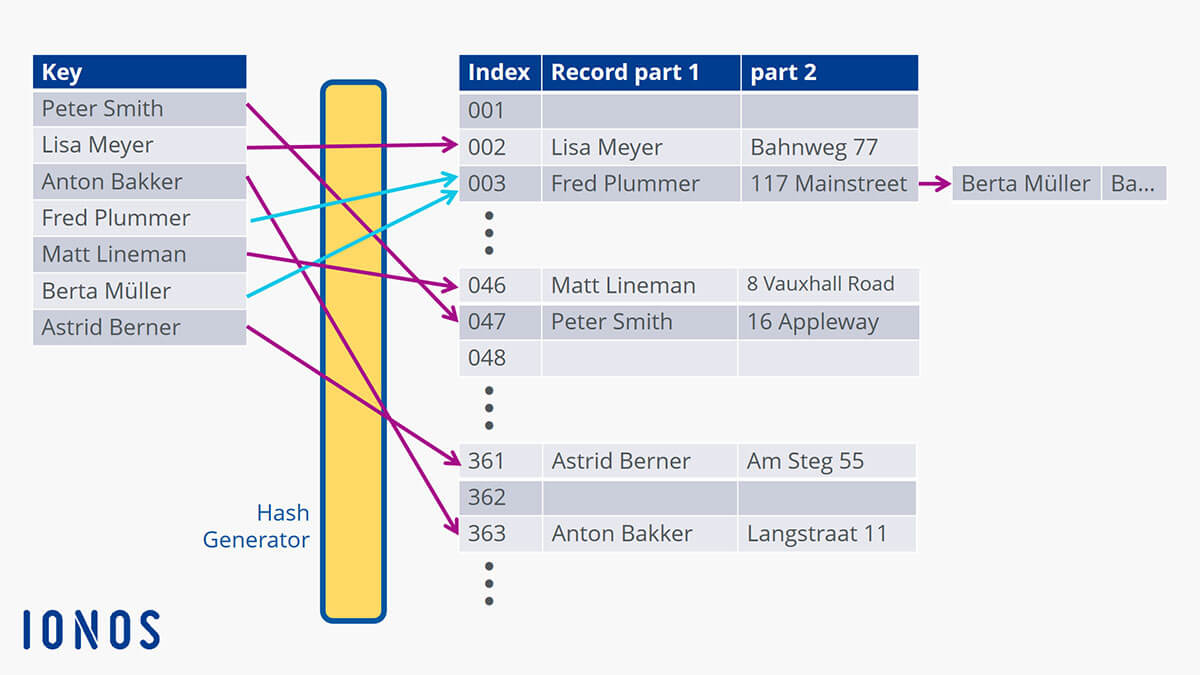
When the search for ‘Berta Müller’ starts, the pointer is set to value 003 as calculated from the hash table and then only has to search for the chained data set at that location. This allows large amounts of data to be packed together more efficiently and makes it faster to search through.
This method is also used in caching so that data that has been used once can be quickly accessed again. The data is stored in the cache as a temporary storage and retrieved from there when it matches an activity-related pattern. For example, this occurs for visited websites which do not have to be completely reloaded from the server when they are requested again because they can be retrieved much more quickly from the cache. Cookies also function as a form of identification that can be compared against and that shows where the user has already been on the web.
What are the different kinds of hashing methods?
The hashing method just described above is also known as open or external hashing which allows data to be stored in chained lists with theoretically unlimited storage space. This does not require more keys, and the chaining allows larger amounts of data to be handled. The word ‘open’ refers to open addressing.
With closed hashing, the number of available keys is limited by the table’s capacity. If you try to store more data than its capacity allows for, overflow will occur. When running through the table again, it will be checked for available locations where the overflows can be placed.
The terms ‘open’ and ‘closed’ hashing are not clearly defined. They are sometimes used with opposite meanings depending on the publication. It is thus recommended to consult and use the corresponding detailed description of the method in the same publication.
Cuckoo hashing is another method for avoiding collisions in database tables. The term originates from the cuckoo’s tendency to push other birds’ eggs out of a nest to lay its own. So, in this case, two hash functions are used to describe two storage locations. If the first location is already occupied, the key stored there will be moved to a new location and the second generated key will take its place. The disadvantage of this method is that it can result in an infinite search loop which will cause the initiated procedure to be aborted due to timeout.
There are various methods for searching databases which have been designed with complicated mathematical formulas that are hidden as program code on a website, such as within the basic search field with the magnifying glass.
In general, databases are increasingly getting larger as the amount of data is growing at a rapid pace. Dynamic hashing addresses this issue by enlarging the hash table to avoid collisions. However, this results in the hash values of previously stored data also changing. Special hash functions have been developed that solve this problem elegantly. There is no limit to the amount of data (at least theoretically). However, searches then run less efficiently.
Advantages and disadvantages of hash tables
The biggest advantage of using a hash table is being able to search through large amounts of data quickly. However, this poses a challenge to the database’s architects who must estimate the required size well in advance to keep the risk of collision low. Many data types can be used in hash tables as long as hash values can be calculated from them.
The disadvantages of hash tables include the fact that databases can degrade if they go through a large number of collisions. The probability that a collision will occur increases with the amount of data. A large number of hash functions do not have the ability to move to the next or previous data set.