

Which free dynamic DNS providers are the best?

DynDNS services help you map the constantly changing IP addresses of your home network to a fixed domain name, ensuring you can access your devices at any time. In this guide, we present the best free and paid DynDNS alternatives.
- Faster domain resolution to keep you online longer
- Added protection against outages and downtime
- UK-based name servers
- No domain transfer needed
An overview of DynDNS alternatives
| Number of hosts, domains | Special features | |
|---|---|---|
| dynv6 (free) | Unlimited hosts, names can be freely chosen | DNSSEC support, multiple APIs |
| No-IP (free) | 1 host, limited domains | - |
| No-IP Enhanced Dynamic DNS (paid) | Up to 25 host names, 80+ domain options | No ads, 100% uptime guarantee |
| No-IP Plus Managed DNS (paid) | 50+ host names, domain registration | Supports email upgrade, SSL upgrade |
| Dynu (free) | 4 domains | Web forwarding |
| Dynu (paid) | 500 domains | Web forwarding, DNSSEC support, logging, two-factor authentication |
| ClouDNS (free) | 1 host | Email forwarding |
| ClouDNS (paid) | More hosts depending on the plan | Email forwarding, DDoS protection, DNS monitoring |
| FreeDNS Afraid.org (free) | Up to 5 sub-domains | No ads |
| FreeDNS Afraid.org (paid) | Depending on subscription, 50-500 sub-domains | No ads, wildcard support, and professional nameserver branding |
| Namecheap FreeDNS (free) | Unlimited domains you own | Dynamic DNS support, global anycast network |
| Namecheap PremiumDNS (paid) | 1 domain per subscription | Enhanced DDoS protection, DNSSEC support (TLD-dependent), 100% uptime SLA |
| Duck DNS (free) | 5 hosts | Available for various operating systems |
| YDNS (free) | Unlimited hosts | DNSSEC support |
Information correct as of November 2025


Why is a DynDNS service required?
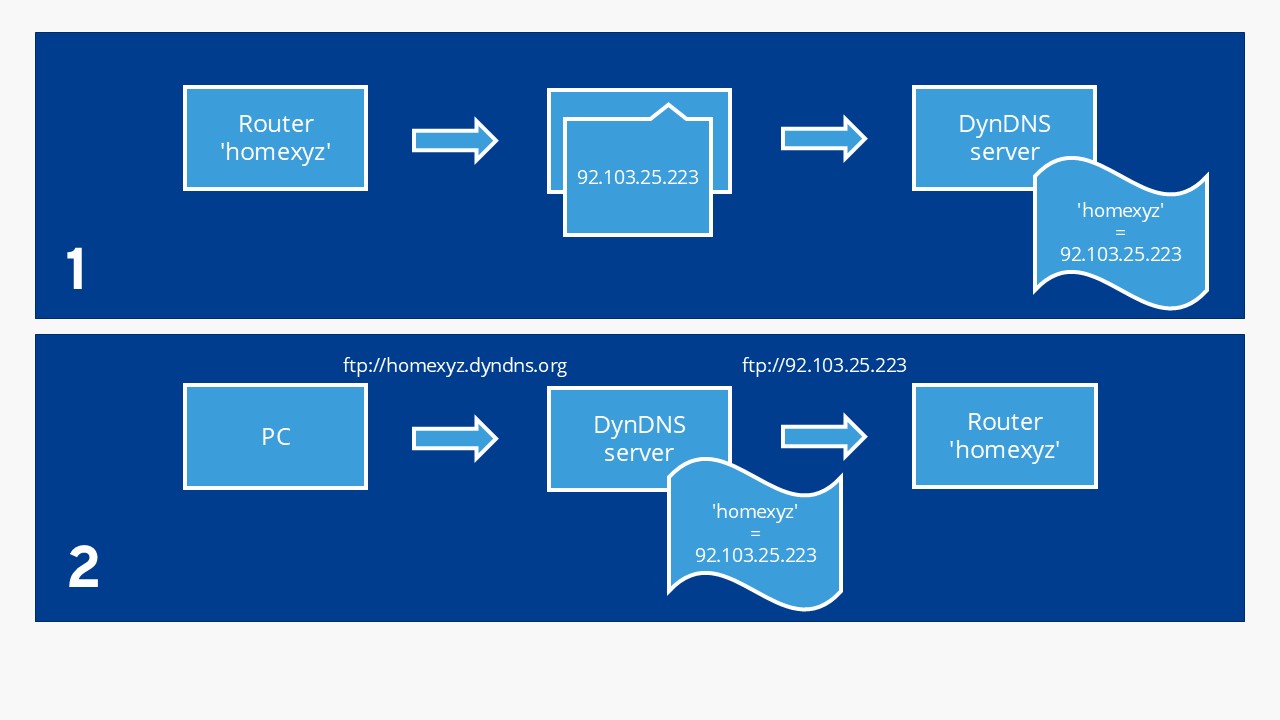
Accessing your home computer while on the go is now easy with tools like Remote Desktop Connection. However, the connection can fail because your internet provider regularly assigns new IP addresses. To keep the connection stable despite changing IPs, you can use DynDNS (Dynamic Domain Name System).
dynv6
The DynDNS provider dynv6 offers a completely free service for private users. A public hostname can be registered directly on the provider’s website in no time—for both IPv4 and IPv6. A recent addition is support for DNSSEC, which provides an extra layer of data security.
Additionally, interfaces can be used to update the zones. Public keys are used for REST and SSH. For the ‘DNS Update’ service, this free dynamic DNS provider uses a TSIG key, which can be created through the service provider’s website.
According to the documentation, additional options such as DNSSEC can be used (if available). dynv6 is primarily targeted at private users and does not offer special enterprise DDoS protection measures or dedicated business support.
No-IP
The No-IP website gives a very professional impression. The DynDNS provider from the USA offers three different packages.
The free package, which includes one host name, is usually enough for private users. However, you must confirm your account every 30 days or it will be automatically deactivated. The free package also displays advertising. Both of these restrictions are removed in the paid packages, which additionally provide more domain options and phone support.
Dynu
The DynDNS provider Dynu is considered particularly user-friendly, making it suitable for beginners. In addition to a free version with four domain names, there is an affordable membership option (around $9.99/£8.00 per year) that allows up to 200 domain names. The paid membership includes additional features like DNSSEC, logging, SSL-support, and prioritised support.
Alternatively, users of the DynDNS alternative can either use a third-level domain name (under the .dynu.com address) or a custom top-level domain name. By using its own client (available for Windows, macOS, and Linux), your PC continuously communicates with Dynu DNS servers, which ensure almost 100 percent availability thanks to a fully redundant infrastructure (routers, switches, bandwidth providers, power supply).
ClouDNS
ClouDNS is a DynDNS provider from Bulgaria that has been operating since 2010. In the free version, one Unicast DNS server is available. Starting at monthly prices of $2.95 (aound £2.30), users can also access Anti-DDoS DNS, which offers special protection against DDoS attacks. From a monthly payment of $9.95 (around £8.00), extensive GeoDNS options for location-based routing are included.
Even in the free basic version, ClouDNS allows 50 DNS entries and 500,000 monthly DNS queries for a DNS zone. Those who need more can extend the limits with a paid subscription. For questions and issues, a 24/7 live chat and a comprehensive knowledge base are available.
FreeDNS Afraid.org
With over three million members, afraid.org is one of the most popular free DynDNS providers worldwide. In the free version, afraid.org offers up to five sub-domains. Another advantage of the DynDNS service is that it is completely ad-free and remains very stable even with high usage.
For users who need more features, FreeDNS offers a premium membership. This allows the creation of additional sub-domains and enables features like wildcard support, captcha-free management, and professional nameserver branding. The exact terms depend on the chosen membership model.
Namecheap
Namecheap’s free FreeDNS service supports Dynamic DNS and allows you to manage DNS for domains registered with any provider. After adding and verifying your domain, you can enable Dynamic DNS directly in the dashboard. For users who need stronger performance, Namecheap also offers PremiumDNS, a paid upgrade that includes advanced DDoS protection and DNSSEC support (where supported by the domain’s TLD registry).
Duck DNS
Duck DNS is a free DyDNS provider that works on various operating systems such as Windows, macOS, Linux, Docker, and Raspberry Pi. Currently, up to five subdomains can be set up per account. Authentication is conveniently done via login through Google, GitHub, Reddit, or X. The provider’s website offers helpful setup guides and configuration examples on different platforms.
YDNS
Another provider for free DynDNS hosting is YDNS. YDNS offers each user unlimited hosts under a fair-use model, along with standard integrated DNSSEC support. The donation-funded DynDNS provider promises to remain free. Registration is straightforward by email.
Many routers include remote-access features or built-in DDNS services. Before signing up for an external service, check your router’s interface — it may already support dynamic DNS, and you can enable it directly there.