

CMYK Color Model explained

Printing colours has been possible since Gutenberg’s time, but the process of reproducing coloured images for printed mass media, for example, was realised a few hundred years later. Standardised colour scales have been around since 1915 with the Standard Colour Reference of America. Today, many homes will own a colour printer. But how does an RGB image get from the computer screen onto the printed paper? And why does it take four colours? We’ll show you what you need to know about CMYK colours and the differences to RGB and other colour models.
Ask, create and research with the European alternative to ChatGPT. Robust security and unlimited chats give you peace of mind.
How does CMYK work?
The use of colours for presenting on screen and in print follows the physical characteristics of the human eye. The eye is particularly sensitive to three light wavelengths. They are red, green, and blue and are used as part of the RGB colour space. This ensures a colour-balanced reproduction on colour monitors.
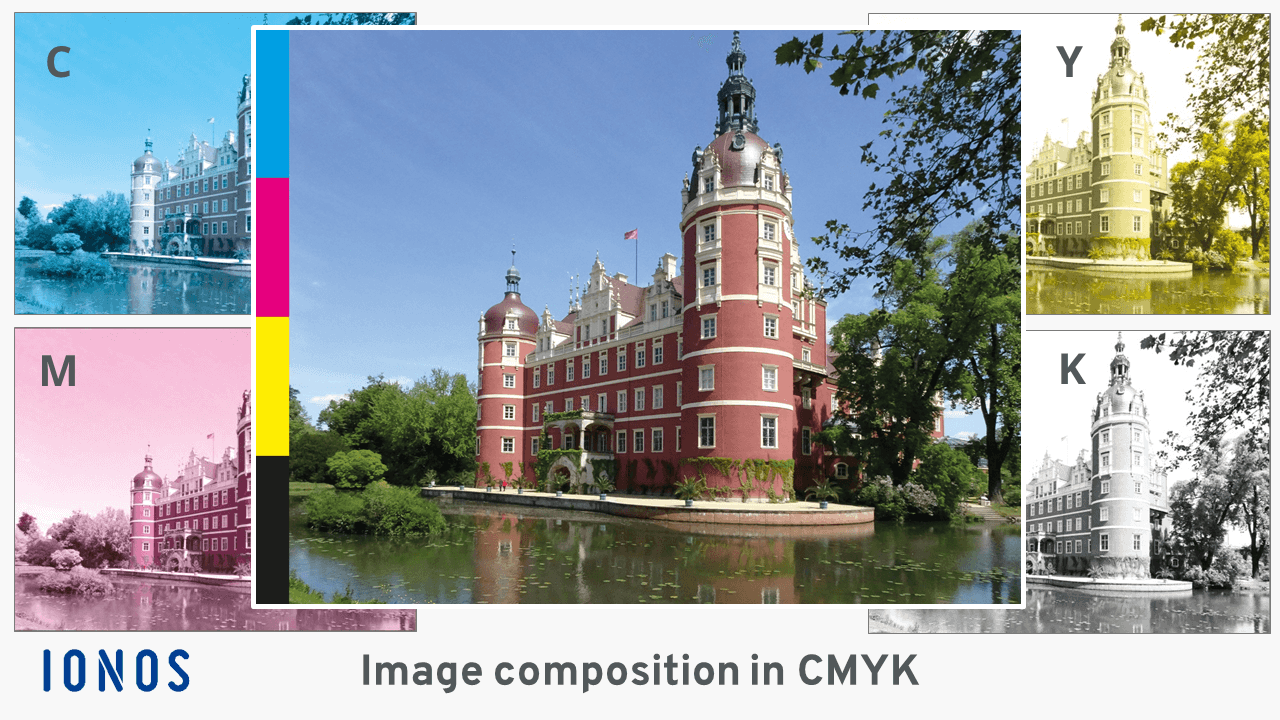
During the printing process, however, white paper is usually printed on. Paper is not transparent and therefore doesn’t allow light to pass through. That’s why the four printing colours cyan, magenta, yellow, and black - CMYK - are applied one after the other in industrial offset colour printing. The actual printing process is based on placing small, closely spaced dots which the human eye perceives as a colour image once combined and viewed from a distance. To produce an adequate image quality, industrial offset printing usually requires 300 dots per inch (dpi). The tiny dots are of different sizes depending on the desired thickness of the colour application. If a colour component equals zero percent, there is no dot at this point and therefore no colour.
Similarly, with colour ink printers, tiny drops of ink are placed onto the paper in the shape of closely spaced dots. They range from 0.3 to 0.4 millimetres in size. It’s the sum of the individual droplets in the CMYK colours that creates the ‘illusion’ of a coloured image. A colour laser printer delivers the same result, but in a slightly different way. There are four electrically charged drums, which are discharged by a laser beam where no toner should be released from one of the four CMYK cartridges. The remaining charged areas are then thinly coated with the colours. These coated print pixels are successively transferred to the paper and fixed by applying heat.
The three examples – offset, colour ink and colour laser printing – illustrate the demands on the precision of the printers. In the following, you’ll find out how colours are divided and used for this process.
How many colours does the CMYK space have?
The CMYK colour space works with the basic colours cyan, magenta, and yellow. The letter K stands for ‘key’ or ‘contrast’ and denotes black. The ‘B’ was already assigned for ‘Blue’ in the RGB colour space, so that it was no longer an option to denote as ‘Black’. CMYK colours are currently standardised according to ISO 2846 – a successor to the so-called Euroscale, which was bindingly specified in DIN 16539 from 1971.
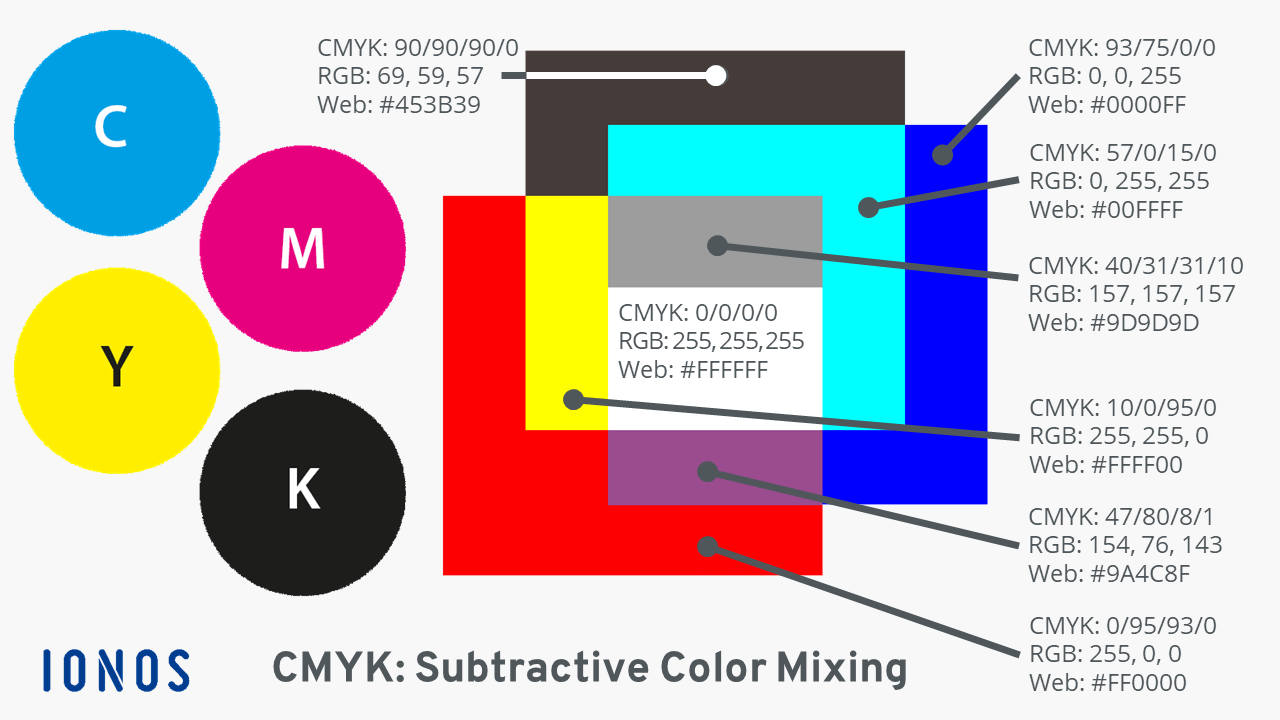
CMYK belongs to the subtractive colour models. To simplify, this means that if all colours are 100 percent active, the resulting colour is black; if all colours are absent, i.e., at zero percent, (white) paper remains white. The intensity of different colour nuances is comparable to mixing colours using a colour box, for example, blue mixed with yellow results in green. Depending on the amount of water and colour, a different shade of green is created.
The important difference to RGB: The absence of all three colours (RGB = 0, 0, 0) ensures black in the RGB colour space. If red, green, and blue are each at their maximum value of 255, white is displayed. Being an additive colour model, RGB is the exact opposite of CMYK.
In practice, it has been found that printing 100 percent cyan, magenta, and yellow results in a very dark shade of brown. In the figure above, this can be seen in the colour field CMYK = 90/90/90/0. To create a true black, an additional component is needed. That is why the colour black (K) has been included in the colour space. At the same time, the addition of black made it easier to scale the other three colours. In theory, it’s possible to display up to four billion different colour tones with CMYK colours.
CMYK and RGB – when to use each?
The CMYK colour model is used when a representation of an image is physically output in the form of print media – i.e., using print machines of various technologies, and computer laser or inkjet colour printers. In a four-colour laser printer, three more ink cartridges are used in addition to black toner – cyan, magenta, and yellow. The same applies to colour ink printers, although additional colours have been used for some time now. Given the higher demand on printed products, industrial printing machines have also been supplemented with additional colour printing units. In six-colour printing, they are green and orange. Other multicolour printing techniques use defined spot colours.
When is the RGB colour model most useful? Find out more in our dedicated guide on RGB colours that reveals the secrets of additive colour mixing in RGB and other colour spaces.
RGB is always involved when something is displayed on screens or monitors. Digital cameras also produce RGB image files. With RGB, 16.8 million different colour tones can be achieved.
What other colour spaces are there?
Every printable medium, including every type of paper, reproduces colours slightly differently despite using the same CMYK values. Some absorb the ink more strongly, while others have a smooth, glossy surface, and others are matt. To compensate for this, standardised colour profiles were created to ensure the same printing results are achieved for various types of paper and ink cartridges. An example of a colour profile like this is the standardised colour profile ‘ICC V4’.
Colour profiles are available for scanners and monitors too to match colours across different technical devices for maximum colour fidelity across different output media. The data sets for standardising colour management systems are coordinated by the International Colour Consortium (ICC).
Colour systems expand on this and define the composition of colours in greater depth. Some rely on theoretical models of colour perception of the human eye.
CIELAB
The colour system is also referred to as CIE-L*a*b* or Lab colours. It is based on the human perception of the so-called normal observer and includes all perceptible colours. It is not based on a mathematical model like RGB or CMYK. The underlying standard is EN ISO 11664-4 ‘Colourimetry – Part 4: CIE 1976 L *a*b* Colour space’. This is often referred to as ‘tristimulus’ in specialist articles.
HKS
The HKS colour system currently consists of 88 basic colours and 3,520 full tone colours that can be used to print on natural and art paper. In contrast to CMYK, the colours are already pre-mixed before the printing process. The aim is an objective comparability and reproducibility of various colour nuances. HKS colours can be simulated using CMYK, but a similar brilliance is rarely achieved.
Pantone
The Pantone Matching System is a colour system that’s used internationally for graphics and print media. It was developed by US company Pantone and contains 1,867 specialist colours (as of 2016) that cannot be displayed using conventional four-colour printing.
RAL
The RAL Classics colour system from 1927 comprises 213 colours. The RAL design system with 1,625 standardised colours has existed since 1993. Some RAL colours are corporate colours or signal colours for certain items, e.g., b. RAL 3024 is used to paint fire and rescue vehicles, rescue cruisers, and lifeboats. The true-to-colour representation of RAL colours is not uniformly possible on monitors and printers and is only approximated when using CMYK or RGB colour specifications.
Find out more about the use of colours and image formats in our guides ‘What is a pixel’, ‘Ten image formats in overview’ and ‘What’s TIFF? An introduction’.
Reviewer

Melissa Senn
Melissa Senn has been with IONOS since 2016 and focuses on website, e-commerce, social media, and AI in the Digital Guide. As a digital strategist, she uses her extensive SEO and GEO experience to transform complex technological trends into practical content.