

CORS: Cross-Origin Resource Sharing Explained

It’s strictly prohibited: If you access a website, you should not be getting additional data from third-party servers! But there can be exceptions. If both website owners agree on cooperation, there’s nothing to stop them reaching an agreement. Cross-origin resource sharing (CORS) regulates this cooperation. How does it work?
How Does CORS Work?
The same-origin policy (SOP) prohibits downloading from other servers when visiting a website. All data should come from the same source, i.e. originate from the same server. This is a security measure, as JavaScript and CSS can load content from other servers without the knowledge of the user – including harmful content. This access attempt is referred to as a cross-origin request. However, if the data exchange is known to both website operators and intended, then the procedure can be permitted. The requested server – i.e. the server from which content is to be downloaded – then allows access via cross-origin resource sharing.
However, this only happens for certain clients. This means: CORS is not an open invitation for any cross-origin requests. Instead, the second server permits exclusive access to the first via the HTTP header. The header of the HTTP response exactly describes which server may download the data and make it finally available to the user. A general permission for access by all clients is only permitted by the integration of wildcards. However, this only makes sense for servers that offer such information that should be available to the general public – web fonts, for example.
Ideally, the user should not notice the exchange of the two servers involved. All current browsers support cross-origin resource sharing, and sending queries and responses happens in the background as quickly as possible when a website is accessed.
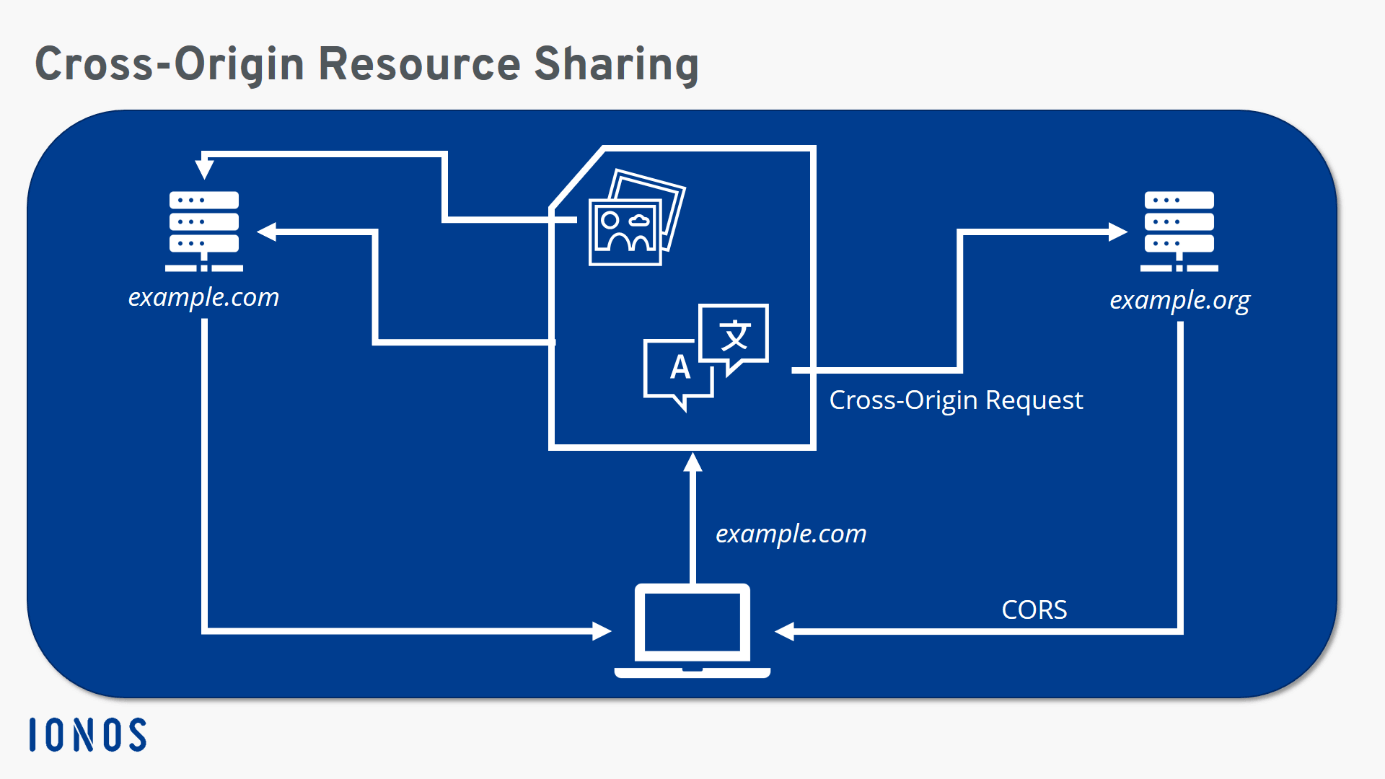
Structure of the CORS Header
In line with the same-origin policy, the details of the origin of a server connection consist of three elements: host, port, and protocol. In the example above, the directive therefore prohibits 'https://example.com' from accessing 'http://example.com' or 'https://example.org'. In the first case, the protocol is not the same, in the second the host information is not identical.
A cross-origin request is basically a HTTP request. Certain methods generally don’t present any problems. GET and HEAD cannot change data and are therefore generally not perceived as a security risk. The situation is different with PATCH, PUT or DELETE: These make harmful interference possible. For this reason, cross-origin resource sharing must also be activated here. Accordingly, CORS isn’t only able to include information on the permitted origin, but also on which HTTP requests are allowed by the source.
If these are security-relevant HTTP methods, the client initially sends a preflight request. This only really indicates which HTTP method will be next directed to the server and asks if the request will be considered secure. The OPTIONS header is used to this end. Only after a positive response can the actual request be made.
There are several CORS headers, each dealing with different aspects. The two important headers for the determination of secure origins and permitted methods have already been mentioned above. But there are more:
- Access-Control-Allow-Origin: Which origin is allowed?
- Access-Control-Allow-Credentials: Are requests allowed even if the credentials mode is set to include?
- Access-Control-Allow-Headers: Which headers may be used?
- Access-Control-Allow-Methods: Which HTTP request methods are allowed?
- Access-Control-Expose-Headers: Which headers may be displayed?
- Access-Control-Max-Age: How old may the preflight request be before it expires?
- Access-Control-Request-Headers: Which HTTP header is specified in the preflight request?
- Access-Control-Request-Method: Which HTTP method is specified in the preflight request?
- Origin: What is the source of the request?
Special focus lies on the first header. There, the server specifies which other host is allowed to access it. In addition to a specific address, you can also get a wildcard in the form of an asterisk. This allows cross-origin requests from any source for the server.
Example of Cross-Origin Resource Sharing
In our example below, we assume Host A (example.com) wants to send a DELETE request to Host B (example.org). For this, the original server first sends a preflight request:
/OPTIONS
Origin: http://example.com
Access-Control-Request-Method: DELETE
If Host B has no problem with this cross-origin request, it responds with the appropriate CORS headers:
Access-Control-Allow-Origin: http://example.com
Access-Control-Allow-Methods: PUT, POST, DELETE
If the headers in the response do not match the specifications of the request, or if the requested server does not answer, no cross-origin request can be made.
Advantages and Disadvantages of CORS
CORS serves to circumvent an inherently secure default setting – namely the same-origin policy. The SOP, in turn, is an effective way to prevent potentially dangerous connections. However, the internet is often based on these cross-origin requests, since many connections from one host to others are certainly desired in many cases.
CORS, therefore, offers an intermediate route: For situations in which cross-origin requests are explicitly required, exceptions can be made with CORS. However, there is a risk that website owners will merely use wildcards for reasons of convenience. This would negate any protection by the SOP. That’s why it’s important to only use CORS in selected special cases and configure it as restrictively as possible.