

Learn Lua with the Lua programming tutorial

Lua is a script language developed in Brazil in the early 1990s. The Lua interpreter translates the source text of a Lua program into Bytecode and then executes it. The interpreter itself is written in C, which gives Lua programs greater performance during execution. Moreover, the C-API allows Lua code to be embedded in C/C++ programs. Lua is a multi-paradigm language suitable for writing imperative, functional, and object-oriented code.
Lua’s strongest differentiator is the simple embedding in other systems and languages. As a result, Lua has established itself as a “glue language” and is used in many game engines. What’s more, the language can be used to manage web servers like Apache and nginx. Via the CGI interface, Lua is also often used as a stand-alone internet programming language. In addition, the language is used for programming mobile apps.
Lua scripting tutorial: first steps
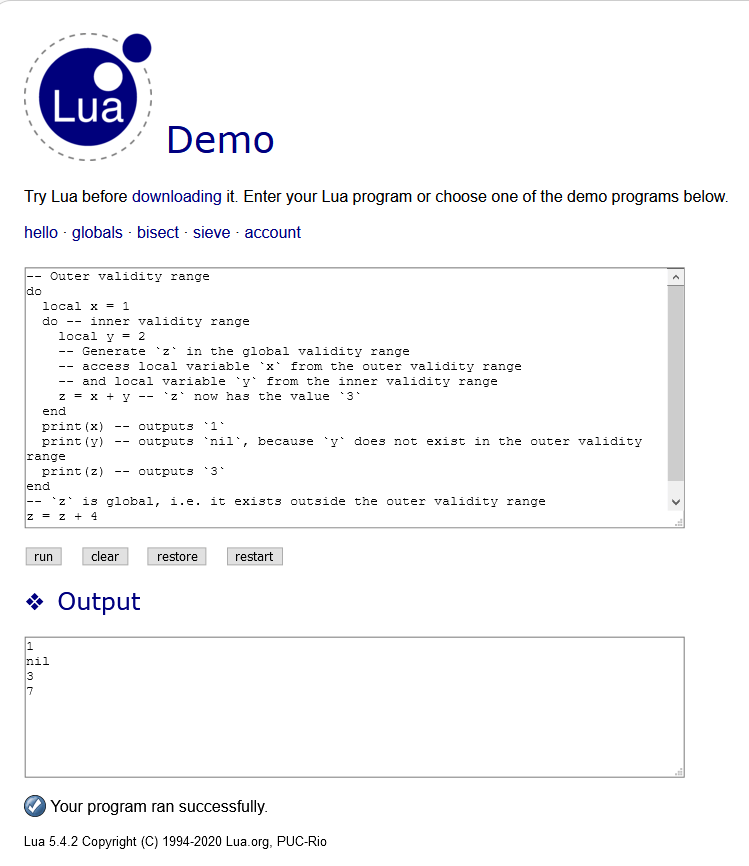
The easiest and fastest way to learn to program with Lua is to run Lua code on the interactive Lua demo website. You can test all the Lua code examples presented further on in this article. Copy one of the code examples into the text field and click on “run” to execute the code.
This means you don’t need to install anything. If you do wish to use Lua on your own system, follow our instructions below. Otherwise, skip to the section “Learning the basics of the Lua script language”.
Preparing your system for the Lua tutorial
The Lua interpreter consists of a single binary file available in the command line after entering the command “lua”. This is saved to the system and may need to be entered in the pathway. Moreover, Lua offers libraries that enable the embedding of Lua code into C/C++ programs.
The “Homebrew” package manager can be used for installation on Mac and Linux systems. If you have installed Homebrew on your system, enter the following instruction in the command line to install Lua:
brew install luaTo install Lua on a Windows system, you can turn to the LuaDist installer.
Using the Lua interpreter interactively
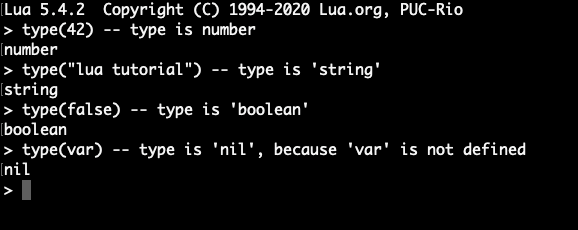
As is the case with many script languages, the Lua interpreter can be run interactively. In interactive mode, the interpreter accepts Lua code in the command line and runs it line by line. The values generated in this way are output directly in the command line. As a user, you can then check and adjust the values of variables. This approach is therefore particularly suitable for rapid prototyping. To launch the Lua interpreter in interactive mode, enter the following command in the command line:
# Start Lua interpreter in interactive mode
lua -iTo leave interactive mode, input the command “os.exit()” or press the [Ctrl]+[D] keys together.
Running Lua script for the tutorial with the Lua interpreter
Instead of entering Lua code piece by piece in the command line, you can also instruct the Lua interpreter to run a complete Lua source text file. To do this, we first generate a Lua file and submit the file name to the Lua interpreter for execution. The interpreter then reads the source text contained in the file, line by line, and executes it.
# Run Lua script
lua <file name>.luaLua source text files end with the file extension “.lua”.
Making Lua script for the tutorial directly executable using a hashbang
With the operating systems Linux / UNIX / macOS, we also can make a Lua source text file directly executable. Here, we enter a “hashbang” as the first line in the Lua file:
#!/usr/local/bin/lua
-- Lua code for execution
As you can see, the hashbang contains the storage location of the Lua binary file – in our example: #!/usr/local/bin/lua. In certain circumstances, the storage location may differ from this on your local system. In this case, you can find out the storage location of the Lua binary file by using the “which” command in the command line:
# Find out the storage location of the Lua binary file
which lua
After you have added the hashbang to a Lua script, you need to mark the file as executable for the user. Use the following command in the command line to this end:
# Mark Lua file as executable
chmod u+rx <file name>.lua
Then, run the Lua script in the current directory:
./<file name>.lua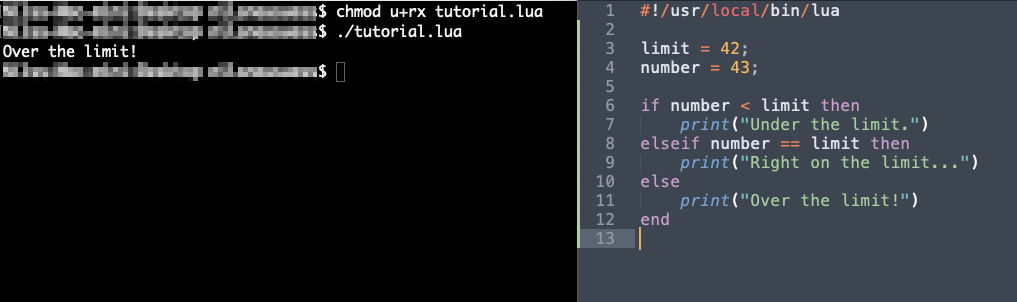
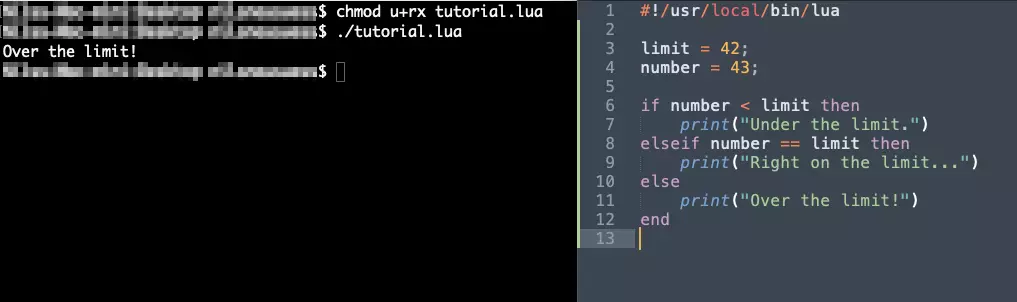
The hashbang trick works with most script languages on Linux and UNIX-type systems such as macOS. The same approach allows you to make Ruby or Python scripts directly executable.
Learning the basics of the Lua script language
Lua is a multi-paradigm language. The fundamental style is imperative and functional. The language is completely dynamic, i.e. no distinction is made between compile time and run time. Lua uses dynamic storage management exclusively. The size of an object in the memory can change during run time. A “garbage collector” (GC) clears up any storage space that’s no longer needed, meaning programmers do not need to take care of that themselves.
Learning to use comments in Lua scripts
Comments are an essential part of any programming language. They are used for the following purposes among others:
- Outlining code components
- Documenting code features
- Activating/deactivating code lines
A single-line comment in Lua begins with a double hyphen (--) and runs until the end of the line:
-- this line is ignored by the interpreterMulti-line comments can be written in combination with double square brackets “[[” and “]]”:
--[[
This comment
covers multiple
lines.
]]
Values and types for the Lua coding tutorial
Like most other script languages, Lua is a dynamic type language. Types do not belong to variables, but values. Each value has exactly one type – whether it’s a number, string of characters, truth value etc. Altogether, Lua has a manageable number of types. They are summarised in the following table:
| Type | Explanation |
| number | Decimal number |
| string | Character string |
| boolean | Truth value: “true” or “false” |
| nil | Missing value; the type has only the value “nil” |
| function | Function |
| table | Combined data type: list/array, hash/dictionary |
| thread | Coroutines |
| userdata | User-defined C data type |
Lua utilises literal syntax for values of all types, except for “thread” and “userdata”. To determine the type of a value, we use the “type()” function. This returns the name of the type as a string. Here’s a few examples:
type(42) -- Type is `number`
type("Lua Tutorial") -- Type is `string`
type(false) -- Type is `boolean`
type(var) -- Type is `nil`, because `var` is not definedWith the following code examples, keep in mind that in Lua the first element of a list has the index 1 instead of 0, as is normally the case in most languages!
Learning to code with Lua: What are expressions, variables, and operators?
An expression is evaluated by the interpreter and a value is returned. Expressions combine literals, operators, variables, and function calls. Expressions can optionally be grouped with brackets “()”. Being a dynamic language, Lua automatically determines the type of the returned value. Here are some examples of expressions:
-- Arithmetic operation in Lua
1 + 2 -- evaluates to the value `3`
-- String concatenation in Lua
'Walter' .. 'White' -- evaluates to `WalterWhite`
-- String concatenation with the automation conversion of a number in Lua
‘The ' .. 3 .. ' Musketeers' -- evaluates to `The 3 Musketeers`
-- Parity test in Lua
7 == '7' -- evaluates to `false`
-- Parity test in Lua
‘small' == string.lower(‘SMALL') -- evaluates to `true`
-- Dynamic type information
type(var) == 'nil' -- evaluates to `true`, because `var` is not defined
A variable is a name for a value in the memory. Like in most programming languages, a name in Lua starts with a letter or underscore (_), following by further letters, underscores, or numbers. Here, a clear distinction is made between upper and lower case. The following reserved words may not be used alone as a name:
“and”, “end”, “in”, “repeat”, “break”, “false”, “local”, “return”, “do”, “for”, “nil”, “then”, “else”, “function”, “not”, “true”, “elseif”, “if”, “or”, “until”, “while”
However, the reserved words can appear as part of a name without causing any problems:
for = "Peter" -- produces an error
for_user = "Peter" -- allowed
A value is assigned to a variable using the assignment operator (=). This shouldn’t be confused with the logical parity operator (==). As normal, a distinction is made in assignment between “L” value and “R” value. The variable has to be on the left side of the assignment operator, i.e. it is the L value. This is assigned the evaluated value of the R value on the right:
number = 13 -- this is OK
13 = number -- produces an error, because the number 13 cannot be assigned a new value
An operator generates a new value from one or more operands. Here, we refer to a unary (one-digit) or binary (two-digit) operator. An operator combines operands of a certain type and returns a value of a certain type. Let’s look at the different operators in Lua.
Arithmetic operators work with numbers and return a number:
| Arithmetic operator | Arity | Operation |
| + | Binary | Addition |
| - | Binary | Subtraction |
| * | Binary | Multiplication |
| / | Binary | Division |
| % | Binary | Modulus |
| ^ | Binary | Potentiation |
| - | Unary | Negation |
The relational operators are all binary, and they test how two operands relate to each other. They return a truth value:
| Relational operator | Test |
| == | Parity |
| ~= | Non-parity |
| > | Larger than |
| < | Smaller than |
| >= | Larger than or equal to |
| <= | Smaller than or equal to |
Logical operators combine truth values and return a new truth value:
| Logical operator | Arity | Operation |
| and | Binary | AND combination |
| or | Binary | OR combination |
| not | Unary | Negation |
In addition to the operators above, there are two special operators in Lua. These are used to concatenate strings and determine the power of a combined value, like a table or string:
| Operator | Arity | Operation |
| .. | Binary | String concatenation |
| # | Unary | Determine the number of elements of a table / length of a string |
Lua does not use any combined allocation operators like “+=” and “-=”, which can usually be found in many script languages. For incrementing and decrementing variables, the operation is written out explicitly:
price = 42.99
discount = 0.15 -- 15% discount
price -= price * discount -- `-=` does not work in Lua
-- Decrementation must instead be written out explicitly
price = price - (price * discount)Understanding validity ranges and blocks for the Lua programming tutorial
The concept of the validity range is important for any programming language. A variable only exists within a certain valid range. Like in JavaScript, variables in Lua are global by default. However, the continuous use of global variables is known as “anti-patterns” and should be avoided. In Lua, a solution can be found in the form of the “local” keyword. This allows you to limit the validity range of a variable to the surrounding block – comparable to the declaration via “let” in JavaScript.
-- This variable is global
x = 5
-- Define a local variable
local z = 10
The bodies of functions and loops open a new validity range in Lua. Moreover, Lua uses the concept of the explicit block. A block defines a new validity range for the code between the keywords “do” and “end”. This corresponds to the open/closing brackets “{” and “}” in Java/C/C++. The following code example shows how blocks, validity ranges, and variables relate to each other:
-- Outer validity range
do
    local x = 1
    do -- inner validity range
        local y = 2
        -- Generate `z` in the global validity range
        -- access local variable `x` from the outer validity range
        -- and local variable `y` from the inner validity range
        z = x + y -- `z` now has the value `3`
    end
    print(x) -- outputs `1`
    print(y) -- outputs `nil`, because `y` does not exist in the outer validity range
    print(z) -- outputs `3`
end
-- `z` is global, i.e. it exists outside the outer validity range
z = z + 4
print(z) -- outputs `7`
Learning to program with the Lua control structures
Lua offers the normal control structures that can also be found in other programming languages. These include branches and loops. Here’s an example of Lua’s “if”, “then”, “else”, and “elseif” instructions:
limit = 42;
number = 43;
if number < limit then
    print("Under the limit.")
elseif number == limit then
    print("Right on the limit…")
else
    print("Over the limit!")
end
Besides the classic “while” loop, Lua also recognizes its counterpart “repeat” “until”. This instruction can also be found in Ruby. It requires a reversal of the condition used. That means, a “while” with the condition “number </= limit” corresponds to a “repeat” “until” with the condition “number > limit”. Beware when using the “repeat” instruction! Regardless of the condition, the loop body is executed at least once. Here’s an example:
limit = 10
number = 1
while number <= limit do
    print("Number:", number)
    number = number + 1
end
-- Attention: although `number` is already larger than `limit`
-- the loop body is executed once
number = 11
repeat
    print("Number:", number)
    number = number + 1
until number > limit
Like most imperative programming languages, Lua offers a “for” instruction in addition to the “while” loop. Two variants are used: a C-like variant with a loop variable as well as a variant with an iterator. Let’s first consider the use of the “for” instruction with the loop variable:
start = 1
end = 10
for number = start, end do
    print("Current number:", number) -- `1,2,3,4,5,6,7,8,9,10`
end
-- Explicitly set step to `2`
step = 2
for number = start, end, step do
    print("Current number:", number) -- `1,3,5,7,9`
end
-- the step can also be negative
step = -2
-- With a negative step, swap start and end to count in descending order
for number = end, start, step do
    print("Current number:", number) -- `10,8,6,4,2`
endSurprisingly, the loop variable defined in the “for” loop is local, not global, without it having to be explicitly declared as local. This makes sense and, in this respect, Lua differs positively from JavaScript. There, a loop variable declared without “let” or “var” is global, which can lead to severe errors.
Now we can move on to Lua’s “for” loop with an iterator. In principle, the approach is like Python. Instead of incrementing a loop variable and using it as an index in a list, we iterate directly using the elements of the list. The “ipairs()” function is often used to generate the iterator. Here’s an example:
-- Define list of years
decades = {1910, 1920, 1930, 1940, 1950, 1960, 1970, 1980, 1990}
-- Access the individual years using an iterator
for index, year in ipairs(decades) do
    print(index, year)
end
Learning more about functions with Lua
As is the case in C/C++, Java and JavaScript, functions are defined with the “function” keyword. The function parameters are written in brackets after the function names. With Lua, however, the brackets can be left out for a function call with exactly one literal as a parameter. A Lua function does not necessarily have to return a value. According to the definition, a function without a value is a “procedure”:
-- Define procedure
function hello(name)
    print("Hello", name)
end
-- Call function
hello("good sir")
-- this is also possible
hello "good sir"
-- the following will not work, however
name = "Walter"
hello name -- syntax error
-- with a variable instead of a literal, the function must be called with brackets
hello(name)
If you want to return a value from a function, the “return” keyword is used as normal. This ends execution of the function and returns the entered value. In the following code example, a number is squared:
-- Function with a single return value
function square(number)
    -- the expression `number * number` is evaluated
    -- and its value returned
    return number * number
end
-- Square number
print(square(9)) -- `81`
Like in Python and JavaScript, a function in Lua can accept a variable number of parameters. The parameters are stored in the special construct “(...)”. To access the parameters, it’s often useful to summarise them in a list with the expression “{...}”. Alternatively, you can use the “select{}” function to extract a parameter under the entered index. We can determine the number of parameters with the expression “#{...}”.
-- Print all parameters of a function
function var_args(...)
    for index, arg    in ipairs({...}) do
        print(index, arg)
    end
end
var_args('Peter', 42, true)
Besides the variable number of parameters, Lua also permits returning multiple values with a “return” instruction. This works similar to Python, but without the explicit “tuple” type. Like in Python, it’s normal to assign multiple variables to the return value for the function call. Here’s an example:
-- Function with multiple return values
function first_and_last(list)
    -- return first and last element of the list
    individual return values are separated by a comma `,`
    return list[1], list[#list]
end
people = {"Jim", "Jack", "John"}
-- Assignment of return values to multiple variables
first, last = first_and_last(people)
print("The first is", first)
print("The last is", last)
If one of the return values is not required, you can use the underscore (_) as a placeholder, following common convention, as shown in the following example:
function min_mean_max(...)
    -- Set initial values for `min` and `max` to the first parameter
    local min = select(1, ...)
    local max = select(1, ...)
    -- Initially set mean value to nil
    local mean = 0
    -- Iterate using the numbers
    -- We do not need the index variable
    -- and therefore use `_` as a placeholder
    for _, number    in ipairs({...}) do
        -- Set a new minimum if necessary
        if min > number then
            min = number
        end
        -- Set a new maximum if necessary
        if max < number then
            max = number
        end
        -- Sum the numbers to find the average
        mean = mean + number
    end
    -- Divide the numbers by their quantity
    mean = mean / #{...}
    return min, mean, max
end
-- Here we do not need the `mean` value
-- and therefore use `_` as a placeholder
min, _, max = min_man_max(78, 34, 91, 7, 28)
print("Minimum and maximum of the numbers are", min, max)
In Lua, functions are “first-class citizens”. In other words, they can be bound to variables and can therefore also be transferred to other functions as parameters. What’s more, a function can act as a return value of a function. Overall, Lua thus enables functional programming – shown here using the well-known “map()” function as an example:
-- `map()` function in Lua
-- Accepts a function `f` and a list as parameters
function map(f, list)
    -- Create new list for output values
    local _list = {}
    -- Iterate using the elements of the list with an index
    for index, value in ipairs(list) do
        -- Apply function `f()` to the current value of the list
        -- and save the return value in a new list on the same index
        _list[index] = f(value)
    end
    -- Return new list
    return _list
end
-- List of numbers
numbers = {3, 4, 5}
-- Function applied to all elements of the list
function square(number)
    return number * number
end
-- Generate the squares via the `map()` function
squares = map(square, numbers) -- `{9, 16, 25}`
-- Output squared numbers
for _, number in ipairs(squares) do
    print(number)
end
Recursion is often used in functional programming. A function calls itself repeatedly with modified parameters. Here we need to exercise special caution in Lua. Functions that are accessed recursively should be declared explicitly as “local”.
function f()
    -- Recursive call
    f() -- may refer to the global variable `f`
end
-- instead
local function f()
    -- Recursive call
    f() -- refers to the local function
end
-- equivalent to
local f; -- Declare variable `f` explicitly as `local`
f = function() -- Assignment of the function to the local variable `f`
    f() -- is guaranteed to refer to the local function
end