

The Python logging module: How to locate script errors

Python is a popular, object-orientated programming language. Many developers are fans of Python because the scripting language allows you to develop programs faster than compiling languages like Java. Compared to “traditional” procedural programming languages like Perl, Python has the advantage of being easy to read and maintain. Whether artificial intelligence, graphical user interface, or system administration: Python can be used for a variety of tasks. But the more often a programming language is used, the more important it is to watch out for errors. Logging should take place from the first development phase up to when it’s being used by the user.
In the Python library, there’s a practical logging module. For both simple debugging and central logging from different servers, this Python logging module can make the work of developers and operators much easier.
What is logging?
Logging, in this context, refers to a protocol. Similar to a logbook, it contains all important records about the development of events. Depending on what is to be examined, either only certain actions or events are recorded in a process, or each individual action is checked.
If you’re learning a new programming language, you’ll inevitably make some mistakes. Even if Python is understandable for those who already know programming languages like C++ or Java due to similar structures (for example the shape of the loops), each language has its own characteristics. Python, for example, represents hierarchies using indentations. If you overlook a missing space in the heat of the moment, even the simplest application won’t work. An error log indicates the corresponding line and the error “unexpected indentation” is displayed to inexperienced developers during debugging. In this case, Python logging records simple script errors and issues a message. But logging can do more than that. Developers use logging in programs for very different application areas:
- Debugging: The entire source code is checked for errors to ensure that the finished program runs smoothly.
- Finding and fixing security vulnerabilities: Possible risks are identified and eliminated.
- IT forensics: Enables you to determine the cause of critical incidents such as hacker attacks from the log file.
- IT audit: This audit determines whether data security and data integrity are ensured, compares the company’s objectives with the existing IT structures for their compatibility, and analyses the efficiency of the programs and operating systems.
- Comparison of different versions of data sets: A comparison is possible by creating a separate log file for each run.
Logging can generate a lot of data, especially when writing a complex application with Python. Developers use Python logging to file (a log file created by the Python logging module and filled with logging information via a handler) to collect this data. It is important that the log file works asynchronously. Otherwise, logging in Python may block the execution of the script.
Error analysis with Python logging: 5 levels of log prioritisation
Some developers use the print output to check their script for errors. To do this, they set the command at all points from which they suspect that an error has arisen. Others even use print as a preventative measure in their script. One problem with this method is that you have to go through all the code afterwards to delete the command. Otherwise, the output text may appear when users use the program. In addition, the source code looks very untidy.
Simple logging saves you additional work and provides a more elegant solution for error analysis. There are five different levels of severity with Python logging. If you want to create your own log filters, you can, of course, do this. Vinay Sajip’s included Python logging module offers a gradation of the severity levels, which seems reasonable:
| Logging level name | Use | Possible message output |
|---|---|---|
| Debug | Problem diagnosis, very detailed | Unexpected indentation in line XY |
| Info | Gives feedback stating that the system is running properly | Function 1*1 is executed |
| Warning | The application is working properly to the greatest possible extent, but an unexpected situation has occurred or a warning has been issued about a future problem | Storage space becomes scarce |
| Error | A function could not be executed because a problem occurred | An error occurred and the action was cancelled |
| Critical | A serious problem has occurred and the entire application may need to be stopped | Serious error: The program cannot access this service and must be terminated |
The different levels each represent information about events of growing importance. Python logging levels are static functions. In object-orientated programming, these functions are the contents of a class. For each instance of the class within an object, static functions are always the same. They do not change and they are also present if no instance is called. If the “Error” message is called up in the same execution object, the associated error message remains the same. For other actions, a different error message can be specified.
“Debug” is the lowest level, which is why information with low priority is also displayed. However, this does not mean that the error’s severity is higher than with “Critical.” Debug includes all other levels and therefore displays all messages up to the critical error.
The Python logging module
The Python logging module is part of the Python library. The logging interface therefore not only interacts smoothly with the rest of the source code, but is also always ready for use. Simple logging and sending the information to a file is quickly built into the existing code using the handler. The Python logging module has additional functions that you can use to customise the tool. These are the main components of the logging module:
- Logger
- Handler
- Filters
- Formatter
The instances are combined in the LogRecord instance and exchange information within it.
Logger
Loggers record the actions during a program run. They do not appear directly as an instance, but can be accessed with the logging.getLogger(logger name) function. You can assign a name to the logger to display hierarchies in a structured way, for example. In Python, you use a dot to represent children separated from packages. The package log can therefore have the subordinate packages log.bam or log.bar.loco. Similarly, the loggers work so that the object “log” receives its children’s information “log.bam” and “log.bar.loco”.
Handler
Handlers receive the information from the loggers and send it on. The handler is a basic class that determines how the interface of the handler instances acts. You define the target with the respective handler class. The StreamHandler sends the information to streams, the FileHandler sends it to files. For a program, you can use several handlers that send messages from the same logger. This is useful if, for example, you want to display debugging information in the console and important error messages in a separate file.
You use the setLevel() method to specify the lowest severity a log message requires to be passed to this handler. Instead of logger.setLevel (which determines the logging level) the method is then called [handlername].setLevel (see code template line 5: fh.setLevel).
Formatter
Unlike handlers, formatters (formatting objects) can be used directly as instances in the application code. You use these instances to specify the format in which your notification is output in the log file. If you do not use any formatting, only the defined message of the logger appears. Use the following function to access the formatter and define the message and date format:
logging.Formatter.__init__(fmt=[message format], datefmt=[date format])
#or also:
logging.Formatter.__init__(fmt=None, datefmt=None)
If you do not specify a date format in the attribute, the formatter specifies the American form and time: “Year-Month-Day Hours:Minutes:Seconds”.
Filters
Filters enable even more precise specifications to be made for the output messages. Define filters first and then add them to the corresponding handler or logger using the addFilter() method. If the value of a filter is false due to the message properties, the message won’t be passed on. Use the logging.filter(name=fh) function, where the attribute “fh” stands for any logger name, to allow the log data of a particular logger and to block all other loggers.
The Python logging module using an example
Python provides developers with the drawing tool Turtle to test basic commands. The example user uses Turtle in the following code. The drawing tool should run straight ahead on a green background, turn to the left, continue running, and then describe a circle. In the example, we include the Python logging commands “Info” and “Error”:
# -*- coding: UTF-8 -*-
import turtle
import logging
turtle.bgcolor("green")
turtle.fd(30)
turtle.lt(90)
turtle.fd(50)
logging.info('It is going well.')
turtle.circle(50)
logging.error('Oops, looks like you are running in circles.')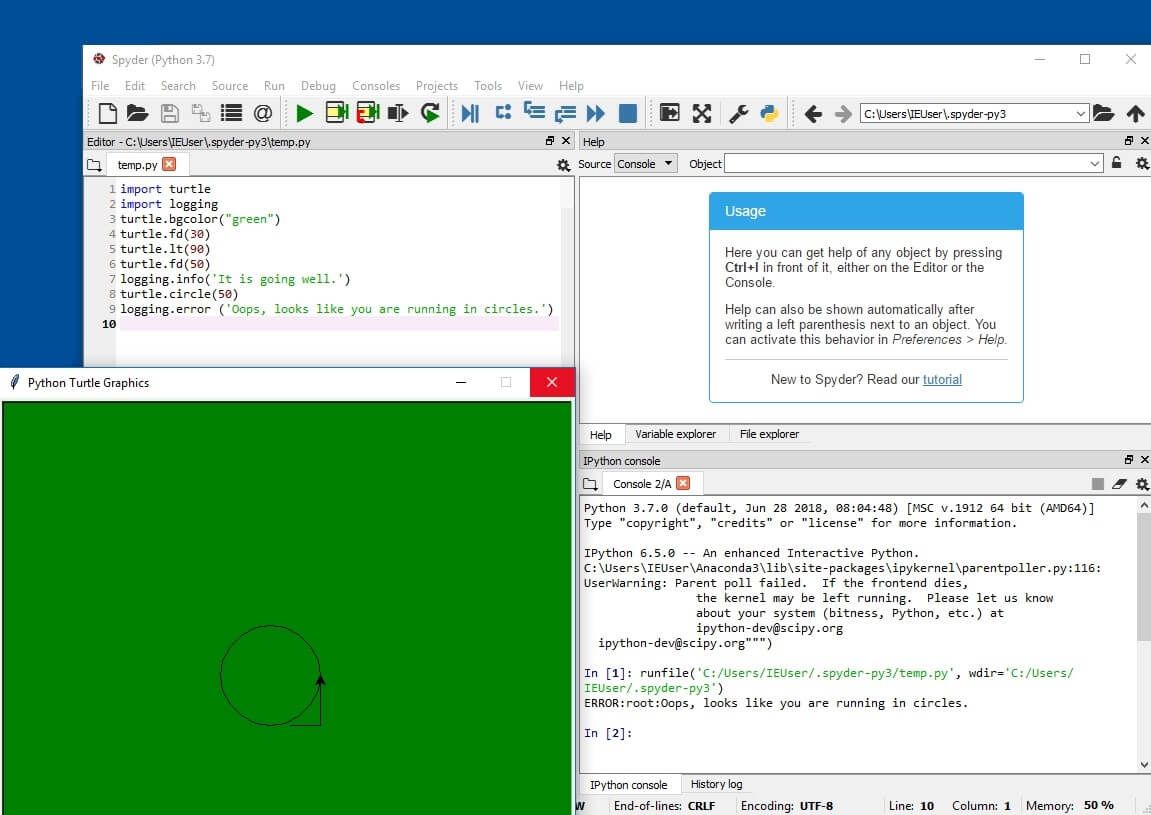
In the image above, you can see what the result looks like. The Turtle module (left window) has accepted the commands and is running as required. In the right window, the code includes the Turtle commands as well as logging commands from the INFO and ERROR levels. The typical output form of a log message is as follows: [Severity]:[Origin of message]:[Notification message].
However, the console (Console 1/A) in the example only specifies the Python logging message ERROR: Error:root:Oops, looks like you are running in circles.
This is because the default setting of the Python logging module is “WARNING”. The module omits all more detailed information as long as these settings are not changed.
Changing the Python logging level
Use the following command to change the setting to the DEBUG level:
import logging
logging.basicConfig(level=logging.DEBUG)
In the picture above, the console displays the logging for each new call. If you stop the program, the console deletes all recordings. To keep track of your logging data, you should use a log file. This practice is called logging to file, i.e. storing log records in a file.
Storing Python logs in a file
Python logging to file works in two ways. Either you create a log file about the basic settings or you use the handler. If you do not specify a target, Python logging temporarily stores the information in the console.
To create a file for your Python logging:
import logging
logging.basicConfig( level=logging.DEBUG, filename='example.log')
The FileHandler is an instance of the logging class. It acts together with the logging instance. It is responsible for where which logging data is sent to and in what form. Besides the FileHandler, there are further LoggingHandlers in the logging module of the Python library – like the StreamHandler and the NullHandler. However, a log file is recommended for subsequent evaluation of the logging data.
To create a FileHandler that stores debug messages in a file:
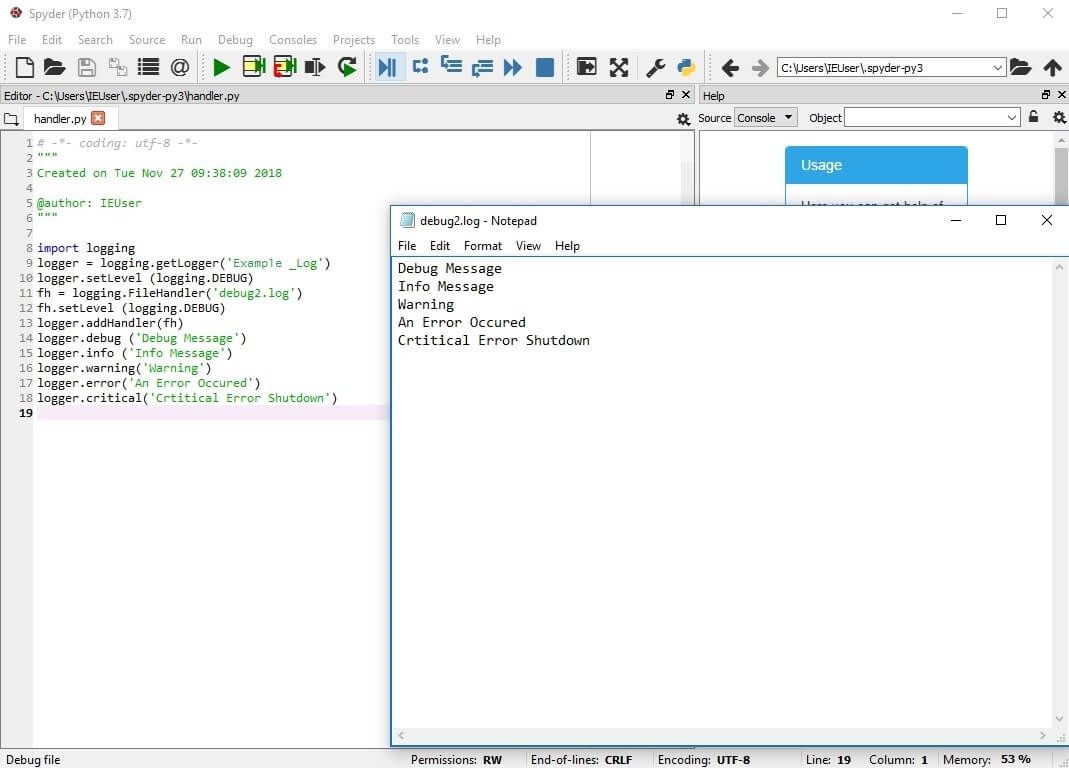
In the image above, the logging.getLogger() function calls up the Python logging module. “fh” is defined as a FileHandler with the attribute “debug.log”. With this, fh can create the log file “debug.log” and send the log messages to you. The method addHandler() assigns the corresponding handler to the logger. You can name the log file according to your wishes.
You can use the following functions to try it out for yourself:
import logging
logger = logging.getLogger('Example_Log')
logger.setLevel(logging.DEBUG)
fh = logging.FileHandler('debug.log')
fh.setLevel(logging.DEBUG)
logger.addHandler(fh)
logger.debug('Debug Message')
logger.info('Info Message')
logger.warning('Warning')
logger.error('An Error Occured')
logger.critical('Critical error shutdown')
If the log file you create with Python logging to file is to provide useful information for certain tasks, simple messages may not be sufficient. A timestamp and the name of the logger help to better classify the information. The following screenshot shows an example of how you can specify the format using formatter attributes. In the Notepad debug.log window, the text output specifies the log messages with date, time, logger name, log level, and message.
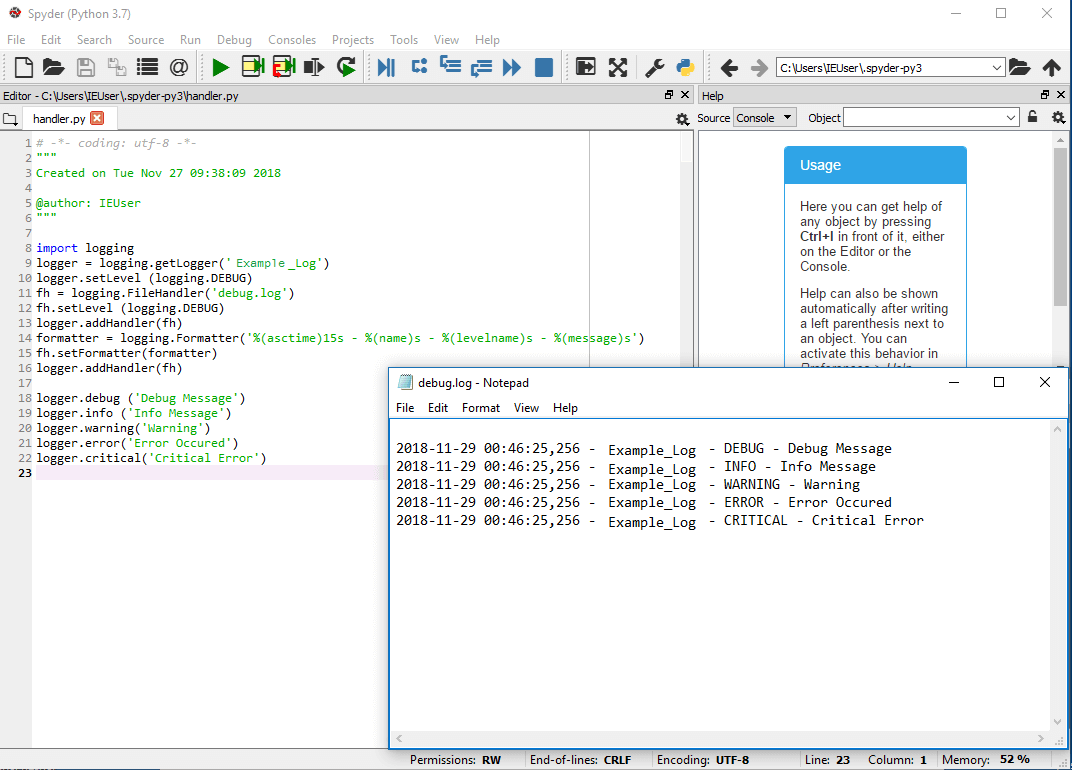
Here is the code once again so you can try it yourself:
import logging
logger = logging.getLogger('Example_Log')
logger.setLevel(logging.DEBUG)
fh = logging.FileHandler('debug.log')
fh.setLevel(logging.DEBUG)
logger.addHandler(fh)
formatter = logging.Formatter('%(asctime)s - %(name)s - %(levelname)s - %(message)s')
fh.setFormatter(formatter)
logger.addHandler(fh)
logger.debug('Debug Message')
logger.info('Info Message')
logger.warning('Warning')
logger.error('Error Occured')
logger.critical('Critical Error')
Summary
Python logging is a practical tool for error prevention, regaining control after hacker attacks, and simply for analysis. While other programming languages add second-hand logging, Python's logging module is part of the standard library. If you insert the method into your code, log messages of different levels are created: both in files and on the console. Formatting and filters as well as handlers enable a user-friendly setting. Make sure you have names for your loggers and their children that can be quickly assigned in order to make working with log files under Python easier.