

Shadow DOM

Web projects have grown ever more complex in recent years. Today, many web pages are written in an idiosyncratic, complicated mixture of HTML, CSS, and JavaScript. They also include more embedded content (widgets, images, videos, etc.) from outside sources such as social networks, streaming platforms, or content delivery networks. If you don’t want to use iFrame to integrate this third-party content, shadow DOM is an excellent alternative.
In this article, we’ll explain what this sublevel of the Document Object Model (DOM) is, describe other scenarios it can be used for, and show you how to implement it on your own website.
What is shadow DOM?
Shadow DOM is a sublevel of the standard Document Object Model (DOM) and one of the four core elements of the Web Components suite standardised by the W3C consortium in 2012. Like a regular DOM, a shadow DOM is automatically generated from the HTML code by most popular browsers. However, this type of DOM doesn’t apply to the entire web project, only to the project component(s) expressed within it. In addition, shadow DOMs separate the elements they contain from any default styling and structuring instructions that apply across projects, such as certain CSS statements. In simple terms, shadow DOMs are self-contained, encapsulated blocks of code within a regular DOM that have their own scope.
"Model" isn’t the most accurate term for DOM or shadow DOM. Strictly speaking, both are interfaces for data access. The underlying object model is only relevant for the validity of these interfaces.
How are shadow DOMs structured?
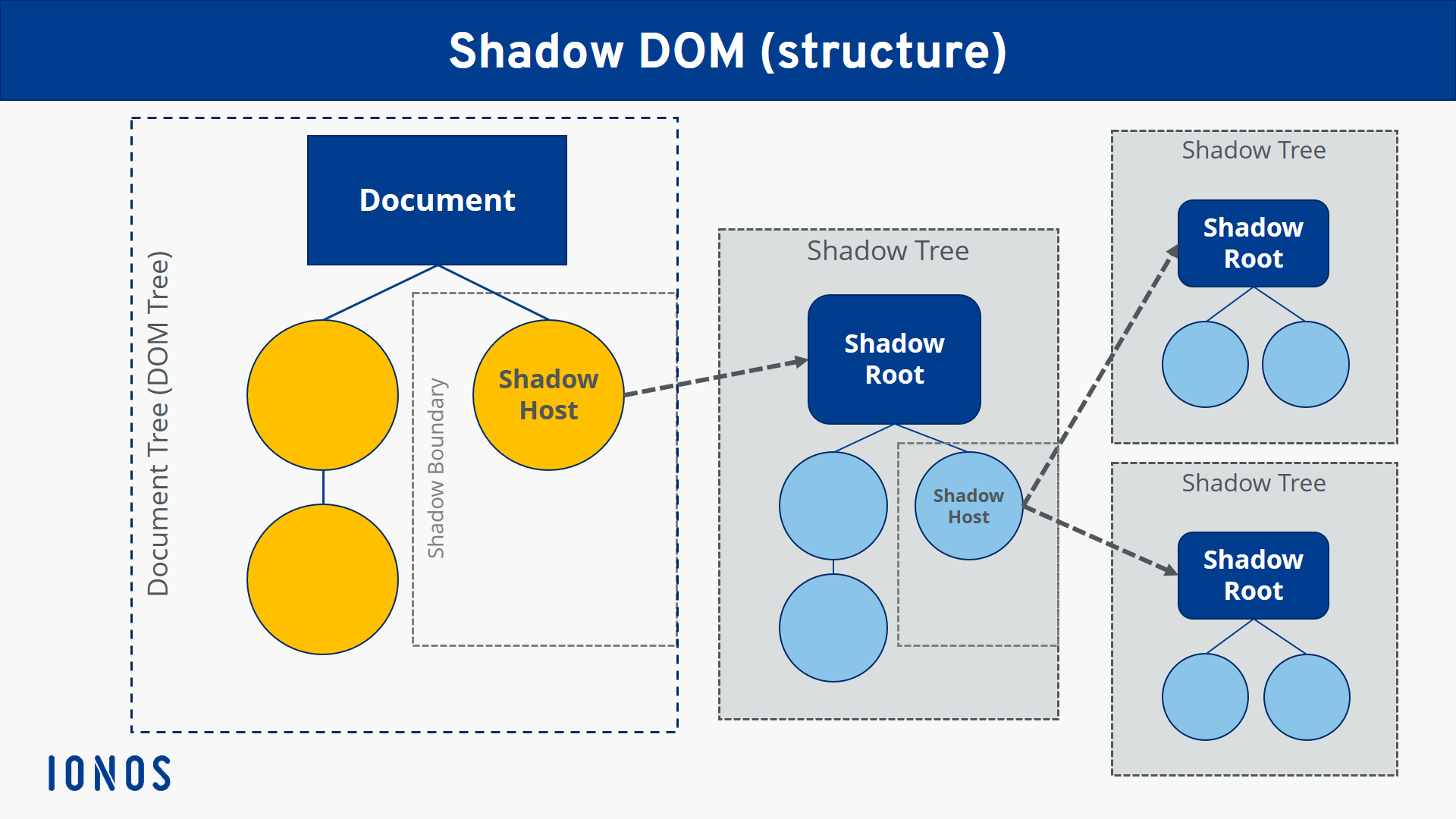
Shadow DOMs allow you to use any number of shadow trees in addition to the regular document tree, which summarises the DOM structure of the entire project. Each of these trees has a root node called the shadow root and contains its own elements and styling. The trees are always assigned to a specific element from the parent document tree or from another shadow tree. In both cases, this node is called the shadow host. The border between the regular DOM and the shadow DOM is called the shadow boundary.
How exactly do you use or implement shadow DOMs?
You don’t need to install or integrate any additional software to use the shadow DOM interface in a web project. Technically speaking, all you’re doing is creating a subtree in the source code. That means you can implement a new shadow DOM at any time via the HTML document of your web application. The shadow DOM is rendered later, together with the complete parent DOM, so no further steps are needed.
The following example illustrates how easy it is to integrate hidden, encapsulated DOM child nodes using simple JavaScript. In this example, a shadow DOM is added to the HTML document with a <p> element, including unique styling instructions:
<html>
<head></head>
<body>
<p id="hostElement"></p>
<script>
    // Create the shadow DOM for the shadow host:
    var shadow = document.querySelector(‘#hostElement’).createShadowRoot();
    // Create an HTML element in the shadow DOM:
    shadow.innerHTML = ‘<p>This text is in the Shadow DOM.</p>‘;
    // Style the HTML element in the shadow DOM:
    shadow.innerHTML += ‘<style>p { color: red; }</style>‘;
</script>
</body>
</html>
The script for implementing the shadow DOM consists of three components: First, the hidden subdocument is generated, then a simple text element is added to it, and finally, the color of this text is modified using the third component (in this case: “red”).
In order for a shadow DOM to be accessed from the outside using JavaScript, you also have to set the status of the method element.shadowRoot to “open.” If you set the status to “closed” instead, access to the hidden DOM is denied.
What are ideal applications for shadow DOM?
Shadow DOMs are an excellent way of keeping certain elements of your web project separate from the rest of the site without having to use special technologies such as iFrames. In addition, most popular browsers now fully support shadow DOMS as well as all other technologies of the modern Web Components suite. So, if you want to design a certain component or a certain area of your website independently of document-wide styling instructions and structures, hidden DOMs are an excellent, easy-to-implement choice, especially for complex projects.
However, not all HTML elements can be turned into a shadow host. For example, if you use this technology on an image file, an error will occur and you’ll get an error message. Shadow DOMs are limited to the following HTML components:
- article
- aside
- blockquote
- body
- div
- footer
- h1, h2, h3, h4, h5, h6
- header
- main
- nav
- p
- section
- span
 To display this video, third-party cookies are required. You can access and change your cookie settings here.