

Singleton Pattern

So-called design patterns help developers in object-oriented programming by providing tried and tested templates to solve programming tasks. Once the most suitable template has been found from the approximately seventy design patterns, it is refined by making individual adaptations. However, the general approach for the pattern stays the same. The singleton design pattern is very powerful but has the reputation of being a relic in object-oriented programming. In our guide, we’ll introduce you to its strengths and weaknesses, and show you how it is used in programming.
What is the singleton pattern?
The singleton pattern belongs to the category of creational patterns within the realm of design patterns. A less frequently used name is simply ‘singleton’. Its purpose is to prevent more than one object from being created by a class. This is achieved by creating the desired object in a class and retrieving it as a static instance. The singleton is one of the simplest but most powerful patterns in software development.
The ‘Gang of Four’ (GoF) – a team of programmers from the US – says this about the singleton pattern: “Ensure that a class has exactly one copy and provide a global access point to it.”
What are the characteristics of the singleton pattern?
If the singleton design pattern was used to create an instance of a class, then the pattern makes sure that it really only remains with this single instance. The singleton makes this class of software globally accessible. In different programming languages, there are different methods to achieve this. To make sure that it remains with only one unique instance, users must be prevented from creating new instances. This is achieved by the constructor declaring the pattern as ‘private’. This means that only the code in the singleton can instantiate the singleton itself. In effect, this guarantees that only one and the same object can reach the user. If this instance already exists, no new instance is created. A possible singleton looks like this:
public class Singleton {
	private static Singleton instance; // protected from external access and static
	private Singleton() {} // private constructor with external access protection
	public static Singleton getInstance() { // public method, call out by code
		if (instance == null) { // only if no instance exists, then create a new
			instance = new Singleton();
		}
		return instance;
	}
}
The singleton pattern in a UML representation
In the below diagram using UML, the entire singleton design pattern is made up of a single object, since only a single instance of a class needs to be created.
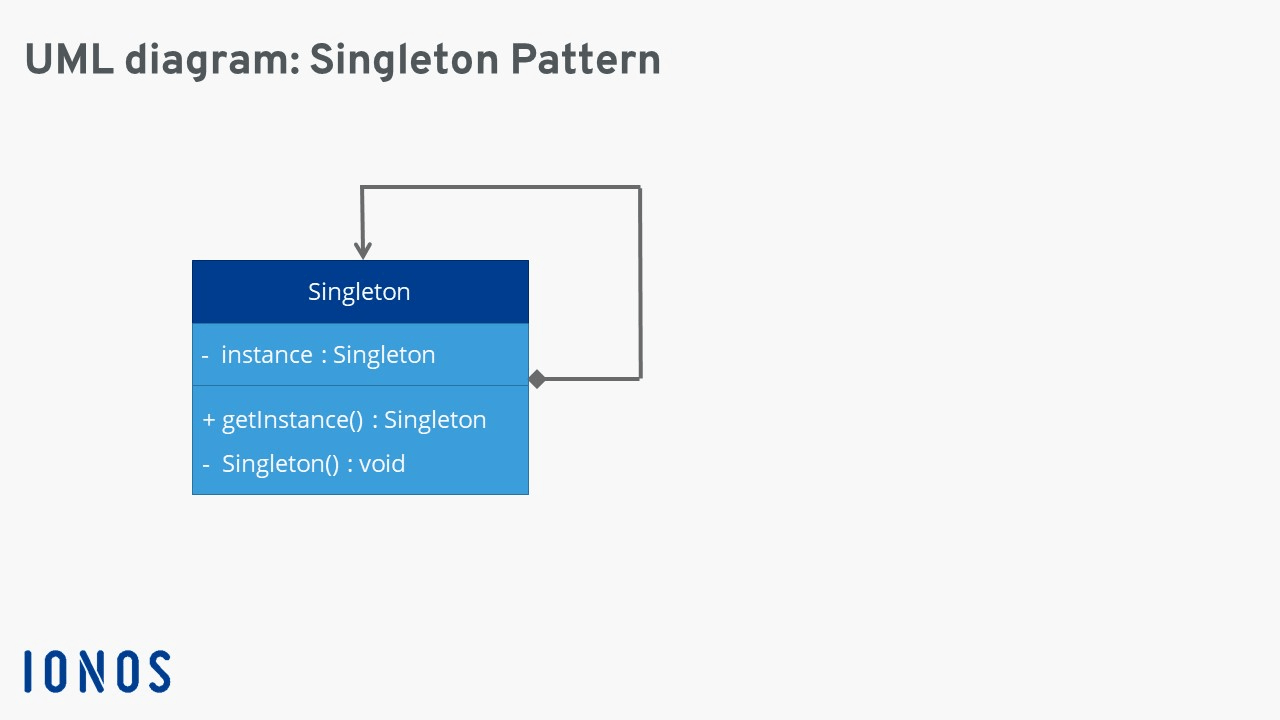
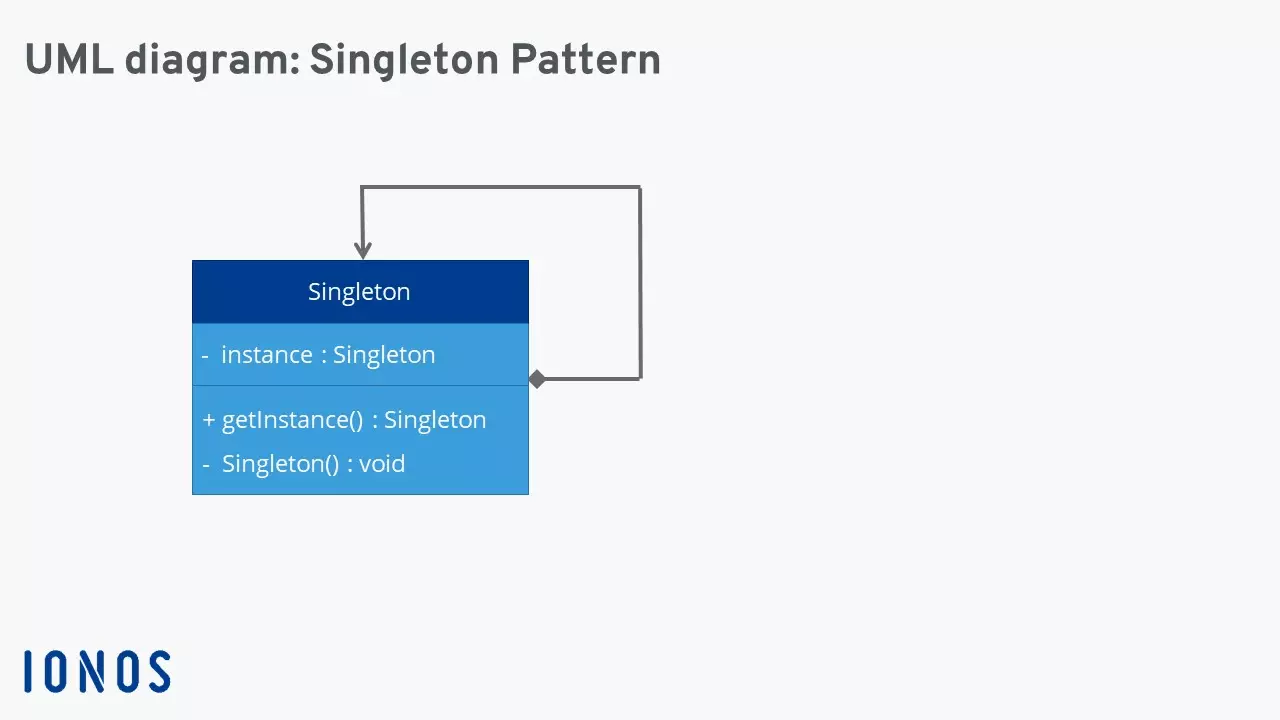
From the outside, it’s not possible to change any part of the unique piece that’s been created. This is the goal when using the singleton design pattern.
Advantages and disadvantages of the singleton design pattern
An overview of the advantages
A singleton can be written quickly and easily, because it’s not populated with countless (global) variables. It encapsulates its creation, which means that it can also exercise precise control over when and how it is accessed. An existing singleton pattern can be derived by means of subclasses to fill new functionalities. Which of these is used is decided dynamically. And, last but not least, a singleton is created exactly when it is needed – a characteristic that’s referred to as lazy loading. The process of instantiating a singleton earlier – before it’s even needed – on the other hand, is called eager loading.
An overview of the disadvantages
The uninhibited use of singletons leads to a state similar to that in procedural programming (i.e., the non-object-oriented), and can lead to unclean programme code. The global availability of singleton design patterns poses risks if sensitive data is being handled. If changes are made to the singleton, you won’t be able to trace which programme parts are affected. This makes software maintenance difficult, because malfunctions are difficult to trace. The global availability of the pattern also makes it difficult to delete singletons, since software components can always refer back to this singleton. In applications with many users (multi-user applications), a singleton can reduce programme performance, because it represents a data bottleneck, being singular.
The singleton design pattern ‘in real life’
The singleton is mostly used when recurring tasks in a programme routine have to be completed. This includes data that has to be written into a file, e.g. during logging, or print jobs that have to be written into a single printer buffer again and again. Because drivers and cache mechanisms also have recurring processes, the singleton design pattern is commonly used for these as well.
Since it’s very difficult to test the singleton pattern, we’ll illustrate how it works using the example of a small company in which several employees use one printer. An example that is close to practice is presented in the Design Pattern Tutorial Series by Daniel H. Jacobsen. The following singleton design pattern is based on this.
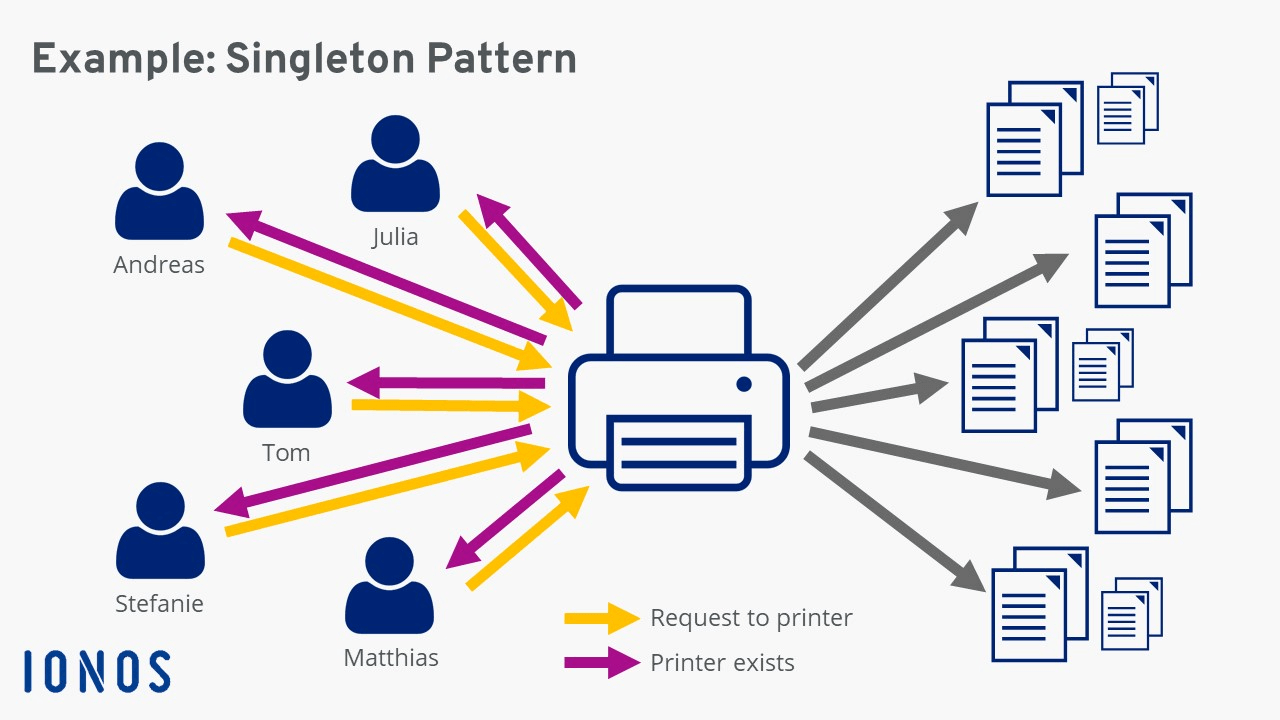
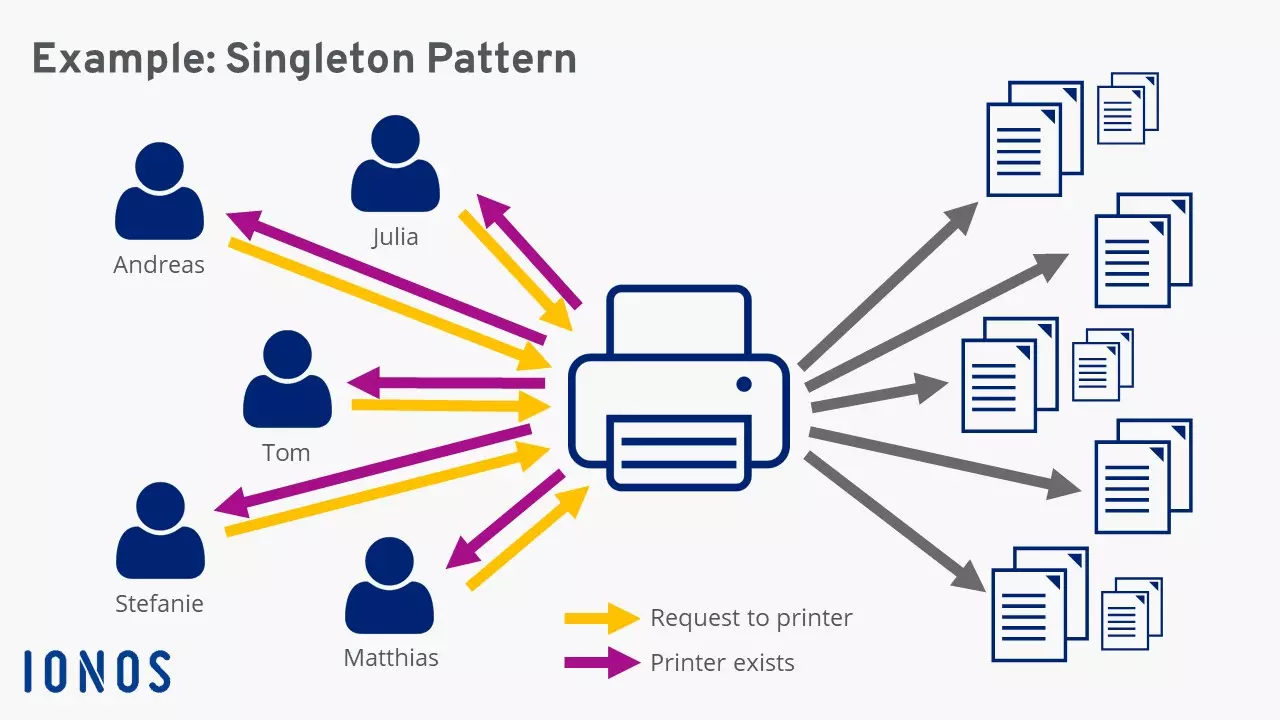
If a user sends a request to the printer, the singleton asks the ‘question’: ‘Is there already a printer object? If not, then create one.’ This is solved with an if/then-statement (return printer == zero ?). To prevent access and changes, single variables and the printer are set to ‘private’ rather than ‘public’.
public class printer {
	private static printer;
	private int NumberPages;
	private printer() {
	}
	public static printer getInstance() {
		return printer == Null ?
				printer = new printer() :
				printer;
	}
	public void print(String text){
		System.out.println(text +
				"\n" + "number of pages printed today" + ++ NumberPages +
				"\n" + "---------");
	}
}
The next step is to ‘encapsulate’ employees of the branch office. The strings for the names, position, and role within the company are also set to ‘private’.
public class Employee {
	private final String name;
	private final String position;
	private final String role;
	public employee(String name, String position, String role) {
		this.name = name;
		this.position = position;
		this.role = role;
	}
	public void printCurrent role (){
		printer = printer.getInstance();
		printer.print("employee: " + name + "\n" +
			"Position: " + position + "\n" +
			"Role: " + role + "\n");
	}
}
Finally, the two singletons are integrated into an output routine.
public class Main {
	public static void main(String[] args) {
		Employee andreas = new employee ("Andreas",
				"Boss",
				"Manages the branch office");
		Employee julia = new employee ("Julia",
				"Consultant",
				"Advises customers on complaints");
		Employee tom = new employee ("Tom",
				"Selling",
				"Sells the products");
		Employee stefanie = new employee ("Stefanie",
				"Developer",
				"IT maintenance in the branch office.");
		Employee matthias = new employee ("Matthias",
				"Accountant",
				"Financial accounting of the branch office.");
		andreas.printCurrentRole();
		julia.printCurrentRole ();
		tom.printCurrentRole ();
		stefanie.printCurrentRole ();
		matthias.printCurrentRole ();
	}
}