

XPath Tutorial for Beginners

With the prevalence of XML as the markup language for platform-independent data exchanges, there is an increasing need for a standard that enables non-XML-based applications to submit complex queries to XML documents.
The Extensible Markup Language (short for XML) is a markup language used for displaying hierarchically-structured data in text form. XML is equally easy to read for both humans and machines. One of its uses is the exchange of data between two computer systems on the World Wide Web.
The relevant standards for program-controlled access to XML documents was developed by the W3 Consortium along with XQuery and XSLT. These have program interfaces available that can access applications on XML documents, query content or transform XML documents. They require a standard that enables elements in XML documents to be addressed: the XPath path description language.
We’ll get you started with the XPath Data Model (XDM) and introduce to you to the syntax that underlines the XPath expressions used to localise XML elements.
- Free website protection with SSL Wildcard included
- Free private registration for greater privacy
- Free Domain Connect for easy DNS setup
What is XPath?
XML Path Language (XPath) is a path description language for XML documents developed by the W3 Consortium. XPath provides users with non-XML-based syntax that makes it possible to specifically address the elements of an XML document.
XPath is normally used in an embedded host language that enables the addressed XML elements to be processed. XQuery, for example, is used to query the XML elements addressed by XPath. XSLT uses the query language when transforming XML documents.
- XPath: Navigation in XML documents
- XQuery: Queries for XML documents
- XSLT: Transformation of XML documents
3.1, the current XPath version, is specified in the W3C recommendation from March 21, 2017.
Despite ongoing development, numerous XSLT processors, web browsers and applications still only support the standard XPath 1.0 from the year 1999.
How Does XPath Work?
A data model underlies XPath and thisinterprets XML documents as a sequence of elements that are arranged in a tree structure. The tree structure of the XPath data model is comparable to the Document Object Model (DOM). Thisalso acts as an interface between HTML and dynamic JavaScript in the web browser.
In the form of paths, the localisation of XML elements occurs based on the unix directory system. The basic elements of this localisation path are nodes, axes, node tests and predicates.
Node Types
The individual elements of an XPath tree structure are referred to as nodes. Ordering the nodes occurs both through the document sequence and through nesting the XML elements.
The XPath data model distinguishes seven node types with different functions:
- Element node
- Document node (from XPath 2.0 onwards—previously they were known as root nodes)
- Attribute node
- Text node
- Namespace node
- Processing instruction node
- Comment node
The following example illustrates the XPath data model node types. The XML document below, used to exchange data for a book order, contains all seven node types.
<?xml version="1.0" encoding="utf-8"?>
<!DOCTYPE Order SYSTEM "order.dtd">
<?xml-stylesheet type="text/css" href="style.css"?>
<!--This is a comment!-->
<order date="2019-02-01">
    <address xmlns:shipping="http://localhost/XML/delivery" xmlns:billing="http://localhost/XML/billing">
        <shipping:name>Ellen Adams</shipping:name>
        <shipping:street>123 Maple Street</shipping:street>
        <shipping:city>Mill Valley</shipping:city>
        <shipping:state>CA</shipping:state>
        <shipping:zip>10999</shipping:zip>
        <shipping:country>USA</shipping:country>
        <billing:name>Mary Adams</billing:name>
        <billing:street>8 Oak Avenue</billing:street>
        <billing:city>Old Town</billing:city>
        <billing:state>PA</billing:state>
        <billing:zip>95819</billing:zip>
        <billing:country>USA</billing:country>
    </address>
    <comment>Please use gift wrapping!</comment>
    <items>
        <book isbn="9781408845660">
            <title>Harry Potter and the Prisoner of Azkaban</title>
            <quantity>1</quantity>
            <priceus>22.94</priceus>
            <comment>Please confirm delivery date until Christmas.</comment>
        </book>
        <book isbn="9780544003415">
            <title>The Lord of the Rings</title>
            <quantity>1</quantity>
            <priceus>17.74</priceus>
        </book>
    </items>
</order>
Element Node
In the XPath data model tree structure, each XML document element corresponds to an element node. Some exceptions are the XML declaration and the document definition at the beginning of the document.
XML declaration:
<?xml version="1.0"? encoding="utf-8"?>Document Type Definition (DTD):
<!DOCTYPE Order SYSTEM "order.dtd">Element nodes begin with a start tag, finish with an end tag and are usually nested into each other.
The first element nodes in the document sequence are referred to as root elements.
The XML document pictured above, for example, contains the element node order as a root element. This acts as a parent element for the subordinated element nodes address, comment and items that again contain additional element nodes as child elements.
Document Node
The roots of the tree structure are referred to as document nodes. In the XML document itself, this is neither demonstrated visually nor represented by text. It is a conceptual node that contains all the other elements of a node. Child elements of the document node are root elements as well as (where applicable) processing instruction nodes and comment nodes.
Attribute Node
The attributes of an XML element are represented in the XPath data model as attribute nodes. Each attribute node consists of an identifier and a value assigned to the attribute.
In the code example, the first element node contains book and the attribute node isbn with the value 9781408845660.
<book isbn="9781408845660">Attribute nodes are considered part of the element node, but not a child element of the element.
Text Node
Character data within the start and end tags of an element node are referred to as text nodes.
In the code example, the element node contains title and the text node contains Harry Potter and the Prisoner of Azkaban.
Harry Potter and the Prisoner of AzkabanNamespace Node
In the case of well-formed XML documents, the element and attribute names being used are assigned a namespace. The assignment usually occurs through the Document Type Definition right at the beginning of the document.
If different namespaces are used in an XML document element or attribute, the respective namespaces will be explicitly defined with the xmlns attribute or xmlns prefix in the start tag of the element in question. The attribute xmlns presumes a Uniform Resource Identifier (URI) as a value that specifies which namespace is to be assigned to the corresponding element. The option of assigning a namespace to an xmlns prefix is possible for the element or child element. Each namespace corresponds to a namespace node in the tree structure.
In the code example, two namespaces were defined for the XML element address: xmlns:shipping and xmlns:billing. The child elements of the address element bear the respective assignment as a prefix.
<address xmlns:shipping="http://localhost/XML/delivery" xmlns:billing="http://localhost/XML/ billing">
        <shipping:name>Ellen Adams</shipping:name>
        <shipping:street>123 Maple Street</shipping:street>
        <shipping:city>Mill Valley</shipping:city>
        <shipping:state>CA</shipping:state>
        <shipping:zip>10999</shipping:zip>
        <shipping:country>USA</shipping:country>
        <billing:name>Mary Adams</billing:name>
        <billing:street>8 Oak Avenue</billing:street>
        <billing:city>Old Town</billing:city>
        <billing:state>PA</billing:state>
        <billing:zip>95819</billing:zip>
        <billing:country>USA</billing:country>
    </address>
The xmlns prefix makes it possible to clearly assign elements of the same name from different namespaces. The element street with the prefix shipping, for example, contains the street specified in the delivery address. The element street with the prefix billing, in contrast, contains the street specified in billing address.
Processing Instruction Node
Processing instructions in XML documents are located outside the document tree structure and are referred to in XPath terminology as a processing instruction node. A process instruction node begins with "<?" and ends with "?>".
In the code example presented above, you’ll find the following processing instruction:
<?xml-stylesheet type="text/css" href="style.css"?>The XML declaration at the beginning of the XML file is syntactically constructed like a process instruction. However, it is not valid as a process instruction node as defined by the XPath data model.
Comment Node
XML document content marked as a comment will be processed by XPath as a comment node. In this situation, the node comprises only the marked character content, not the markup.
In the code example presented above, you find the following comment node:
This is a comment!Localisation Path
Addressing nodes occurs with the help of a localisation path. With localisation paths, it is a matter of using an XPath expression to navigate through the tree structure and to choose a desired node set. The node set is the outcome of an XPath expression.
Localisation paths are evaluated from left to right. One distinguishes between absolute and relative localisation paths. An absolute localisation path begins at the document node. In this case, you prefix the XPath expression with a slash (/). Relative localisation paths begin at an arbitrary node within the tree structure. This starting point is called the context node.
A localisation path consists of individual localisation steps that, as is the case when addressing files in the directory system, are separated by a slash (/).
Each localisation step consists of up to three parts: the axis, the node test and an arbitrary number of predicates.
- Axis: When choosing the axis, you determine the navigation direction in the tree structure starting from the context or document node.
- Node test: The node test corresponds to a filter with which you limit the notes lying on the axis to the desired node set.
- Predicates: Predicates enable you to again filter the nodes selected through the axis and node test.
The localisation path for an XPath expression is notated in accordance with the following syntax:
axis::nodetest[predicate1][ predicate 2]…| Notation | Function |
|---|---|
| / | Functions as path separator between two localisation steps |
| :: | Functions as path separator between axis and node test |
Axes
The XPath syntax enables a navigation by means of the following axes.
| Axis | Selected Nodes |
|---|---|
| child | All directly subordinated child nodes |
| parent | The directly superordinate parent node |
| descendant | All subordinated nodes |
| ancestor* | All superordinated nodes |
| following | All the subsequent nodes in the document sequence with the exception of descendants |
| preceding* | All preceding nodes in the document series with the exception of ancestors |
| following-sibling | All the subsequent nodes in the XML document that descend from the same parent node |
| preceding-sibling* | All the preceding nodes in the XML document that descend form the same parent node |
| attribute | All attribute nodes for an element node |
| namespace | All namespace nodes for an element node. As of version 2.0, this axis is no longer contained in the specification |
| self | The context node itself |
| descendant-or-self | All subordinated nodes including the context node |
| ancestor-or-self* | All superordinated nodes including the context node |
In the case of the axes denoted with an asterisk (*), there are backward applications that are an optional component according to the XPath specification version 1.0 and do not have to be supported by standard-compliant applications.
The following graph shows a schematic representation of the most important axes in the XPath data model starting from the context node (red).
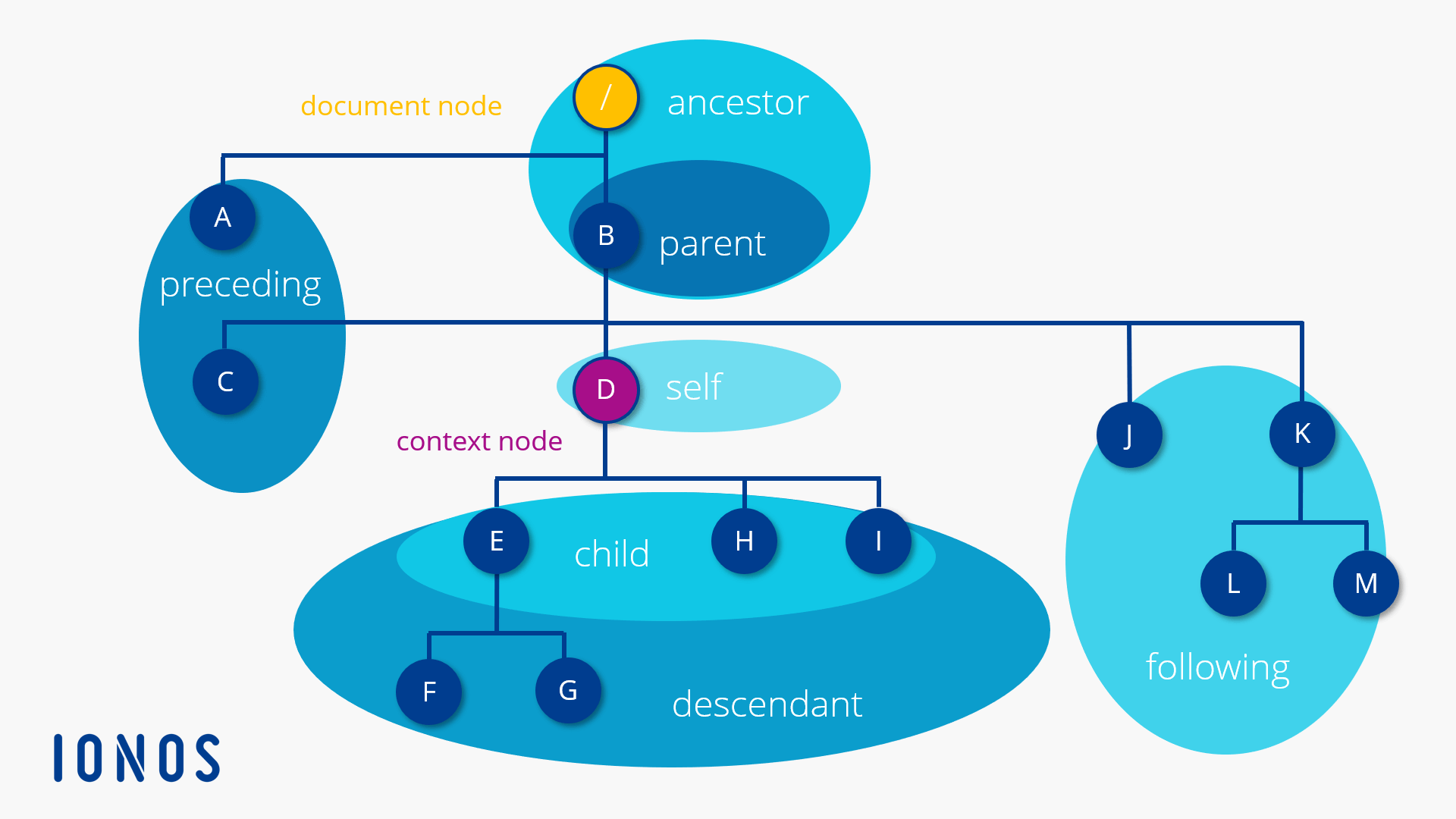
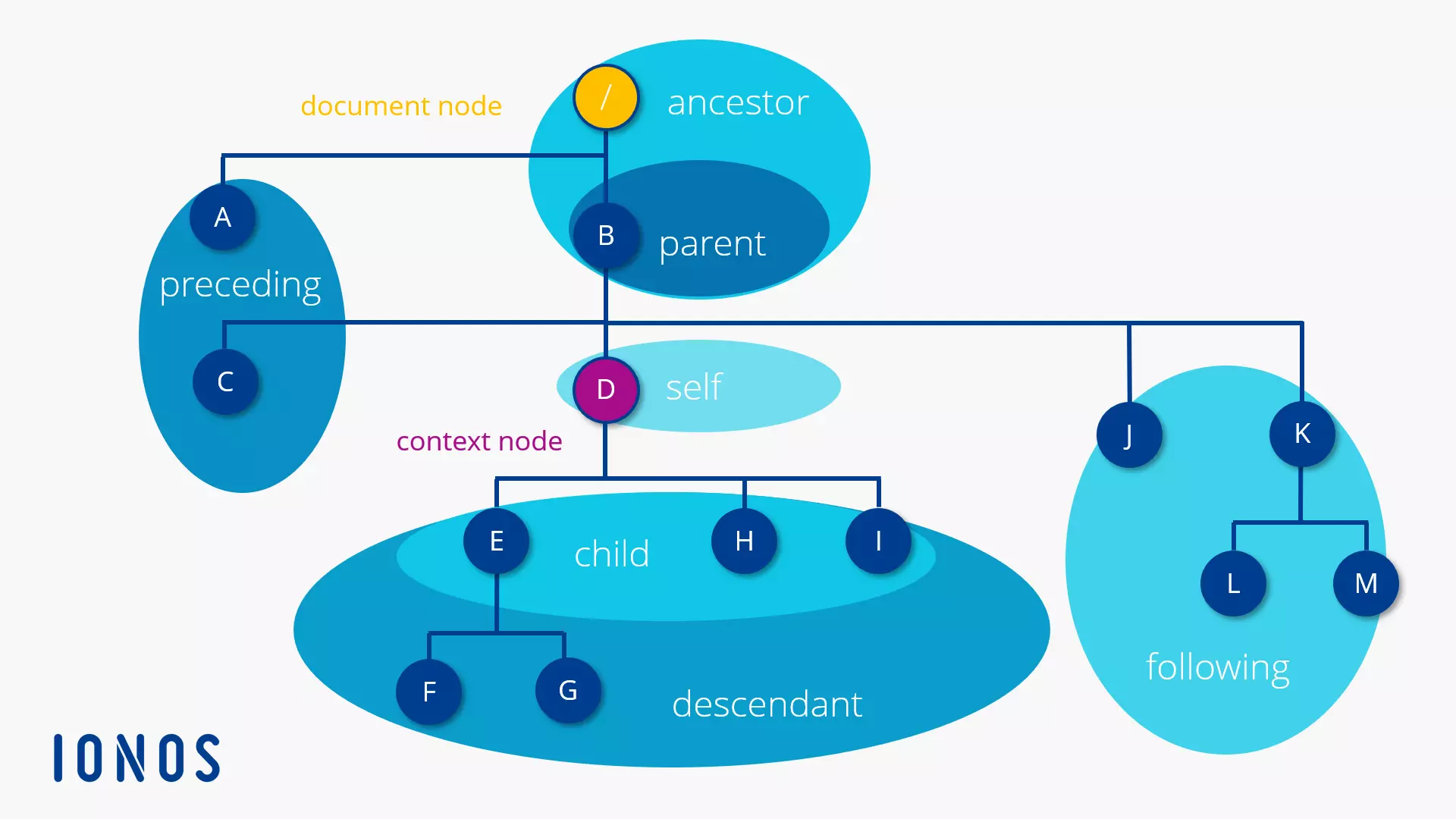
For example, all child:: elements choose D from the context node. The node set comprises the nodes E, H and I.
Node Test
With the node test you define a filter for the node set selected via the axis. According to the XPath specification there are two possible filter criteria.
- Node name: Specify a node name as a node test in order to choose all nodes with the corresponding name on the chosen axis.
- Node type: Specify a node type as a node test in order to choose all nodes on the chosen axis with the corresponding type.
Node Names as a Filter Criterion
With the following localisation path, for example, you could choose—based on the code example presented above—all descendants with the name book starting from the document node.
/descendant::bookIf, however, you would like to filter out the attribute isbn for all element nodes with the name book, you’ll need a localisation path with two localisation steps.
/descendant::book/attribute::isbnNode Type as Filter Criterion
If you’d like to define a node type as a filter criterion for selecting the node set, use one of the following functions as a node test:
| Function | Selected Nodes |
|---|---|
| node() | The node() function selects all nodes on the chosen axis. |
| text() | The text() function selects all text nodes on the chosen axis. |
| comment() | The comment() function selects all comment nodes on the chosen axis. |
| processing-instruction() | The processing instruction() function selects all process instruction nodes on the chose axis. |
XPath 1.0 already defines 25 functions. Beginning with XPath 2.0 there are 111 functions available for specifying localisation paths. You’ll find an overview in the W3C recommendation XPath and XQuery functions and operators 3.1 from March 21, 2017.
Node Test with Wild Card
If you use the place holder * (asterisk) instead of the node test, all nodes will be chosen on the selected axis that correspond to the axis’ main node type. So, if an axis contains element nodes, then this node type is the axis’ main node type. This applies to all axes with the exception of attribute and namespace. In this case, attribute nodes or namespace nodes qualify as main node types.
The following localisation path, for example, displays all the attributes of the current context node:
attribute::*Shortened Notation
For the frequently-used axes and localisation steps, short cuts were defined that can be used in the XPath expression as an alternative to the English designations.
| Standard Notation | Short Cut | Example |
|---|---|---|
| child:: | blank | In the case of child, it concerns the standard axis. The axis designation can be omitted when necessary. The child::book/child::title localisation path thus corresponds to the book/title short abbreviation. |
| attribute:: | @ | The axis attribute, including the separator, can be shorted with the @ symbol.The localisation path book/attribute::isbn selects the isbn attribute node of the book element and states book/@isbn in the shortened notation. |
| /descendant-or-self::node()/ | // | The localisation step /descendant-or-self::node()/ selects the document node and all descendants and is abbreviated with //. Instead of /descendant-or-self::node()/child::item write //item in shortened form. The localisation path selects all item nodes in the document. |
| parent::node() | .. | The localisation step parent::node() selects the parent node of the context node and is shortened with .. |
| self::node() | . | The localisation step self::node() selects the current context node and is shortened with . |
Predicates
With predicates you define further filter criteria for the node sets selected through the axis and node test.
Predicates form the optional third part of a localisation step and are notated in brackets. The filter criteria within the brackets is formulated as expressions, that, among other things, can contain path expressions, functions, operators and strings.
The XPath syntax supports universal predicates and numerical predicates.
Universal Predicates
Expressions in universal predicates filter the node set that has been selected through the axis and node test by issuing a Boolean value (true or false) for each node in the selection. All nodes with the value true are part of the result set.
The formulation of expressions for universal predicates occurs with the help of operators. These are used in order to specifically select specific nodes with specific content or properties—for example, all nodes that include a character string, an attribute value or a specific child element (perhaps at a specific position).
The following tables give you an overview of the operators that are available. There is a distinction between arithmetic operators, logical operators and relational operators.
| Arithmetic Operators | Function |
|---|---|
| + | Addition |
| - | Subtraction |
| * | Multiplication |
| div | Floating point separator |
| mod | Modulo |
| Relational Operators | Function |
|---|---|
| = | Equal |
| != | Unequal |
| < | Less than; masking required within XSLT (<) |
| > | Greater than; masking within XSLT (>) is recommend |
| <= | Less than or equal; masking required within XSLT (<) |
| >= | Greater than or equal; Masking within XSLT (>) recommended |
| Logical Operators | Function |
|---|---|
| and | Logical And Connective |
| or | Logical Or Connective |
In the following example the predicate isolates [title="Harry Potter and the Prisoner of Azkaban"] the result set on an element node called book, which contains the child element title and the string Harry Potter and the Prisoner of Azkaban.
The example corresponds to the XPath 3 syntax, which may not be supported by online tools. Have the presented query reproduced here, for example, with the following online tester: http://videlibri.sourceforge.net/cgi-bin/xidelcgi.
/order/items/book[title="Harry Potter and the Prisoner of Azkaban"]We have now chosen the element node book, which contains the data for the Harry Potter book.
<book isbn="9781408845660">
        <title>Harry Potter and the Prisoner of Azkaban</title>
        <quantity>1</quantity>
        <priceus>22.94</priceus>
        <comment>Please confirm delivery date before Christmas.</comment>
    </book>
Another child element of this element node is the comment element. If we would like to select its content, the localisation path must only be expanded by two localisation steps.
/order/items/book[title="Harry Potter and the Prisoner of Azkaban"]/comment/text()We navigate with the comment localisation step (abbreviate form of child::comment) to the book element’s child element of the same name and select its text node with the text() function. This corresponds to the following string:
Please confirm delivery date before Christmas.Should only a path expression be used in a predicate, then it’s called an existence test. With the following localisation path, for example, it can be tested if the XML document presented above contains one or several nodes with the name comment.
Shortened notation:
//book[comment]Standard notation:
/descendant-or-self::node()/child::book[child::comment]The localisation path //book[comment] selects all nodes with the name book that have a child element with the name comment.
Numerical Predicates
Numerical predicates enable you to address nodes using your position. The following localisation path, for example, selects the second node in accordance with the document sequence with the name book:
//book[2]Strictly speaking, predicate [2] is the abbreviated form of [position()=2]. XPath thus initially selects all nodes with the name “book” and then filters out the node for which the position()=2 function yields the true Boolean value.
Unlike with programming languages, XPath numbering begins with 1.
Additional Information on XML Path Language
On the W3C website you will find an overview of the current development status of XML Path language as well as all released standards and designs.
Free information and tools for using XPath for web applications are available to you at MDN Web Docs as well as in the Microsoft Developer Network.