

Mileage log template: Free of charge as an Excel and PDF file

If you drive a company car as a self-employed person or as an employee, the tax office generally assumes that you also use it for private purposes. In most cases, you will have to pay tax on this company benefit/perk. There are two options available to you: either you record the frequency and duration of all business and private trips in a detailed mileage log, or, you deduct your vehicle expenses for the year, meaning you must retain all receipts and relevant documents relating to vehicle charges.
In order to qualify for either option, however, you must adhere to the strict requirements of Her Majesty’s Revenue & Customs. Find out what these requirements are, what else you need to look for, and download our free mileage log template as an Excel or PDF file.
Requirements of a proper mileage log
Here are the guidelines for creating and maintaining a proper mileage log:
- A separate logbook must be kept for each vehicle.
- If the vehicle is used by more than one person, the driver’s name must be recorded for each journey.
- Minimum details include: Date and mileage according to the odometer at the beginning and end of each trip, total distance travelled, the destination, the route (in the event of detours), as well as the purpose of the trip.
- When recording private journeys, the initial and final mile readings are sufficient. For journeys between home and the workplace, this is also sufficient.
- Entries should be made daily, i.e. promptly after each trip. Recording information days after the fact, rounding up and estimating are not permitted.
- For the purpose of HMRC verification, the mileage log should be as clear as possible and each entry needs to be legible.
- All information in the logbook must be complete. This means that, even for routine journeys, all mandatory information must be provided each time. The only exceptions are certain professional groups like taxi drivers and sales representatives.
- Make sure that your entries are correct so that there are no discrepancies with the other details in your tax return (e.g. with regard to expense reports).
- In addition, do not round up. Mileage information must be as accurate as possible.
- Subsequent changes in the logbook are only permitted to a limited extent. If they are nevertheless absolutely necessary, they must be marked accordingly. Transparency is the top priority.
- The tax office generally requires driver’s logbooks in a closed, non-manipulatable format. This means that a stack of loose sheets may not be accepted, but a bound book or exercise book will be. Smartphone apps for keeping electronic logbooks are also permitted, as long as subsequent changes to entries are technically excluded or automatically marked. However, make sure in advance that the selected program meets the requirements listed here.
Mileage log template: Download and instructions for completion
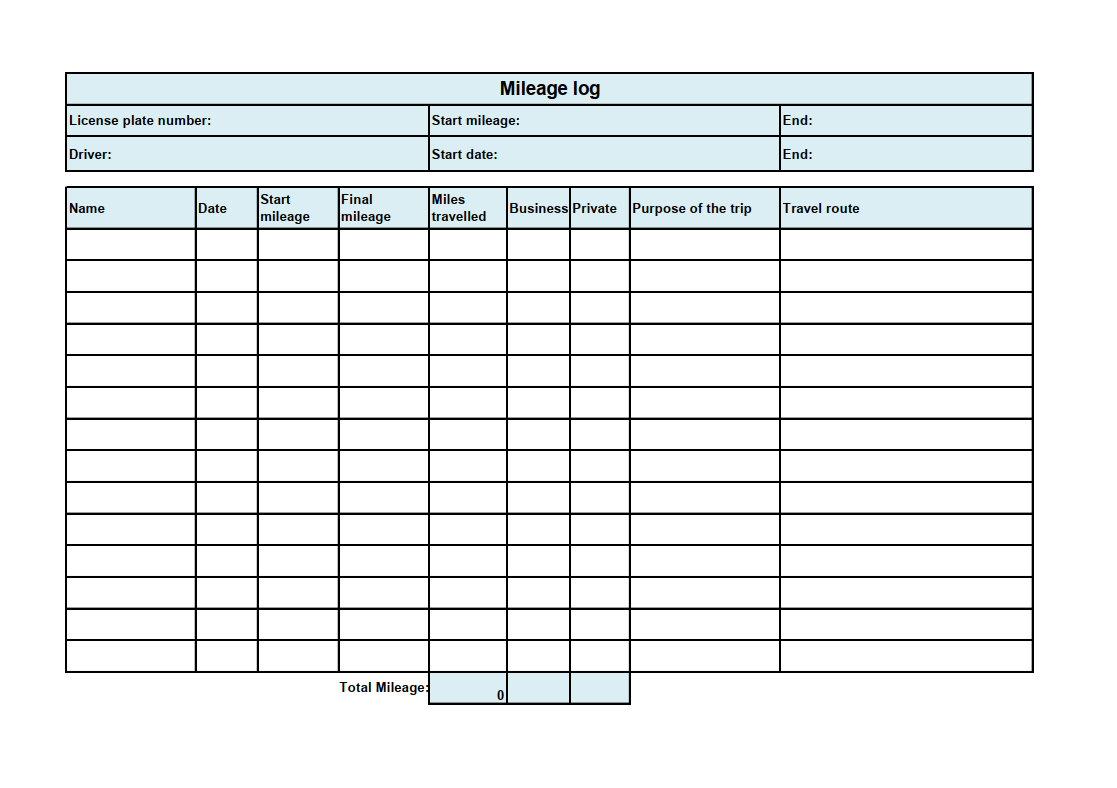
You can download the following mileage log template free of charge as an Excel or PDF file and use it immediately:
Free Download
The following instructions explain how to complete the form correctly:
- In the top left corner, enter the vehicle’s official registration number
- Enter your name or the name of the employee who will be primarily using the vehicle.
- Note the mileage of the vehicle at the beginning of the respective usage period in the upper right corner. Do not forget to add the final mileage before submitting your mileage log to the tax office.
- One line below defines the exact period of vehicle usage. In many cases, this is congruent with the current fiscal year. However, the dates can also differ.
- In the following lines, document the name of the driver, the date, the mileage at the beginning and end of the trip and the total distance travelled for each individual trip. Also specify whether it was a business or private trip and what purpose it served. In the case of detours, it may also be useful to explain the route in more detail.
Keep in mind: Since Excel mileage logs can be modified at will and these changes are difficult to trace, they may not be recognised by the tax authorities. This applies even if you complete the logbook on your PC and then print it out.
You can use our mileage log template to create your own paper logbook, but remember to write all your entries by hand – this will satisfy HMRC. You can also use the Excel spreadsheet for your personal records and calculations.
Please note the legal disclaimer relating to this article.