

CC – How to include indirect email recipients

When working in groups and project teams, you usually send emails to everyone involved. This ensures tasks are assigned transparently and always keeps the team up to date. But these kinds of emails are only rarely directed at the whole group. You generally only address selected colleagues. Everyone else will receive a carbon copy (CC) and will simply read it as indirect recipients.
We explain the meaning of CC, how it can be used for professional email communication, and how it differs from other email address fields.
What is carbon copy (CC)?
Carbon copy is an additional address field in the email header. Recipients in the CC field receive a copy of the message. The term comes from carbon paper that was commonly used to duplicate documents.
CC vs. BCC
When writing a new email, replying to an email or forwarding one, you’ll find up to three address fields in the header of your email window.
- The To field is used to input the recipient’s address. This is where you enter the contacts you’re directly addressing. These are typically the recipients you directly reach out to in the message.
- The CC field is located beneath the To field. Contacts you enter here will receive the message for their information without feeling directly addressed. Contacts in the CC field are displayed to all recipients of an email.
- The CC field is followed by the BCC field (short for blind carbon copy) – the address field for the recipients of blind copies. Contact addresses in the BCC field are kept hidden from email recipients.
Some email programs hide the CC or BCC feature in the standard view. In this case, use the buttons provided to display the extended address options.
The screenshot below shows all three address fields in the message window of the email program Microsoft Outlook.
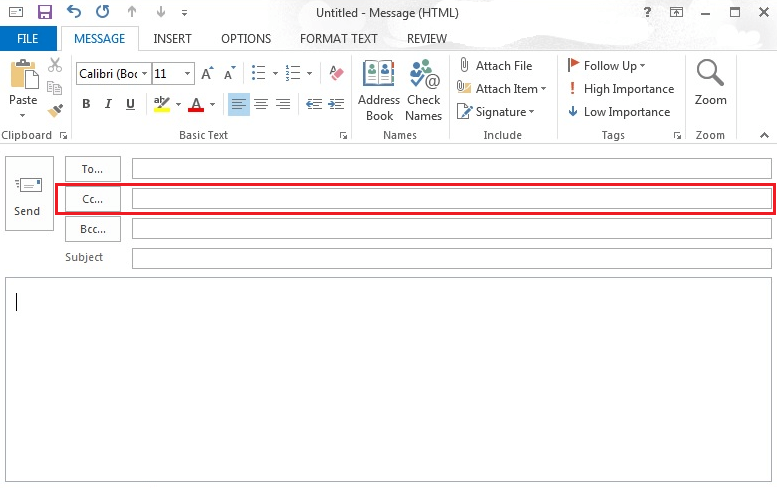
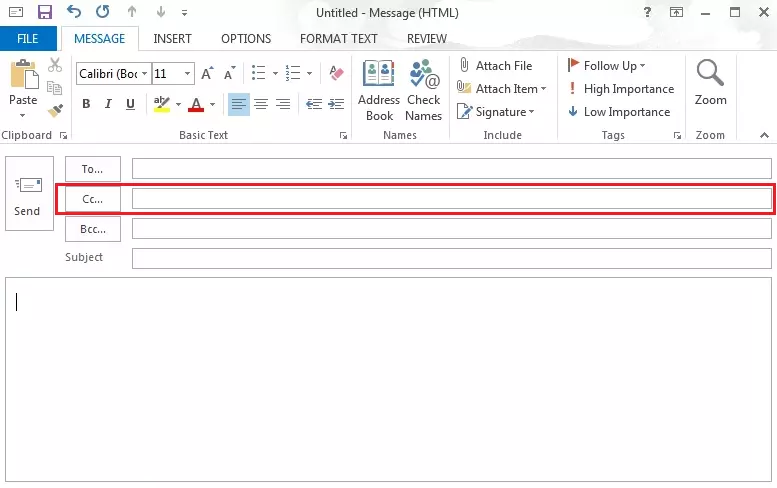
The BCC field in Microsoft Outlook is hidden in the standard setting. We show you how to activate this with just a few clicks in the related article on the topic.
What you should keep in mind when using the CC field
Whether you place a recipient’s address in the To, CC or BCC field depends on the following two questions:
- Is the contact the main recipient of the email?
- Should this address be visible to all recipients and is this permissible?
Differentiate between main and CC recipients
You address all main recipients of your message in the To field. Regardless of the order of addresses, this enables you to show that you intend them to be main direct recipients and that you may also expect a response from them.
On the other hand, recipients in the CC field receive a copy of the message simply for their information. This is also referred to as a courtesy copy. A reply is not usually expected from CC recipients.
CC recipients are always visible
Addresses in the To and CC field are displayed to all recipients of a message. You should therefore only use the CC field in email mailing groups in which the individual group members already know each other.
For data privacy reasons, advertising emails, newsletters, and public circulars should never be sent to customers or business partners using the CC field. Instead, you can use the mail merge feature in your email program or the BCC field.
You can find more tips and tricks for business email correspondence in our “email guide” as well as how to mail merge in Word.