

Databases

A database collects data and links it to a logical unit. The individual data units are provided with meta-descriptions and information necessary for their processing. Databases are extremely useful for managing databases and facilitating the retrieval of specific information. In addition, rights can be defined in many databases that determine which persons or programs are authorised to access which data. It is also a matter of presenting the contents in a clear, demand-oriented manner.
Database systems differ conceptually from each other and so have individual strengths and weaknesses. However, all of them are subdivided into the database and the database management system. The “database” refers to the complete set of data to be ordered (also referred to as a “database”). The database management system is responsible for administration and determines structure, order, access rights, dependencies, etc. It often uses a specially defined database language and a suitable database model that defines the database system’s architecture.
Many of these systems can only be read by specific, precisely defined database applications. Nowadays, there is often confusion when a database program is just referred to as a “database” without other specifications. The term is also often used when referring to simple collections of files. Technically, however, a folder on a computer that contains many files, for example, is not yet a database.
Databases are logically structured systems for electronic data management that use database management systems to control affiliations, access rights, and store information about the database they contain. Most databases can only be opened, edited, and read using special database applications.
Why do we need databases?
To make electronic data processing structurally efficient, the concept of the electronic database as a separate software layer between the operating system and the application program was developed in the 1960s. It was the result of practical experience: working manually with individual files, supervising and granting access rights simply proved to be too difficult so electronic data processing was developed to make the task easier. The idea for the electronic database system was one of the most important innovations in the development of the computer.
 To display this video, third-party cookies are required. You can access and change your cookie settings here.
 First, network and hierarchical database models were developed. However, these soon proved to be too simple and technically limited. IBM achieved a major breakthrough in the 1970s with the development of the much more powerful relational database model, which quickly spread into working life. The most successful products of this time were the database language SQL from Oracle and the successor products from IBM, SQL/DS and DB2.
Until the 2000s, well-known manufacturers dominated the market for database software until several open source projects brought in a breath of fresh air. The most popular freely accessible systems include MySQL and PostgreSQL. The trend towards NoSQL systems, which began in 2001, continued the tradition of relational database systems started by manufacturers.
Today, it is impossible to imagine many areas of application without database systems. All business software is based on powerful databases that provide system administrators with extensive options and tools. In addition, data security has become an increasingly important topic in database systems. Finally, passwords, personal information and even electronic currencies are stored and encrypted in electronic databases.
The modern financial system, for example, can be imagined as a network of databases. Most sums of money exist as electronic information units – protecting this information with the help of secure databases is an essential task for financial institutions. Not least because of this, electronic databases are extremely important for modern civilisation.
Functions and requirements of a database management system (DBMS)
A widely used term to describe functions and requirements for transactions in a database management system is ACID, an acronym for atomicity, consistency, isolation, and durability. The partial terms of ACID cover the most important requirements for a DBMS:
- Atomicity or seclusion is the “all or nothing property” of DBMS where only valid queries are made in the correct order and the entire transaction is executed correctly
- Consistency requires that successful transactions leave a stable database, which requires constant reviews of all transactions
- Isolation is the requirement that transactions do not “stand in each other’s way,” which is usually happens with locking functions
- Durability means that all data is stored permanently in the DBMS, even after a successful transaction has been completed. This also applies to system errors or DBMS failures. Transaction logs, for example, which log all processes in the DBMS, are essential for durability
The following is a further subdivision of the functions and requirements that a database management system might have, beyond the ACID model.
| Function/requirements | Explanation |
| Saving data | Databases store electronic texts, documents, passwords, and other information that can be accessed through queries. |
| Data revision | Most databases allow you to edit stored information directly, depending on access rights. |
| Deleting data | Data records contained in databases can be deleted completely. In some cases deleted data can be recovered, in others the information is lost forever. |
| Metadata management | Information is usually stored in databases with metadata or metatags. These create order within the database and make a search function possible, for example. Access rights are also often regulated through metadata. Data management follows four fundamental operations: create, read/retrieve, update, and delete. This concept is known as the CRUD principle and is the basis for data management. |
| Data integrity | Databases need to be secure to prevent unauthorised access to stored data. In addition to a powerful encryption process, careful management (particularly by the main administrator) is essential for data security. Data security usually means taking technical precautions to prevent manipulation or loss of data. It is a core concept of privacy. |
| Data integrity | Data integrity means that data within a database follows certain rules to ensure the data’s accuracy and define the business logic of the database. This is the only way to ensure that the database functions consistently as a whole. There are four of these rules in relational database models: area integrity, entity integrity, referential integrity, and logical consistency. |
| Multi-user mode | Database applications allow access to the database from different devices. In multi-user operations, the distribution of rights and data security is fundamental. Another challenge for multi-user databases is how to keep data consistent with simultaneous read and write access for multiple users without affecting performance too much. |
| Query optimisation | On the technical side, a database must be able to process each query as efficiently as possible to guarantee good performance. If a database goes “too many ways” with a data query, the overall database performance suffers. |
| Trigger und storage Procedures | These procedures are mini-applications stored within a database management system that are called upon (“triggered”) to change certain actions. Among other things, this improves data integrity. In relational databases, database triggers and stored procedures are typical processes – the latter can also contribute to system security if users are only allowed to perform actions with prefabricated procedures. |
| System transparency | System transparency is particularly relevant for distributed systems: By depriving the user of data distribution and implementation, the use of the distributed database resembles that of a centralised database. Different levels of system transparency reveal or obscure the background processes. However, the main function is to simplify use as much as possible. |
If you run your own database, a comprehensive data backup method is extremely important!
What kind of databases are there?
You can differentiate between commonly used database models by other criteria than just technical development of electronic data transmission. The main focus was on efficiency and user-friendliness, but also on the arms race of well-known manufacturers.
Hierarchical database model
The oldest database model is the hierarchical one. It has since been replaced by the relational database and other models. However, the hierarchical model has recently been used more and more frequently: XML uses the simple system for storage, for example. Here and there, insurance companies and banks still use hierarchical databases, especially for older database applications. The best known hierarchical database system is IMS/DB from IBM.
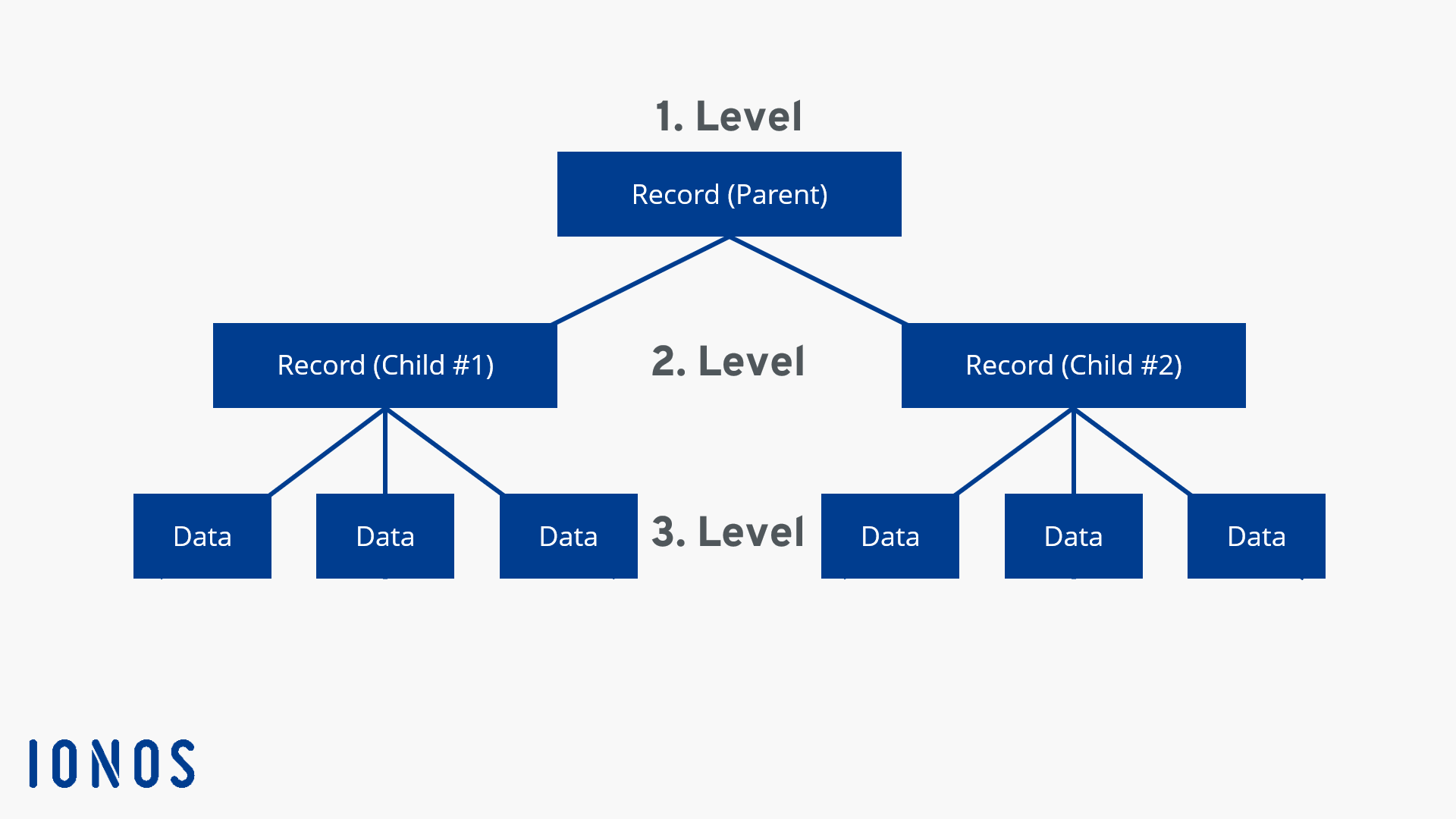
Hierarchical databases have very clear dependencies. This means that each data record has exactly one predecessor (parent-child relationships, PCR) except the root of the database. This leads to the tree structure shown above. Although each “child” can have only one “parent,” each “parent” can have any number of “children.” Because of the strict hierarchical order, layers that are not directly adjacent cannot interact with each other. Also, a connection between two different trees cannot be easily established. Hierarchical database structures are therefore extremely inflexible, albeit very clear.
Datasets that have “children” are called “records.” Records without “children” are called “sheets” because they usually contain the documents in a hierarchical database. Records are usually used to organise the sheets. Each query in a hierarchical database accesses a sheet that is accessed from the root through the records.
 To display this video, third-party cookies are required. You can access and change your cookie settings here.
 Network type database model
The network database model was designed approximately at the same time as the relational database model, even though it outperformed the competition in the long term. Unlike the hierarchical model, records have no strict parent-child relationships. Each data record can have several predecessors, which results in a net-like structure. Similarly, there is no unique access path to a data record.
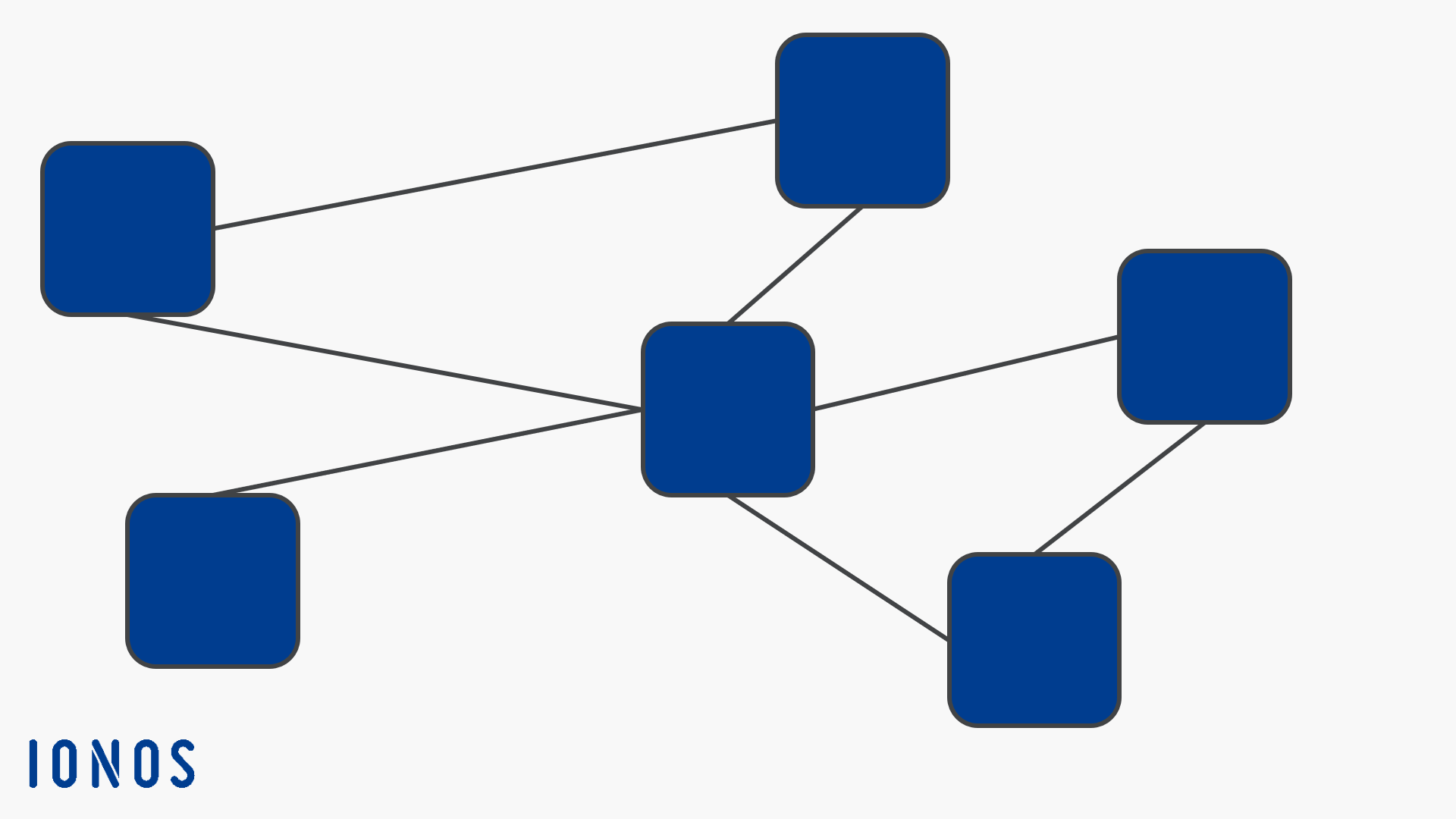
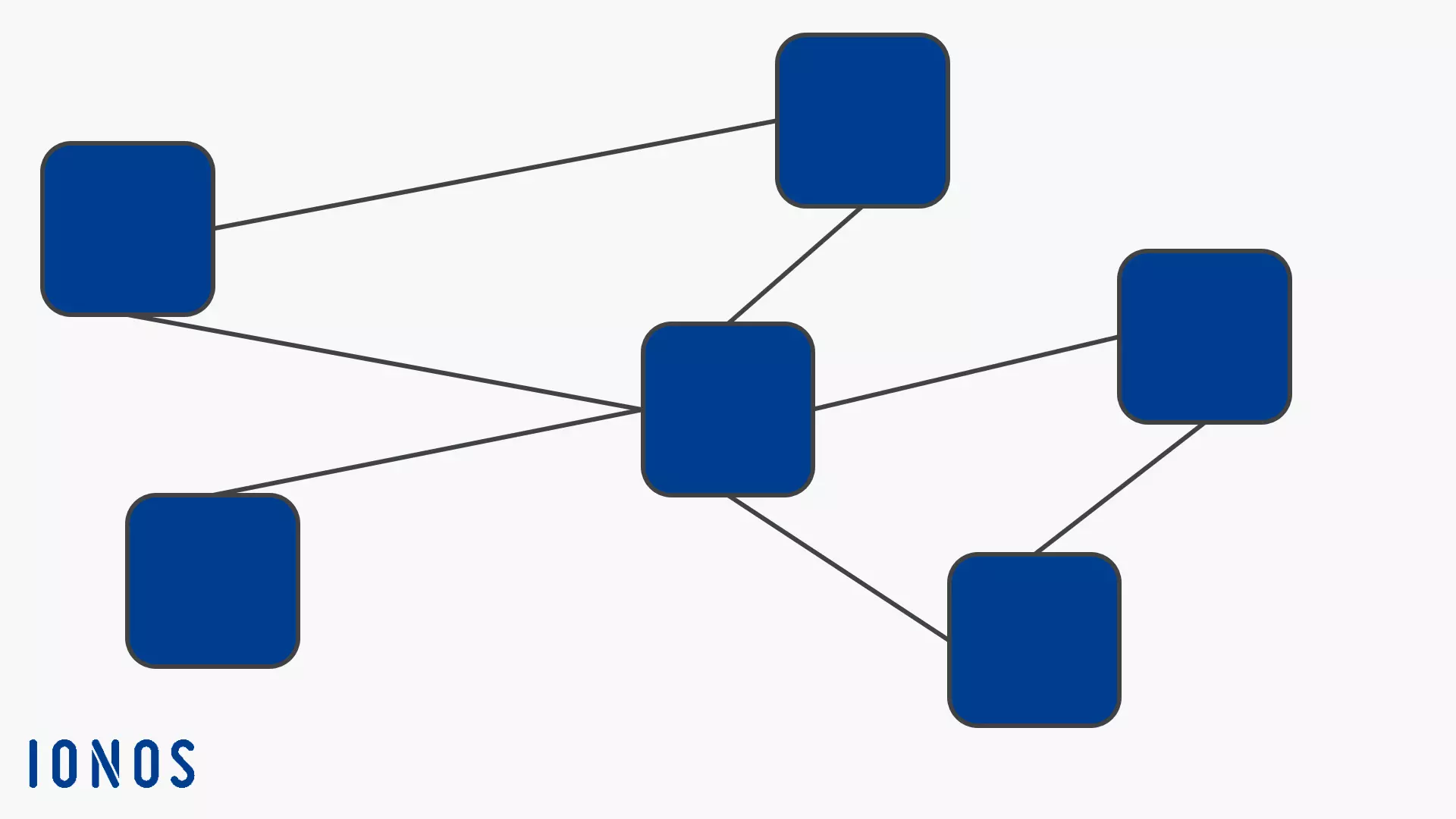
The data set in the middle of the graph can theoretically be reached by five other sets. At the same time, access to the middle data set allows access to five additional data sets. Dependencies can also be defined in the network database model: The topmost record has no direct link to the one on the far right, so it has to go through the middle one (which can then allow or deny access). To do this, the user can directly access the data record in the upper left-hand corner. Data sets can be added and removed fluidly in the network model without significantly interfering with the overall structure.
Today, the network-like database model is used mainly on mainframes. In other areas, either the hierarchical model (especially for IBM customers) continues to be trusted, unless the transition to a more flexible and easy-to-use relational model has been made. Well-known network database models are the UDS from Siemens and the DMS from Sperry Univac. Over the years, both companies have also developed interesting hybrids between network model and relational model without achieving a real breakthrough. However, the results of this test can still be traced in Siemens SQL today. A modern further development of the network model is the graph database, whose structure is reminiscent of a network.
Relational database model
The most popular database model today is the relational one, even if it is considering imperfect by many. The associated relational database management system is better known by the acronym RDBMS, and SQL is usually used as the database language. The table-based relational database model is based on the core concept of “relation,” a term that is firmly defined in mathematics. The relations are formulated using relational algebra, which can be used to extract specific information from these relations. This principle is the basis of the database language SQL.
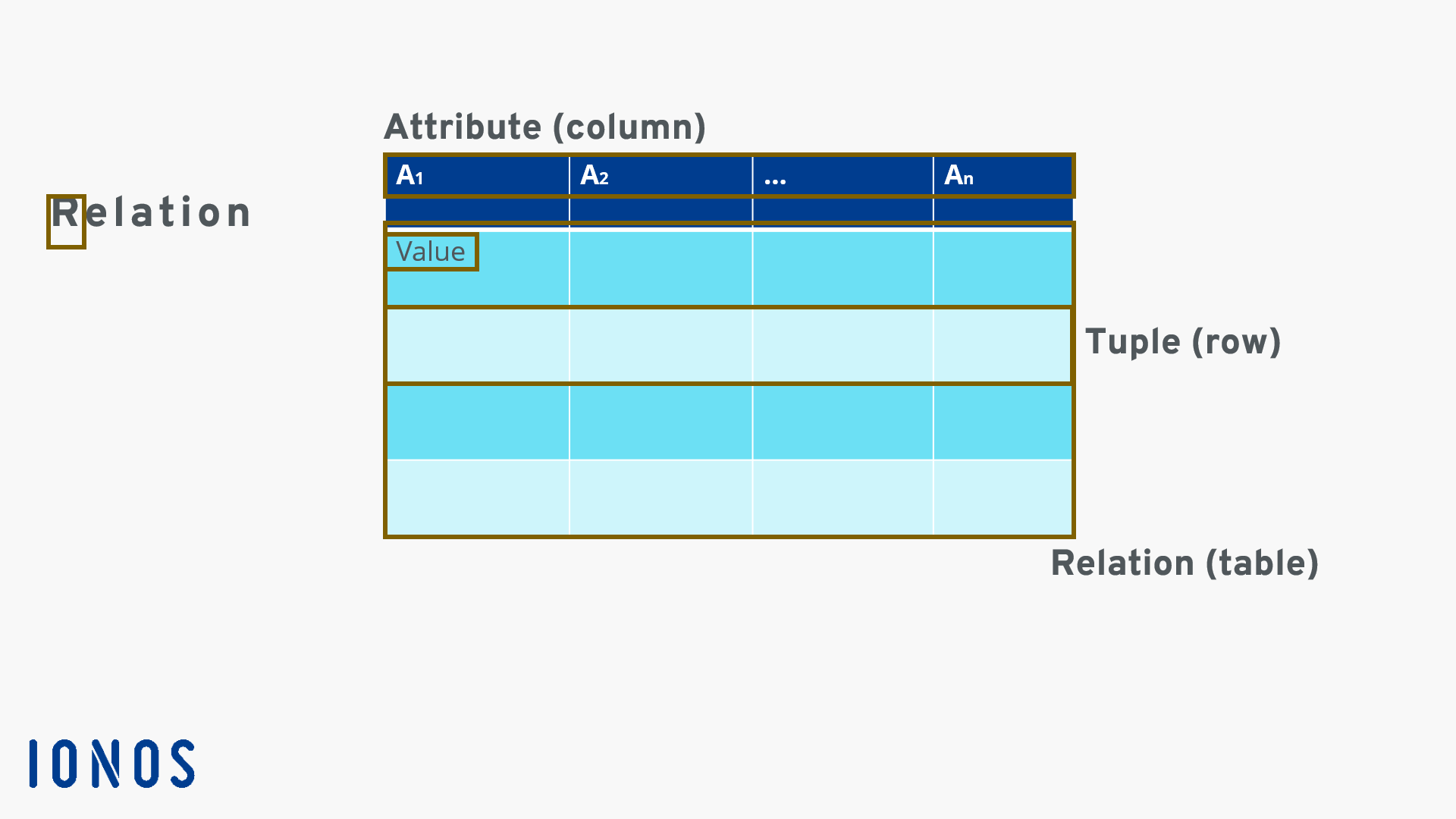
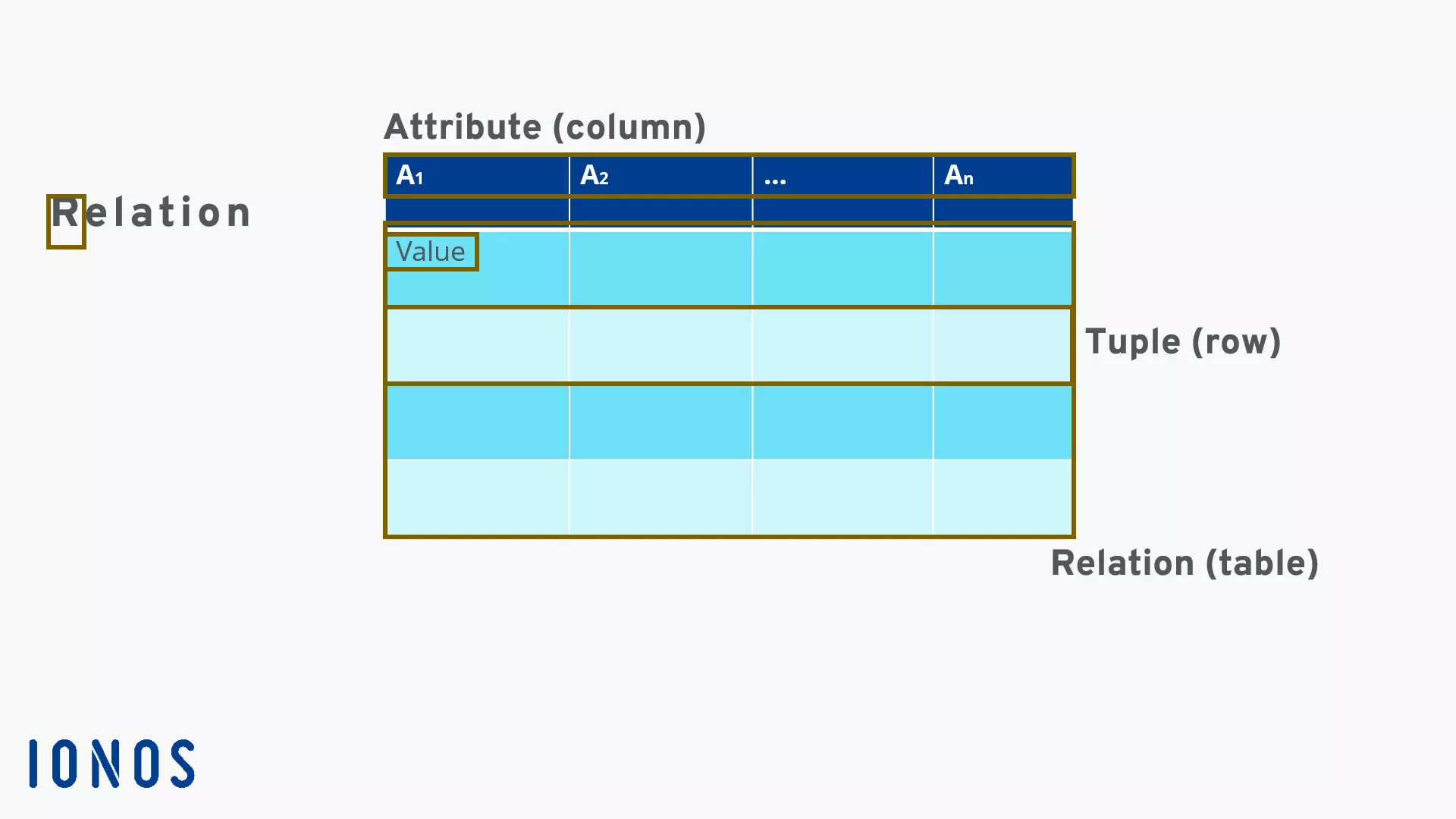
The relational database model works with individual tables that define the localisation and links between information. This information forms a data set (in the diagram of a line or a “tuple”). Individual information is collected as attributes (in graph A1 to An) in the columns. The total relation (“relation” is often used synonymously with the term “table”) is derived from related attributes. The primary key, which is usually defined as the first attribute (A1) and must never change, is elementary for the unique identification of a data record. In other words, this so-called primary key (also “ID”) defines the exact position of the following data set with all attributes.
Read our article in on the relational database to find out why it has become the established standard, the details of how it works, and what kind of criticism it faces.
Object-oriented database model
Object databases were only conceived at the end of the 1980s and still find few application areas today. The object-oriented databases, some of which are available as open source, are most frequently used on Java and .NET platforms. The best-known object database is db40, which scores, above all with its small memory size. Object databases usually work with the query language OQL, which is very similar to SQL.
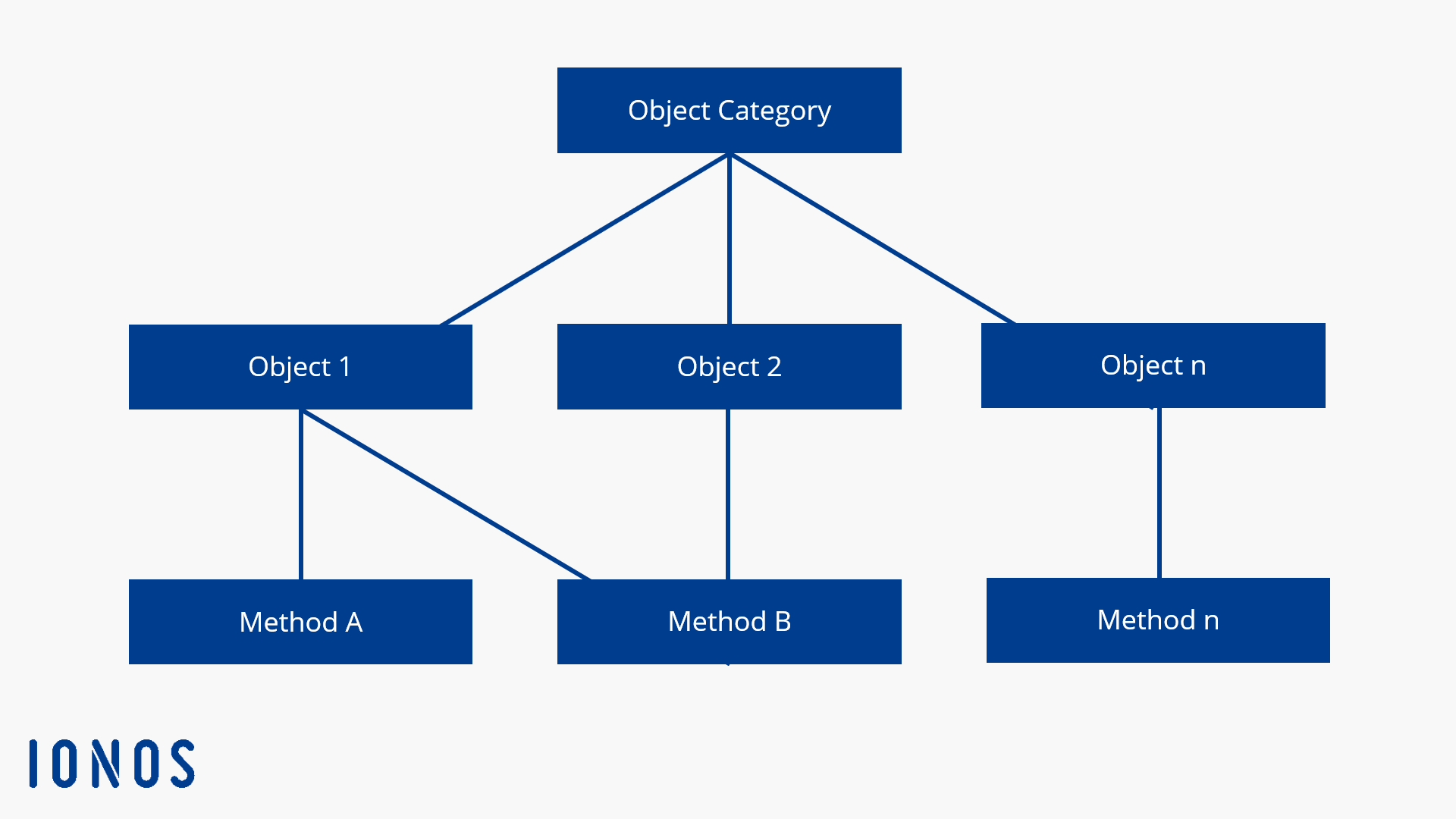
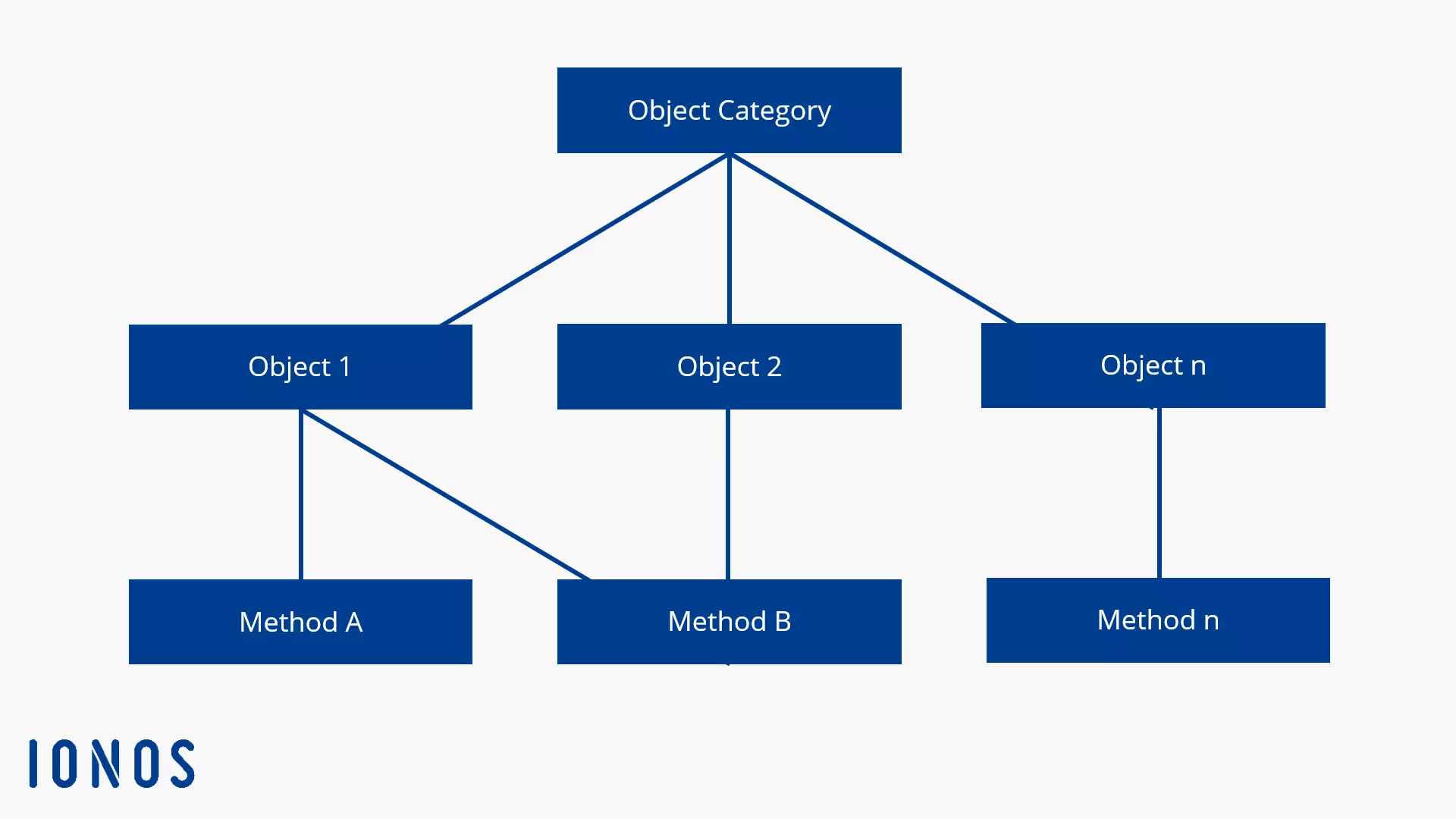
In the object-oriented database model, data and its functions and methods are stored in an object. Objects are usually term objects with associated attributes that describe the object in more detail. Access to these objects is defined in the object database management system using the “methods” that are stored together with the data in the object.
Objects can be complex and can consist of any number of data types. In addition, objects are unique within the database system and are identified with the unique identification number (object ID, OID). As you can see in the diagram, individual objects are grouped into object classes, resulting in a class hierarchy. Although there seems to be a similarity to the hierarchical database model, the object-oriented approach is decisive here and there are no fixed parent-child relationships. Nevertheless, the method of access can be specified by the object class.
Object databases offer advantages for complex problems with corresponding object depths. The object database works largely independently without much intervention in normalisation and ID referencing, and subsequently allows the relatively simple and smooth feeding of new, complex objects. However, simple queries are much faster in a relational database system, for example. Since object-oriented database systems are not very popular, this leads to insufficient compatibility with many common database applications.
Document-oriented database model
In this model, documents form the basic unit for storing data. They structure data and should not be confused with documents like those used in text editing programs. The data is stored in key/value pairs and consists of a “key” and a “value.” Since the structure and number of these pairs are not fixed, individual documents within a document-oriented database can look very different. Each document is a self-contained unit. Relations between documents are not easily to make, but are also not necessary in this model.
In recent years, document-oriented databases have experienced a real boom thanks to the NoSQL’s success, especially because of its good scalability. An example of this kind of database system is MongoDB.
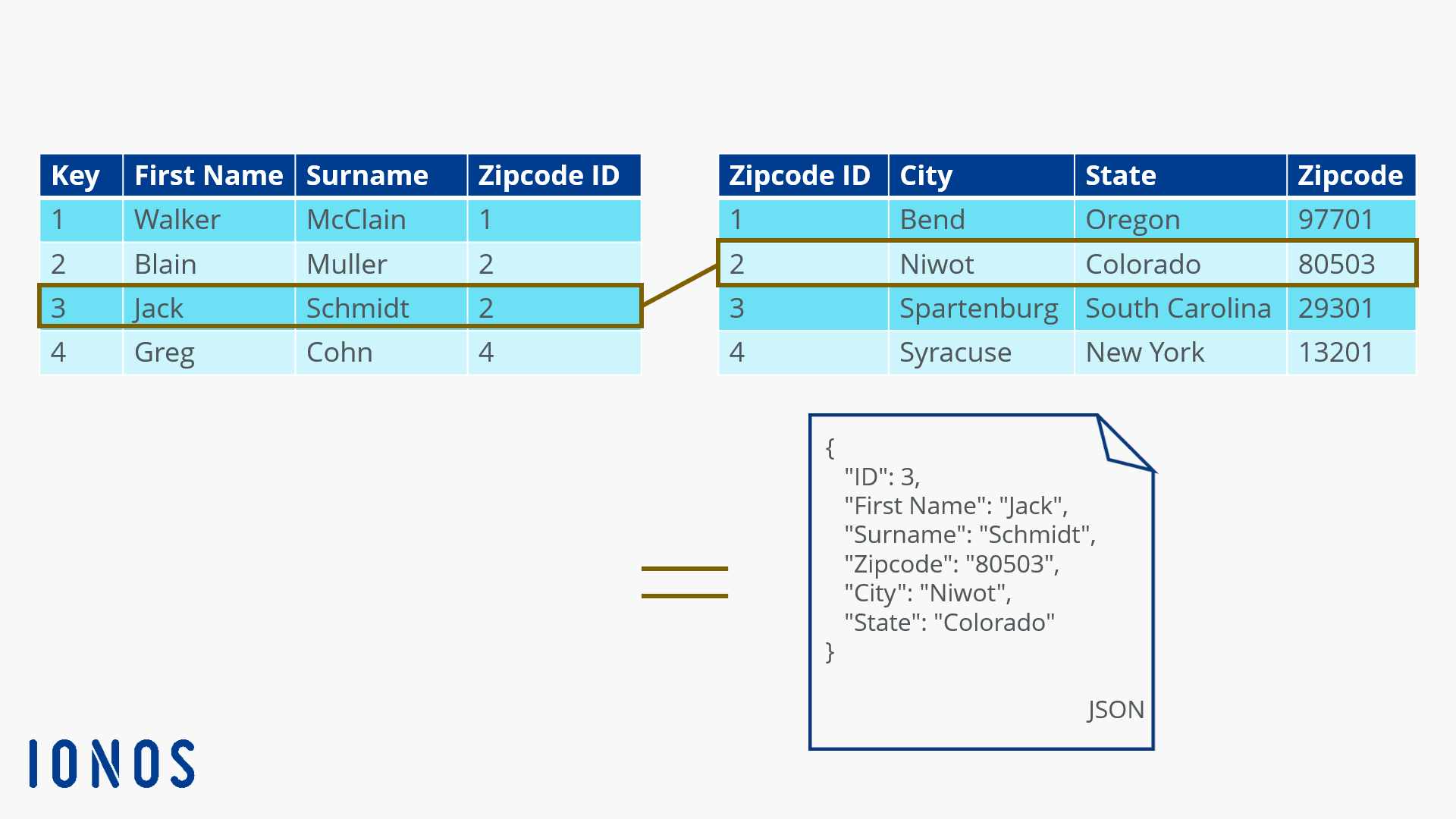
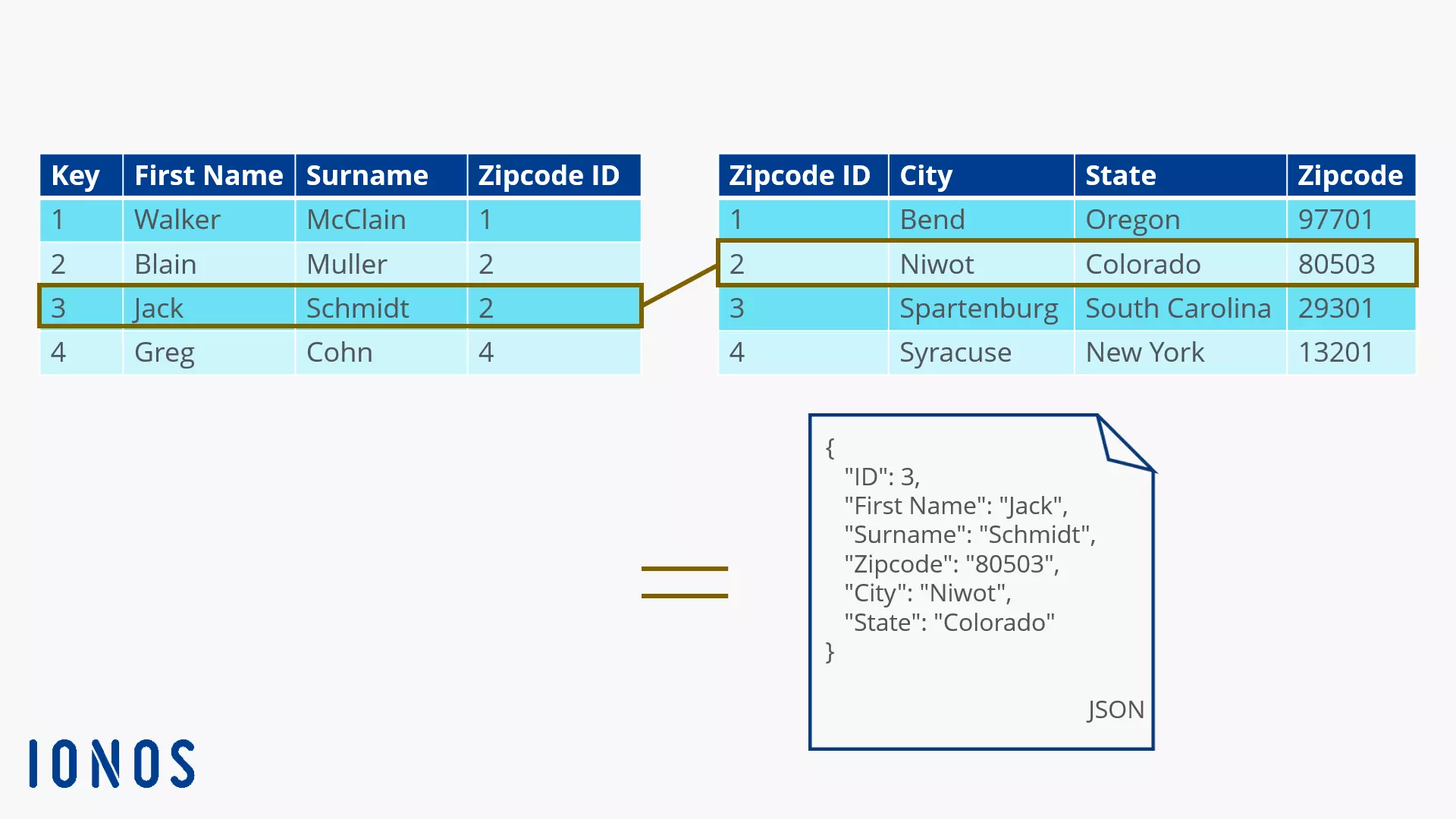
In the relational model (shown in the graph with the tables), different relations are linked together to read a common data set. In the document model, a single document is sufficient to store all information. The schema is freely selectable: the document-oriented database model is conceptually schema-free, as long as the database language used remains the same.
An elementary idea for document databases is that related data is always stored together in one place (in the document). While relational databases usually display and output related information by linking several tables, the specific query of a document in the document-based model is sufficient. This reduces the number of operations required in the database.
Document-based database systems are particularly interesting for web applications, because complete HTML forms can be fed in with them. Especially during the course of developing web 2.0, document databases became more and more popular. However, there are considerable differences between the different document-oriented database systems, from syntax to internal structure. So, not every document database is suitable for every area of application. Precisely because of these different iterations there are some well-known document-oriented database systems out there today: Lotus Notes, Amazon SimpleDB, Mongo DB, CouchDB, ThruDB, Orient DB, and many more.
Overview: database models
| Database model | Development | Advantages | Disadvantages | Fields of application | Known representatives |
|---|---|---|---|---|---|
| Hierarchical | 1960s | Extremely fast read access, clear structure, technically simple | Rigid tree structure that does not allow links between branches | Banks, insurance companies, operating systems | IMS/DB |
| Networked | Start of the 1970s | Multiple search paths to the data set, no strict hierarchy | Poor overview with larger databases | Mainframe | UDS (Siemens), DMS (Sperry Univac) |
| Relational | 1970 | Simple, flexible creation and editing, easily expandable, fast commissioning, lively and competitive | Unmanageable with large amounts of data, poor segmentation, artificial key attributes, external programming interface, object properties and object behavior difficult to map | Controlling, accounting, merchandise management systems, content management systems, and much more | MySQL, PostgreSQL, Oracle, SQLite, DB2, Ingres, MariaDB, Microsoft Access |
| Object-oriented | End of the 1980s | Best support of object-oriented programming languages, storage of multimedia content | Increasingly poorer performance with large data volumes, few compatible interfaces | Inventory (museums, retail) | db4o |
| Document-oriented | 1980s | Central storage of related data in individual documents, free structure, multimedia orientation | Relatively high organisational effort, often programming skills are required | Web applications, internet search engines, text databases | Lotus Notes, Amazon SimpleDB, MongoDB, CouchDB, Riak, ThruDB, OrientDB |