

HTTP 503 (Service Unavailable): meaning and troubleshooting

The HTTP Error 503 is one of the most popular error messages on the World Wide Web. This status code has already been encountered by nearly every internet user. In some cases, all you have to do is re-load the page, but this doesn’t always work: It requires more than simply refreshing the browser window a couple of times to make the 503 error message disappear.
It doesn’t matter whether you’re using a desktop, tablet, or smartphone, the 503 status code is the server’s way of informing visitors that the service they’re trying to reach isn’t available (Service Unavailable). This article explains what causes the error message to be shown and what solutions are available for users and server operators.
- Free website protection with SSL Wildcard included
- Free private registration for greater privacy
- Free Domain Connect for easy DNS setup
What is behind the HTTP 503 code?
The Error Code 503 is one of several status codes that a server can use to respond to HTTP requests from clients, such as web browsers. By doing this, it informs the client whether the request has been successfully processed or whether further steps are needed from the client’s side to complete the processing. 503 is one of the HTTP codes that informs of any server-side error, which would prevent the request from being processed. The message sent would then be 'Service Unavailable', which informs the client that the server is temporarily not available. A corresponding value in the 'Retry-After' field in the header of the HTTP response can be used to specify that at a later time the request is able to be processed.
The error message’s exact wording can vary slightly, as the following list of some of the common variants shows:
- Status code HTTP Error 503
- HTTP 503
- HTTP Error 503
- HTTP Error 503 The service is unavailable
- 503 Error
- HTTP Server Error 503
- Error 503 Service Unavailable
- HTTP /1.1 Service Unavailable
- 503 Service Unavailable Error
- 503 Service Temporarily Unavailable
- Service Unavailable – DNS Failure
- Error 503 Maximum threads for service reached
When does HTTP Error 503 (Service Unavailable) occur?
An HTTP 503 error always occurs when a server can’t deliver the requested resources at the time the client requests them. There are roughly three possible reasons for this:
1. The server is being subjected to maintenance, such as bringing in updates, securing databases, or creating backups and is therefore not connected to the internet during these processes.
2. The server is overloaded, meaning that is it receiving more requests than it can handle. This is why it responds with the error message. There are many reasons for an overload to occur: often an unexpected increase in traffic is the cause, but also when a web project continues to grow it can cause an overload if resources aren’t upgraded at the same time. Other possible reasons are malware/spam attacks as well as web applications or the content management system being incorrectly programmed.
3. In rare cases, an incorrect DNS server configuration on the client side (computer or router) may result in an HTTP 503 error message. The selected DNS server itself might temporarily have problems, which then results in the HTTP request showing a 'Service Unavailable' message.
How to troubleshoot HTTP 503 Errors
The 503 Error is both annoying for visitors as well as for web project operators. It’s especially problematic if the user needs to use the service quickly, but the site can’t be accessed: for example, if you want to make a bank transaction or send an e-mail. Also, users who rely on web apps or cloud services such as browser games, Office solutions, storage platforms, or project tools, don’t want to have to wait for the web presence to be available again.
The operators responsible for the respective web project should look into troubleshooting. On the one hand, the inaccessibility of the service inevitably leads to dissatisfied users and traffic loss; on the other hand, if HTTP 503 error messages occur too frequently, they can lead to a decreased search engine ranking.
503 Error: solutions for client users
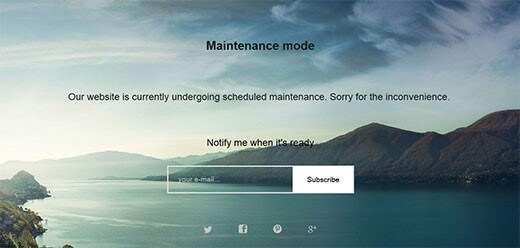
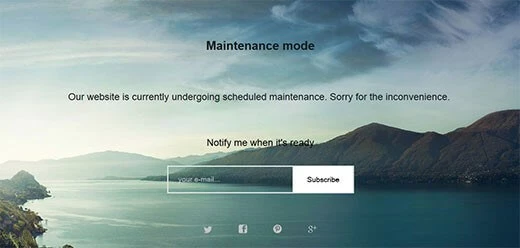
If you want to access a web project via the browser and end up receiving the 503 status code, you’re not usually told what the exact reason is. An exception (as mentioned earlier) is maintenance work, which is planned by the website operator and is therefore usually indicated by a customised 503 Error page. This page often provides information on how long the site will be inaccessible for. If there is no indication that the HTTP 503 Error is the result of maintenance, you can try to solve the
'Service Unavailable' problem with the following tricks.
Solution 1: Refreshing the page
It is possible that the server was unable to answer the HTTP request correctly. In this case, it may be enough to just refresh the page to resolve the HTTP 503 error. To do this, simply click on the refresh button next to your browser’s address bar or alternatively use the [F5] key or the [Ctrl] + [R] key combination.
If the 503 Service Unavailable message appears when you complete an online payment or during the payment process, you should use the refresh function carefully. Refreshing the page could lead to payments going through multiple times. Many payment services and credit card companies therefore use special protection mechanisms to avoid this.
Solution 2: Restarting your computer, router, etc., or changing your DNS server
It has already been suggested that the cause of a 503 error can be due to a problem with the DNS server. In most cases, this is indicated by the specific message 'Service Unavailable – DNS Failure', which indicates a faulty DNS configuration of the system or the router, as well as showing that there’s a technical problem with the selected DNS server. While you can solve the former scenario by restarting your device, the latter problem can be more effectively helped by selecting another DNS server.
Solution 3: Visiting the website later
If you took the initiative and still weren’t successful after the refresh attempts, restarting, and configuring the DNS server, it’s best to close the page and try again later. Since the cause of the inaccessibility is often too much traffic, you will be decreasing the burden on the server by closing the page. By trying again later, the server will have hopefully stabilised and will be able to process all HTTP requests as desired. The same applies, of course, when the 503 Error pages are due to maintenance, but the operator is not informed about this by a specific error page.
Solution 4: Contacting the website’s administrator or support
If a website is unavailable for an extended time, it may be useful to contact the appropriate administrator or support, if it’s available. This may help you learn about the reasons behind the HTTP 503 issue and the current state of troubleshooting.
HTTP 503 troubleshooting: options from server operators
As a website operator, it is in your own interest to fix HTTP 503 Errors as quickly as possible or even try to stop them from happening at all. Otherwise this leads to dissatisfied users, loss of traffic, and being penalised by search engine machines.
It isn’t always possible to prevent errors from happening. For example, if your server is temporarily shut down because of maintenance work being done on your project. However, with appealingly designed error pages, you have the opportunity to inform your visitors about the circumstances surrounding the downtime. In addition, it is useful to specify a time when your site will be available again once you’re able to estimate the duration of the maintenance. Further tips and tricks for dealing with Error Code 503 can be found in the following paragraphs:
Solution 1: Keep the necessary hosting resources in mind
Traffic is probably the biggest issue when it comes to the HTTP 503 problem. On the one hand, one of the most important goals is to attract as many visitors as possible, but on the other hand, the increase in visitors causes an overload of the server and therefore increases the probability of 503 errors. It is therefore very important to maintain an overview of the user numbers and to increase hosting resources in good time to ensure long-term stability. If you are running web projects that are heavily dependent on seasonal events, such as online shops for Christmas shopping, you should choose a hosting solution that allows for a temporary increase in server capacity.
Solution 2: Update your software regularly
If malicious software and spam are triggering the 503 errors, you should immediately contact your hosting provider and work with them to resolve the issue. To avoid scenarios like these, you should pay close attention to your web project’s security right from the get go. The conditions of your provider play an important role – how much protection you receive depends on the chosen server package. For example, you should always use up-to-date software and import available updates as soon as possible. Otherwise, outdated applications with known vulnerabilities will quickly become a gateway for hackers.
Solution 3: Detect and fix programming errors
Another cause of an HTTP 503 Error generated by the server could be that the web project or the content management software is incorrectly programmed. For example, WordPress is very vulnerable to 503 errors due to loading times being too long. This can result from an excessive number of database access attempts or badly programmed plugins, which make the CMS perform additional functions, but often slow down the process at the same time. The same applies if you integrate too many extensions. The solution is to filter out the problematic plugins so that you can deactivate them if you need to.