

InfluxDB – explanation, advantages, and first steps

Sensors that collect scientific or industrial measurement data generate large volumes of data in a short period time. This data has to be processed together with a timestamp of the measurement. Special databases are required for this time series data. This article focuses on InfluxDB, a database management system (DBMS) specially designed for this task.
What is InfluxDB?
InfluxDB is a database management system developed by InfluxData, Inc. InfluxDB is open-source and can be used free of charge. The InfluxDB Enterprise version offers maintenance agreements and special access controls for business customers, and is installed on a server within a corporate network. In addition, the new InfluxDB 2.0 version runs as a customisable cloud service with a web-based user interface for data ingestion and visualisation.
The InfluxDB database management system is written in Google’s programming language Go, also known as Golang. The first version of InfluxDB used InfluxQL, a query language developed by InfluxData, for external database queries.
InfluxDB 2.0 is written in a new language called Flux, which InfluxData publishes on GitHub as an open-source project. The project is updated on GitHub by developers working with time series data. Flux is a standalone language for time series databases (TSDB). It can be used with InfluxDB version 1.7 and higher, either independently or with third-party databases.
Flux is optimised for ETL processes (extract, transform, load) in databases and is not compatible with the InfluxQL query language previously used. However, InfluxData is planning a migration path for existing customers to translate InfluxQL code into Flux.
Flux syntax is based on the popular language JavaScript. It is easy to learn and can be expanded. A key feature of Flux is that it can integrate different data sources using third-party APIs, for example. As a result, Flux is compatible with analytics tools like Jupyter. The Apache Arrow data interchange interface permits communication with other systems and integration in big data environments.
When is InfluxDB used?
InfluxDB is ideal for time-series databases (TSDB), which store time series. These databases are used, among other things, to store and analyse sensor data or protocols with timestamps over a certain period of time. For example, Internet of Things devices or scientific measuring instruments deliver millions of incoming data sets in a constant stream of data.
This data must be quickly processed once it reaches the database. For this reason, InfluxDB includes a built-in time service that uses the Network Time Protocol (NTP) to ensure that time is synchronised between all systems.
With InfluxDB, a database can be very compact and must contain only two or three columns. In this example, the data source, the actual value and the corresponding time stamp are stored in the database.
| Sensor | Value | Time |
|---|---|---|
| Sensor 1 | 140.50 | 04/23/2020 @ 10:00 |
| Sensor 2 | 110.02 | 04/23/2020 @ 10:00 |
| Sensor 1 | 142.32 | 04/23/2020 @ 10:05 AM |
| Sensor 2 | 110.50 | 04/23/2020 @ 10:05 AM |
| … | … | … |
InfluxDB differentiates between tag and field columns. Where a tag is simply metadata that is included in the index, fields contain values that can be analysed. In our example, the first column is a tag and the second one is a field. This differentiation makes it easier to manage the database and analyse measurement data.
What are the advantages of InfluxDB?
Compared to ordinary relational databases, TSDBs like InfluxDB offer clear speed advantages when it comes to storing and processing time-stamped measurement data. A traditional DBMS slows down when organising complex indexes, which are not used at all in this area of application. InfluxDB can maintain high write speeds over a long period of time because it uses a very simple index.
Unlike version 1.x, the new InfluxDB Cloud 2.0 from InfluxData is a cloud-based solution that can run on Amazon Web Services (AWS), the Google Cloud Platform (GCP) or Microsoft Azure. With serverless computing, you don’t need your own server infrastructure. In the cloud version, you no longer have to reserve individual servers. Instead, the system automatically adjusts to the load, which is important for industrial IoT applications and machine learning, where the volume of data can change instantaneously.
Whereas the first version required the TICK stack (Telegraf, InfluxDB, Chronograf and Kapacitor), InfluxDB 2.0 already has everything you need. Both the local and cloud versions contain the entire database management system in a single program file currently available for 64-bit Linux, Linux for ARM processors, macOS, and as a docker container. Telegraf etc. can still be used to collect data for InfluxDB 2.0.
First steps in InfluxDB
InfluxDB offers free access to InfluxDB Cloud 2.0 for anyone getting started with the solution. This plan allows you to try out the database and the entire hosted, multi-user data platform for time series data. InfluxDB Cloud 2.0 also contains modules for collecting, evaluating and visualising stored data.
The free version offers limited data rates for reads and writes, up to 10,000 data sets, and a maximum storage period of 30 days. These limits are usually sufficient for hobby projects, in which case the free version would suffice. A free plan can later be upgraded to a paid, usage-based plan without losing data.
To get started, create a free user account on the InfluxDB Cloud 2.0 signup page. Then click the verification link in the email.
After verifying your user account, log in and select your cloud provider. In Europe, InfluxDB Cloud 2.0 is currently available only via Amazon Web Services (AWS). However, this is not an issue if you’re using the free version. If you’re already using Amazon Web Services or Google Cloud Platform (GCP), you can subscribe to the InfluxDB cloud products through the marketplaces of these cloud providers.
Once you’ve logged in, InfluxDB displays your personal dashboard, where your data is collected and visualised. Data can be collected via Telegraf plug-ins, the InfluxDB v2 API, the Influx command line interface (CLI) or directly via the InfluxDB user interface. Client libraries for various popular programming languages are also available.
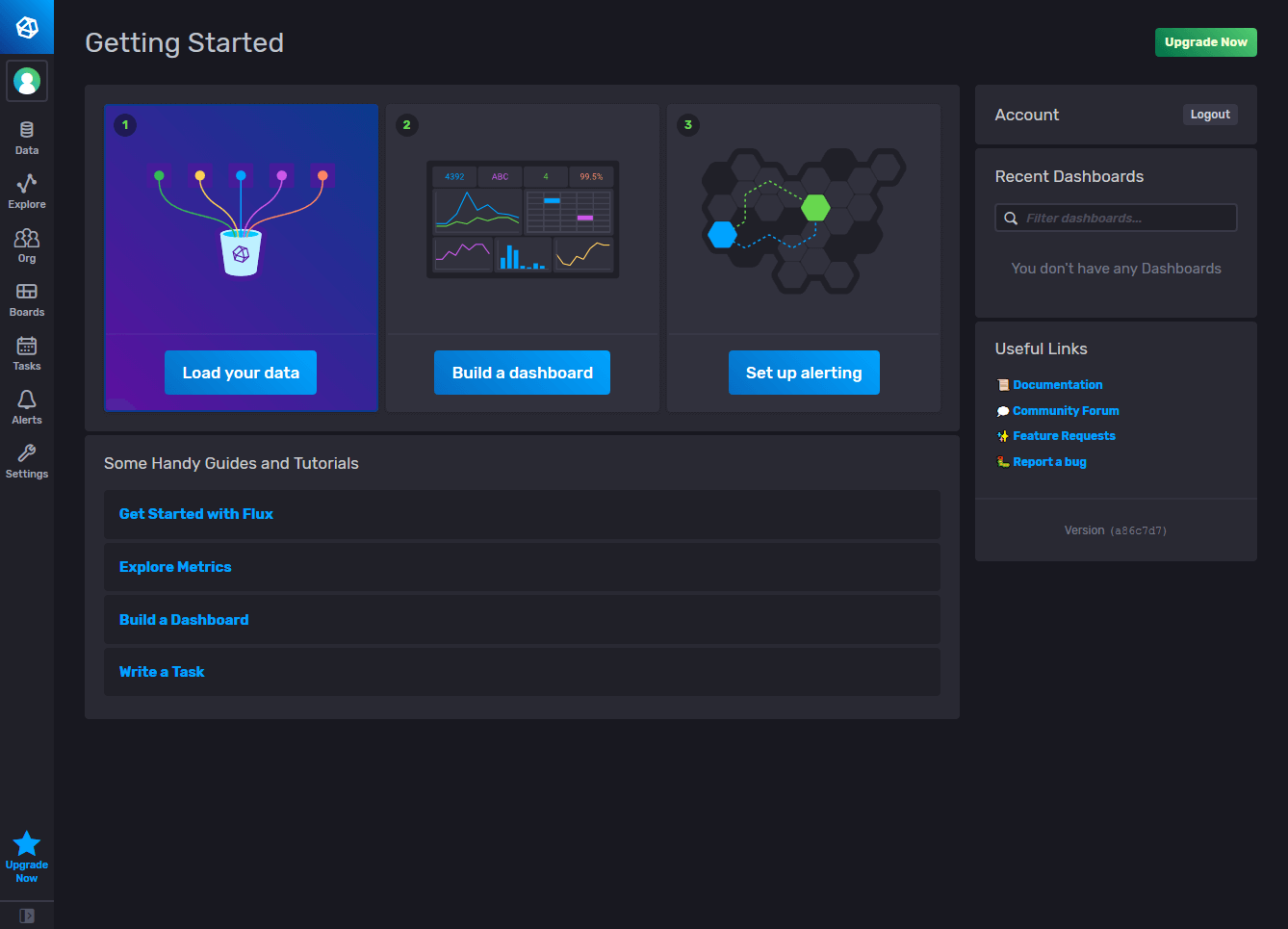
You can create Telegraf configurations interactively or copy existing configurations to send data to the InfluxDB Cloud 2.0 instance. Once you’ve configured InfluxDB cloud to collect data, you can create personal dashboards to query and display the data.
In the InfluxDB data explorer, you can explore and visualise the collected data. You can adjust time intervals and ranges for refreshing the dashboard’s data according to the needs of your project. The InfluxDB user interface provides a variety of attractive visualisation options. The web interfaces allows you to move seamlessly between the Flux Builder and manual editing of database queries.
On the “Usage” page, you can view your current database usage at any time to determine whether a paid plan might be worthwhile.
The most important new features of InfluxDB Cloud 2.0 at a glance
Free plan (with limits): No downloading, no installation and no in-house server infrastructure required; fastest introduction to InfluxDB 2.0 technology; the free plan is designed for getting started with InfluxDB and for small hobby projects.
Flux support: Flux is a standalone scripting and query language for time series databases that increases productivity by allowing easy reuse of code. Flux was developed and optimised for working with data in InfluxDB 2.0, but it can also be used with other data sources.
Unified API: The unified InfluxDB v2 API offers access to all InfluxDB components, such as data ingestion, query, storage and visualisation. This enables seamless movement between the installed open source version and the InfluxDB Cloud 2.0 version.
Visualisation and dashboards: Based on the innovative Chronograf project from the first version of InfluxDB, the new user interface offers significantly faster results when visualising and querying data in real-time.
Usage based pricing plans: Usage-based billing offers more flexibility than a self-hosted database system and ensures that you only pay for what you actually use.
Reviewer

Julia Hertler
With over 18 years of experience in content marketing, Julia Hertler has deep expertise in digital communications. For the past 10 years, she has specialised in the areas of domains and hosting at the IONOS Digital Guide, making complex technical topics easy to understand.