

How to edit drop-down lists in Google Sheets
In Google Sheets, it’s possible to create drop-down lists within a cell. If you want to add new choices, you can easily edit or extend your Google Sheets drop-down list.
What is a Google Sheets drop-down list?
A drop-down list is a list that allows users to select one of several predefined values. In the Google Sheets spreadsheet program, you can create drop-down lists in cells similar to the way you would create drop-down lists in Excel. In addition to creating drop-down lists, you may also need to edit them from time to time, for example, if the options are no longer up to date or need to be renamed.
- Up to 50 GB Exchange email account
- Outlook Web App and collaboration tools
- Expert support & setup service
How to edit a Google Sheets drop-down list
If you want to edit drop-down lists in Google Sheets, you have several options.
Google offers a comprehensive range of different apps for companies. With the Google Workspace solution from IONOS, you can use these tools and a Gmail account together with a domain from IONOS. Benefit from real-time collaboration and online storage for your data.
Edit with the editing tool
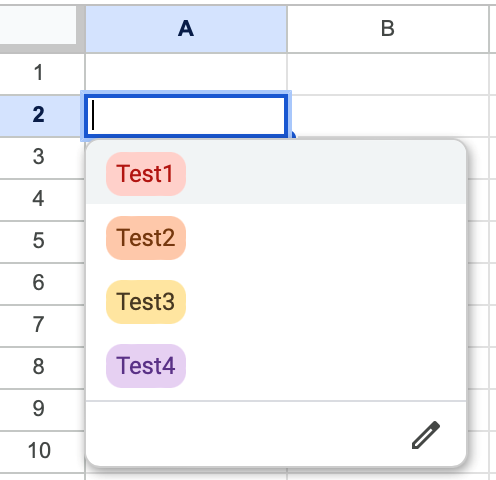
You can use the built-in editing tool to expand or edit your Google Sheets drop-down list. Simply follow the instructions below:
- Click on the cell with the drop-down list that you want to edit.
- You’ll see a pencil symbol in the bottom right-hand corner. Click on this.
- You can now edit your Google Sheets drop-down list. Continue just as you would when creating a Google Sheets drop-down list.
Edit by right-clicking
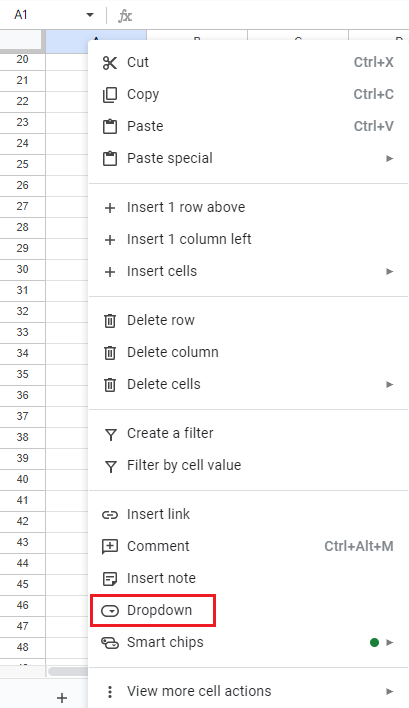
Another simple and intuitive way to expand or edit a Google Sheets drop-down list is by right-clicking on the cell.
- Right-click on the cell containing the drop down list.
- A list with various options will open. Select the Dropdown option.
- You can now edit your Google Sheets drop-down list in the drop-down editor.
- Keep your data safe with industry-leading security
- Save time on updates and maintenance
- Easily add apps and online office tools