

Webinar: definition, basics, and possible uses

The internet and the World Wide Web connect people all over the world. Social networks serve as meeting points for public and private exchanges with friends, family, and acquaintances, but also with strangers. Most of the information online is free and available to everyone. Online shops and sales platforms such as Amazon and eBay make it possible to shop directly from home. It is also easy to share media content such as images, music, and videos: you can listen to music on your smartphone while on the go, share songs and images with other users, and share live streaming experiences with others.
A popular format that also makes use of the web and internet’s possibilities and is used in many industries for presentation purposes is the so-called webinar.
What is a webinar?
The term 'webinar' is the amalgamation of the two words 'web' and 'seminar'. The term describes the online transmission of seminars, presentations, or similar content using video technology. In contrast to a webcast where information is presented on demand and only transmitted in one direction, a webinar is interactive and therefore allows two-way communication between the organiser and the other participants.
A webinar is an online presentation that is broadcast over the internet in real time using video technology. The exchange between speaker and participants usually takes place via webcam and microphone (VoIP). The term is composed of the two words 'web' (from world wide web) and 'seminar'.
Webinars usually take place in real time, but recordings are sometimes used. In both cases, a specific start and end time is given in advance. The organiser has the possibility to present material (media content, presentation slides, own screen, etc.) and to talk to the participants using VoIP (voice over IP). Thanks to networking via the internet, the speaker and participants do not have to be in the same place – all they need is an internet connection and the respective access data. If the organiser grants a participant speaking rights, they can speak directly to others during the event. Other interactive possibilities with webinars (also known as online seminars, web conferences, live webcasts, or web interviews) include chats, surveys, file sharing, or downloading.
How does a webinar work?
Before an online seminar can take place, the speaker must first set up an appointment and inform the desired participants about it. Usually the number of participants is limited, so people that want to take part in the webinar must register. The provider then sends a confirmation e-mail to all selected users, which contains further instructions along with the necessary login data and/or access link. It is also common practice to send a reminder message just before the web conference starts. When the webinar begins, participants connect to the web conference room, which requires a standard internet browser. In rare cases, however, it may also be necessary to install a specific client application and use it for the webinar session.
Connecting to a webinar is usually only possible for a limited period. Usually, access is stopped approximately five to ten minutes after an online seminar has begun. Therefore, if you register for a lecture and only start the login procedure after the deadline has expired, you won’t be able to take part. Just like in real life – it’s important to be punctual!
Once you’re connected to the webinar room, you can follow the live broadcast. Typically, you can switch between several windows that present different contents or perform different functions. Normally, there’s the main image, which shows presentation slides or the speaker’s screen for example, and there’s also a slightly smaller window in which the speaker can be seen live. Additional windows may include a list of attendees, a chat feature, or allow access to shared files. If it is a recording, live stream and communication elements are obviously not part of the webinar.
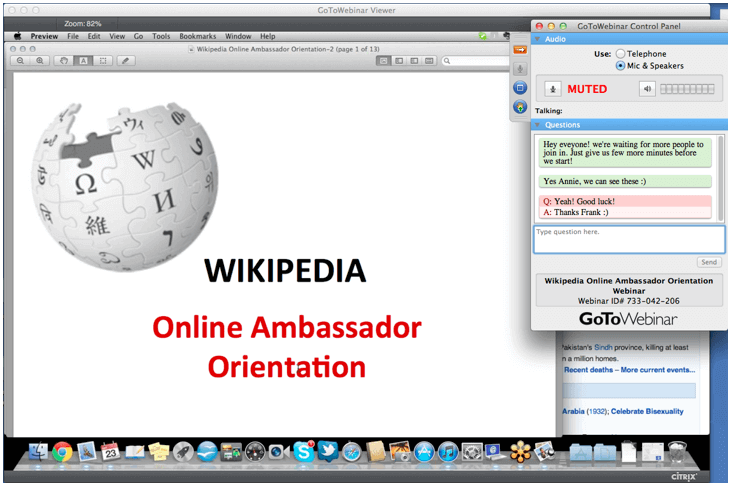
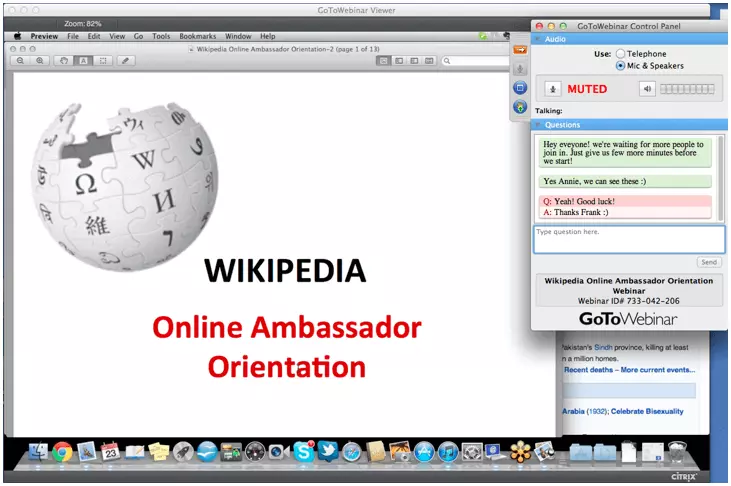
In principle, participation in an online seminar with all internet-enabled devices is possible. Sufficient bandwidth is required due to the large amount of video and image content. However, mobile devices such as smartphones or tablets may not be supported, requiring the use of a desktop computer instead. As already mentioned, the connection is established via standard web browser or special client software, which in this case has to be identified and provided by the organiser. It administrates the data transfer and webinar using the appropriate application.
The technical requirements for webinar participation
In principle, participation in an online seminar with all internet-enabled devices is possible. Sufficient bandwidth is required due to the large amount of video and image content. However, mobile devices such as smartphones or tablets may not be supported, requiring the use of a desktop computer instead. As already mentioned, the connection is established via standard web browser or special client software, which in this case has to be identified and provided by the organiser. It administrates the data transfer and webinar using the appropriate application.
If you can’t log in to a browser-based webinar due to the browser being used, this may be because the installed version is not up to date. In this case, it should be updated first. There is also the possibility that this internet browser isn’t supported, which means you will have to choose an alternative – at least to attend the webinar.
To be able to follow the webinar, participants usually only need speakers or a headset for audio playback. If you want to communicate directly with the speaker and other participants, you also need a microphone or webcam. In some cases, however, it is possible to dial in via telephone and listen to the presentation this way.
If you want to create a webinar yourself, you will find special webinar software on the Internet. In many cases these can also be tested free of charge.
The features of online seminars at a glance
In summary, the following features make online conferences interesting for organisers and participants:
- Real-time audio communication via VoIP
- Text communication via chat
- Uncomplicated presentation of slideshows or screen content
- Video streaming
- Sharing and downloading of additional material
- Practical possibility of recording complete lectures and sharing or viewing them afterwards
- Creating and making surveys or quizzes available
Webinar: advantages and disadvantages
Even if the contents could theoretically be the same, online seminars differ from conventional face-to-face seminars. They offer some advantages compared to classical lectures, but they also come with some disadvantages: the webinar format scores particularly well when it comes to not being dependent on a certain location. This saves time and money for both the speaker and the participants, since they don’t need to travel to the seminar location. Depending on the context of the webinar, anonymous participation is possible in many cases since you only have to enter a valid e-mail address.
On the other hand, you’re much more dependent on technology, which isn’t always so reliable. If the participant’s device is broken or the internet connection isn’t working properly, they can’t take part. If the technical problems are on the organiser’s side, the webinar might have to be cancelled or at least postponed.
The following table summarises the advantages and disadvantages of webinars:
| Webinar – Advantages | Webinar – Disadvantages |
|---|---|
| Saves costs through no longer having to travel to and from the hotel, overnight stay, room booking, etc. | Technical problems can lead to the event being cancelled, or prevent participants from joining in |
| Simple and automated registration | The participants’ mood and motivation is difficult for the speaker to determine |
| Easy to exchange information before, during, and after the event | Participants could easily be distracted i.e. due to their surroundings, or because they know they aren’t being watched |
| Anonymous participation is possible | Interaction between speaker and participant is often reduced to a minimum |
| In theory, there is no limit to the number of participants (in practice, the maximum number of participants depends on the technical conditions) | Time frame is almost always binding – sometimes it isn’t possible to log in later. |
| Ability to share or download additional digital material at any time during the webinar (non-binding) | |
| Easy to evaluate and store presented content |
In which areas are online seminars useful?
If you look at it one way, webinars do not differ in any way from classical face-to-face seminars: both formats offer a good framework for sharing teaching content with a large number of people within a very short period of time. It is therefore hardly surprising that online seminars play an important role in e-learning. Universities and language schools offer webinars in a wide variety of subject areas, making it a lot easier for teachers and students alike. Online seminars and lectures provide the perfect basis for successful studies, especially in distance learning courses. However, teaching and learning via the internet is not the only application scenario where the advantages of webinars come into their own. The online presentation format also demonstrates its strengths in the following areas:
- Presentation of products
- Press conferences
- Meetings
- Online interviews with multiple people
- Software training courses