

YouTube sponsorship: support at the touch of a button

YouTube is undisputedly the world's most popular video website – and the second largest search engine after Google. Every day, thousands of content producers upload their videos to YouTube. YouTube itself recently announced that video creators now have the possibility to integrate a “join” button into their YouTube channel. Previously, join buttons on YouTube were only available for gaming channels. Now this option is available for all channel categories on YouTube.
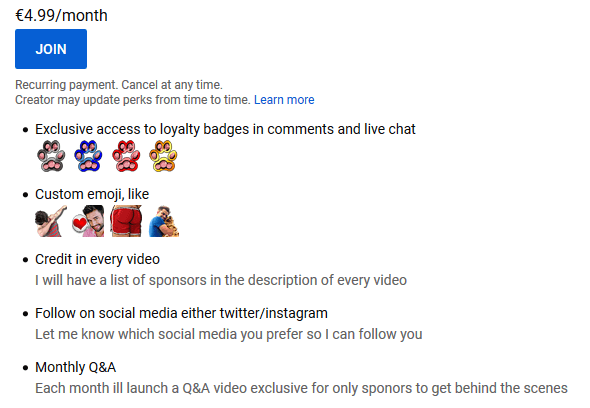
Through a monthly cancellable membership, viewers can now receive special emojis from the creator and make use of an internal member area and exclusive discounts on products or promotional gifts. Therefore, the members belong to a kind of exclusive club, similar to donation platforms like Patreon and Kickstarter. This means YouTube is becoming accessible to a flourishing market that is ready to pay – and connects its content creators better to the video platform, as they no longer have to switch to external sites such as Patreon. This guide tells you everything you need to know about YouTube sponsorship and the join button.
Becoming a YouTube sponsor: what’s the join button all about?
Once a channel offers the YouTube sponsorship option, it will be displayed under all videos that the channel operator posts. The blue YouTube join button is next to the red subscription button.


As an official sponsor of a YouTuber, you have some advantages over non-sponsors. Which advantages and benefits you enjoy as a sponsor depends on the respective YouTuber. They may provide exclusive video material and distribute promotional codes, recommendations, images, or extra content to their members. Special announcements or events such as fan meetings can also be organised exclusively for sponsors. In this way, the YouTuber can thank their sponsors for their support. On top of that, this makes the sponsors feel that they are part of their own fan community.
Do you want to know how to increase your number of followers on YouTube to qualify for the sponsoring programme? Our guide has articles on the topics YouTube SEO, how to make money on YouTube and becoming a social media influencer so you can start your success story today.
What a YouTube sponsor has to do is similar to what sponsors on the Patreon and Kickstarter donation platforms have to do. On these two platforms, sponsors can choose from different membership packages, which cost different amounts and are associated with different exclusive offers from the YouTuber. For many fans, these extras are the reason why they pay a monthly amount to the creator. This principle works so well because performance is compensated with a reward.
In contrast to the platforms mentioned above, however, YouTube offers only one model – at a fixed monthly price of $4.99 (around £4.00). Whether different membership packages will be offered on YouTube in the future depends on how well the sponsor function is accepted by the users. If this model is successful, channel operators may receive more freedom when designing their membership plan.
After completing the membership process to become a YouTube sponsor, the amount will automatically be debited from your account at the beginning of each month. YouTube requires either a valid credit or debit card number, or you must agree to the debit via PayPal. The membership can be cancelled monthly. You can also pause your membership if you wish. The YouTuber can change and extend the advantages for the sponsors over time.
What are the advantages and disadvantages of YouTube fan funding?
Joining a channel offers sponsors some advantages. For example, sponsors can enhance their video comments with icons and emojis personalised by the channel owner, so those visiting the comment section can see who sponsors the channel. It is also possible to get discounts: These can be discount codes for the YouTuber’s shop, or reduced prices for events that the YouTuber is attending. Some YouTubers even give members free or discounted access to courses or the chance to meet them in person.
In addition, the name of the sponsor is displayed in green in live streams with a small red camera behind the name. This ensures that the audience knows that this person has joined the YouTuber’s channel. YouTube seems to have copied this principle from the livestream platform Twitch, in which sponsors are highlighted in live chats using symbols.
If you join a channel, you pay around £4 per month. According to YouTube, the creator receives a 70 percent share of this amount, which is around £2.70. However, taxes are also deducted from this money. This makes YouTube relatively expensive compared to dedicated crowdfunding platforms such as Patreon and GoFundMe. The latter takes 5 to 10 percent of the fees – so the project creator receives 90 to 95 percent of the donations.
However, YouTube offers a greater reach than other platforms. And thanks to YouTube sponsorship, a fan who wants to sponsor one of their favourite channels no longer has to go to an external crowdfunding project page that the YouTuber has linked to, where they then have to create an additional account. The YouTube sponsorship programme enables the entire business and support model to run on one single platform. This convenient way to donate could be the deciding factor for many fans, since it means they can support their favourite YouTuber in just a few clicks and with only a small donation.
Thanks to the YouTube sponsorship programme, the YouTubers themselves can theoretically forego time-consuming cross-platform work, so that they have more time for their actual work: creating content (although it may be useful to use multiple platforms – if you have enough time to maintain different accounts on different platforms). At the moment, however, a YouTuber needs at least 100,000 subscribers in order to be able to partake in the membership programme in the first place. As with every new feature on YouTube, it will probably be tested to see which functions and sponsoring models are most useful for which number of sponsors. YouTube is likely to make a few tweaks here and there in the years to come until the sponsorship programme really kicks off.
If you operate a YouTube channel, you should inform yourself about YouTube membership so that you can get on board in good time. The earlier you start (as soon as you are approved), the more likely you are to win the “early adopters” as sponsors and therefore not only earn more money, but also increase your reach.
The biggest disadvantages of YouTube sponsorship in its current form are undoubtedly the relatively high fees and that the minimum number of followers is 100,000.
Are the fees generally too high for you and/or do you operate a smaller channel that is not (yet) suitable for the programme? Then you should consider alternative crowdfunding or donation platforms. In our articles on the topics of crowdfunding and crowdfunding platforms, you can learn more about these popular financing models.
Overview: Advantages and disadvantages of YouTube sponsorship
| Advantages | Disadvantages |
| Fans can support their favourite YouTuber directly via the video portal. | YouTube keeps a relatively large part of a donation itself. So out of the $4.99 (£4.00) per month per member, the YouTuber only receives about £2.70. They then have to pay tax on this. |
| Members become part of an exclusive club and enjoy special benefits (special emoticons, chat mentions, participation in exclusive events, etc.). | YouTubers only qualify for the sponsorship programme if they have 100,000 subscribers or more. Smaller channels therefore suffer. In addition, there’s temptation to artificially generate followers with questionable methods. |
| YouTubers don’t need to bother with time-consuming cross-platform work if they want to collect donations. | So far there is only one model for sponsors: $4.99 (£4.00) per month. YouTube sponsorship is therefore currently still inflexible and allows neither sponsors nor channel operators any freedom of choice. |
| The join button on YouTube videos is quick and easy to use and yet unobtrusive. The button is well integrated into the basic functions of YouTube. |
Please note the legal disclaimer relating to this article.