

Boolean operators: Smart searching in Google and other search engines

Boolean operators are a versatile and valuable tool for anyone using search engines to look for information online. They are mathematical operators used with a special syntax and can be used to expand or restrict search operations or programming sequences, or to apply certain conditions. This guide lists the most useful Boolean operators, with examples to show how they can be used.
Ask, create and research with the European alternative to ChatGPT. Robust security and unlimited chats give you peace of mind.
Helpful Boolean operators for Google searches
| Operator | Function |
|---|---|
| AND | Links conditions together; the results must match all the specified words/phrases |
| OR | Links conditions together; the results must match one of the specified words or phrases |
| NOT | Excludes terms from the search results |
| AROUND(X): | A proximity condition; finds terms within X words of each other |
| IN: | Performs quick conversions between different units/currencies, etc. |
| define: | Returns a definition of the specified search term |
| weather: | Displays a detailed weather forecast for the desired destination |
What are Boolean operators?
The three basic expressions of Boolean algebra, as established by English mathematician George Boole, are AND, OR, and NOT. These operators are used in all common programming languages, primarily to return results based on whether specified conditions are ‘true’ or ‘false’.
Boolean operators are used to write logical expressions that test whether a specified condition is ‘true’ or ‘false’. They specify and/or link together certain conditions.
The operators can be expressed in symbols as well as in words. These symbols are also known as ‘logical operators’ and are mainly used in programming languages. For example:
- & or && mean AND
- | or || mean OR
- ! or ~ mean NOT
Placing the AND operator between two conditions means that both conditions must be met in order for the result to be ‘true’.
With the OR operator, only one condition has to be met for the result to be ‘true’.
When NOT is used, all the conditions except the excluded ones must be true.
Search engines like Google use these Boolean operators as follows:
- AND: A space between two terms is interpreted as ‘AND’.
- OR: Both the word ‘OR’ and the pipe symbol ( | ) act as the OR operator. The Windows keyboard shortcut for the pipe symbol is ALT + [0] [1] [2] [4] (on the number pad). In MacOS it is [ALT] + [7].
- NOT: Putting a minus sign before a word (with no space) excludes the word from the search. Be careful not to accidentally type a dash instead of the minus sign, as this will give completely different search results.
For an overview of frequently used Boolean operators for Google Searches, check out our guide: ‘Advanced web search with Google operators’.
Special Boolean operators
Some extra Boolean operators have been added to the basic ones described above to make searching even more efficient.
Use a notes app to save your favourite search queries on your desktop. This will save you a lot of time, whether it’s looking up the operators, or typing the queries!
AROUND(X): Cut through the noise
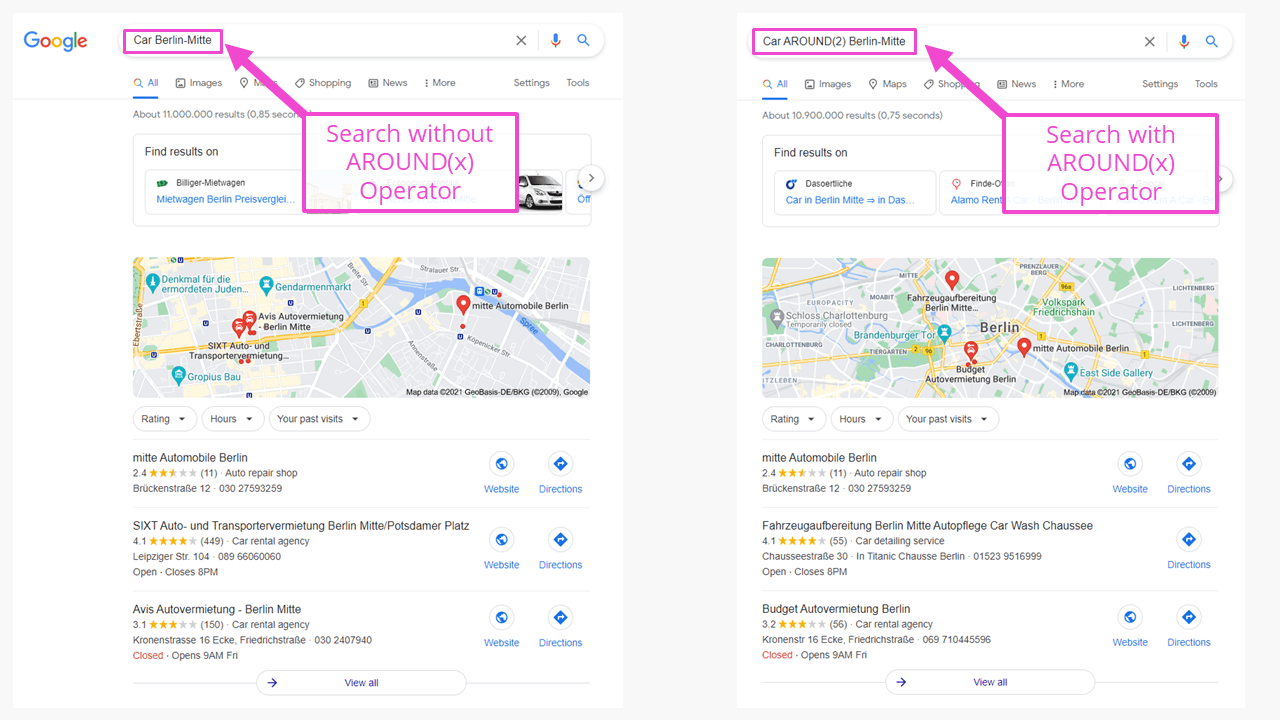
One of the lesser-known Boolean operators is AROUND(X), which can be used when searching for multiple terms. The X is a number that specifies how far ‘around’ the first term the second must be found. It defines the maximum permitted distance, in words, between the two terms.
Here’s an example to illustrate how it works:
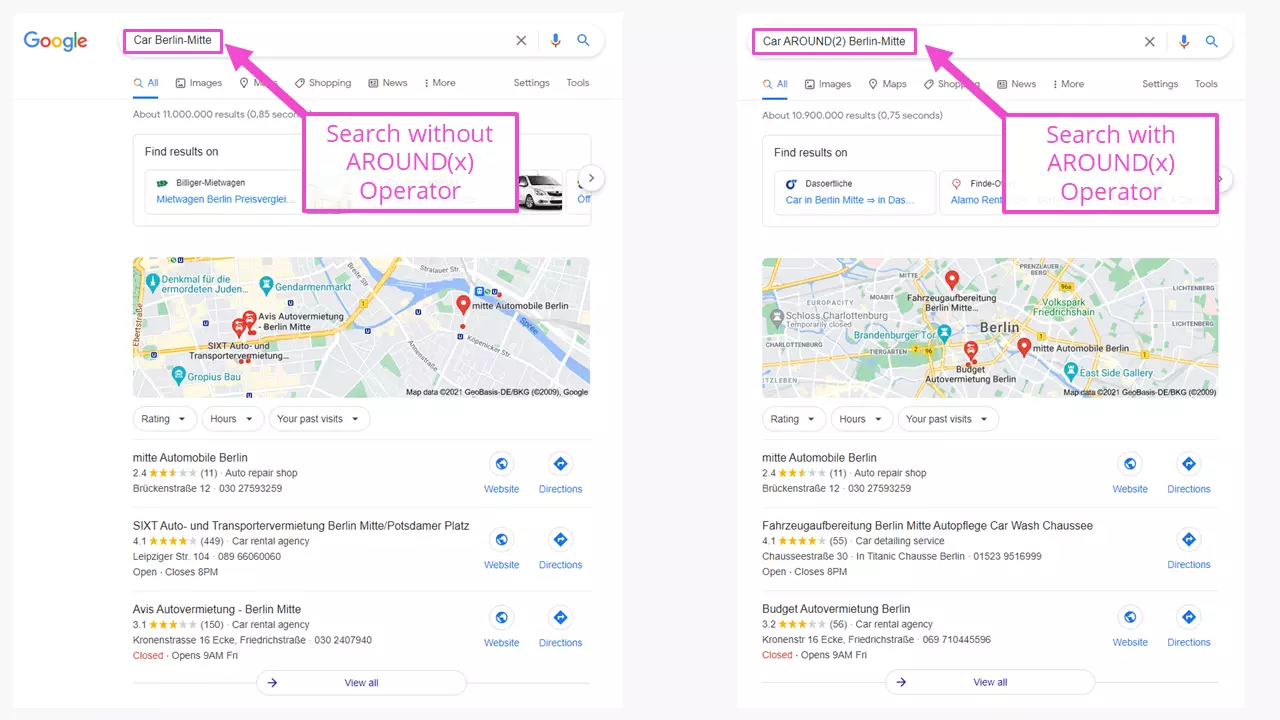
Car AROUND(2) Berlin-MitteThis Boolean search tells Google to look for the terms ‘car’ and ‘Berlin-Mitte’ with two (or fewer) words between them. As you can see, the results differ from those obtained by simply searching ‘Car Berlin-Mitte’.
IN: Quick conversions of measurements and currencies
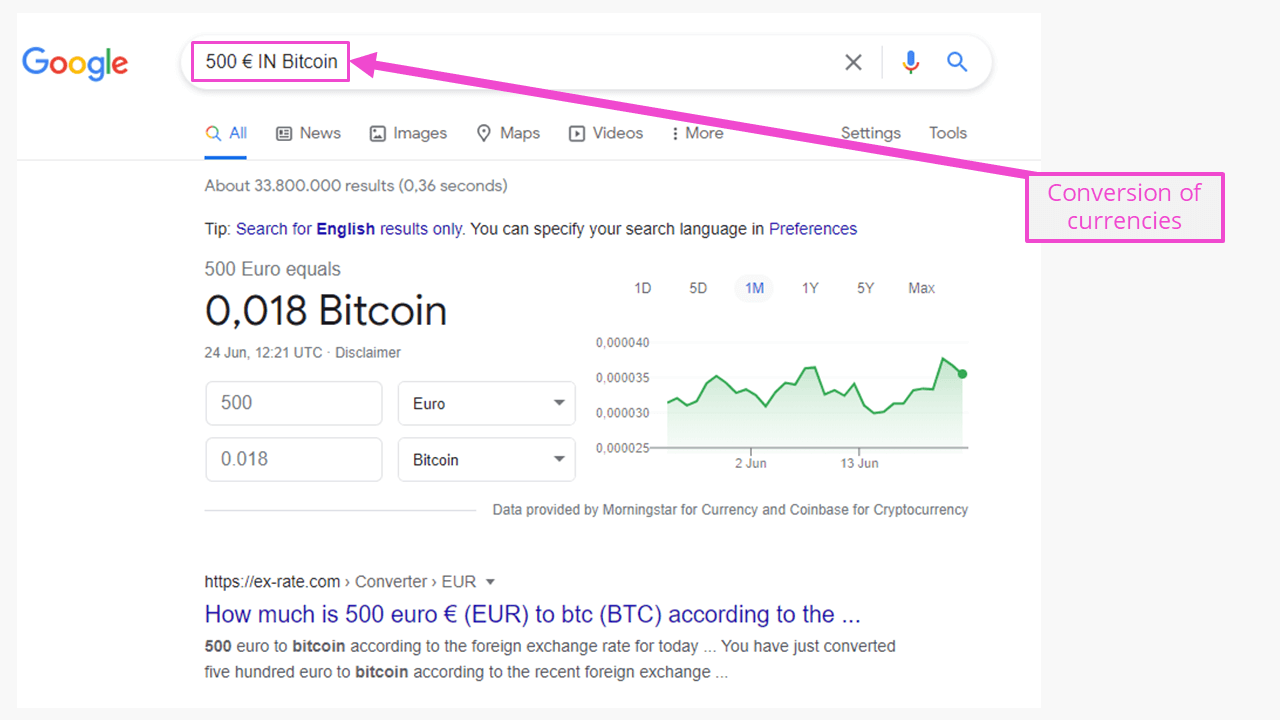
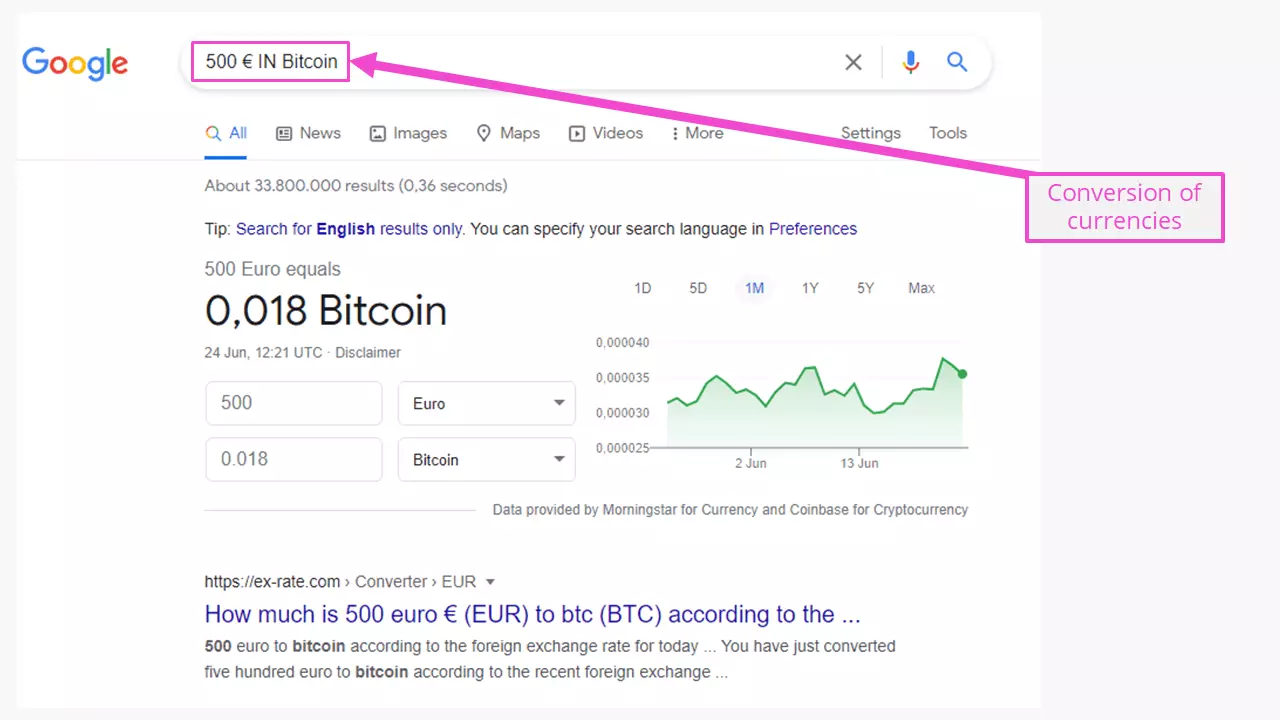
The Boolean operator IN is a convenient way of converting units of measurement or currencies. Simply enter the amount or measurement with its unit or currency, followed by ‘IN’, and the output unit or currency. For example, if you enter ‘87 cm IN inches’, Google returns the result ‘34.252 inches’, with a note indicating the mathematical formula used to do the calculation. For currencies, the exchange rate (and a disclaimer) is shown.
This operator works with other common units of measurement like temperatures (Celsius/Fahrenheit), lengths, surface areas, and volumes, but not with rare units. For instance, if you try to convert degrees Celsius to the Réaumur temperature scale, which is no longer in use, Google will only return the Wikipedia entry and various conversion sites.
source: Specify the source of a news item
When people hear the word ‘source’ in a computer context they often think of the source code of a website. Here, though, ‘source’ is used in the journalistic sense to find results from one of the news sources listed in Google News. For instance, suppose you wanted to find articles about a collapsed building in Florida, written by CNN. You would enter:
Collapsed building Florida source:CNNweather: Suncream or umbrella?
If you type ‘weather:’ followed by a place name, Google will display a graphical weather forecast for the week ahead, including temperature, precipitation, and wind. The source of the data is the weather.com website. Below the forecast you will also see results from various weather websites.
weather:BerlinOther advanced operators
Here are some other handy Boolean operators for Google searches:
Enter ‘define:’ followed by a term to get its definition, an audio button to hear how the term is pronounced, and notes about spelling, synonyms, etc.
define:birdbathTo search various sources for results relating to a particular movie, you can use the ‘movie:’ operator. For example, let’s say you’re interested in movies about the Second World War, filmed or set in Berlin. You could search for:
movie:Berlin 1945The searched sources include YouTube (part of Google), online encyclopedias as well as state-owned and private archives. If the movie is currently showing at cinemas in your area, Google will also display showtimes and venues.
Combining Boolean operators
Another great thing about Boolean operators is that you can combine them to make your searches even smarter. We’ve listed some useful combinations below.
Improve the SEO of your website
The following search query can be used to find possibilities for internal links:
site:website.tld [keyword]This helps users navigate your website and increases your chances of being linked to from other websites.
Find content on a specific website
Example:
site:website.tld ‘photography’This search will return all (sub)pages from the specified website that contain the word ‘photography’. And in the Google Images tab you will see photos found on the specified website.
Tidy up forgotten files
The trick to finding ‘forgotten’ files on your own website is to combine the ‘site:’ and ‘filetype:’ operators, as shown below:
site:website.tld filetype:pdfor
site:website.tld filetype:pdf keywordThe first of these queries will show all PDF files from the specified website. You can refine the results by adding a keyword, as shown in the second query. As explained above, the spaces are equivalent to the ‘AND’ operator. The filetype operator currently works with around 25 common file types, including documents, images, and videos.
Identify pages without HTTPS
As a webmaster, you may want to check your website for unsecure pages, which are those without HTTPS. To do this, you can use the following query:
site:website.tld -inurl:httpsThe minus sign here excludes pages with https in their URL. The remaining indexed pages are therefore not encrypted with HTTPS.
Grouped search queries
You can use round brackets to group parts of a query together. For instance:
tire balancing (Berlin-Spandau OR Falkensee OR Staaken) -sales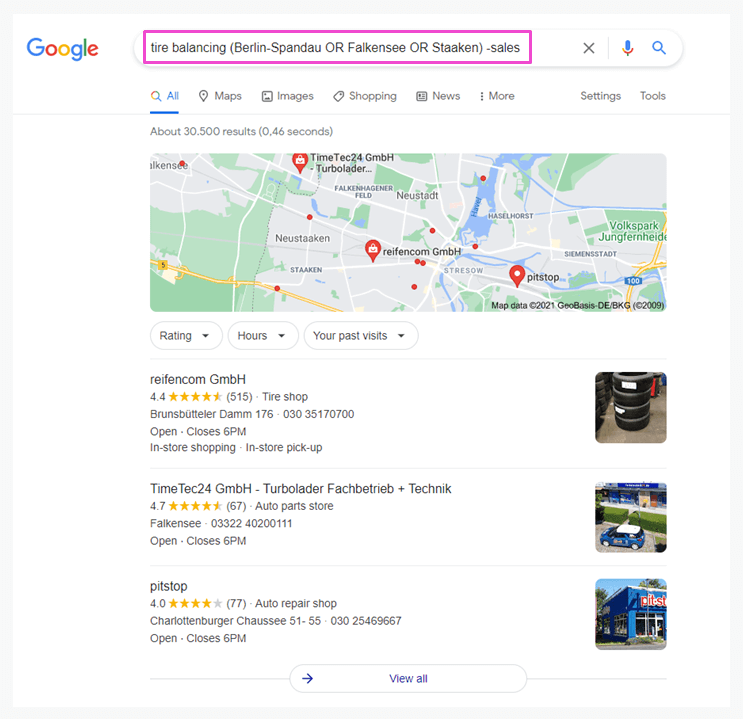
Do not put more than five keywords in the brackets, otherwise the search may fail. Note that -sales here excludes pages with that keyword, so that only workshops are displayed.
- Improve your Google ranking without paying an agency
- Reply to reviews and generate social media posts faster
- No SEO or online marketing skills needed
Search ‘from…to’ using numrange
The shorthand for the ‘numrange’ operator is two little dots: ‘..’. The numbers in question can be numerical postcodes, years, or measurements. The query below combines the ‘intitle:’, ‘OR’ and ‘..’ operators, and returns results for SEO copywriters in the Manchester area:
intitle:job OR vacancy ‘SEO copywriter’ M1 1AD..M1 3AQ ManchesterIf no results are found, Google will display suggestions from the surrounding area.
When using numrange with numerical postcodes, it’s best to enter the city too, so that Google knows that you’re looking for a location.
You can use the numrange operator to find pages indexed between two dates too. However, Google uses the Julian calendar, so you’ll need to convert the dates to this format first. Alternatively, to avoid the need for conversion, you can just use the years, for example, ‘2009..2014’.
Find favourite topics
Example:
site:*.co.uk intitle:tips cycling beginnersAt the time of writing, the search query above finds 6,090 .co.uk webpages that have the terms ‘tips’, ‘cycling’, and ‘beginners’, in the page title. The asterisk ( * ) acts as a wildcard, letting you search for any website with the specified domain name extension.
Let’s see what happens if we edit the code as follows:
site:*.co.uk intext:tips cycling beginnersThis returns 398,000 results, because Google is now looking for the keywords in the page text, not just in the title. This shows that pages with keywords in the title stand out better.
The Boolean searches illustrated here for Google can in principle be used in other search engines too, as they are all based on Boolean operators. For an overview of search engines, take a look at our article on Google alternatives.
Reviewers

Melissa Senn
Melissa Senn has been with IONOS since 2016 and focuses on website, e-commerce, social media, and AI in the Digital Guide. As a digital strategist, she uses her extensive SEO and GEO experience to transform complex technological trends into practical content.

Julia Hertler
With over 18 years of experience in content marketing, Julia Hertler has deep expertise in digital communications. For the past 10 years, she has specialised in the areas of domains and hosting at the IONOS Digital Guide, making complex technical topics easy to understand.