

Data warehouse systems: get success with big data analysis

Decision support systems have a long tradition in the world of business. Since the 1960s companies have been using analysis methods with the aim of gaining dispositive data. The aim is to support management with the strategic direction of business processes using data-based reports, models, and prognoses.
Analytic information systems, with their corresponding functions, comprise of concepts like MIS (Management Information Systems), DSS (Decision Support Systems), and EIS (Executive Information Systems). They can be difficult to distinguish from one another and have, in the areas of business practice as well as well as marketing, been categorised since the nineties under the collective term business intelligence (BI).
Business intelligence refers to the collective term for the IT-supported preparation and analysis of companies’ raw data. BI should generate knowledge that serves as a decision maker for the strategic direction and orientation of a company.
The database of the decision support systems in the context of BI is nowadays usually provided by a central so-called data warehouse. We guide you through the basics of data warehousing, trace the reference architecture of such an information system, and suggest established providers of commercial DWH solutions as well as free open source alternatives.
What is a data warehouse?
According to its definition, a data warehouse (DWH) is a data bank system separate from an operative data handling system, in which data from different, sometimes even very heterogeneous sources, is compressed and archived for the long term. Many companies carry over historical data periodically from data handling systems into such a data warehouse to prepare them for access at a later date as well as strategic analysis in the context of business intelligence (BI). Thus, operative data becomes dispositive data:
- Operative data: Operating data refers to transaction orientated information that arises in companies from day to day and is generated from administrative and accounting systems. Some of these typical data sources include operating data handling systems like product management systems, enterprise resource planning (ERP), information or ordering systems, and, of course, accounting programs.
- Dispositive data: If operating data is brought together (aggregated) in a central location, saved for the long term, and prepared for analysis, it can then be referred to as a dispositive data.
A DWH offers analysts a comprehensive view of heterogeneous data files and makes it possible to gather operational figures in the context of online analytical processing (OLAP). As a central point for all relevant company files, the DWH serves the purpose of company-internal knowledge management. It’s usually the case that users are just granted reading access. A DWH functions as a database for dating mining methods and is the basis of all considerations in the area of performance management and the strategic company direction.
Structure of a DWH: data warehouse architecture
The process of managing and evaluating a DWH is known as data warehousing and involves the following phases:
- Data acquisition and data integration
- Data repository
- Data evaluation and analysis
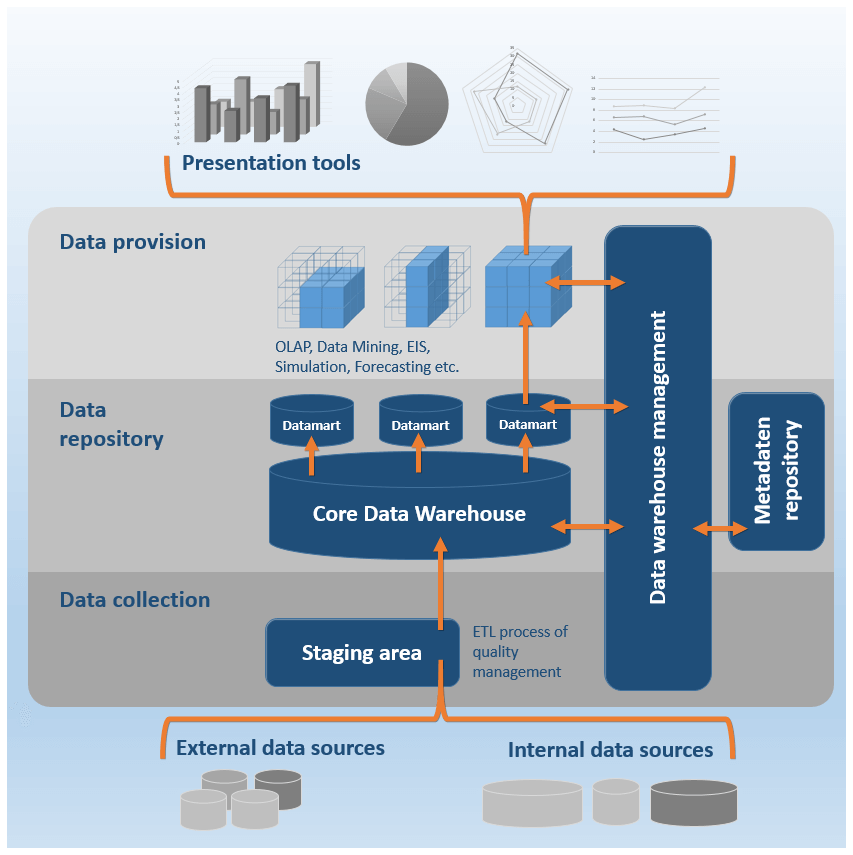
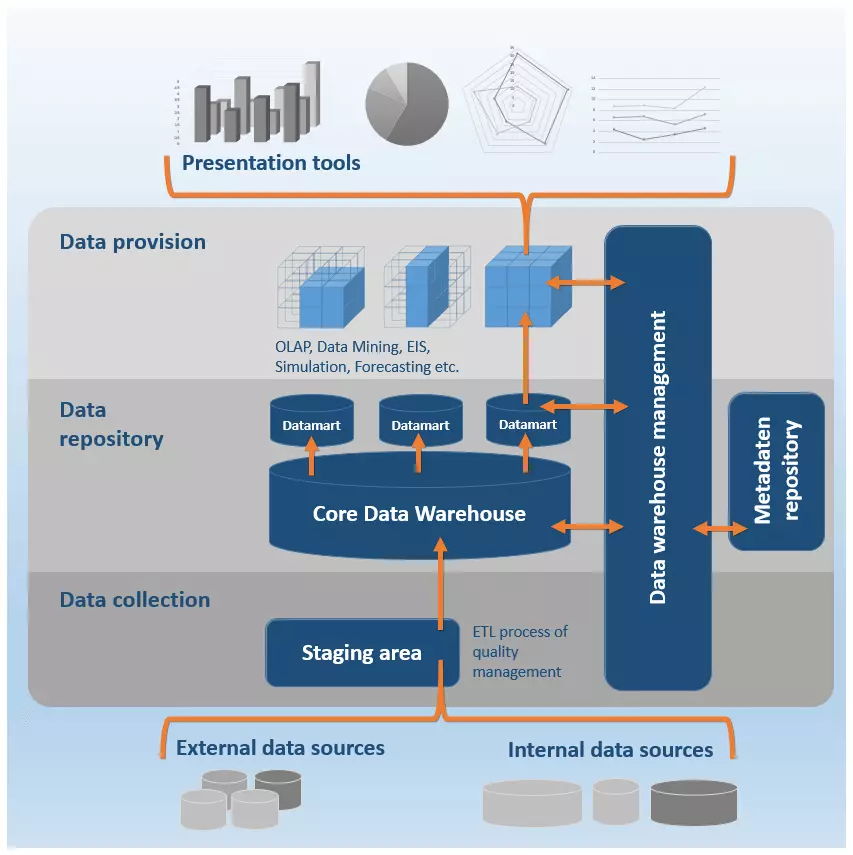
The phases of data warehousing are reflected in the typical structure, the so-called reference architecture of data warehouse systems. Of course, the system architecture of a DWH changes depending on the specific product and provider — fundamentally they orientate themselves around a technical structure based on a modular model, made up of three levels:
- Data collection
- Data Repository
- Data provision
In addition, there is also a central control component; a data warehouse manager that assigns specific administrative functions to every level of the DWH. The individual components of a data warehouse do not necessarily have to come from one provider as the respective services can also be rendered by different software products or individual solutions.
The following illustration depicts a schematic representation of the DWH reference architecture.
Data recording level
Before files can be uploaded to the DWH, it is often the case that the heterogeneous information is translated into a uniform presentation form. A DWH is supplied from the company’s internal data sources as well as from relevant external ones too.
- Internal data: Operating systems: Enterprise Resource Planning systems (ERP), Customer Relationship Management systems (CRM); operating databases; Content Management Systems (CMS); flat files (e.g., Excel, CSV, Text files), emails, etc.
- External data: Applications and systems from external service providers, websites, social media, cloud services, etc.
Systems on the data recording level provide interfaces for companies’ operating systems and are employed in the first phase of data warehousing — two central functions of these DWH components are data acquisition and data integration.
When it comes to data acquisition, the following extraction techniques are used:
- Trigger: Provided that a company’s operating systems support a database trigger, one can be deployed in order to automatise data extraction. Triggers make it possible to define operations that will be automatically implemented when certain occurrences take place. Usually, these occurrences relate to changes in the database of the source system, which then subsequently lead to an extraction of the modified data in the DWH.
- Log files: If it’s the case that an operating system doesn’t support trigger technology, then a DWH’s data handling system can contain a program that can usually evaluate a source system’s log files and extract the logged operations within.
- Monitoring program: If neither a trigger nor a log file is available for extraction, it’s usually the case that a monitoring program will be employed. It extracts changes in the database of an operating system occur using algorithms that periodically create snapshots of the monitored files and then match them with previous ones.
If it so happens that none of the above-mentioned techniques are supported and access to the operating system’s database is not possible, then these changes must be logged independently and the relevant modifications communicated to the data warehouse.
When it comes to data integration, most DWHs provide OLAP functionalities that make it possible to present files in multi-dimensional structures. Online Analytical Processing (OLAP) is an analysis method that offers compression of company files that are relevant to management. The process is based on the ETL process:
- E = Extraction: Data extraction involves the selection of relevant information from various data sources. This can be executed either as a push or as a pull strategy. If the data extraction takes place as part of a push strategy, then the data sources are instructed to periodically generate extracts and then transfer these to the DWH. With a pull strategy, the DWH will initiate the data extraction by itself.
- T = Transformation: The extracted files are adjusted as part of a transformation and uniformly translated into the format of the target database.
- L = Loading: The loading phase involves the saving of the transformed files in the respective target databases of the DWH.
The data handling level of a DWH can contain a so-called staging area. This refers to a temporary section of the database where the pre-processing of loaded files takes place. Such a staging process is particularly essential when it comes to complex ETL processes.
Given that DWH files are brought together from different sources, data integration is based on a diverse range of tools that make the transformation and adjustment of the adjusted files possible. These can be organised into the following categories.
- Data migration tools: Programs for data migration make it possible to easily define the transformation rules in order to transfer heterogeneous output data in a uniform target format.
- Data scrubbing tools: When it comes to data scrubbing, the programs that are called into action are based on the fuzzy logic approach as well as neuronal networks. The goal here is to improve the file quality by addressing mistakes, gaps, and repetition in datasets through the implementation of pre-defined rules, algorithms, and lookup tables (LUT). In this case, one also speaks of quality management.
- Data auditing tools: Data auditing tools are used in data integration to establish rules and connections between files. Additionally, programs like this make it possible to identify files that infringe on these rules, meaning that they are presumably mistakes.
Following data integration, we come to the acquiring of extracted files in the central database, the so-called core data warehouse. This step is supported through programs that offer the following functions:
- Integrity conditions check
- File sorting
- Calculation of aggregations
- Determination of access structures
- Partition of files for efficient access
Data retention levels
Central to DWH is the data retention level. This involves the so-called core data warehouse. Extracted files are stored in the DWH mostly in the form of multi-dimensional matrices, known as star and snowflake schemas, in the long-term archives for future analyses. Only rarely will these refer to the entire database of the DWH. In order to facilitate an efficient analysis, it’s normal practice to create data segments of the entire portfolio, so-called data marts.
A data mart is a copy of a part of a database that is usually implemented as a non-persistent intermediary storage. From time to time it is also the case that so-called independent data marts are used that hold a separate data extract on a long-term basis.
A star schema is a type of Entity Relationship Diagram (ERD), i.e., a graphical representation of the table structure of a database that illustrates the various entities as well as their relationship to one another. The star schema serves, essentially, as a visualisation of multi-dimensional file structures.
Each star schema is made up of a table of facts as well as multiple dimension tables that then group themselves in a star shape around the table of facts.
- The facts table contains so-called facts: the performance and result figures of the company that need to be continuously held onto (e.g. turnover)
- The dimensions table contains attributes with which the data from the facts table can be described. It refers to a collection of reference information relating to the saved events within the table of facts.
In a star schema, the facts table is simply connected with all dimensions tables via foreign key relationships. Connections between individual dimension tables are established. The following illustration shows a simplified portrayal of such a data structure:
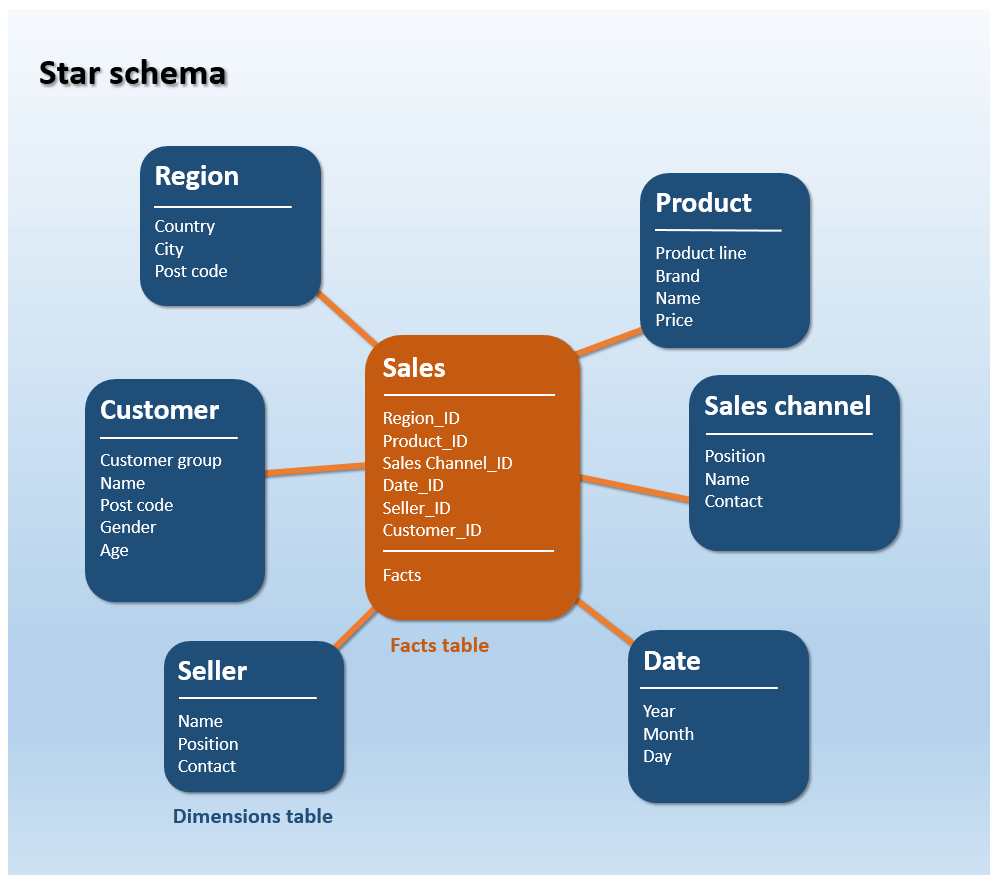
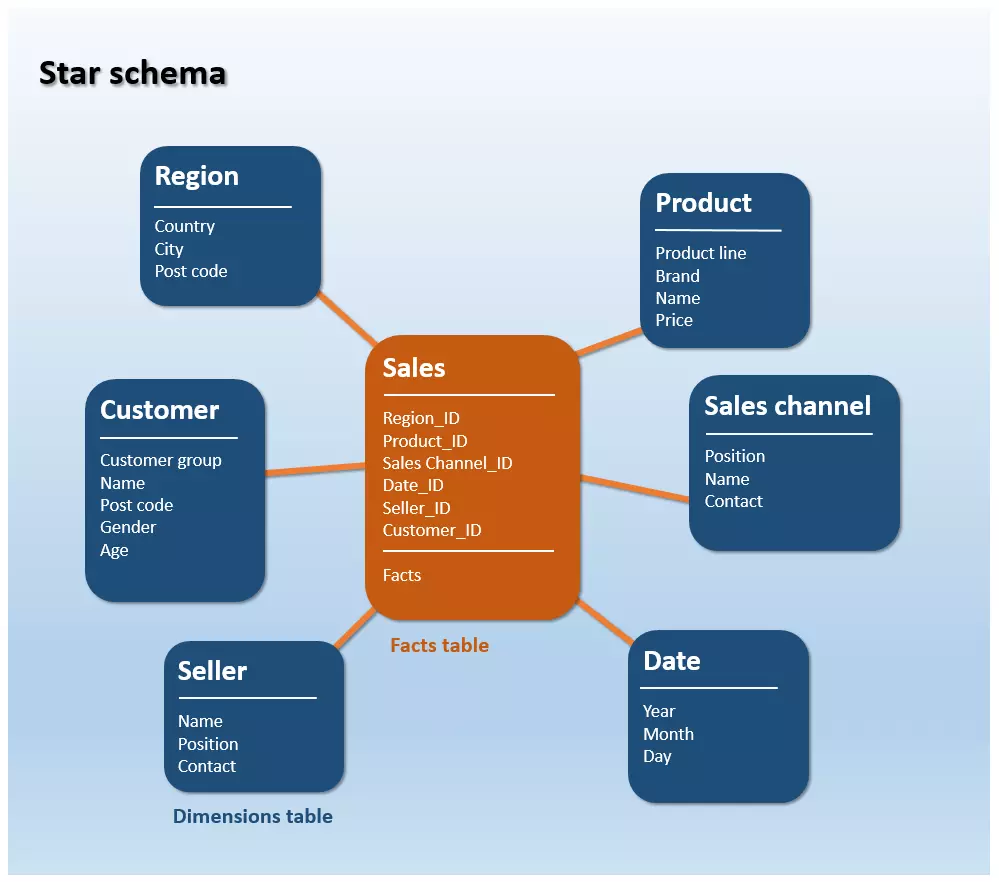
In the star schema above the example of Turnover is displayed in relation to a certain sales channel, a specific product, a seller, the region, and the corresponding time period. A possible query across three dimensions could be: how much turnover can be achieved from a particular product over the Online Shop sales channel during the period of 2016?
A continuation of the star schema is the snowflake schema. Whilst the dimensions table of a star schema exists in a de-normalised form, the reference information of a snowflake schema is saved in 3-D form. A hierarchical classification of the data takes place, meaning that any redundant information is outsourced and placed into new tables. This leads to a sort of distinctive branching out that then takes on the appearance of a snowflake.
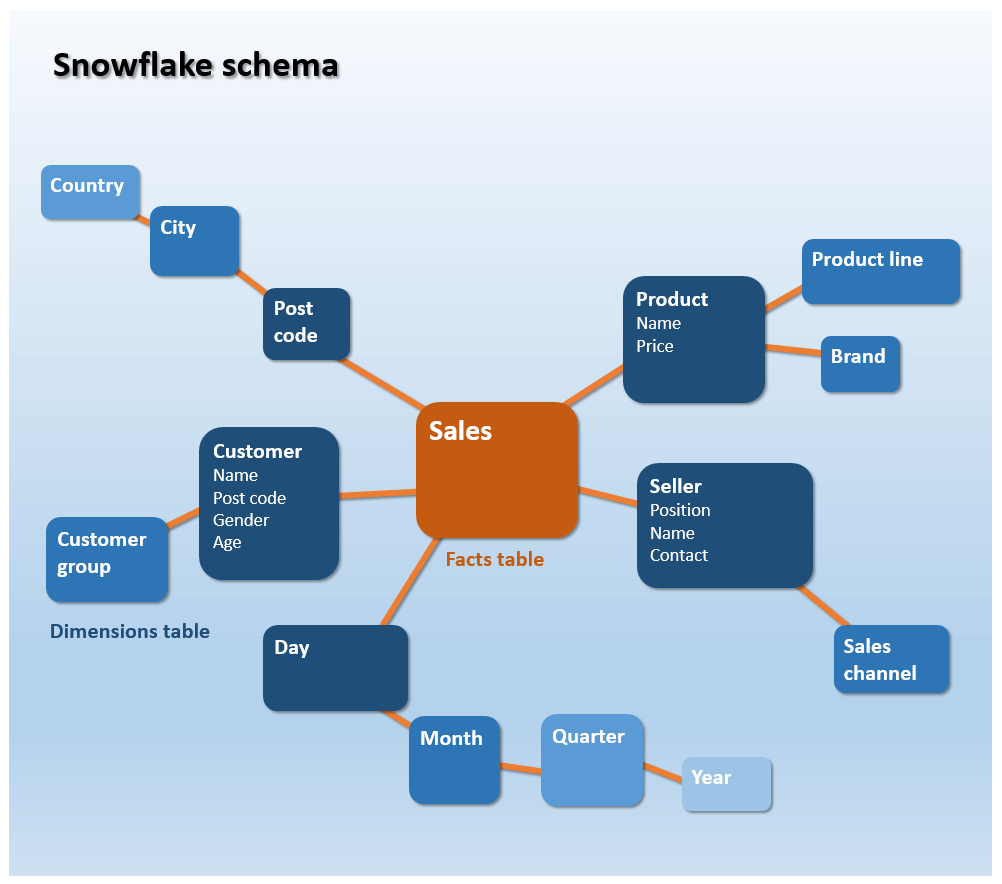
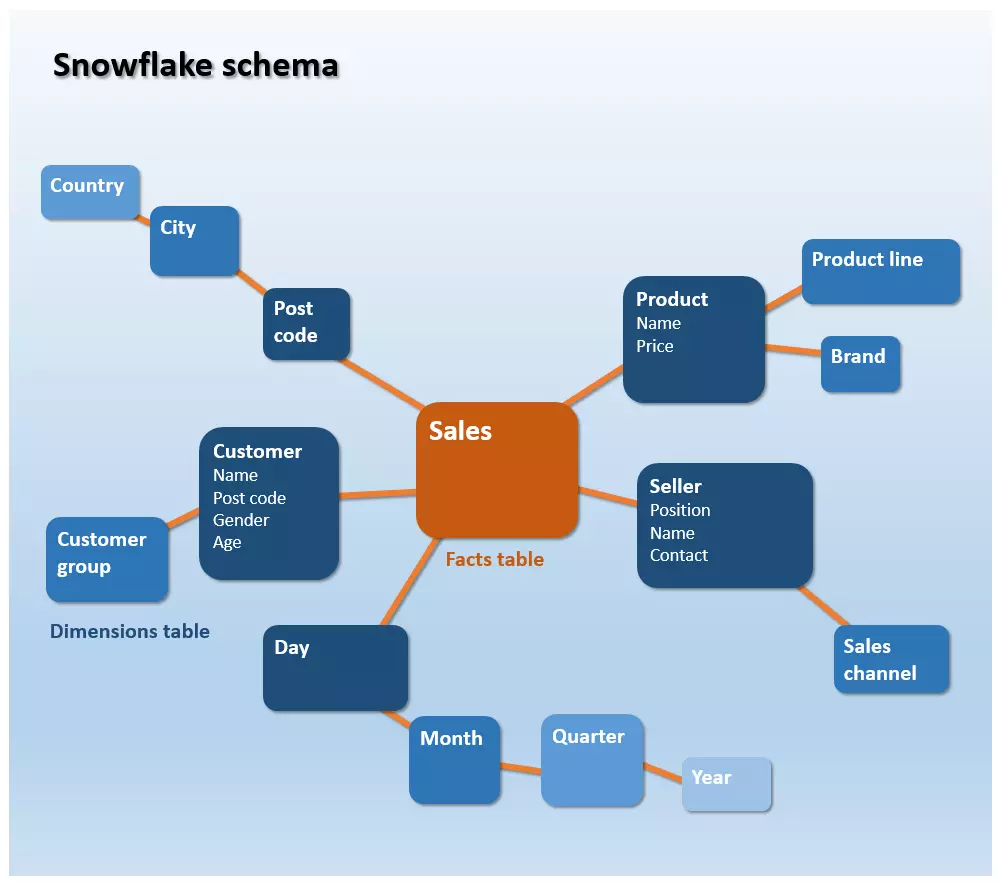
Snowflake schemas differentiate themselves from star schemas in that they take up less storage space. This comes as a result of the normalised data retention. In this case, normalisation refers to the outsourcing of columns into new tables with the aim then of avoiding double entries. The dismantling of redundant information also reduces the outlay in terms of data management — each piece of information will ideally only appear once and, therefore, only need to be placed once in the schema.
If the files are outsourced in normalised tables, this inevitably leads to more complex file structures, which are usually accompanied by a longer A. If it is the case that analysts want to access files in a snowflake schema, then the multi-level dimensions tables first need to be linked into the framework of a so-called join.
A join refers to database operation with which, under certain circumstances, can be merged via database tables that are linked with a foreign key.
In practice, the data structure of a DWH is based mostly on the snowflake schema, while individual data marts are implemented as star schemas.
With both the star and snowflake schemata we are dealing with dimensions tables; as each table is seen as one dimension of a multi-dimensional OLAP dice. This makes it possible to analyse business performance indicators multi-dimensionally, e.g., turnover, with the aid of as many referential facts stored in the DWH as you wish, to then be examined in the amount of detail that one desires.
The following illustration shows the schematic portrayal of a three-dimensional OLAP dice, whose corners span the dimensions Product line, Sales channel, and Time period. The length of the dice edge is determined by the number of cells. Each cell of the dice contains exactly one value — e.g., the turnover for the product line Insurance liability in the year 2016 over the distribution channel Branch trade (highlighted in bright blue in the graphic).
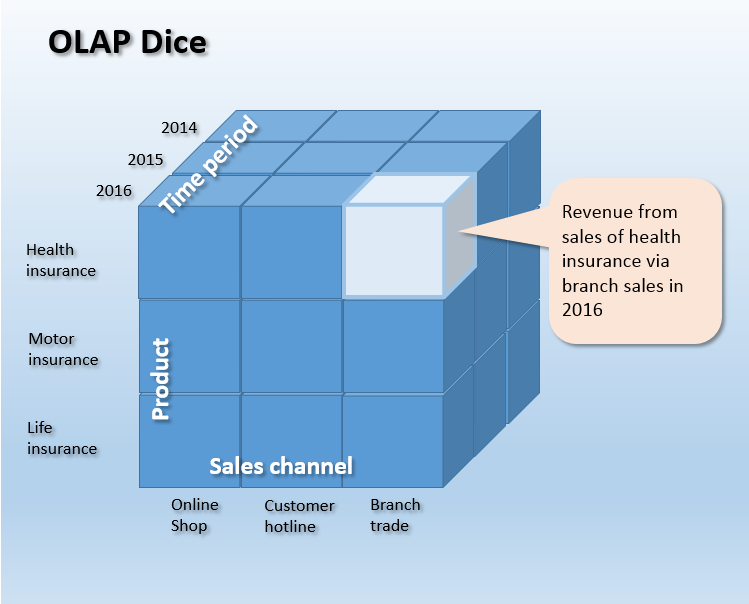
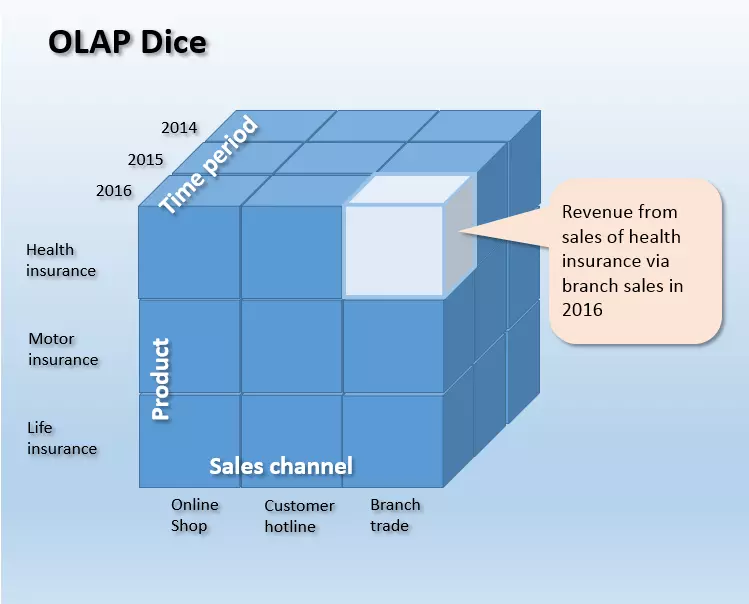
The OLAP process is also not just limited to three dimensions. A data dice like this is structured in a way that is n-dimensional and can, in theory, be made up of any number of dimensions you desire.
Depending on which storage technology underlies the core data warehouse, one can then differentiate between the various OLAP processes. If the dice refers to data from a relational database, you can describe it as a ROLAP (Relational OLAP). Dice that are based on multi-dimensional databases are known as MOLAP (multi-dimensional OLAP).
Data provision level
The data provision level functions as an interface to end applications and presentation tools. Methods for data evaluation and analysis are sourced from diverse end application tools. This makes it possible to extract information from the data warehouse’s database and process it in various presentation forms for end users. The spectrum ranges from reporting and query tools, collaboration tools, data mining tools, tools for online analytical processing (OLAP), executive information systems (EIS), to forecasting and simulation tools.
Reporting and query tools
Reporting tools provide end users with various functions in order to set up predefined reporting. This can happen automatically at regular time intervals or on request. In order to make it easier to facilitate requests to the DWH, these can also be predefined with the help of query tools.
Collaboration tools
Collaboration tools support the communication and cooperation of end users with data analysis. The range of functions offered by this tool range, for example, from the saving of annotations to the exchange of analysis results.
Data mining tools
The collective term data mining also includes all undirected, partly automatised analysis methods, which aim to identify relevant patterns, trends, and relationships in the database. Data mining tools rely on statistical and mathematical methods as well as on techniques relating to artificial intelligence (AI) and machine learning. The extent of the files, which companies create, process and bring together for the purpose of analysis in DWHs is experiencing exponential growth. Globally, the average data volume is doubling every two years. With this in mind, data mining methods in the context of data warehousing are growing in significance.
Tools for online analytical processing (OLAP)
Of the available data evaluation and analysis tools out there, OLAP applications have managed to establish themselves as the standard user interface in the area of data warehousing. Tools that are used in the area of online analytical processing provide end users with various functions, with which queries to the DWH can be formulated ad-hoc. They serve to assist navigation through the multi-dimensional database. The display via OLAP makes it possible to model prepared data depending on popular predefined dimensions. Analysts have a choice of various basic operations, with which an OLAP dice can be edited and processed:
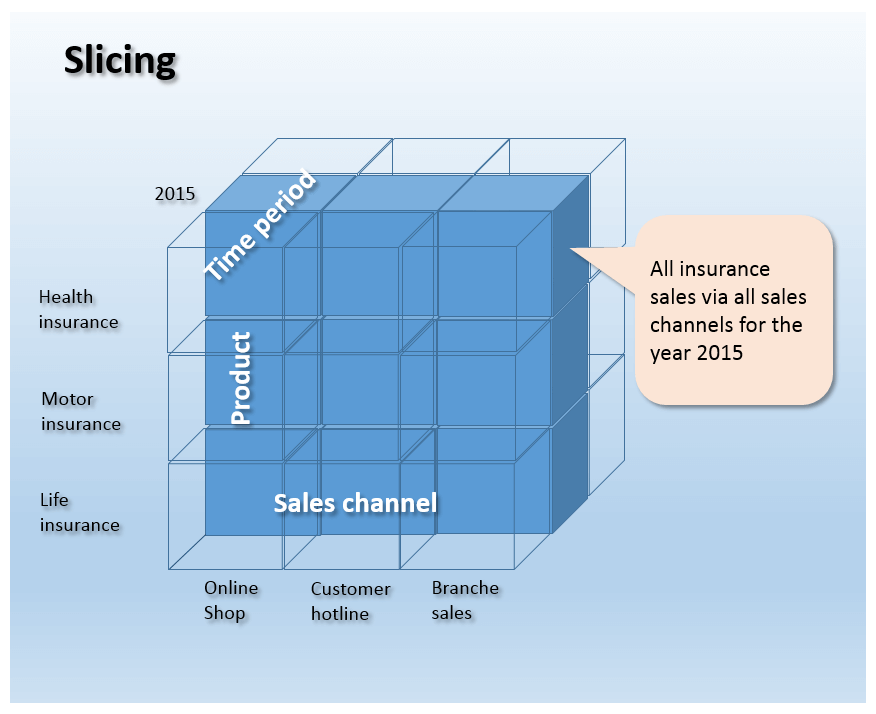
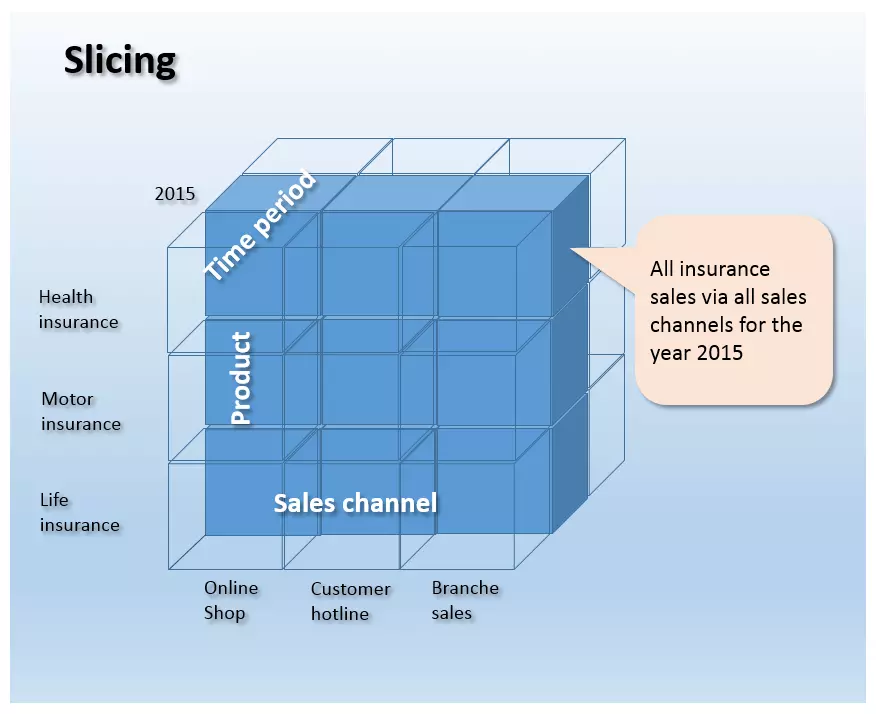
- Slicing: Slicing refers to a process wherein a dimension of the OLAP dice is narrowed down to a certain subset. What happens is that basically a slice is cut from the Data dice and then viewed separately. The following illustration shows the dimension of Time period with the section of 2015 highlighted. Thus, the highlighted section shows the turnover for all insurance products sold through all the distribution channels during the year 2015.
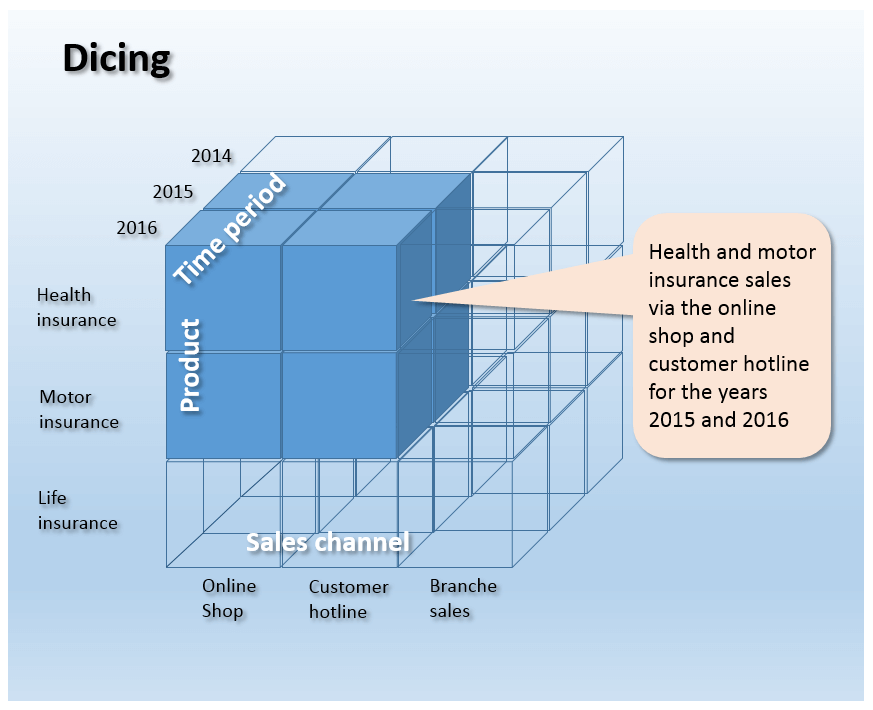
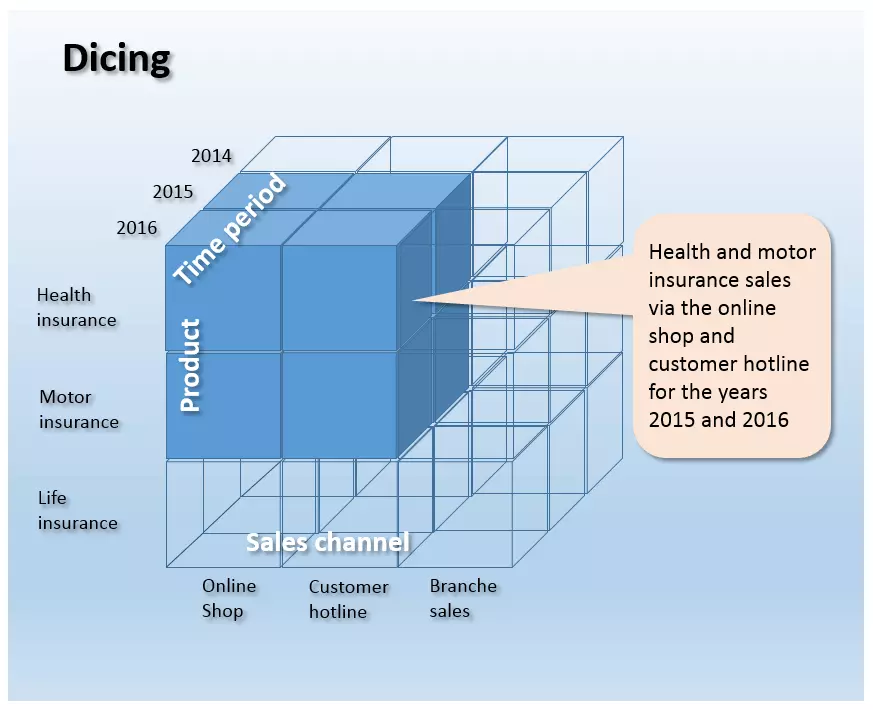
- Dicing: This refers to the cutting of an OLAP dice via a simulated slicing operation in multiple dimensions. The dicing process leads to a smaller dice which then represents a partial quantity of the entire dice. The following illustration depicts a dicing operation, in which the entire dice is reduced to subsets across all three dimensions.
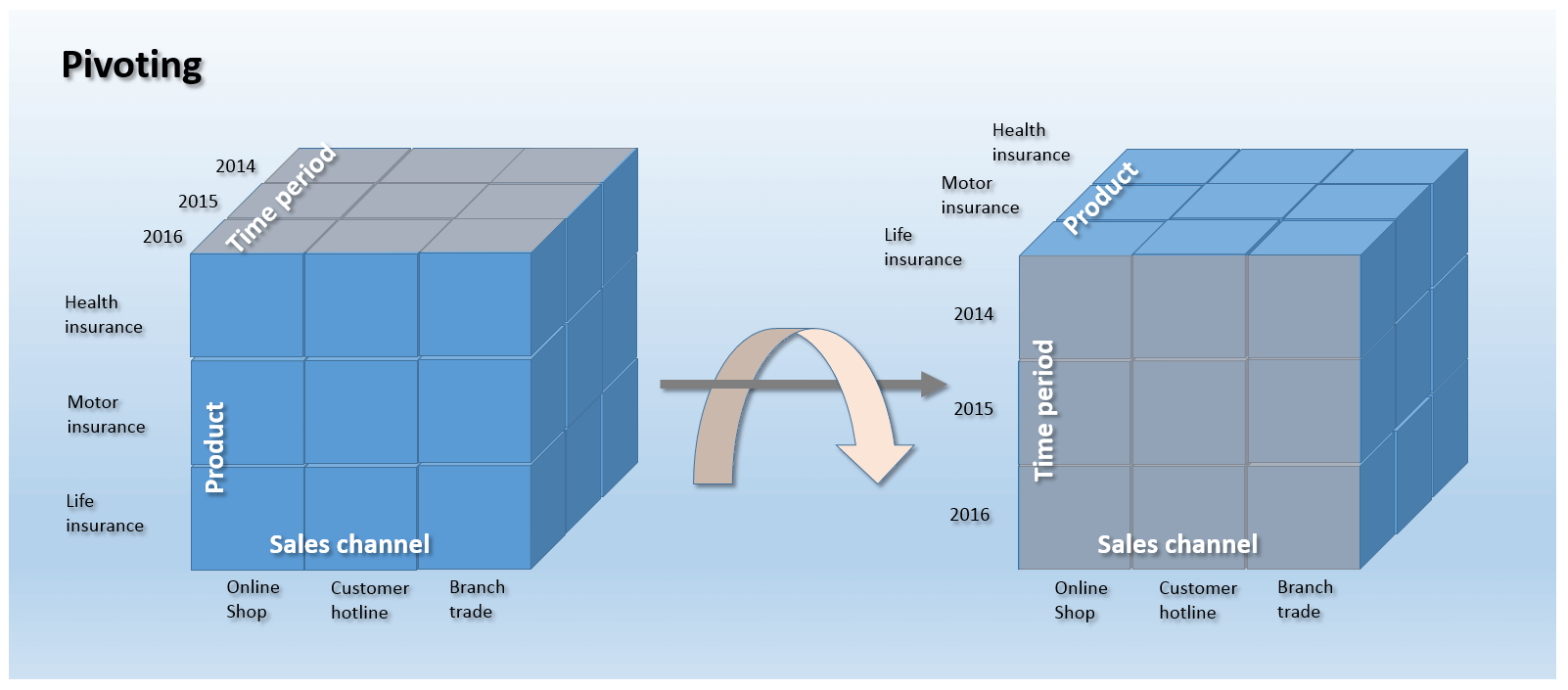
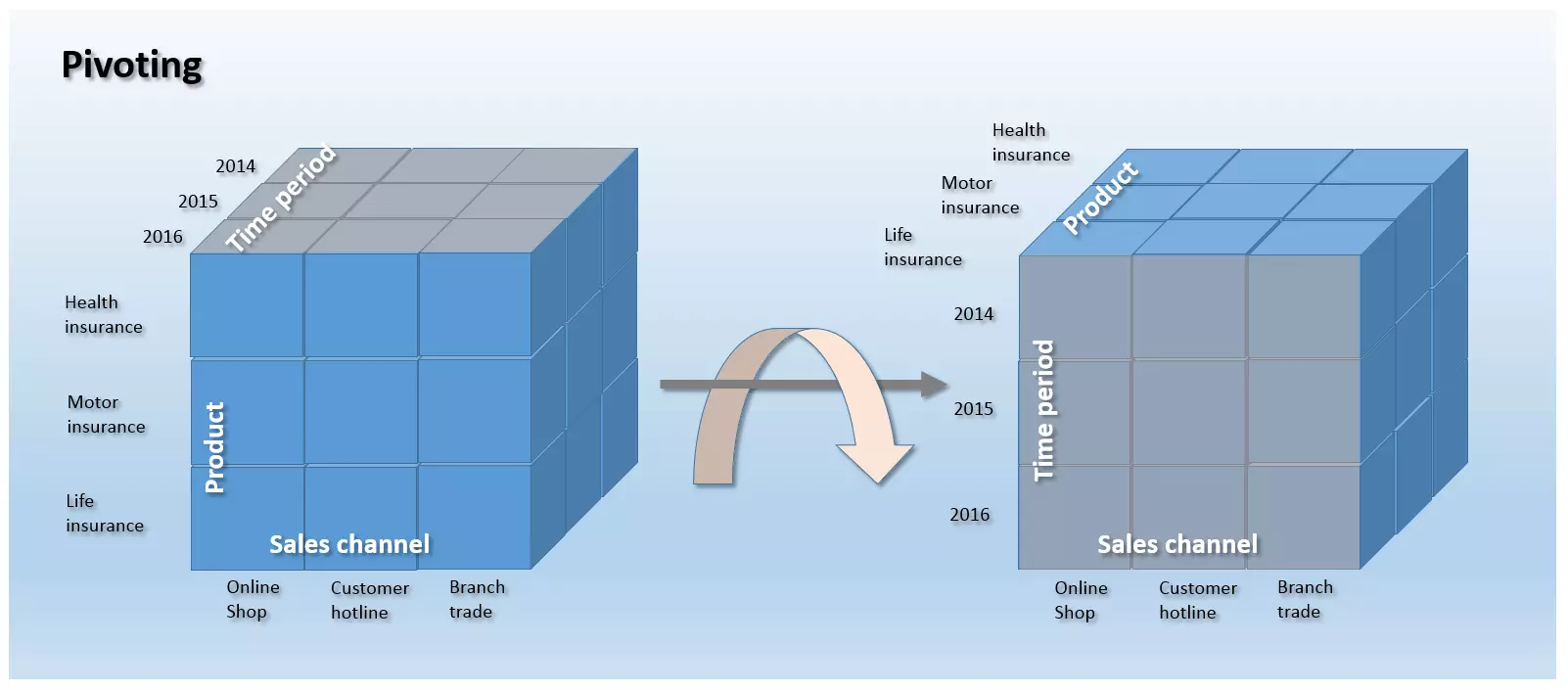
- Pivoting: The turning of the data dice in a way that makes at least one other dimension is visible is known as Pivoting.
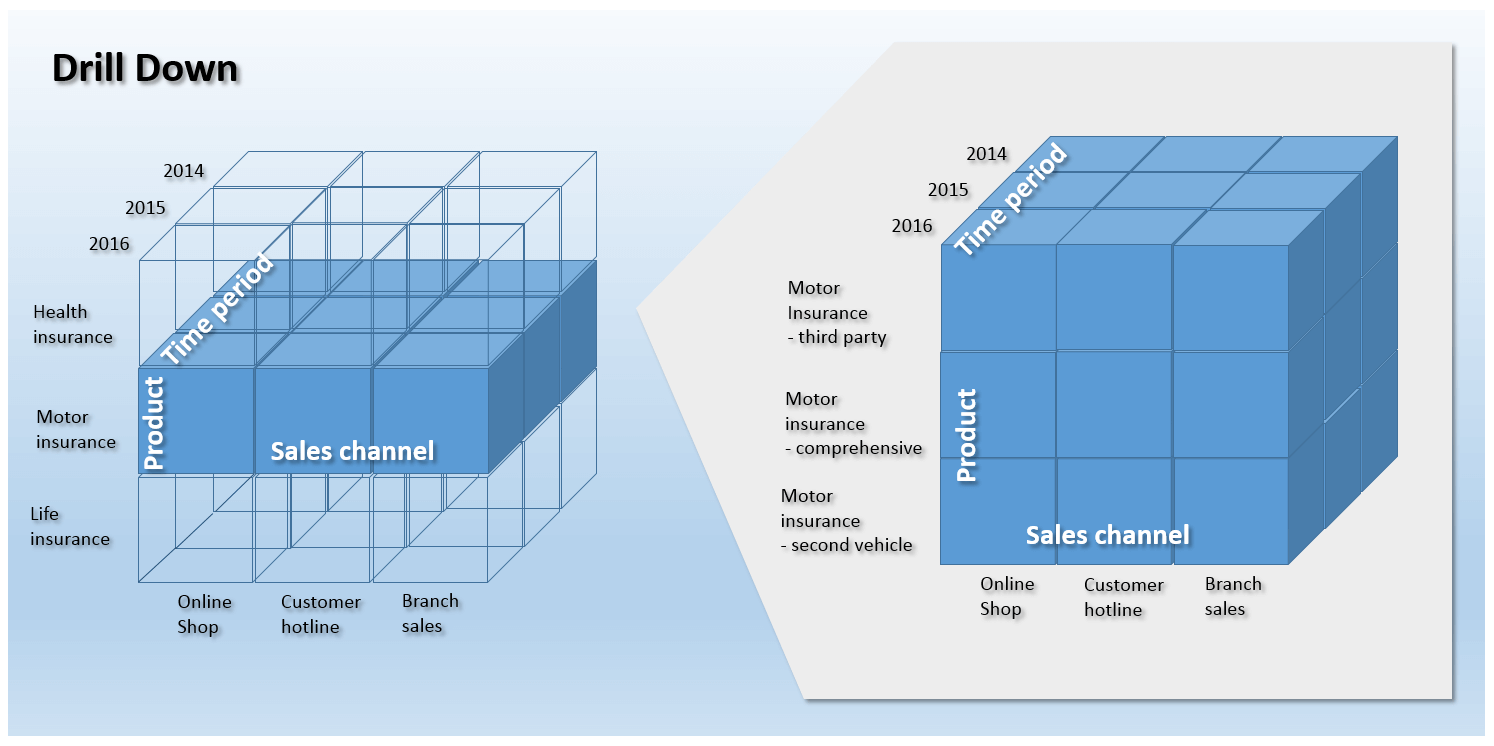
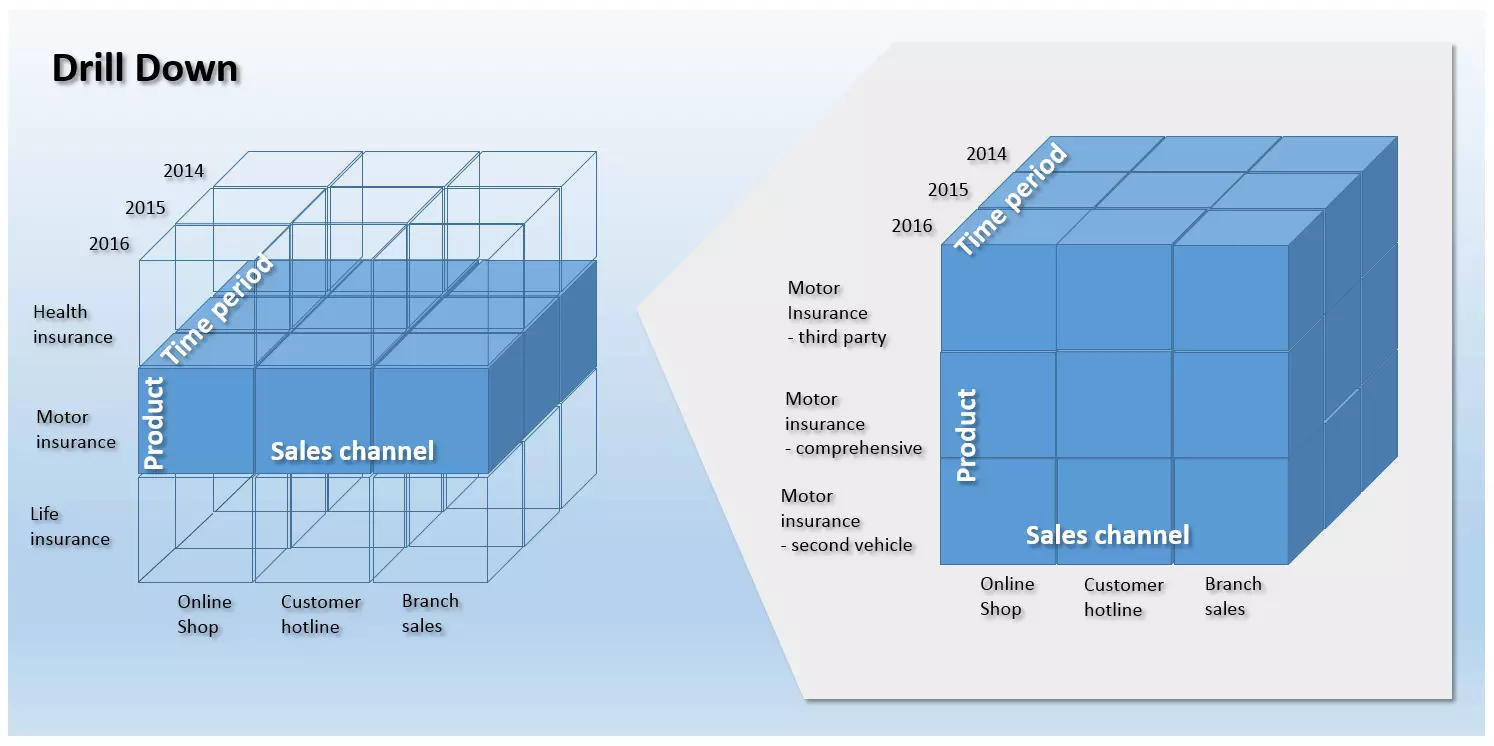
- Drill Down/Roll-Up: If the aggregations of an information object need to be broken down into detailed values, then the drill down operation is called into action. This makes it possible for analysts to zoom into an OLAP dice and increase the granularity of the files. As a counter operation to the drill down, the rollup consists of compressed data at a higher hierarchical level. The drill down and rollup are used in the navigation of multi-dimensional hierarchical structures. The following illustration shows a drill down of the information object Turnover in the dimension of Product lines. The granularity is increased in order that the stored turnover figures in the DWH in relation to individual products can be interpreted and analysed.
- Drill Out/Split: The drill out operator (also known as split) makes it possible for analysts to add further dimensions to an OLAP dice. The result of this is more detailed data. Unlike with the drill down, the level of detail in relation to granularity is not increased. Instead, it is increased through an information yield that is a result of the additional reference information of the added dimension.
- Drill in/Merge: As a counter operation to the drill out, with a drill in, the level of detail of the OLAP dice is reduced through the removal of a dimension. Unlike with a rollup, the loss of information comes not as a result of the change of viewing level, but instead as a result of the loss of dimensional information. The granularity remains the same.
- Drill across: The data operation drill across serves to analyse a database. While the operations discussed so far relate to an OLAP dice, the drill across process is deployed across many correlated data dice in order to make global analyses possible. This means that a lot of fact tables that have at least one common dimension can be analysed on the same hierarchical level and granularity, while still maintaining the viewing level.
- Drill through: A drill through refers to an operation by which an analyst chooses an individual cell of a data dice and views it in the highest level of detail. Unlike with the drill down, the drill through accesses the source files of the selected dice cell. This means that the result of the drill through operation is derived from the table cells that underlie the selected dice cell.
Executive Information Systems (EIS)
Similarly to OLAP, EIS tools offer end users various possibilities for formulating ad-hoc queries and modeling files. In contrast to OLAP, the term EIS nowadays relates primarily to completed application systems, which create reports for certain operating areas like sales, marketing, and financial planning.
Forecasting and simulation tools
Forecasting and simulation tools offer end users the possibility of updating DWH saved figures in the future to develop forecasting models.
Data warehouse management
Special tools are active across all levels of the DWH that can be summarized under the term warehouse management. The task given to these components is the building, maintaining, and operating of all administrative functions that are necessary for the area of data warehousing. The main scope of duties of the DWH manager is the scheduling of the DWH processes, metadata management, security management, as well as system management.
- Scheduling: Scheduling involves the management of DWH processes. Administrative functions in the context of scheduling can be categorized in relation to the following data warehouse architecture:
- Data collection/Data entry: In terms of data collection, the DWH manager is responsible for the design and adjustment of the ETL processes. Furthermore, administrative functions are also made available with a view to monitoring the updating process and quality management.
- Data retention: When it comes to data retention, the DWH manager supervises the storage usage, constructs aggregation tables, and carries out archiving and backup operations.
- Data provision: Administrative functions for the provision of data relate to user administration as well as to the monitoring of query running times.
- Metadata management: A central component of the DWH manager is the metadata repository. It contains all information that is necessary for the construction and operation of information relating to the database of the DWH. Files saved in the repository may cover things like the definition of the underlying database schema, information on the saving structures, information on the path of access, metadata on the description of the source data, as well as update times, rules on data cleansing and transformation, indices and partitions tables. Furthermore, the DWH manager looks after the exchange of metadata between individual components of the DWH and provides a homogenous base for metadata.
- Security management: Security management involves diverse services in the areas of user authentication, authorization, and encryption.
- System management: When it comes to system management, the DWH manager provides various administrative functions for the operation of the DWH. For example, these include monitoring (performance, capacity, etc.), data archiving, and data backup.
Data warehousing from a data protection point of view
The large-scale aggregation of operational, business, and customer data in a data warehouse, as well as the analysis of this mass of data, offers companies the chance to sustainably optimise business procedures and processes. This is done with the help of data mining methods and/or OLAP applications. Along with the advantages in the area of decision making, data protectionists also emphasise the risks of such big data analyses of this kind — specifically for the basic right to informational self-determination and protecting your private sphere.
According to critics, what’s particularly problematic about such analyses is that they make the creation of personal profiles and automatised predictions of behavioural tendencies possible. At the center of the debate is the potential for manipulation of the information that is gained from the data analyses.
Under the Data Protection Act businesses and organisations are also legally required to inform the Information Commissioner’s Office of how your business uses personal information, and also to respond to any data protection inquiries made by individuals. The act also outlines other important legal responsibilities which are titled as ‘data protection principles’. Some of these include making sure that the information is:
- used fairly and lawfully
- used for limited, specifically stated purposes
- kept for no longer than is absolutely necessary
- kept safe and secure
- not transferred outside the European Economic Area (EEA) without adequate protection (this refers to the rights and freedoms of data subjects in relation to the processing of personal data)
These are otherwise known as ‘common sense’ principles. Overall the Data Protection Act has the purpose of balancing individual rights against the legitimate needs of that of a business to actually process personal data.
Data warehouse software
It’s been quite some time since data warehousing has been considered some kind of venture, discussed solely in the boardrooms of bigger corporations. These days even small and medium-sized enterprises (SMEs) see the potential of optimising their business processes through big data analyses. Alongside upmarket BI (Business Intelligence) suites and integrated DWH complete solutions, there have also been reasonably priced entry-level products, flexible cloud services, as well as sophisticated open source applications on the market for years, many of which are aimed specifically at mid-tier businesses.
Fee-based data warehousing products
Well-established commercial BI software normally distinguishes itself through its high degree of reliability, the range of services provided in the context of a service level agreement (SLA), as well as the professional support on hand. However, users need to budget for their acquisition, or at least for the cloud-based use of these services.
The following list provides an overview of the leading providers of fee-based data warehousing products in alphabetical order.
| Propriety software providers | Data warehousing products |
|---|---|
| Amazon Web Services | Amazon Redshift |
| Cloudera | Cloudera Enterprise |
| Hewlett Packard Enterprise | HP Vertica, HP ArcSight Data-Platform, HP Haven OnDemand, HP IDOL, HP Key View |
| IBM | IBM Netezza, IBM PureData System, IBM InfoSphere DataStage |
| Microsoft | SQL Server, Microsoft Analytics Platform System, Azure HDInsight for Hadoop |
| Oracle | Oracle Business Intelligence, Oracle Database, Oracle Exadata Database Machine, Oracle NoSQL Database,Oracle TimesTen In-Memory Database, Oracle Big Data Appliance |
| Pivotal Software | Pivotal Greenplum, Pivotal Big Data Suite, Pivotal HDB (powered by Apache HAWQ), Pivotal HDP (OEM Hortonsworks Data Platform) |
| SAP | SAP NetWeaver Business Intelligence, SAP IQ, SAP HANA Enterprise Cloud |
| SAS | SAS Data Management, SAS Access Interface to Hadoop, SAS Federation Server, SAS Data Loader for Hadoop, SAS Event Stream Processing |
| Snowflake Computing | Snowflake |
| Teradata | Teradata Active Enterprise Data Warehouse, Teradata Data Warehouse Appliance, Teradata Appliance for Hadoop, Teradata Integrated Big Data Platform, Teradata Aster Big Analytics Appliance |
Open source solutions
Alongside fee-based products, the market also offers a range of open source solutions for business intelligence software that provide data warehousing functions free of charge. Below is an overview of open source tools from the area of business intelligence. The table shows not only the most common BI open source programs but also the scope of applications offered by each of them. More information on open source business intelligence tools can be found in this article from the website OpenSource.com.
| BI-Software | RohdatenRaw data extracting extrahieren | Transforming raw dara | Loading transformed data | OLAP | Data Mining | Dash-boards | Reports |
|---|---|---|---|---|---|---|---|
| Pentaho DI | ✓ | ✓ | ✓ | - | - | - | - |
| Talend OS | ✓ | ✓ | ✓ | - | - | - | - |
| Jasper ETL | ✓ | ✓ | ✓ | - | - | - | - |
| Pentaho Mondrian | ✓ | - | - | ✓ | - | - | ✓ |
| Jedox | ✓ | - | - | ✓ | - | ✓ | ✓ |
| BIRT | ✓ | - | - | - | - | ✓ | ✓ |
| SQL Power Wabit | ✓ | - | - | ✓ | - | ✓ | ✓ |
| KNIME | ✓ | ✓ | ✓ | ✓ | - | ✓ | ✓ |
| RapidMiner | ✓ | ✓ | ✓ | ✓ | ✓ | ✓ | ✓ |
| Weka | ✓ | ✓ | - | ✓ | - | ✓ | |
| JasperSoft | ✓ | ✓ | ✓ | ✓ | ✓ | ✓ | |
| Pentaho | ✓ | ✓ | ✓ | ✓ | ✓ | ✓ | ✓ |
| SpagoBI | ✓ | ✓ | ✓ | ✓ | ✓ | ✓ | ✓ |
In accordance with the application areas, the listed open source programs can be assigned to the fields of ETL, OLAP, data mining and reporting. Additionally, there are also integrated BI solutions that cover all listed application areas.
ETL software
When it comes to data collection and integration in the context of an ETL process, there is also the possibility of the open source programs Pentaho DI, Talend OS and Jasper ETL.
- Pentaho DI: Also known under the name ‘Kettle,' the ETL tool Pentaho Data Integration (DI) is part of the larger Pentaho BI suite but can also be used independently from the other Pentaho components as a standalone application in data warehouse architecture. The data collection and integration tool consists of a graphic user interface, which can also be used by users without any prior programming knowledge, to manage and administrate ETL processes. Pentaho DI also offers a comprehensive range of various processing modules that allow you to define individual steps of the ETL process. This data integration tool supports all common database systems. On top of this, flat files like CSV, Excel, or text data can all be used as data sources. Furthermore, the tool also provides interface functions for proprietary BI suites from SAS or SAP as well as from analysis software like Google Analytics.
- Talend OS: Comparable with Pentaho DI is the open source ETL tool from the software provider Talend. Talend Open Studio (OS) makes it possible for users to define data collection and integration processes with the help of parameterised modules (so-called ‘jobs’). The program offers interfaces for all common data sources and various data transformation functions. A map editor allows users to transfer heterogeneous raw data in a predefined target structure. Like with Pentaho DI, Talend OS users can engage with graphic user interfaces without prior programming knowledge.
- Jasper ETL: Jasper ETL is the result of a cooperation between the software producers Jaspersoft and Talend. This ETL is largely based on Talend OS, the market leader when it comes to the data integration tools in the open source sector. Deployment of this tool is especially recommended, in the context of DWH architecture, if it is the case that other BI products from Jaspersoft are also being used.
OLAP applications
Pentaho Mondrian and Jedox are two established OLAP tools under an open source licence.
- Pentaho Mondrian: Mondrian is a Java-based OLAP server. Originally developed as a separate open source project, since 2006 Mondrian has been part of the Pentaho BI suite. But users do also still have the option of using it as a standalone application. Alongside Mondrian, with BI solutions there are also other open source providers available to use, like Jaspersoft. Users benefit from a bundling of open source resources that make collective projects possible, like the Mondrian Schema Workbench or the OLAP4J interface. The Mondrian project follows a relational online analytical process (ROLAP). Databases build a databank, where tables are organized in the form of star or snowflake schemata. Access is in the form of multi-dimensional queries (MDX) via XML for Analysis (XMLA) or else via the Java interface OLAP4J. With the Mondrian Schema Workbench, users also have the possibility of a graphic user interface. Mondrian Schemata can be easily and conveniently developed and tested on a desktop.
- Jedox: With its BI suite of the same name, the software developer Jedox offers a complete solution for business intelligence and performance management applications. A central component of this software is a high-performance, in-memory OLAP server, which can be integrated by way of interfaces for Java, PHP, C/C++ or .NET. Of particular use to Jedox users in the area of KMU are the Excel add-ins that allow the OLAP server to interface with this program. This is also the case with the well-known table calculation software from Microsoft. Office applications are very common among small and medium-sized businesses, often acting as the basis for data storage. Therefore, Excel integration reduces the time and energy spent on employee induction and training.
Data mining
Even in the area of data mining, there are several products available under an open source license. Two of these products are RapidMiner and Weka.
- RapidMiner: The analysis platform RapidMiner from the software company of the same name provides users with an integrated environment for machine learning, sentiment and time analysis, as well as forecast models. It also caters for data, text, and web mining. All of this then takes place in an open core model. Support covers all steps of the data mining process including data processing, visualisation, validation, and optimization. For some users, the free Community version with just one logical processor and one analysis scope of 10,000 data sets is not sufficient. If this is the case, then there is also the possibility of the fee-based Enterprise license. The program is written in Java and provides a user interface with which an analysis workflow can be easily defined and carried out in just a few mouse clicks.
- Weka: Weka (Waikato Environment for Knowledge Analysis) is an open source project from the University of Waikato in New Zealand. The analysis tool offers users various algorithms in the area of machine learning. Alongside the classic data mining processes like classification, association, regression or cluster analysis, Weka also features various components for data preprocessing and visualisation. The program, which is written in Java, also offers a graphic user interface. All software features can also be carried out via command lines. If required, it’s also possible to integrate Weka into various software solutions via a Java interface.
Reporting Systems
Two recommended open source tools in the area of reporting systems are BIRT and SQL Power Wabit. Alongside the classic monthly, quarterly, and annual reports, it also offers ad-hoc functions, allowing you to compile relevant information in real time.
- BIRT: BIRT (Business Intelligence and Reporting Tools) is an open source project from the non-profit Eclipse Foundation that provides BI reporting functions for Rich Clients and web applications. The software is suitable for Java-based applications and covers the broad sectors of data visualisation and reporting systems. Designs for BIRT reports are created in a graphic interface, which is based on the open source programming tool Eclipse, then saved as XML files.
- SQL Power Wabit: With the reporting tool SQL Power Wabit users can compile reports based on classic databank queries. OLAP dice are only supported if a description of the data structure is present. The tool supports standard reports, ad hoc queries, user-defined overview pages, as well as drill down operations in the context of online analytical processing. Functions like a drag & drop control system, the updating of result reports in real time, a global search function, and a WYSIWYG Editor for the drafting of reports, all make the SQL Power Wabit suitable for users; even those without SQL capabilities. This allows for the convenient compiling of comprehensive reports in just a few mouse clicks and, if required, also the personalisation of fonts, text color, and layout.
Integrated BI solutions
Apart from the fee-based BI suites from established providers like SAP, Oracle, IBM, SAS, HP, and Microsoft, there are also software projects on the open source market, which offer users data warehousing solutions as an integrated program package. Pentaho CE, Jaspersoft, and SpagoBI are recommended by this digital guide.
- Pentaho Community Edition (CE): The Pentaho BI package contains, alongside a selection of in-house developments, a number of already existing open source projects, which can be purchased bit by bit and then integrated into the product portfolio. The main focus of the project is based around data integration and the automatisation of reports. The following programs are featured in the package:
- Pentaho Business Analytics Platform: The BA Platform is a web application that makes it possible for users to merge all information through a central platform.
- Pentaho Data Integration: Pentaho DI refers to the ETL tool described above.
- Pentaho Report Designer (PRD): PRD is the evolved version of the project JFreeReport. The open source reporting solution supports a range of output formats like PDF, Excel, HTML, Text, Rich-Text-File, XML, and CSV.
- Pentaho Marketplace: The Marketplace allows users, in just a few clicks, to extend the Pentaho platform by plug-ins.
- Pentaho Aggregation Designer (PAD): Through PAD, users can set up and adjust databank content. Central to this tool is the OLAP server, Mondrian.
- Pentaho Schema Workbench (PSW): This is a graphic design interface that allows users to create and test schemata for Mondrian OLAP dice.
- Pentaho Metadata Editor (PME): PME assists the detailed description of underlying data structures with the help of an XML file.
Pentaho Enterprise Edition (EE) is a fee-based version of the BI suite with a range of additional features and professional support.
- Jaspersoft: Jaspersoft also offers various DWH applications as part of an integrated BI solution. The collection of programs includes:
- JasperReports Server: This is a report server offering OLAP functions via an adjusted Mondrian server.
- JasperReports Library: Jaspersoft provides a library for generating reports.
- Jaspersoft Studio: This is an editor provided by the BI suite for the writing of reports.
- Jaspersoft ETL: The Talend OS-based ETL tool has already been described above.
- Mobile BI: Mobile BI is the native app for iPhone and Android devices. It means reports and dashboards can be accessed from mobiles.
Jaspersoft also offers the possibility of a further range of functions through its fee-based, commercial version.
- SpagoBI: Unlike with Pentaho and Japersoft, who market their products under a dual license, the IT-initiative SpagoWorld offers only an open source solution. However, business users do have the possibility of paying for the professional setting up and customisation of the software. The program is made up of the following components:
- SpagoBI Server: At the core of this open source resource is the SpagoBI server that provides all of the various analysis tools and functions.
- SpagoBI Studio: The program includes an integrated development environment.
- SpagoBI Meta: SpagoBI Meta offers users an environment for metadata management.
- SpagoBI SDK: Through the SpagoBI SDK, the Spago BI suite has an integration layer that makes it possible for various external tools to be incorporated, e.g., Talend OS (ETL), Jedox, or Mondrian (OLAP); Weka or R (data mining); as well as BIRT or JasperReports Library (reporting systems).
Data retention
Even when it comes to data retention, users have a choice of various open source software alternatives to the proprietary databank management systems like Microsoft SQL Server, IBM DB2, or the solutions offered by Oracle and Teradata. One of the prominent data stores are the relational database systems MySQL and Maria DB, or else the object-relational database PostgreSQL. Last but not least, there is also the offering from Pivotal that goes by the name of Greenplum Database, an optimised and evolved development offered specifically for data warehouse architecture under an open source licence.
Summary: Data warehousing for SMEs
Data warehousing has now well and truly become part of small and medium-sized enterprises. Along with the more expensive business solutions, the market for BI solutions and data warehouse solutions offers a wide range of very useful open source projects. This means that the financial hurdle for smaller and medium-sized businesses is no longer as big an issue when it comes to using big data analysis.
Surpluses can be achieved by a business through combining already existing data with straightforward expenses. If in the course of the analysis, gaps begin to emerge in the database, then the next step should be the reorganisation of the data collection with the help of the previously mentioned ETL and OLAP tools. The final step in the integration of a data warehouse architecture into your IT infrastructure is carried out by data mining tools. Then, with the help of ongoing analyses (e.g., shopping cart analyses) new trends and cross connections can show up, providing important information for strategic decision making.
SMEs that are contemplating the construction of a data warehouse should make sure that they remain compliant concerning data protection during the implementation of their BI strategy.