

What is Chroma DB?

Chroma DB is an open source vector database designed for storing and retrieving vector embeddings. Together with associated metadata, these vectors can be used by extensive language models.
Chroma DB, the database for vector embedding
Chroma DB is a specialised open-source database focused on storing and retrieving vector embeddings quickly and efficiently. Vector embeddings are numerical representations of data such as text, images or other media types commonly used in natural language processing (NLP) and machine learning (ML) applications. Chroma DB enables developers to efficiently manage a large number of embeddings, making it ideal for tasks such as semantic search, recommendation systems and the optimisation of AI models.
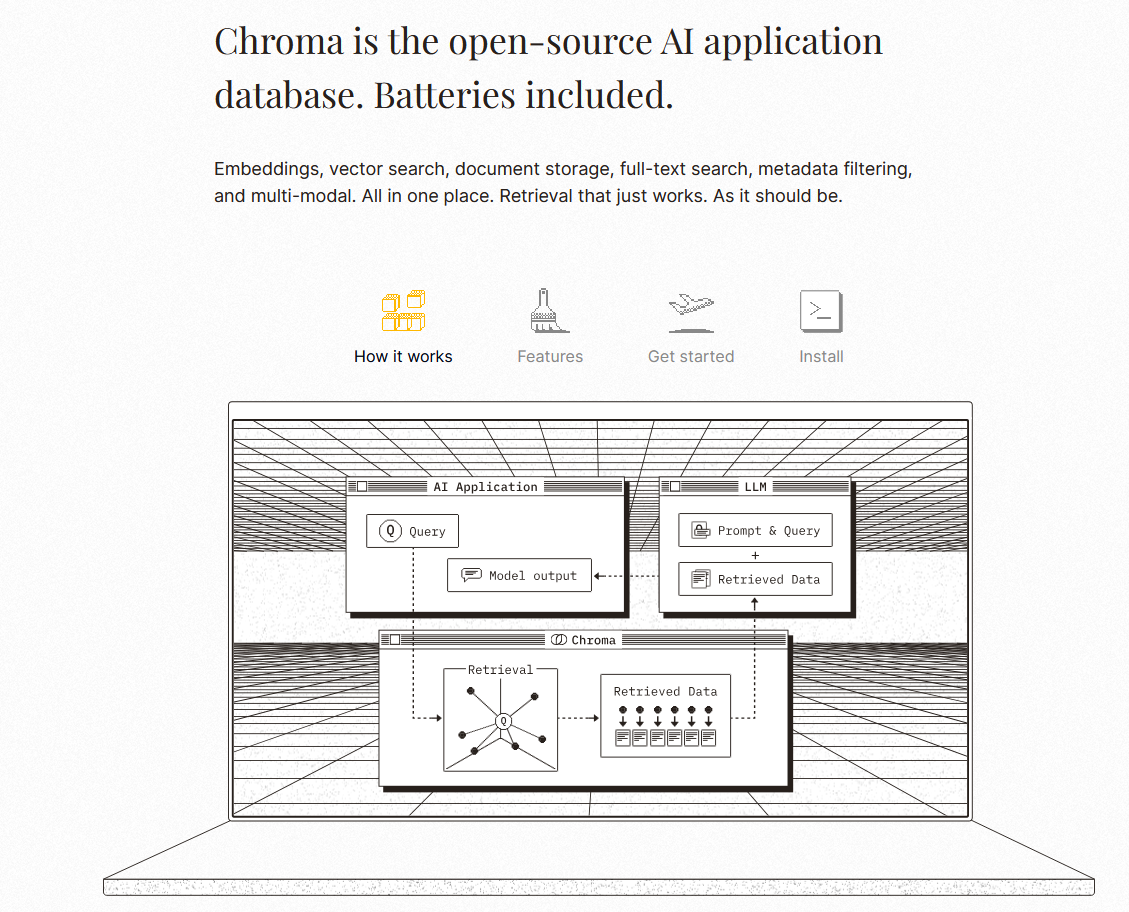
How does Chroma DB work?
Chroma DB specialises in efficiently storing and retrieving vector embeddings. The most important features of the functionality include:
Storage structure and data organisation
Chroma DB uses an in-memory database to ensure quick access. This means that the data is mainly stored in the main memory, which results in fast read and write operations. The data is stored in a vector form, which means that it is represented as numerical arrays. Vectors are often generated by machine learning or deep learning models and represent the semantic content of the data, e.g. texts or images. This makes it possible to find similar data points quickly and efficiently. Chroma DB’s storage architecture can also be extended to persistent storage to preserve data beyond restarts.
Indexing and search
Chroma DB utilises advanced indexing algorithms to optimise the efficiency of searching for similar vectors. This is typically achieved through methods like Approximate Nearest Neighbor (ANN) search algorithms, which significantly reduce the search space and, as a result, enhance response times.
API and interfaces
The API of Chroma DB is designed to be minimalistic and user-friendly. It features four main functions: adding, updating, deleting, and searching for vectors. This simplicity allows for quick integration and ease of use across various applications. Both novice and experienced developers can work with the API effortlessly, as it includes only basic, intuitive commands. This minimalist approach ensures the API is accessible to all while remaining powerful enough to manage complex tasks.
How and when is Chroma DB used?
Chroma DB is used in various areas, including:
Semantic search
Semantic search is an advanced search technique that analyses the context and meaning of words and phrases to better understand user intent, delivering more relevant search results. Unlike traditional searches that rely on exact keyword matches, semantic search considers synonyms, related terms, and the overall semantics of the query. Vector embeddings convert texts into numeric vectors that capture their underlying meaning. This allows the search engine to measure the similarity between different texts and retrieve contextually relevant results more accurately.
Training of language models
Chroma DB plays an essential role in training large language models by enabling the efficient storage and retrieval of embeddings. This is especially important for applications such as virtual assistants and chatbots which require real-time response generation. Language models such as GPT generate vast amounts of vector data that must be stored and accessed rapidly to ensure optimal performance.
Recommendation engines
Chroma DB helps generate recommendations by identifying similar items or content, which in the context of eCommerce improves the user experience and can also boost sales by presenting customers with relevant products.
Chatbots and AI-powered assistance systems
Chroma DB enhances chatbot performance by delivering relevant information based on user queries. It can recognise semantically similar queries and provide corresponding answers or data. This results in a more natural and fluid interaction between users and the system, improving the overall experience.
Chroma DB is proving to be a useful tool in practice in various industries ranging from eCommerce to healthcare. For example, it’s used to generate product recommendations based on search queries (semantic search). In the financial industry, Chroma DB is used to detect anomalies in transaction data. By finding patterns in the vector embeddings, suspicious activity can be identified more quickly. Chroma DB can also analyse medical image data to detect similar disease patterns and thus speed up diagnostic processes.
- Get online faster with AI tools
- Fast-track growth with AI marketing
- Save time, maximise results
What are the advantages of Chroma DB?
Efficient storage and management
- In-memory database: Supports persistent in-memory storage that enables fast access times.
- Simple API: Provides four main functions, making it easy to integrate and use.
Flexibility and customisability
- Open source: As it is an open source project, developers can make suggestions and improvements.
- Support for different embedding models: Uses the all-MiniLM-L6-v2 model by default, but can be customised with different models.
Scalability and performance
- Persistence: Data can be saved on exit and reloaded on startup, keeping the data persistent.
- Fast queries: Optimised indexing and query processes enable fast search queries and data retrieval.
Integration and interoperability
- Compatibility: Can be integrated into various software applications and platforms.
- Expandability: Planned hosting services and continuous improvements make Chroma DB future-proof.
Improved search and analysis
- Semantic search: Allows you to perform queries and retrieve relevant documents based on content meaning.
- Metadata management: Supports the storage and management of metadata along with the embeddings.
Community and support
- Active developer community: Support from a large developer community that helps with problems and develops new features.
- Documentation and resources: Comprehensive documentation and tutorials make it easy to get started and use.
Chroma DB in comparison to other vector databases
With the rise of AI applications, the need to manage complex objects like text and images has driven the development of vector databases. Alongside Chroma DB, Faiss and Pinecone are currently among the most popular options.
Faiss developed by Facebook AI Research, emphasises efficient similarity search and clustering of high-dimensional vectors. This open-source library provides a variety of indexing methods and search algorithms optimised for speed and memory efficiency. Pinecone, on the other hand, is a fully managed cloud vector database designed specifically for storing and searching vector data, with a strong focus on language models.
Below we compare the most important features of the three vector databases in an overview table:
| Feature | Chroma DB | Pinecone | Faiss |
|---|---|---|---|
| Scalability | In-memory storage, expandable | High scalability with automatic management | Supports large data sets, scalability depends on configuration |
| Performance | Fast search times through optimised indexing | High performance with large data sets through distributed architecture | Very high performance through specialised algorithms |
| Integration | Simple API with four main functions | Supports multiple programming languages, extensive integration options | Flexible, can be deeply integrated into existing ML workflows |
| Ease of use | Minimalistic API, easy to integrate and use | User-friendly, comprehensive documentation and support | More complex implementation and management |
| Open Source | ✓ | ✗ | ✓ |
| Indexing strategies | Optimised indexing | Multiple support | Variety of indexing and search methods |
| Community and Support | Active community, comprehensive documentation | Strong commercial support, regular updates | Large community, extensive resources |
When selecting a vector database, it’s essential to assess your project requirements and familiarise yourself with the different platforms to find the best fit for your specific use case. Consider factors like dataset size, required query speed, and scalability. Weigh these aspects against each platform’s strengths to make an informed decision.