

Man-in-the-middle attack

A Man-in-the-Middle attack is an online attack pattern in which an attacker physically or logically places a controlled system between the victim’s system and an internet resource used by the victim. The aim of the attacker is to intercept, read or manipulate the communication between the victim and the internet resource unnoticed.
What is a man-in-the-middle-attack?
A man-in-the-middle attack (MitM attack) refers to the method where a hacker intercepts the data traffic between two communication partners, leaving both parties to think that they are only communicating with each other. These kinds of attacks were previously carried out by manipulating physical communication channels. In times of shared public communication networks, the third party used to position themselves between two or more communication partners. MitM attacks are primarily seen in computer networks where there is an attempt to overturn SSL/TLS encryptions with the aim of obtaining secret information, usernames, passwords, or bank details. The basic course of a man-in-the-middle attack is as follows:
System A attempts to establish an encrypted connection with System B. Instead, the data flow is redirected by a criminal third party, which results in the encrypted connection running from system A to system C and only then is it redirected to System B. This means that the one in control of System C (usually the attacker) can see the data traffic in its entirety, record it, or manipulate it – often with the communication partners being unaware of anything fishy having taken place. In the World Wide Web context, System C would present itself to System A as a web server, and as a web browser to System B.The following graphic illustrates the based scheme of a Man-in-the-Middle attack.
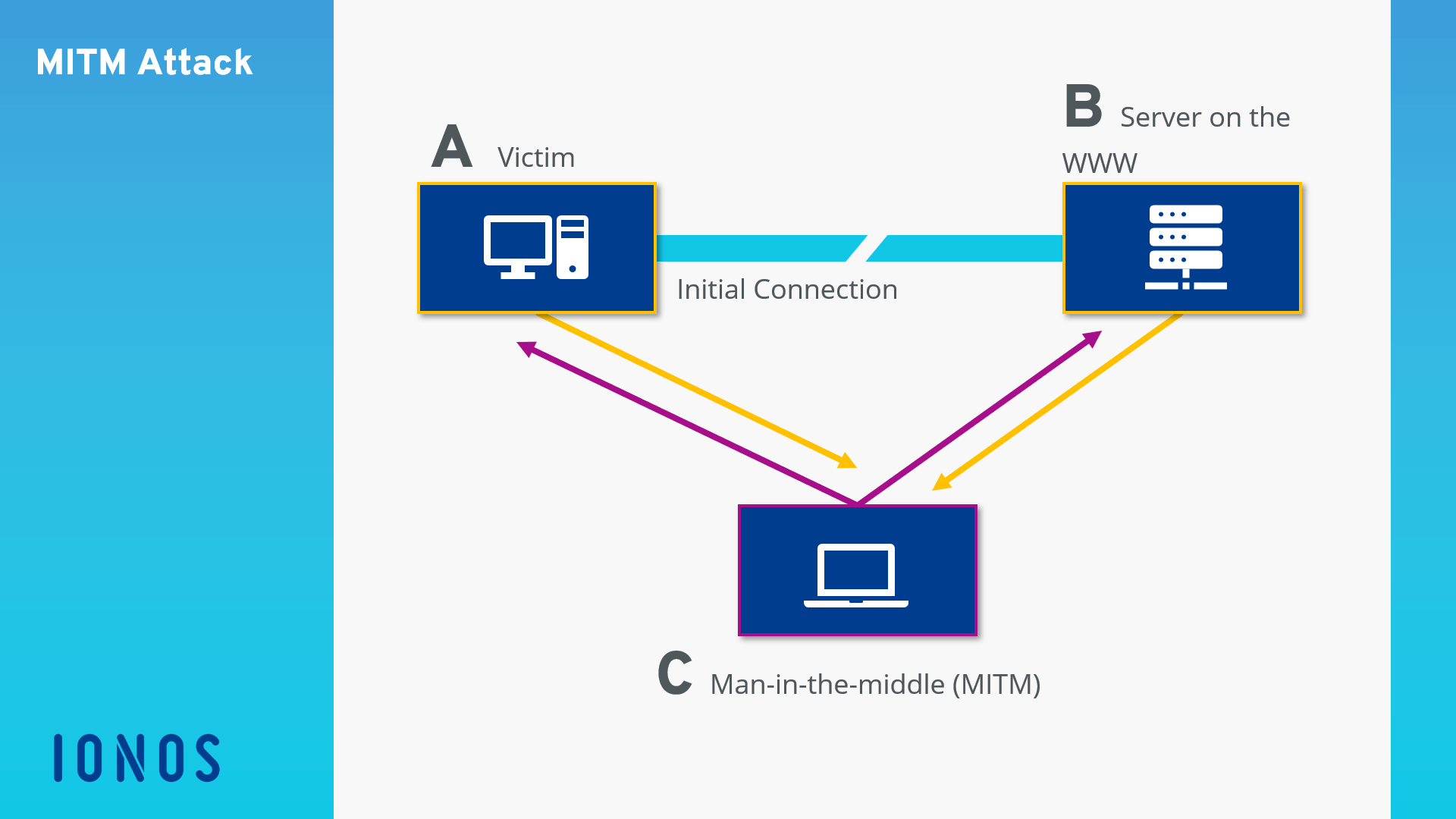
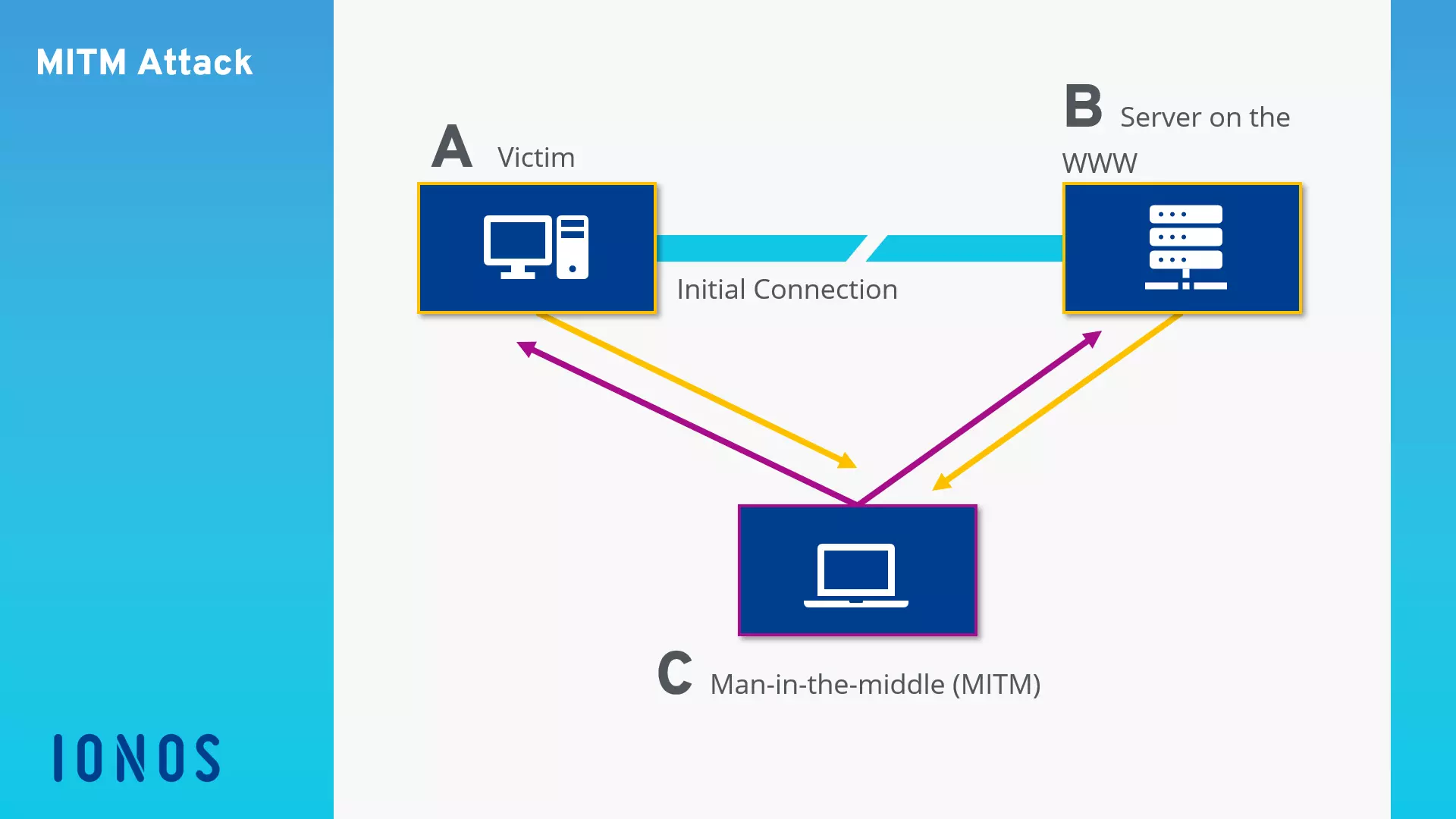
Man-in-the-Middle attack pattern
In order to infiltrate data traffic between two or more systems, hackers use various techniques that target known vulnerabilities in the world of online communication. A place to carry out LAN internal man-in-the-middle attacks is, for example, the DHCP (Dynamic Host Configuration Protocol) service, which is responsible for allocating local IP adresses, as well as the ARP system (Address Resolution Protocol), which determines hardware addresses (Media Access Control, MAC). Man-in-the-middle attacks can be performed on a global scale by manipulating DNS servers, which are responsible for the resolution of internet address in public IPs. Hackers also exploit security gaps in outdated browser software or provide corrupted WiFi access to unsuspecting internet users. These attack patterns are typically automated by software. If attacks are performed by people, then these are known as human-assisted attacks.
DHCP starvation attack
When it comes to DHCP-based attacks, a hacker’s own computer (one that’s under their control) is issued as a DHCP server within a Local Area Network (LAN). This kind of server is a central component of the local network and is responsible for allocating the network configuration to other computers in the LAN. This is usually done automatically: as soon as a computer builds the first connection to the LAN, the DHCP client of the operating system asks for information such as a local IP address, network mask, default gateway address, and the address of the responsible DNS server. It sends out a broadcast to all devices on the LAN and waits for the confirmation from the DHCP server. The first detailed answer is accepted.
This fake DHCP server gives hackers the possibility to control the allocation of local IP addresses, enter default gateways and DNS servers on the swapped computer and redirect outbound traffic on any computer in order to intercept or manipulate content.
Since this attack pattern is based on manipulating the DHCP system, it is known as DHCP spoofing. This kind of man-in-the-middle attack does, however, require the attacker to be on the same LAN as the victim. Hotel LANs or public WiFi networks are therefore at risk of becoming targets of DHCP-based attacks. If the attacker wants to infiltrate a wired corporate network, they must first obtain physical access to the LAN in order to infiltrate the fake DHCP server.
Internet users can take measures against DHCP spoofing such as being cautious when using unknown networks. It is advisable to use secure web applications from online banks or shopping portals only in known and trusted LANs such as your private home network or the one at work.
ARP cache poisoning
ARP is a network protocol, which is used to map IP network addresses to the hardware addresses used by data link protocols. So that a computer can send data packets within a network, it must know the hardware address of the recipient system. For this purpose, an ARP request is sent as a MAC broadcast to all systems in the LAN. This includes both the MAC and IP address of the inquiring computer as well as the IP address of the requested system. If a computer in the network receives one of these ARP requests, it checks whether the packet contains its own IP address as recipient IP. If this is the case, an ARP reply is sent back with the sought MAC address to the requested system.
The allocation of this MAC address to the local PC is stored in table form in the so-called ARP cache of the requested computer. This is where ARP cache poisoning starts. The aim of this attack pattern is to manipulate the ARP tables of various computers in the network through fake ARP replies, for example, displaying a computer, which is under the attacker’s control, as a WiFi access point or gateway to the internet.
If ARP spoofing is successful, attackers are able to read, record, or manipulate all outbound data traffic from infected computers before it’s sent to the real gateway. Just like with DHCP spoofing, ARP cache poisoning can only happen if the attacker is in the same LAN as the victim’s system. This kind of man-in-the-middle attack can be performed using simple program like the freeware tool, Cain & Abel, which was originally developed to trace lost passwords, or an alternative is to use the software, Ettercap.
As with DHCP-based attacks, users that are in a corrupted LAN don’t have a chance to defend themselves against ARP spoofing. This means that in order to prevent this from happening, users should avoid unfamiliar networks or ensure they use them wisely.
DNS-based attacks
While ARP cache poisoning targets vulnerabilities in the address resolution in the Ethernet, cache poisoning on a DNS basis focuses on the internet’s domain name system, which is responsible for URL resolution in public IP addresses. With this kind of attack, hackers manipulate entries in the cache of a DNS server so that they can answer requests with fake target addresses. The hacker can redirect internet users (unbeknown to them) to any site in the network. They usually use known security gaps of older DNS servers.
Basically, DNS information is not stored on a single DNS server, but rather on numerous computers in the network. If a user wants to visit a site, they generally use a domain name. In order to access the appropriate server however, an IP address is needed. The user’s router determines this IP by sending a DNS request to the standard DNS server specified in the configuration. This is usually the DNS server of the internet service provider (ISP). If Resource Records on the requested URL are found, the DNS server answers the request with the appropriate IP address. Otherwise, the DNS server determines the requested IP with the help of other servers with DNS tasks. The server additionally sends a relevant request to other DNS servers and stores their responses temporarily in a cache.
Servers that use an old version of the DNS software primarily fall victim to hacking attacks. They accept and generally store not only information that has specifically been requested, but also information that has been supplied. If hackers have captured a single DNS server, it is easy to deliver fake records with every correct IP address and thus poison the cache of the requesting DNS server.
The effectiveness of man-in-the-middle attacks can be seen by incidents in the past where whole namespaces were redirected. It’s practically impossible for users to protect themselves against such attacks because they are carried out directly in the internet’s infrastructure. It is therefore the responsibility of the operator to ensure that the DNS servers provided are using up-to-date software and are sufficiently secure. Under the name, DNSSEC (Domain Name System Security Extensions), various internet standards were developed in order to enhance the DNS system with various security mechanisms and to improve data authenticity and integrity. Distributing these standards is taking a long time, unfortunately.
Simulating WiFi access points
An attack pattern that especially targets mobile device users, is based on simulating an access point in a public WiFi network like those provided in cafés or airports. Here, the hacker has configured their computer so that this additional route promises to lead to the internet – perhaps one with a better signal quality than the real access point. If an attacker succeeds and deceives the unsuspecting user into using their access point, they can see the whole data traffic that runs through the system and are then able to read it and manipulate it before it reaches the real access point. If the access point requires authentication, the hacker can also get their hands on all user names and passwords that the user enters during registration. It’s especially dangerous and you’re more likely to become a victim of a man-in-the-middle attack if your device is configured so that it automatically connects to the access point with the strongest signal.
In order to protect yourself from these attack patterns, internet users should only let their devices connect to familiar WiFi networks and ensure that they only use official access points.
Man-in-the-browser attack
A variant of the man-in-the-middle attack, in which an attacker installs malware in an internet user’s browser in order to intercept data traffic, is known as a man-in-the-browser attack. Computers that aren’t fully updated provide security gaps, which give attackers the perfect opportunity to infiltrate the system. If particular program infiltrate the user’s browser, they hide in the background and record all data that is exchanged between the victim’s system and various websites in the network. This attack pattern allows hackers to intercept a large number of systems with relatively little effort. The data espionage usually takes place before a possible transport encryption via TLS/SSL can take effect.
Internet users can prevent man-in-the-browser attacks effectively by making sure that all of the system’s software components are up-to-date and any known security gaps are closed by running security updates.
Human-assisted-attack
A human-assisted-attack refers to when an attack pattern is not purely automatic, but is instead controlled by one or more attackers in real-time. This type of man-in-the-middle attack could go as follows: once an internet user logs onto the website of their bank, the hacker (who has placed themselves between the user’s browser and the bank’s server) receives a signal. They now have the ability to steal session cookies and authentication information in real-time and use them to gain access to usernames, passwords, and TANs.
Preventing Man-in-the-Middle attacks
As a rule, it is rarely possible for those affected to recognise whether a Man-in-the-Middle attack is happening. The best protection is prevention. In the following list, we have compiled the most important tips on how internet users and website operators can minimise the risk of becoming the target of an MITM attack.
Tips for internet users:
- Make sure that you always access websites through an SSL/TLS secured connection. In this case, the internet address will begin with https. Http connections are a security risk.
- Verify that a website’s SSL certificate is current and issued by a trusted certificate authority, especially before you enter any credentials.
- Always use the latest version of your favourite web browser and keep your operating system up to date with updates.
- Avoid the use of freely accessible VPNs or proxy servers.
- Keep your passwords up to date, use a separate password for each application and don’t reuse old passwords.
- Avoid public WiFi spots – for example in hotels, train stations or shops.
- If you need to use public networks, avoid downloads, don’t submit any credentials like your email account or social networks – and never make online payments.
- Use additional methods for secure login, if the website operator offers the service – for example, multi-factor authentication (MFA) through token one-time passwords via SMS or smartphone app.
- Do not click on links in emails from unknown senders that might lure you into a malware laden website.
Tips for website operators
- Protect your customer’s data by securing websites with customer logins using an up to date SSL certificate from a reliable certificate authority.
- Offer your customers additional methods for secure login – like multi-factor authentication via email.
- Communicate to your customers that you never query login data through emails and avoid hyperlinks in customer emails.