

What is RAID (Redundant Array of Independent Disks)?

RAID improves the fail safety of data storage devices. Developed for use in HDD hard drives, it’s still used today in server environments. What exactly does the structure of a RAID system look like and what are the differences between the individual levels?
- Free website protection with SSL Wildcard included
- Free private registration for greater privacy
- Free Domain Connect for easy DNS setup
RAID: definition and history
The term ‘RAID’ was first used in 1988 in a publication written by computer scientists at the University of California at Berkeley entitled “A case for redundant arrays of inexpensive disks (RAID)”. In their thesis, the authors discussed the possibility of combining inexpensive PC hard disks into a network and operating them as one large logical drive as an alternative to expensive SLED hard disks (Single Large Expensive Disks) of mainframe computers. Since this increased the risk of hardware failure, the concept focused on redundant data storage.
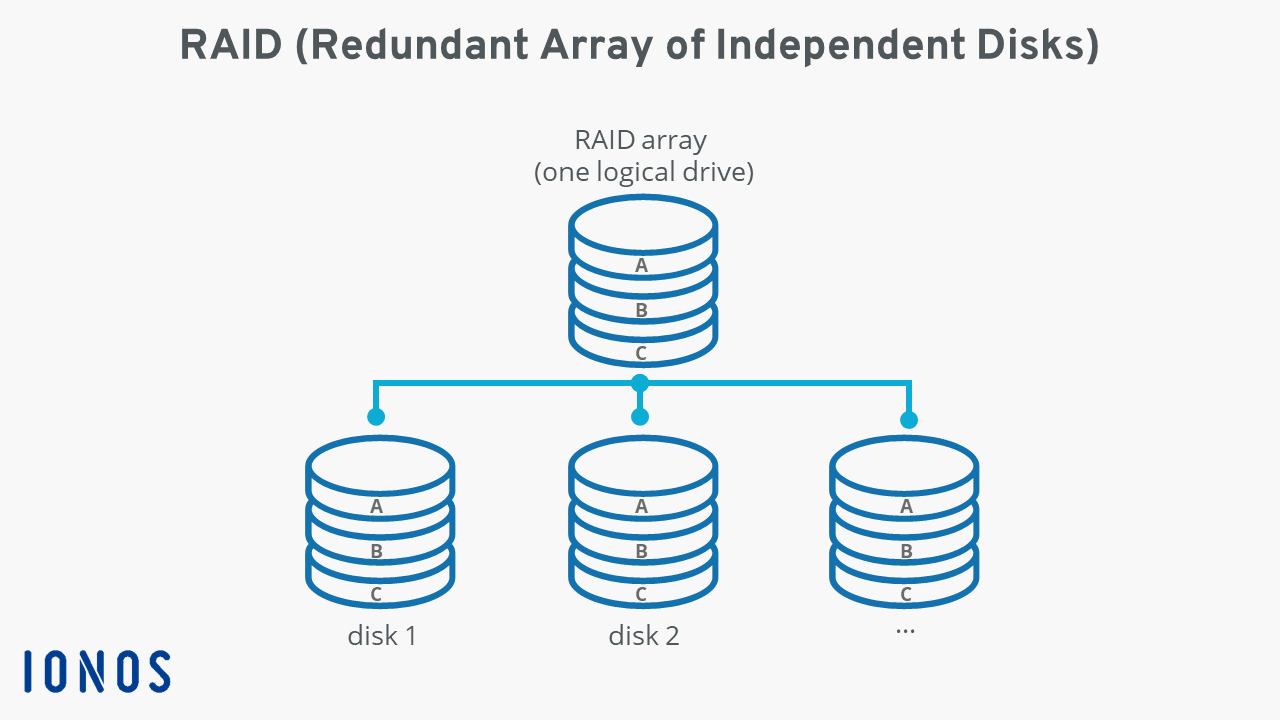
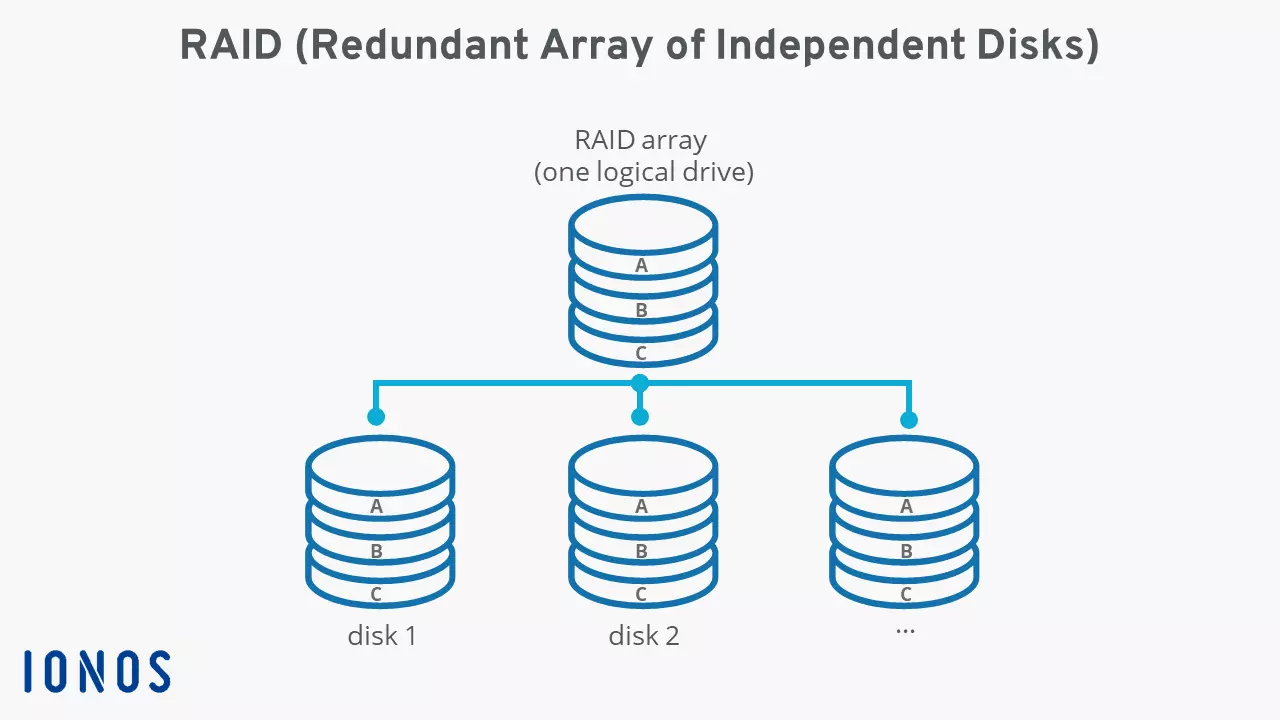
Over the coming years, RAID was standardised and developed – its suitability to server applications increasingly coming to the fore. As a result, it became less about saving money and more about exchanging hard disks without causing operational errors. It’s all in the name: Redundant Array of Independent Disks. The RAID technology is specifically tailored to the properties of classic HDD hard drives. Modern SSDs can technically be bundled, but at the loss of performance and lifespan due to the missing TRIM functionality in RAID.
A RAID (Redundant Array of Independent Disks) is a combination of at least two different storage media in a single large logical drive. The central principle of a RAID system is the redundant storage of data, which ensures that the integrity and functionality of the overall network are not jeopardised if individual hard drives fail.
The role of RAIDs in today’s server environments
RAID systems are still important components in server environments today. Their most important role is the redundancy of the stored data. This shouldn’t be confused for the concept of data backups. As part of a server structure, RAIDs ensure that the failure of a single hard drive doesn’t have severe consequences, because its data is stored elsewhere in the RAID system. Other advantages of RAID are an increase in storage capacity and faster read and write speeds when accessing the hard disk space.
From a user perspective, a RAID system, which always consists of at least two storage media, cannot be distinguished from a single logical data carrier.
How individual storage media of a RAID system interact, and which function a network should ultimately fulfil in a server network varies widely. However, there are various standardised setups that are defined in so-called RAID levels. In addition, a distinction is made between software and hardware RAIDs, depending on whether the interaction of the network is organised on the software or hardware side.
What is the difference between hardware and software RAIDs?
Categorisation into hardware and software RAIDs can lead to the wrong impression of what these two types of hard disk drives are all about. Both variants require software to operate – the terms only refer to the type of implementation.
With hardware RAID, the organisation of the individual storage media is performed by special, high-performance hardware, also known as a RAID controller. This controller is installed either in a computer or a disk array that also houses the hard disks. Disk arrays are commonly used in data centres, whereby the external systems are often referred to as DAS (Direct Attached Storage), SAN or NAS. The great advantage of hardware-based organisation of RAIDs is excellent performance in the form of high data transfer rate.
In a software RAID, the storage quota is managed by software that runs directly on a host’s CPU, also referred to as host-based RAID system. Common operating systems such as Windows (as of NT) or Linux distributions include the necessary components. Compared to the hardware alternative, a software RAID is set up much faster and cheaper. Disadvantages are high CPU for the host and the lack of platform independence. Since disk access cannot be regulated as elegantly as with a RAID controller, performance also tends to be worse.
| Software RAID | Hardware RAID | |
|---|---|---|
| Costs | Low | High |
| CPU demands (host) | High | Low |
| Performance | Low | High |
| Platform independence | No | Yes |
| Operating system dependent | Yes | Yes |
Common RAID levels at a glance
The manner in which hard disks are combined in a RAID is called a ‘level’. However, this can cause some misunderstandings, because hard drive setups don’t build upon one another in levels. The individual levels are not connected and only characterise the different structural approaches and functions of the RAID. Common levels include RAID 0, RAID 1, RAID 5 and RAID 6. Combinations of two RAID levels are also possible. RAID 10, for example, designates a RAID 0 system that has been combined from several RAID 1 systems.
The RAID levels presented here characterise standardised RAID systems established by the RAID Advisory Board (RAB). At the same time, numerous manufacturer-specific RAID setups with individual names or designations exist, but they are beyond the scope of this article.
RAID 0: Striping
Strictly speaking, hard disk groups under a RAID 0 label don’t count as RAID systems at all, as they don’t rely on redundancy for storage. The only purpose of RAID 0 is to accelerate access to data by combining two or more hard drives into a single logical drive. To this end, data is evenly distributed across the individual data carriers in successive blocks that are called stripes. That’s why RAID 0 is also known as “striping”. While the network provides more storage capacity and a higher throughput rate, it lowers security: if a hard drive fails, all data is lost. You can find out more about striping in our detailed guide to RAID 0.
RAID 1: Mirroring
RAID level 1 is also known as ‘mirroring’. Here, all hard disks always have the same data status providing for excellent redundancy and data safety in case of failing storage media. As such, the capacity of the RAID is always as high as the capacity of the smallest hard drive installed. The write speed in a RAID 1 is as fast as that of a single drive. By connecting the components to their own channels, such as SATA, reading speed can be doubled. Find out more about ‘mirroring’ as a storage method in our article on RAID 1.
RAID 5: Striping with distributed parity information
RAID 5 describes a network of three or more hard disks, the number of which is typically uneven – three, five, seven, etc. The storage concept uses the striping of RAID 0 and distributes the data in blocks across the various data carriers. Together with the data blocks, parity information is evenly distributed across the integrated hard drives, which can be used to restore lost data if a storage medium fails. Thus, RAID 5 ensures a higher read speed and also more security than a single drive. Due to the constant need to recalculate the parity blocks, the writing speed is comparatively slow. Read more about the concept in our separate RAID 5 article.
RAID 6: Striping with doubly distributed parity information
RAID level 6 follows a similar approach to RAID 5: data is distributed evenly and in blocks to the integrated storage components, and parity information makes for higher security. However, recovery data is generated in duplicate, which means the RAID type can cope with the simultaneous failure of up to two hard disks (when a minimum of four are installed). The network therefore offers a high level of data security and good read access. Since calculating the parity blocks is even more time-consuming than with RAID 5, the write speed is slower. In our guide on RAID 6 we discuss the strengths and weaknesses of striping with doubly distributed parity information.
RAID 10: RAID 0 across multiple RAID 1
RAID 10 or RAID 1+0 combines the features of RAID level 0 and RAID level 1: an increased data throughput rate and higher data security. For this purpose, several RAID 1 systems are combined in a RAID 0 array – at least four hard drives are required. Find out when this combination is a good idea and what its disadvantages are in our article on RAID 10.
You can find out more about the most important standard setups and view a detailed comparison of their different operating modes, advantages, and disadvantages, and use cases in our comparison of RAID levels.
What to watch out for when setting up and adapting RAIDs?
There are a few things to consider when setting up and operating a RAID system. Firstly, you need to decide what type of network you want to set up. For example, if you’re only looking to increase data throughput, you could use a level 0 system or alternatively opt for an SSD. If you want to boost data security, you could choose between mirroring (e.g., level 1) or storage with parity information (e.g., level 5).
When selecting hard drives, choosing identical models is preferable. In many RAID setups, the maximum storage volume depends on the smallest disk, which is why storage potential may be lost when mixing hard drives of different sizes. More importantly, rely on hardware such as NAS that are designed for endurance and a longer life. The size of the data carrier also plays an important role when defective hardware is replaced later or when the RAID is enlarged: new or added components must be at least the size of the smallest existing or defective data carrier.
Here’s an important reminder when using RAID systems: while the interaction of hard drives improves the security of the stored data through redundancy, it cannot replace a good backup solution.
Looking for a simple and secure backup solution for your smartphone, computer, or cloud infrastructure? The Cloud Backup from IONOS offers comprehensive protection for all your data and devices!