

Single sign-on (SSO)

It is well known that a large majority of companies are active on social media, and/or use the advantages of cloud services, and also mobile devices such as smartphones and tablets. These forms of technology have long since become an integral part of everyday working life. This means a whole lot of passwords that you have to remember – in addition to those you already have in mind for your private e-mail and social media accounts.
It’s no surprise, then, that the everyday web user suffers from a serious case of chronic “password fatigue” – you end up resorting to simple numerical sequences such as “12345” or noting down important passwords on Post-it notes on your computer monitor. The long-term consequences are not only a lack of productivity, but also a lack of data security. The remedy: single sign-on, or SSO for short. But what exactly is single sign-on, and how secure is the popular authentication method really?
What is SSO?
Single sign-on describes an authentication procedure in IT that basically always runs the same way:
- A web user logs on once to their workstation.
- They thereby gain access to all computers and services (including the cloud) for which they are locally authorised, as long as they’re at the same workstation.
- As soon as the user logs off from their workstation, all access rights no longer apply. This happens either after a pre-defined period or when the user manually executes a single sign-out or single sign-off.
SSO is therefore an access method for multiple associated but independent applications, in which the user only has to log on once instead of entering his access data individually for each software. Due to their user-friendliness, single sign-on procedures are used both in the private sector (web applications and private clouds), and in the professional sector (applications and portals used within the company in the intranet).
How does single sign-on work?
If a web user wants to log in to several services and applications during a session, they usually have to enter their access data separately for each of them. If, instead, the user has registered using a single sign-on service, this task is performed by an upstream software package. This software has all the user's access data at its disposal and verifies it fully automatically against all other services without any intervention on the part of the user. A single, overarching identity of the user (similar to a VIP badge) is used, which is known to all participating applications and is regarded as trustworthy thanks to the reputation of the single sign-on service.
Various authentication and authorisation systems are used to ensure that such a single sign-on procedure functions smoothly.
OpenID
OpenID is an open authentication standard that is used for over a billion accounts, including Google, WordPress, and PayPal. The latest version of the system is called OpenID Connect (OIDC) and is a combination of OpenID and OAuth2. If it is used with a single sign-on procedure, the user needs an OpenID account, which they receive from a so-called OpenID identity provider (e.g. Google). With this account (or the corresponding URL), the user logs on to all websites that also support OpenID. In the course of this, the trusted identity provider transfers a "token" as proof of the user's identity to the respective website.
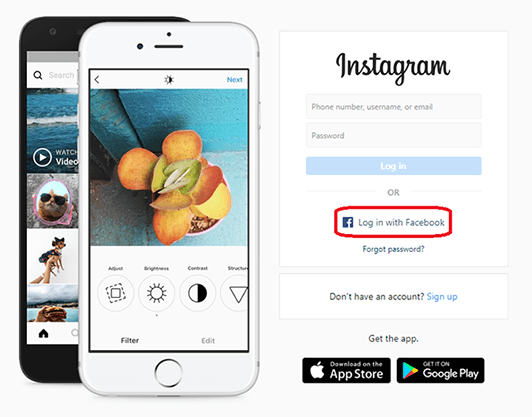
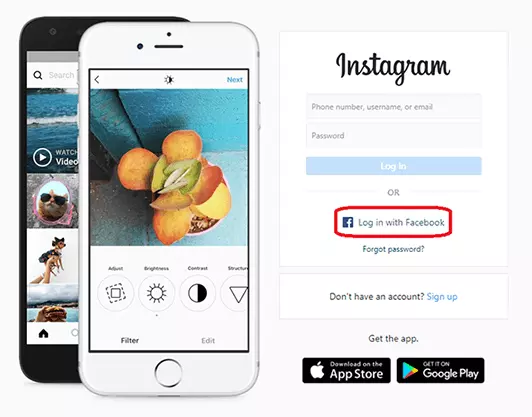
Figuratively speaking, SSO via OpenID can be thought of as a journey where you cross a border. The traveller (the user) uses a passport from a government (the identity provider) that the destination country (the website) trusts. The passport verifies the identity of the traveller. A good example of this is the “Log in with Facebook” button, which can be found on many websites.
OAuth2
Unlike OpenID, OAuth2 is an authorisation tool rather than an authentication tool. The main difference is that instead of proving your authenticity, you have to delegate this to a so-called client that logs on to the web page with a token from the identity provider. The advantage of this is that you don’t have to transfer data to the respective website.
The appropriate metaphor for this would be “house sitting”: If a house owner (as a user) hands over their house key to a friend (the client), the friend is “authorised” to enter the house (the website). OAuth2 is used, for example, when you want to import friends from your Facebook account into another service without passing on your Facebook information to that service.
The IT terms “authentication” and “authorisation” are often confused or mistakenly used synonymously due to their minor differences. Authentication takes place when a service identifies a user on the basis of their access data. In the case of authorisation, the user grants a service the right to use certain data and functions of their profile.
SAML
SAML is the oldest of the three systems mentioned and serves as an open standard for both authentication and authorisation in an SSO procedure. Here, too, a distinction is made between three main parties: the user (called principal), the website (called service provider) and the identity provider who carries out the verification. The process is very similar to that of OpenID, which is why the corresponding passport metaphor is also applicable here.
However, SAML's website always makes an active identification request itself, which is sent to the identity provider in the form of an XML message, giving details of the information required. The identity provider then responds with a so-called assertion, which contains the requested authentication and authorisation information as well as specific attributes such as the user’s e-mail addresses and telephone numbers. SAML can so also be described as the issuance of personal government documents at the request of the target country.
Solutions for single sign-on
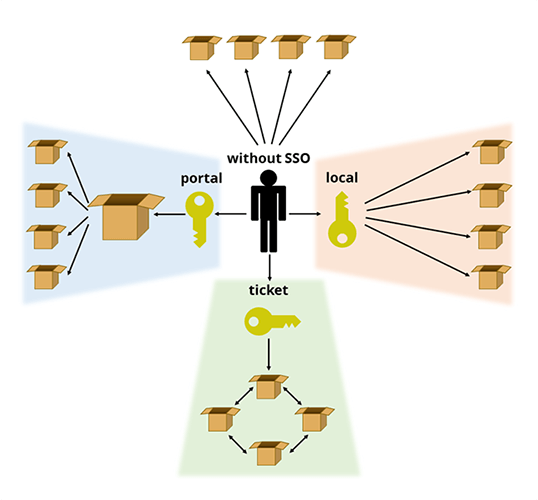
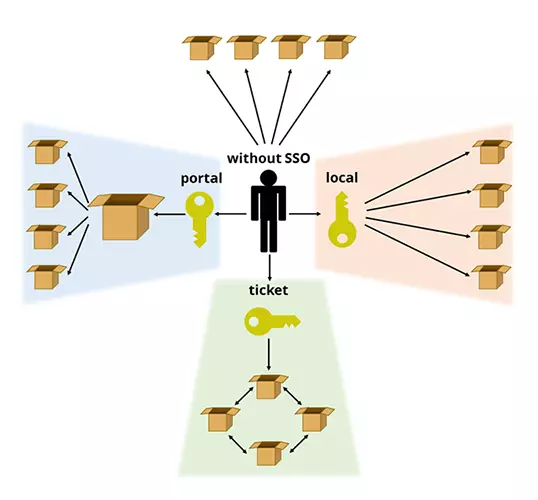
There are three main approaches to implementing SSO processes in common IT practices:
Portal solution
As the name implies, the user logs on to this SSO solution at a portal – a system in which various applications, processes, and services are integrated. After successful authentication, this system provides the user with a blanket identification feature (such as a cookie) that gives them access to all the functions integrated into the portal. A good example of this is a Google account: Once registered and logged in, you also have immediate access to other services of the whole Google group, such as the Play Store or Google Mail.
Ticketing system
The meaning of ticketing is already in the name: At the heart of this SSO solution is a network of known services. If the user logs on to one of these services, a virtual ticket is assigned to him for identification with all other participants from this “circle of trusted persons.” Examples include the Kerberos authentication service and the Liberty Alliance project.
Local solution
With a local single sign-on solution, an SSO client is usually installed on the workstation. This workstation is configured in such a way that it obtains the access data for all required applications and services, for example from an encrypted local file on the hard disk, a server in the local network or a database, and automatically enters them in the logon screen. The password services of browsers such as Safari or Chrome are single sign-on clients. Another particularly secure method is to use a physical “token” as the carrier for the access information. A USB stick or a smart card can be used for this.
What are the pros and cons of single sign-on?
With SSO, you can access multiple services and applications without having to sign up for each one individually.
Benefits of single sign-on
For users, the main advantage is that they no longer have to remember dozens of passwords. This even frees the user from having to manage passwords, which is why single sign-on procedures are also regarded as an alternative to password managers. Seeing as this is such a convenient alternative, and because it saves time and hassle, SSO solutions are used in private as well as in professional contexts.
Companies that implement SSO in their operations expect more productivity from their employees and fewer helpdesk calls due to forgotten passwords. IT therefore has less work and costs less. At the same time, it makes it easier for IT specialists to assign accounts to new employees or delete the accesses of former employees.
In addition, SSO solutions offer advantages for internal company data security. If employees only have to remember one password, it can be much more complex. In this way typical errors in password selection, which are often the reason for successful hacking attacks, can be avoided. The password only needs to be entered at a single interface, and this reduces the potential for phishing and man-in-the-browser attacks. Under these circumstances, the company can afford to focus all security efforts – such as SSL certificates in one area.
Disadvantages of SSO
On the other hand, there is a certain implementation effort as well as the inherent weaknesses of single sign-on. In essence, only those services that are supported by the respective SSO system can be used. If the SSO system fails, access to the associated applications will be limited or impossible. This is the case, for example, when social media accounts are also integrated that are blocked by the network in libraries and educational institutions, for production reasons at certain workplaces, or in countries with active censorship (e.g. the People's Republic of China).
The actual security of single sign-on should also be considered. If a user leaves their workstation, a third party could theoretically use the time until the automatic “single sign-out” takes place, in order to take advantage of the access granted through the sign on. It is also problematic if the “master password” for the SSO interface falls into the wrong hands – this gives the attacker immediate access to all associated services.
There are also concerns due to the GDPR, in which the requirements for protecting personal data have been tightened throughout Europe since 25th May 2018. It is now necessary to obtain an explicit agreement from the users to be able to use single sign-on. In the past, this agreement was also required, but the legalities surrounding the situation have been changed so much that the situation is now much stricter.
In view of these potential risks, it is necessary to pay special attention to the security of the data stored on the server side. It makes sense to up the security of SSO features using two-factor authentication, or other solutions such as smart cards or tokens, which can generate TANs.
Case study: Facebook vs. Verimi
The advantages and disadvantages of single sign-on can be illustrated with Facebook. The social media platform enables a user to use their Facebook account to register and log on to other websites. A so-called social plug-in in the form of a “Log in with Facebook” button is integrated on the respective registration or login page. This is convenient for the user, but it also has the disadvantage that the more services and applications are linked to the Facebook account in this way, the more personal data Facebook collects. One single successful cyberattack is then sufficient to access all personal data.
Facebook has also passed on data to these services that was actually intended exclusively for the social media platform. This includes public data such as the name and profile picture, but it also has passed on non-public data such as a person's age, place of residence, and relationship status. Although Facebook communicates its data forwarding policy as transparently as possible, in order to use certain services, users often have no choice but to agree to this data exchange. Facebook also receives data from the linked services. With these, the platform can further supplement its user profiles and place even more targeted, personalised advertising.
The new SSO identity provider is to offer a higher level of data protection and transparency, and is to be used in the long term also for banking and administration. The basis for this is the data protection regulation as well as the encoded storage of personal data in exclusively European computer centres. The extent to which the project will continue depends, however, on how many partners will integrate it into websites and apps in the future.
Summary: single sign-on – yes or no?
If one researches single sign-on on the internet, one finds relatively little negative information about the convenient multi-authentication procedure. Instead, for years it has been treated as a downright revelation for the digital workplace as far as comfort and data security are concerned. The US-American Cloud Access Security Broker (CASB) Bitglass praises the global use of cloud services in companies, but at the same time criticises the comparatively low use of single sign-on methods. This article states that the use of unintentionally competing access solutions to services and applications does not make it possible to fully make use of the potential of digitisation.
However, there is another side to the coin. As we have mentioned, single sign-on is a convenient solution for both private and public usage. However, there are some security risks involved. For example, if the master password is leaked, or given to the wrong person, all data secured by this solution is at risk. Furthermore, using a physical solution, such as a USB token, has the risk that if an employee loses it, it could fall into the wrong hands.