What is OneDrive? Things to know about Microsoft cloud storage
If you have a Microsoft account, you get 5 GB of free storage space in the Microsoft cloud storage called OneDrive. If you need more storage for business tasks, simply choose the paid OneDrive subscription.
What is Microsoft OneDrive?
OneDrive is a cloud service, meaning it provides external data storage. You can use it to store important data as a backup, share files with others, and collaborate on documents. It works independently of your device and location.
Windows users are familiar with OneDrive, as it has been integrated into the operating system since Windows 10 and comes included with every Microsoft account. Like other cloud services, it allows you to upload data to the Microsoft cloud with a single click, back up your files, and share selected content with other users.
- Store, share and edit data easily
- ISO-certified European data centres
- Highly secure and GDPR compliant
What functions does OneDrive offer?
To use the OneDrive functions, simply sign in with your Microsoft account. Signing in also gives you access to other Microsoft online services such as Word, Excel, Teams and Skype. If you use Windows 10, you will already be able to see the OneDrive icon in Windows Explorer.
The most important functions of OneDrive include:
- Upload and download files to or from the cloud
- Share selected files with others for editing
- Use collaboration functions with Microsoft services such as Word and Excel
- Move files to the OneDrive folder on desktop to synchronise files between cloud and computer
- Synchronise changes to documents and files between the cloud and end device
- Access to cloud storage regardless of location or device
- Mobile cloud access to data via app (for Android, iOS, Windows Phone)
- Storage expansion through paid OneDrive packages
- Direct saving of Office documents in OneDrive via the ‘Save as’ function
Requirements for using OneDrive
The use of OneDrive requires a registered Microsoft account. The following minimum technical requirements and restrictions also apply:
- At least Windows 10
- At least macOS 13.0
- No Linux support
- At least 1 GB RAM
- Fast internet connection
In principle, OneDrive can be used with newer computers, laptops and smartphones without any problems. If you’re logged in as a Microsoft user in Windows 10 or Windows 11, you already have OneDrive as an integrated Microsoft feature.
Which OneDrive variants are available?
Microsoft’s cloud storage OneDrive is not only offered as an app in your Windows operating system or via the browser, but can also be used via various other end devices. Other OneDrive app and client variants are:
- OneDrive client for Mac
- OneDrive for Xbox
- OneDrive for HoloLens
- OneDrive for Surface Hub
- OneDrive for Microsoft Tablets
You can also use the OneDrive mobile app. In addition, you can use it to access your cloud data on Android (from 6.0) and iOS (from 16) and edit it as you wish.
Advantages of OneDrive
Value for money
One of the biggest advantages of OneDrive is its strong value for money across different subscription packages. The Basic package offers 100 GB of cloud storage for just £19.99 per year. The Microsoft 365 Personal package includes 1 TB of storage along with essential Office apps and Skype, all for £59.99 per year. If you’re simply looking for free, no-frills cloud storage, the basic option with 5 GB is a great starting point.
Integration with Microsoft 365
With a Microsoft 365 subscription, you automatically benefit from OneDrive premium services, a benefit that’s particularly worthwhile for professional or academic work. This includes the unlimited and secure OneDrive vault for your most important data, links with expiry dates, password protection, integration of Office services such as Word, Excel and PowerPoint, ransomware protection and a restore function for all changes made in the last 30 days.
Are you looking for a complete Office solution for your company? At IONOS, you get Microsoft 365 with Office, extra-large OneDrive storage, an email solution and many other extras.
Personal vault
For both free and paid packages, OneDrive offers a digital vault for your most important data. The free package allows you to store three files, while the Premium package allows you to store an unlimited number of files.
Quick and easy synchronisation
With OneDrive synchronisation, you can save changes independently and centrally in the cloud and synchronise them easily. So, if you access your storage from other (also mobile) end devices, changes are automatically applied.
Store files in the cloud as required
By offloading your files to the cloud, you free up more local storage space, create important backups and gain flexible access to your files in the cloud.
Disadvantages of OneDrive
Only 5 GB of free cloud storage
Even a simple cloud storage comparison shows that OneDrive offers relatively limited free storage. For example, Google Drive provides 15 GB of free storage, giving it a clear advantage. While OneDrive still offers more than Dropbox’s free 2 GB, it falls short compared to many Dropbox alternatives when it comes to free storage options.
Whether for automatic backups or location- and device-independent work, with IONOS HiDrive cloud storage, you can back up data as required in ISO-certified data centres in Europe.
Restoring version history not free of charge
The option to restore document and file versions from the past 30 days is only available with paid packages. Accidentally deleted data in the free cloud storage cannot be recovered.
Limited upload size even with paid packages
Even in paid packages, uploads are limited to files with up to 250 GB per file. You should therefore look out for OneDrive alternatives if you want to upload content with more GB.
| Advantages of OneDrive | Disadvantages of OneDrive |
|---|---|
| ✓ Convincing price-performance ratio | ✗ Only 5 GB of free cloud storage |
| ✓ OneDrive premium services with Microsoft 365 subscription | ✗ Restoration of files etc. subject to charge |
| ✓ Personal vault | ✗ Upload size limited |
| ✓ Quick and easy synchronisation | |
| ✓ Files can be outsourced as desired |
What does OneDrive cost?
Depending on requirements and needs, Microsoft’s cloud storage offers various prices and packages as well as Microsoft 365 license models for personal, family or business use.
| Offer | Costs | Details |
|---|---|---|
| OneDrive | Free | Use 5 GB of cloud storage completely free of charge with OneDrive. Other Office services are not included. |
| OneDrive Basic | £19.99 euros per year / £1.99 euros per month | The Basic subscription offers 100 GB of storage without additional Office services. |
| Microsoft 365 Single | £84.99 per year / £8.49 per month | Microsoft 365 Single not only provides 1 TB of storage, but also all the important Office services. |
| Microsoft 365 Family | £104.99 per year / £10.49 per month | The family subscription is valid for up to 6 people, includes 6 TB and all Office applications. |
| OneDrive for Business | £3.80 per month for 1 TB of storage | You get practical functions such as file sharing. |
| Microsoft 365 Business (Basic & Standard)** | Basic: around £4.60 per month for 1 TB of storage (per user) Standard: around £10.40 per month for 1 TB of storage (per user) |
The Business packages are suitable for companies and collaborative work in different teams. The Basic version includes Microsoft Teams as well as SharePoint, Exchange, Excel Mobile and PowerPoint Mobile. The Standard package includes comprehensive features such as all Office applications, business email, support, deployment and business licenses. |
All package information is correct as of January 2025.
If you don’t like Microsoft 365 productivity software, then Google Workspace may be the solution for you. Please see our helpful comparison on the subject of Google Workspace vs Microsoft 365.
How secure is OneDrive?
To protect your data, OneDrive offers two-factor authentication, which protects your OneDrive and Microsoft account from misuse. Your OneDrive data is transferred and accessed using AES 256-bit encryption. The following features provide additional security:
- A personal password
- Security information and security questions
- Advanced security features such as ransomware and virus protection
- 30-day data recovery with a Microsoft 365 subscription
We answer the question ‘How secure is OneDrive?’ in detail in our digital guide article.
The most important OneDrive features
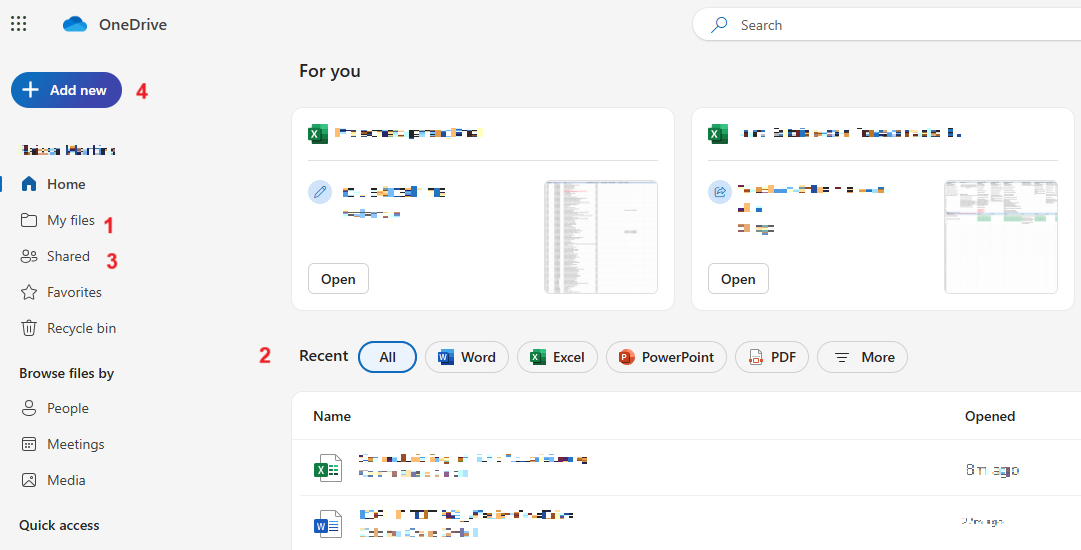
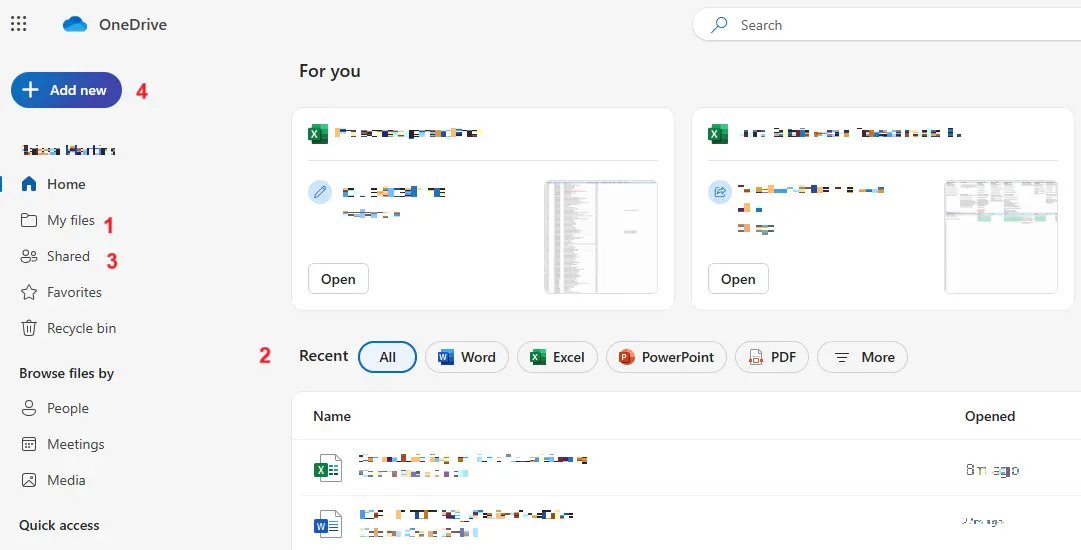
The user interface in OneDrive is basically self-explanatory and easy to use. The left side menu shows you the most important items, including your content stored in the cloud under ‘My files’ (1). Documents and media files that you have used recently can be found under ‘Recently used’ (2). Files that you edit or share with others are in the ‘Shared’ folder (3). The ‘New’ option (4) is used to create new folders or documents or to store new folders or files in the cloud.
- Keep your data safe with industry-leading security
- Save time on updates and maintenance
- Easily add apps and online office tools