

Programming Language Dart

It feels as if there are almost as many programming languages as there are grains of sand on the beach. Among the numerous options out there, the programming language Dart is the new kid on the block. When comparing internet programming languages, the basic programming paradigms are usually fairly similar. It is only when you take a deeper dive into them and examine them in detail that the differences become apparent.
Recently developed programming languages are often dedicated to creating mobile applications for smartphones and tablets. These languages need to enable a good user experience (UX) with minimal syntax and also use as little of the device’s available memory as possible. In the following, we will explain how Google’s programming language Dart fits into this category and what it can do.
What is Dart?
Dart is a programming language that was and still is primarily developed by Google. Dart is ECMA standardised (European Computer Manufacturers Association). Dart is intended to be an attractive alternative to JavaScript for programming in modern web browsers. Dart developers believe that it is no longer possible to solve the issues with JavaScript by continuing to develop the language.
The programming language Dart was developed in 2010 and first released the following year. Browsers did not and still do not natively support Dart, so the Dart2js compiler (‘Dart to JavaScript’) was developed since JavaScript can be executed in all modern browsers. Dart is similar to common object-oriented programming languages (e.g. Swift, C# and Java) which are based on specific programming paradigms. Its rules for combining specific characters (i.e. the syntax) are similar to those in the programming language C. This similarity makes the language quite easy to learn, so you can get started using it without having to overcome any huge language barriers.
How is Dart structured?
Dart is comprised of variables, operators, conditional statements, loops, functions, classes, objects, and enumerations. It features inheritance and generic programming which are important concepts of an object-oriented programming language – much of which will be familiar to an experienced programmer. If you are looking to try out this language for the first time, there is an open source platform called DartPad available which you can use to get a feel for the language and check out some examples from a drop-down menu.
All programs written in Dart start by calling the “ ‘main’ function:
void main() {
}
The following example demonstrates how to define a variable and execute a conditional statement:
void main() {
    var animal = 'horse';
    if (animal == 'cat' || animal == 'dog') {
        print('This animal is a pet.');
        } else if (animal == 'elephant') {
        print('That\’s a huge animal.');
     } else {
        print('This animal is not a pet.');
     }
}
In DartPad, this results in the following output in the console:
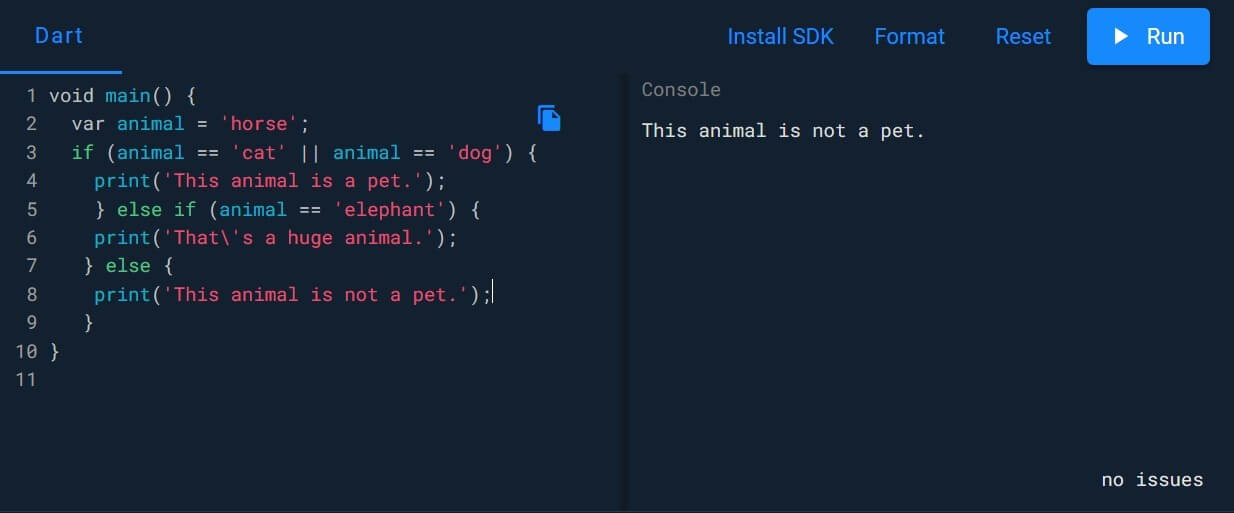

For the variable ‘animal’ (var animal), replace ‘horse’ with ‘cat’, ‘dog’, or ‘elephant’ and watch how the output changes in the console on the right-hand side. For more detailed information on how to program with Dart, check out our Dart tutorial.
What is Dart used for?
Dart is primarily used to program for internet-enabled devices (e.g. smartphones, tablets, and laptops) and for servers. Until recently, it has not been realistic for programming beginners to try to develop mobile or web-based applications themselves. Dart’s approach aims to make programming such apps easier. Google’s own software development kit (SDK) Flutter and the well-known advertising tool Google Ads are both programmed with Dart. Additional examples include the websites for the New York Times and Groupon. DartPad, mentioned above, provides a convenient way to get to know the language using the trial-and-error method and acquire basic programming skills with it.
What are Dart’s strengths and weaknesses?
Dart has a number of advantages but also some disadvantages.
Advantages
Dart is an open source programming language and can be used by anyone free of charge. Dart is developed by Google. Being backed by such a large company means that this language has long-term prospects for further development. Dart is easy to learn for programmers because of its syntax. Its developers have simplified and intelligently condensed many of the complicated syntactical concepts found in other languages. Anyone who has already worked with C# will be able to quickly familiarise themselves with Dart. This programming language has been developed for the web. Due to being able to be quickly and directly converted into JavaScript, Dart can work in all modern mobile and desktop browsers. To program with this language, all you need is a simple text editor. However, this will require a deeper knowledge of the programming language. It is easier to work in special editors like Android Studio (Google) and Visual Studio Code (Microsoft).
Disadvantages
Dart is a relatively new programming language. This means that its support community is not very large yet and it doesn’t have as many learning resources available as JavaScript. However, it is safe to assume that this will soon change. The initial installation of an editor and its technical resources on a computer is well documented but is also fraught with pitfalls. Critics have also pointed out that once again a new language has been introduced to the market instead of trying to perfect the existing ones.
How is Dart different from other programming languages?
One major way that Google’s programming language Dart stands out from other programming languages is by being easier to read with a syntax that is similar to that of a human language. It uses fewer commands but more options. You can freely choose the names for your variables making any code you write yourself understandable. This also eliminates the need to make tons of additional comments in the code. You can use spaces, tabs, and line breaks as you wish. This allows a programmer to clearly structure the code in a way that will ultimately be ignored by the compiler. There are exceptions such as keywords, variable names, and function names (i.e. defined terms in Dart). These include ‘if’, ‘else’, ‘string’, and ‘void’ among others. Lastly, a clear distinction is made between using uppercase and lowercase letters which significantly increases the scope for naming.
In an analysis of the most popular programming languages in 2019, the developer platform Stack Overflow found that Dart (66.3%) was just behind JavaScript (66.8%).