

Units of storage in computers: What are digital units of measurement?

How much internal storage should a good smartphone have? How much RAM is recommended? How many gigabytes does a terabyte hard drive contain and what are kilobytes and megabytes anyway? We use feet to measure the world’s highest mountains, and bytes to measure the ever-growing mountains of data. If you want to be able to understand different storage capacities and the proportions of different groups of data, you’ll need to be familiar with the units of storage in computers, starting with the smallest one – the byte – and going all the way up to zetta-, yotta-, and brontobytes.
What are units of storage in computers?
Few people are aware that we now live in the era of the zettabyte. In 2016, the amount of data generated annually reached the size of one zettabyte. It’s estimated that by the year 2025 there will exist 175 zettabytes of data worldwide. How does that translate? One zettabyte contains one billion terabytes. Hard drives that are considered to have large storage capacity have at least one terabyte of memory. One terabyte is enough space for 250 two-hour long HD movies. One zettabyte thus corresponds to 250,000,000,000 HD films!
Since digital applications, smart technologies, and the Internet itself have become a fixed part of our lives, data quantities have exploded. Businesses and private individuals produce so much data that it can no longer be clearly expressed in bits and bytes. Every day, about 2.5 quintillion bytes are produced worldwide. Humanity’s digital footprint is thus barely comprehensible. However, knowing the storage units for computers goes a long way to helping one understand how big a set of data actually is.
What’s a bit?
The smallest unit of information is a bit. Even the largest mountains of data start there, since a bit is the smallest possible distinction that a computer can make: 1 or 0. In programming, this is called a ‘Boolean’. There’s nothing smaller than a bit – the state 1 or 0 for digital applications, and since computers communicate in binary, data sets are calculated in ones and zeros.
Try imagining storage units in computers as containers. A bit is the smallest container and holds just one piece of information. It is not yet a data set, as data sets consist of many containers with many pieces of information.
The word ‘bit’ is an abbreviation for ‘binary information digit’ and was used for the first time by American mathematician John W. Turkey in a Bells Lab memo. The term started being more widely used after Claude E. Shannon used it in his 1948 treatise ‘A Mathematical Theory of Communication’.
What is a byte?
The word ‘byte’ (B) was coined in 1956 by IBM engineer Werner Buchholz to describe a group of bits. Data quantities and thus also storage units in computers are always given in bytes.
One byte consists of 8 bits and is abbreviated by a ‘B’. Since one bit can convey one of two states (i.e., 1 or 0), a byte can convey 256 (28) different states. That’s because each of the 8 bits in a byte presents 8 chances for a bit to be set to 1:
10000000
01000000
00100000
00010000
00001000
00000100
00000010
00000001
What are various data quantities called?
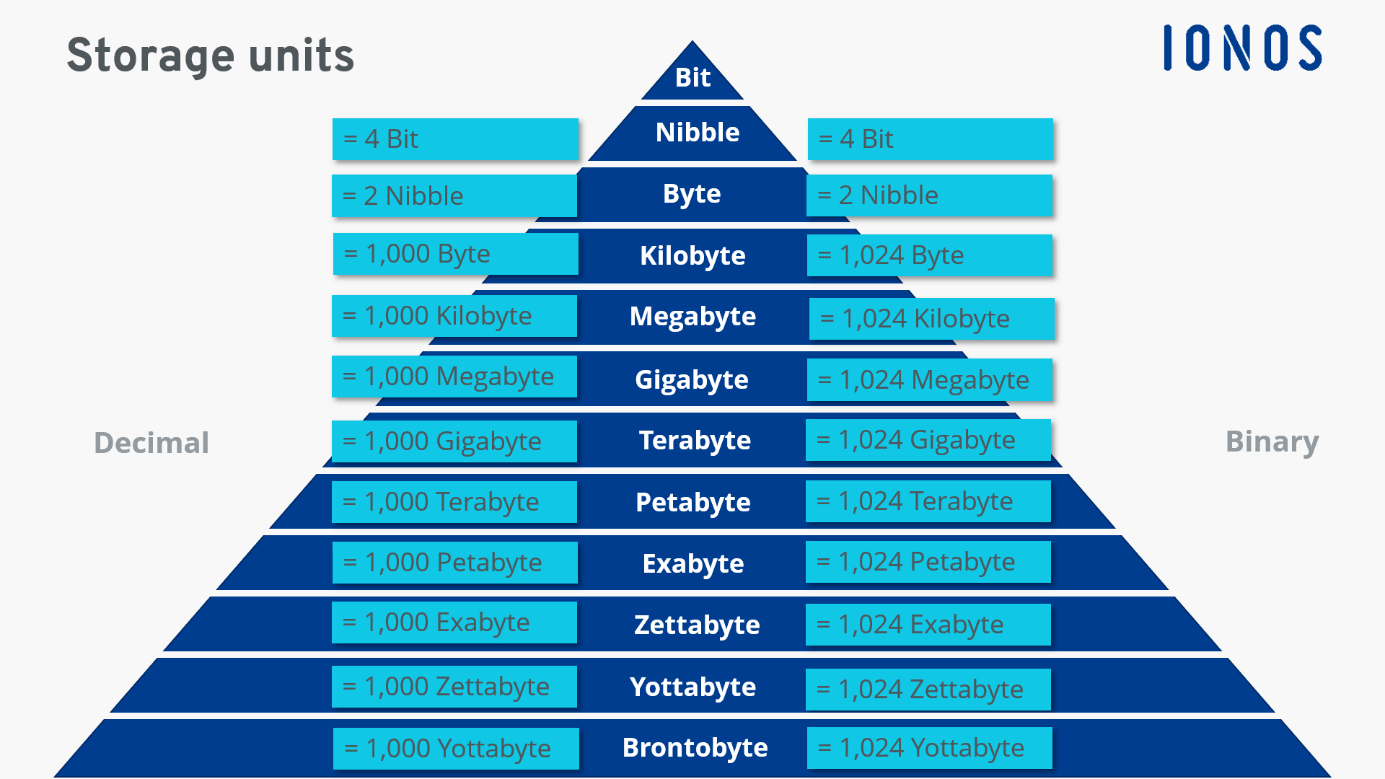
Various prefixes come in handy for differentiating among quantities of data that are larger than just a few bytes: for example, kilobyte, megabyte, and gigabyte. In establishing these prefixes, the decimal system that humans commonly use and the binary system used by computers come head to head. That’s why there are two systems for labelling data quantities: binary prefixes and decimal prefixes.
Binary prefixes, also referred to as IEC prefixes, define data quantities in powers of two (i.e., 2x). Decimal prefixes, also called SI prefixes, stand for powers of ten (i.e., 10x).
| Binary prefixes (IEC prefixes) | Decimal prefixes (SI prefixes) |
|---|---|
| Kibibyte (KiB) = 210 bytes | Kilobyte (KB) = 103 bytes |
| Mebibyte (MiB) = 220 B | Megabyte (MB) = 106 B |
| Gibibyte (GiB) = 230 B | Gigabyte (GB) = 109 B |
| Tebibyte (TiB) = 240 B | Terabyte (TB) = 1012 B |
| Pebibyte (PiB) = 250 B | Petabyte (PB) = 1015 B |
| Exbibyte (EiB) = 260 B | Exabyte (EB) = 1018 B |
| Zebibyte (ZiB) = 270 B | Zettabyte (ZB) = 1021 B |
| Yobibyte (YiB) = 280 B | Yottabyte (YB) = 1024 B |
You might have already noticed that commercial indications of storage units (e.g. KB, GB, or TB) are not always accurate. That’s because binary prefixes can more accurately represent storage units in computers but aren’t the official unit for describing quantities of data. For example, 1 kilobyte is supposedly 1,000 bytes in the decimal system. But 1 KB is 1,024 bytes. The International Electronic Commission (IEC), which is responsible for setting standards for electronics, officially recommends using binary prefixes. However, aside from Linux systems, binary prefixes have yet to gain widespread use.
How are data quantities calculated?
A computer needs 1 byte to store one character. This gives us the following:
1 byte = 1 character (e.g., A, Z, ?, 5, 0, #)
1 kilobyte corresponds to 1,024 bytes, or 1,024 different characters.
One page of text with 1,800 characters including spaces thus corresponds to about 1,800 bytes or 1-2 kilobytes. In programs like Word, formatting and graphics can quickly bring that number up to 10-12 KB. But these are still very small units of storage for computers.
In contrast, a smartphone with a 12-megapixel camera takes photos that are 2-4.5 MG per picture. Commercially available laptops have 8, 12 or 16 GB in RAM. And hard drives have long been available in the terabyte range.
The following chart might help you understand the conversions between storage units:
| Decimal (based on 10) | Binary (based on 2) |
|---|---|
| Kilobyte = 1,000 B | Kibibyte = 1,024 B |
| Megabyte = 1,000 KB | Mebibyte = 1,024 KiB |
| Gigabyte = 1,000 MB | Gibibyte = 1,024 MiB |
| Terabyte = 1,000 GB | Tebibyte = 1,024 GiB |
| Petabyte = 1,000 TB | Pebibyte = 1,024 TiB |
| Exabyte = 1,000 PB | Exbibyte = 1,024 PiB |
| Zettabyte = 1,000 EB | Zebibyte = 1,024 EiB |
| Yottabyte = 1,000 ZB | Yobibyte = 1,024 ZiB |
This next chart provides an overview of how many bytes each data quantity contains when using decimal prefixes for binary units (as is standard practice):
| Data quantity | In bytes |
|---|---|
| Kilobyte | 1,024 |
| Megabyte | 1,048,576 |
| Gigabyte | 1,073,741,824 |
| Terabyte | 1,099,511,627,776 |
| Petabyte | 1,125,899,906,842,624 |
| Exabyte | 1,152,921,504,606,846,976 |
| Zettabyte | 1,180,591,620,717,411,303,424 |
| Yottabyte | 1,208,925,819,614,629,174,706,176 |
Cost-effective, scalable storage that integrates into your application scenarios. Protect your data with highly secure servers and individual access control.
What comes after terabytes?
The standard unit for large storage volumes is currently terabytes. External hard drives typically offer 1-5 terabytes of memory. Considering that 44 trillion gigabytes are produced annually, that’s actually not very much.
Peta- and exabytes
The next biggest units of storage in computers are petabytes and exabytes, which are mostly relevant in the everyday business of tech giants like Google and Apple. Google reports that it has a data volume between 10 and 15 exabytes. That amounts to around 30 million computers put together.
Zetta- and yottabytes
Exabytes are followed by zettabytes, the unit used to describe the amount of data generated annually. It’s estimated that humanity produced up to 59 zettabytes of data in 2020 alone. Zettabytes are followed by yottabytes and this is where things begin to get a bit theoretical. The yottabyte is the biggest storage capacity currently accepted by the International System of Units. Yottabytes are mostly relevant in the context of the personal data intelligence agencies have stored worldwide - very big data.
Bronto- and gegobytes
But of course, that’s not where it ends. Mass data like brontobytes and gegobytes are such large, purely theoretical quantities of data that they’re not officially recognized by the International System of Units. It’s predicted that in 2030, the amount of data generated annually will reach 1 brontobyte for the first time. To put it in physical terms: Given the size of today’s hard drives, a one-gegobyte hard drive would be 23,000,000 times larger than the surface area of the earth.
It’s not just about having a lot of storage capacity. Businesses need to make sure data can be quickly and efficiently accessed by the user. That’s why technology has moved beyond classic file storage, which stores files in hierarchical folder structures and paths. Modern storage solutions like block storage (which divides data into equally sized blocks) and object storage (which organises data in packet form along with meta data and ID) make it possible for businesses to efficiently store huge quantities of data.
Concrete examples of units of storage in computers
Whereas storage units in terabytes are still comprehensible, dimensions like 175 zettabytes are abstract and near impossible to grasp. These simple, concrete examples make it a bit clearer:
1 byte = 1 letter/character
1 kilobyte = 1 standard page (1,800 characters)
1 megabyte = approx. 1 book with 200 pages
2–5 megabyte = 1 HD movie
1 gigabyte = approx. 1,000–2,000 books
1 terabyte = approx. 250,000 MP3 songs
1 petabyte = approx. 223,000 HD movies or 745 million floppy disks
1 exabyte = approx. 12 billion DVDs or 16 trillion MP3 songs
1 zettabyte = all of the data generated worldwide in 2016
1 yottabyte = approx. 45 quintillion Blu-ray Discs with 25 GB each
According to scientists, the storage capacity of the human brain is estimated to be around 2.5 petabytes. That’s 1,024 external hard drives with 1 terabyte storage volume each. Why we still can’t seem to remember our email passwords or friends’ birthdays remains a mystery!
Storage capacity for commonly available hard drives is currently in the terabyte range. That’s a lot, but often still not enough. If you need a lot of storage space and want to have access to your data across different devices, you should consider cloud storage. The HiDrive Cloud Storage by IONOS offers flexible access from several devices and high security cloud space for storing your data. Avoid losing your data and create important backups with affordable packages ranging from 100 to 2,000 Gb of cloud space!