

What is a bit? Bits and bytes explained

Bits and bytes are part of our everyday digital life. Knowing about bits is essential for understanding how much storage your hard drive has or how fast your DSL connection is. So what is a bit and how is it different from a byte? A bit is the smallest unit of electronic information; multiple bits form a byte. Whereas the storage capacity of hard drives is given in bytes, data transfer rates are shown in bits. Keep reading to find out more about what bits and bytes really mean.
- Free website protection with SSL Wildcard included
- Free private registration for greater privacy
- Free Domain Connect for easy DNS setup
What is a bit?
You’re probably familiar with the image of green ones and zeros filling the screen, made famous by the Matrix movies. This binary code forms the basis for all digital information processing and data transfers. Computers use binary numbers to communicate. Binary numbers represent two states: 1 for ‘on/true’ and 0 for ‘off/false’. The bit is the representation of one of these two states.
‘Bit’ stands for binary digit and is the smallest unit of binary information. It thus forms the basis for all larger data in digital technology. It doesn’t get smaller than a bit, as a bit represents the state 0 or 1. Since computers communicate using binary states, they don’t understand anything ‘smaller’ than 1 or 0. Figuratively speaking, the bit is the smallest possible container in which information can be stored.
What is the difference between bits and bytes?
Thanks to their very similar names, bits and bytes can easily be confused. Bits are primarily used to represent data use and transmission speeds of internet, telephone, and streaming services. The bit rate refers to how many bits are transmitted per second.
Bytes, on the other hand, are used to express storage sizes. 1 byte is equal to 8 bits. This means that one byte can represent 256 (28) different states. A byte is usually the smallest unit that can represent a letter of the alphabet, for example. The kilobyte is the next largest unit; it equals 1,024 bytes and can represent 103 states.
While there’s nothing smaller than a bit, there is a unit in between bits and bytes - the nibble. A nibble usually consists of 4 bits. Since the rounded conversion doesn’t always correspond to 4 bits, internet and telephone service providers also use the terms ‘semi-octette’ and ‘quadbit’.
What are the various multiples of bits and bytes?
Bits and bytes are too small to be used in most situations. Instead, various multiples are commonly used. DSL providers usually advertise high-speed internet connections with 300 megabits per second (Mbit/s). And the storage capacities of hard drives or USB sticks are usually given in megabytes, gigabytes, or terabytes.
The following table provides an overview of bit and byte multiples:
| Data units | in bits | Data quantities | in bytes |
| Bit | = 1 or 0 | Byte (B) | = 8 Bits |
| Kilobit (Kbit) | = 1,000 Bits | Kilobyte (KB) | = 1,024 Bytes |
| Megabit (Mbit) | = 1,000 Kbits | Megabyte (MB) | = 1,024 KB |
| Gigabit (Gbit) | = 1,000 Mbits | Gigabyte (GB) | = 1,024 MB |
| Terabit (Tbit) | = 1,000 Gbits | Terabyte (TB) | = 1,024 GB |
| Petabit (Pbit) | = 1,000 Tbits | Petabyte (PB) | = 1,024 TB |
| Exabit (Ebit) | = 1,000 Pbits | Exabyte (GB) | = 1,024 PB |
| Zettabit (Zbit) | = 1,000 Ebits | Zettabyte (ZB) | = 1,024 EB |
| Yottabit (Ybit) | = 1,000 Zbits | Yottabyte (YB) | = 1,024 ZB |
| Brontobit (Bbit) | = 1,000 Ybits | Brontobyte (BB) | = 1,024 YB |
There are two systems for labelling data quantities: using decimal prefixes and binary prefixes. Decimal prefixes are by far more commonly used and are the ones shown in the above table. To learn more about the way bits and bytes are converted, see our article on storage units.
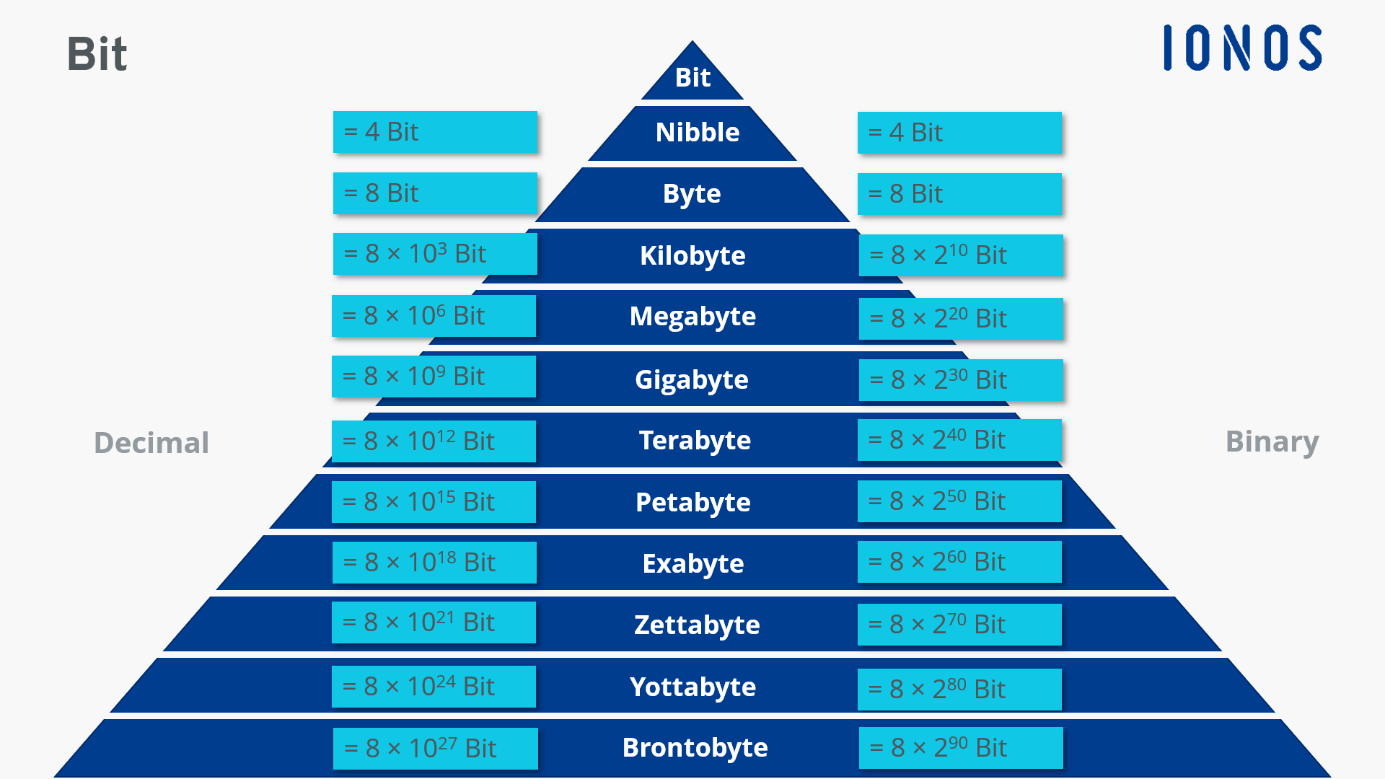
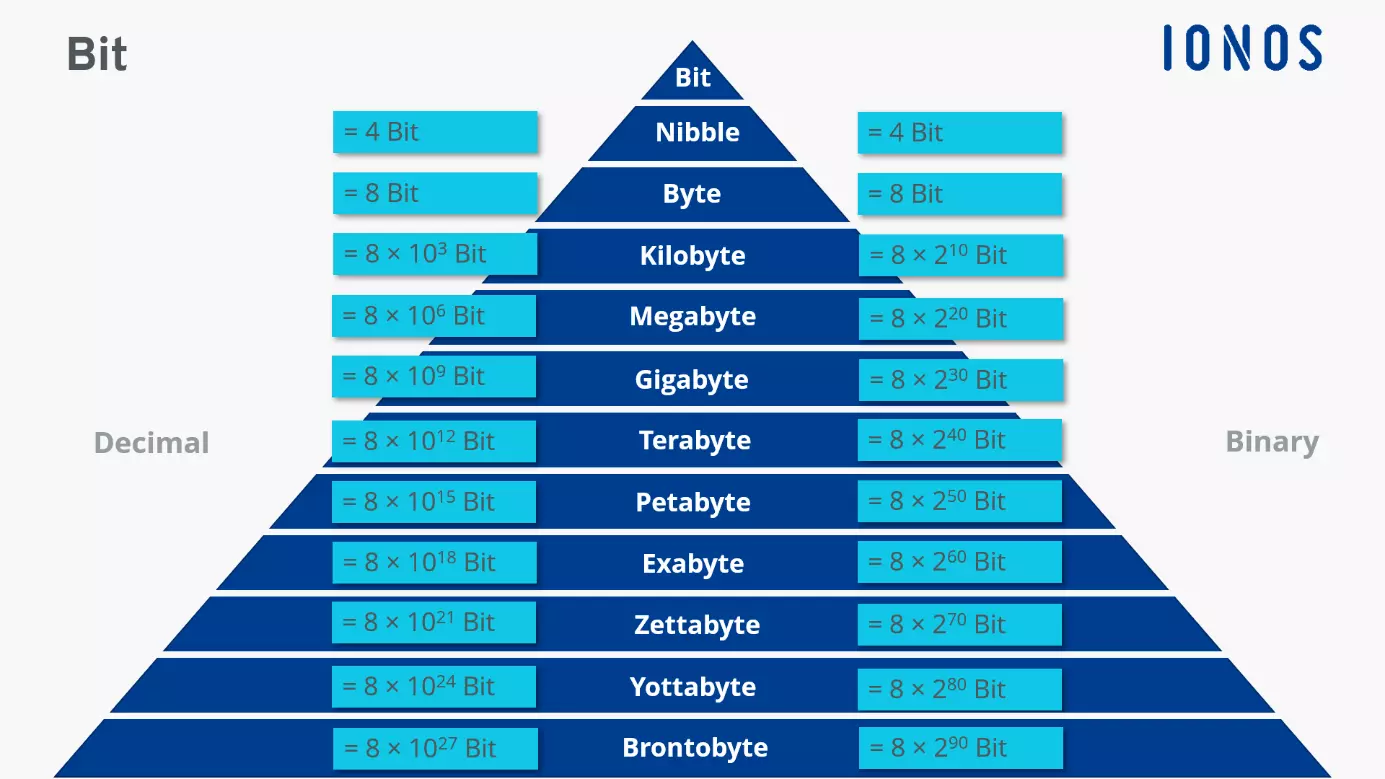
The following bit rates are often used when talking about data transmission or the reading/writing speeds of hardware and storage devices:
- Kbit/s: Kilobits per second
- Mbit/s: Megabits per second
- Gbit/s: Gigabits per second
- Tbit/s: Terabits per second
Terms like ‘gigabytes’ and ‘terabytes’ can be hard to grasp. To get an idea of what these data quantities actually mean, take a look at these concrete examples:
Storage capacity:
1 MB = approx. 1 book
1 GB = approx. 3,334 books
1 TB = approx. 3,334,000 books
Data use:
approx. 100–200 KB = 1 image in a messenger app
approx. 100–200 MB = 1 hour-long video call
approx. 300 GB = 100 hours of video streaming
How did bits get their name?
The term ‘bit’ was first used by John W. Turkey, an American mathematician. Turkey shortened ‘binary information digit’ into ‘bit’ in a Bell Labs memo. The word became more widely used after Claude E. Shannon included it in his 1948 treatise ‘A Mathematical Theory of Communication’. Vannevar Bush used the phrase ‘bits of information’ to refer to truth values that used to be saved on computer punch cards.
Keep in mind that storage capacity and data transmission speeds aren’t the only important characteristics when it comes to memory. Having flexible access to your data is also key. Use the HiDrive Cloud Storage by IONOS to create backups and store your data centrally in secure cloud storage. That way you’ll have access to your files on all your devices. The best part: You’ll avoid losing any of your data, have constant access to it, and get great prices for cloud storage with options ranging from 100 to 2,000 GB.